PostgreSQL

PostgreSQL is an open-source relational database system known for its reliability and feature robustness. As a DinoAI agent environment in Paradime, PostgreSQL enables running dbtβ„’ models and queries during DinoAI background agent sessions.

circle-exclamation

Setup Instructions

  1. Click Settings in the top menu bar of the Paradime interface to access Account Settings

  2. In the left sidebar, click Connections

  3. Click Add New next to the DinoAI Background Agent Environment section

  4. Select PostgreSQL

  5. In the Profile Configuration field, add at least these required parameters. For additional configuration options, see the Profile Fields Reference section.

host: analytics-db.company.com                # Database host
port: 5432                                    # Connection port
user: analytics_user                          # DinoAI agent service user
password: ****                                # Service user password
database: analytics_prod                      # Database name
schema: dbt                                   # Default schema
circle-info

After adding the configuration, ensure it's properly formatted using a YAML formatter like YAML Formatterarrow-up-right.

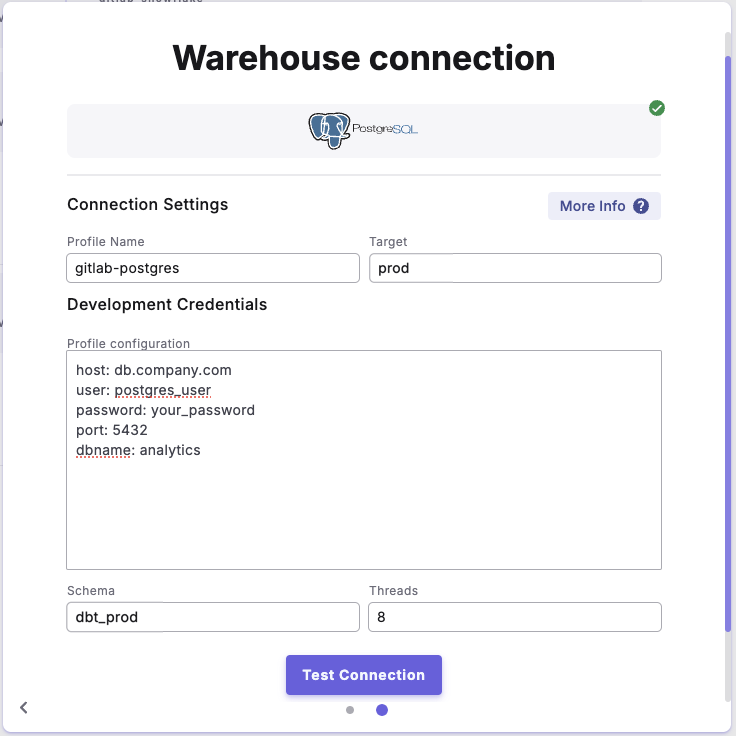
  1. Provide a dbtβ„’ Profile Name (this should match the profile name set in your dbt_project.yml).

  2. In the Target field, enter dinoai. This is the target your dbtβ„’ project will use during DinoAI background agent sessions.

  3. The Schema field is pre-configured, but you can change it to specify the schema where dbtβ„’ will build objects.

  4. The Threads value is pre-configured to 1, but you can adjust this to specify how many parallel operations your dbtβ„’ project can run.


Example Profile Configuration


Profile Fields Reference

Field
Description
Example
Default Value
Required

host

Database server hostname or IP address

db.company.com

None

βœ…

user

Authentication username for the DinoAI agent service user

postgres_user

None

βœ…

password

Authentication password for the DinoAI agent service user

your_password

None

βœ…

port

PostgreSQL server port number

5432

5432

βœ…

dbname

Name of the target database

analytics

None

βœ…

schema

Name of the target schema. Configured in the UI Schema field.

public

public

βœ…

threads

Number of concurrent operations. Configured in the UI Threads field.

4

1

βœ…

keepalives_idle

Time in seconds between connection keepalive pings

60

0

❌

connect_timeout

Seconds to wait for connection establishment

10

10

❌

retries

Number of times to retry failed connections

3

1

❌

search_path

Order of schemas PostgreSQL will search through

public, prod

$user,public

❌

role

PostgreSQL role to assume when executing queries

analytics_role

None

❌

sslmode

Level of SSL connection security

verify-full

prefer

❌

sslcert

Path to client SSL certificate file

/path/to/cert

None

❌

sslkey

Path to client SSL private key file

/path/to/key

None

❌

sslrootcert

Path to SSL root certificate authority file

/path/to/root.crt

None

❌

Last updated

Was this helpful?