For the complete documentation index, see llms.txt. This page is also available as Markdown.

Microsoft Fabric

Microsoft Fabric is a unified analytics platform that combines data warehousing and analytics services. As a DinoAI agent environment in Paradime, Microsoft Fabric enables running dbt™ models and queries during DinoAI background agent sessions.

Authentication Methods

Microsoft Fabric uses Microsoft Entra ID (formerly Azure AD) as its primary authentication system. Set authentication to one of these values:

  • ActiveDirectoryPassword - Microsoft Entra ID username and password

  • ServicePrincipal - Service principal authentication

Setup Instructions

  1. Click Settings in the top menu bar of the Paradime interface to access Account Settings

  2. In the left sidebar, click Connections

  3. Click Add New next to the DinoAI Background Agent Environment section

  4. Select Microsoft Fabric

  5. In the Profile Configuration field, add the following parameters based on your authentication method. Reference the Profile Fields Reference section below for additional context and configurations.

driver: 'ODBC Driver 18 for SQL Server'    # ODBC driver name
server: fabric.analytics.com               # Server hostname
port: 1433                                 # Default port
database: analytics_db                     # Database name
schema: reporting                          # Schema name
authentication: ActiveDirectoryPassword    # Password authentication
user: user@company.com                     # User email
password: your_password                    # User password

After adding the configuration, ensure it's properly formatted using a YAML formatter like YAML Formatter.

  1. Provide a dbt™ Profile Name (this should match the profile name set in your dbt_project.yml).

  2. In the Target field, enter dinoai. This is the target your dbt™ project will use during DinoAI background agent sessions.

  3. The Schema field is pre-configured, but you can change it to specify the schema where dbt™ will build objects.

  4. The Threads value is pre-configured to 1, but you can adjust this to specify how many parallel operations your dbt™ project can run.


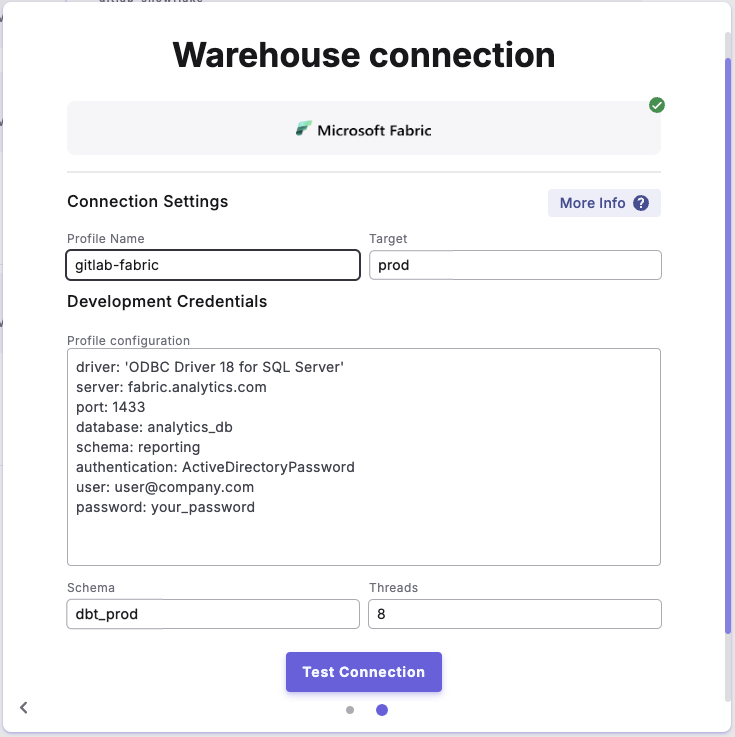
Example Profile Configuration

Profile configuration example for "Microsoft Entra ID username and Password"

Schema Authorization

When creating schemas in Microsoft Fabric, you can control who owns them:

  • Useful for managing permissions in Microsoft Entra ID environments

  • Recommended when working with group-based permissions


Profile Fields Reference

Field
Description
Example
Default
Required

driver

ODBC driver

ODBC Driver 18 for SQL Server

ODBC Driver 18 for SQL Server

host

SQL analytics endpoint

localhost

None

port

Server port number

1433

1433

database

Database name

analytics_db

None

schema

Schema name. Configured in the UI Schema field.

dbo

dbo

authentication

Authentication method

ServicePrincipal

sql

retries

Number of connection retry attempts

1

1

encrypt

Enable connection encryption

true

true

trust_cert

Trust server certificate

false

false

login_timeout

Connection timeout in seconds

0

0

query_timeout

Query timeout in seconds

0

0

schema_authorization

Schema owner principal

db_owner

None

UID

Username for the DinoAI agent service user

fabric_user

None

PWD

Password for the DinoAI agent service user

your_password

None

tenant_id

Microsoft Entra ID tenant ID (for service principal)

your_tenant_id

None

client_id

Microsoft Entra service principal client ID

your_client_id

None

client_secret

Microsoft Entra service principal client secret

your_client_secret

None

Last updated

Was this helpful?