> ## Documentation Index
> Fetch the complete documentation index at: https://docs.paradime.io/llms.txt
> Use this file to discover all available pages before exploring further.
# Start chats faster and search every agent session
> A New chat entry starts an agent session in one step, and a full session list adds search, filters by status, type, and agent, and sorting.
*August 19, 2026*
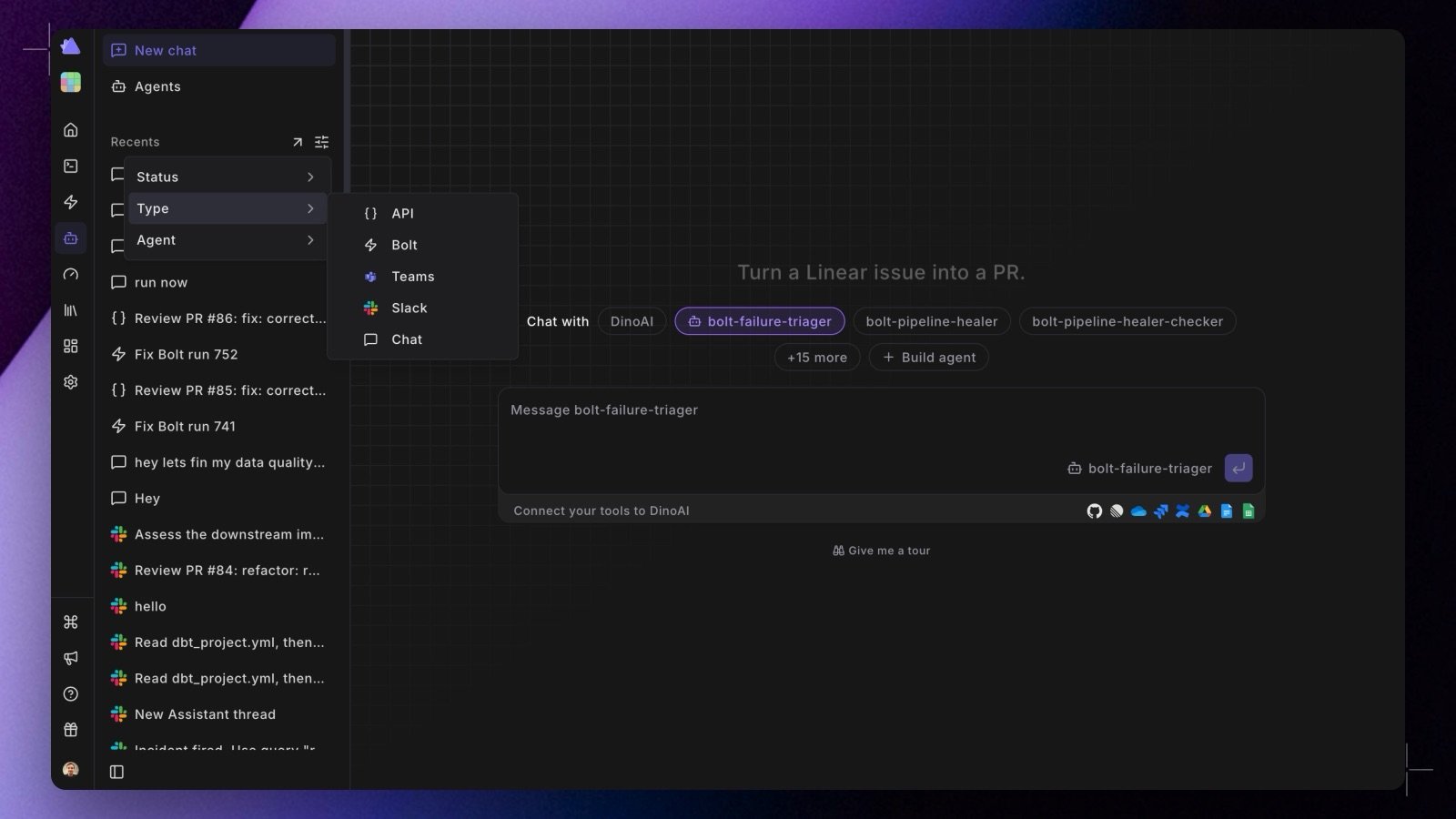 Two changes make agent sessions faster to start and easier to find again.
**New chat** at the top of the Agent panel opens a page that is just the composer: pick an agent from the dropdown (or leave it on **Default agent**), type your prompt, and send. No more navigating to the agent list first. See [Starting a new chat](/products/dino-ai/programmable-agents/agent-sessions#starting-a-new-chat).
The left panel's session list is now **Recents**, with a filter for status, type (chat, Bolt, Slack, API), and agent. **View all** opens the [full session list](/products/dino-ai/programmable-agents/agent-sessions#searching-all-sessions) as a page, with a search box that matches titles and session ids, faceted filters, and a sortable history.
Shipped in Paradime v6.7.0.
## Related topics
- [Changelog](/changelog/overview.md)
- [Agent Sessions](/products/dino-ai/programmable-agents/agent-sessions.md)
- [Every agent session in one panel](/changelog/2026-08-05/agent-sessions-panel.md)
- [Creating Agents in the App](/products/dino-ai/programmable-agents/creating-agents-in-the-app.md)
- [Starting a Slack Agent session](/products/dino-ai/slack-agent/starting-a-session.md)
Two changes make agent sessions faster to start and easier to find again.
**New chat** at the top of the Agent panel opens a page that is just the composer: pick an agent from the dropdown (or leave it on **Default agent**), type your prompt, and send. No more navigating to the agent list first. See [Starting a new chat](/products/dino-ai/programmable-agents/agent-sessions#starting-a-new-chat).
The left panel's session list is now **Recents**, with a filter for status, type (chat, Bolt, Slack, API), and agent. **View all** opens the [full session list](/products/dino-ai/programmable-agents/agent-sessions#searching-all-sessions) as a page, with a search box that matches titles and session ids, faceted filters, and a sortable history.
Shipped in Paradime v6.7.0.
## Related topics
- [Changelog](/changelog/overview.md)
- [Agent Sessions](/products/dino-ai/programmable-agents/agent-sessions.md)
- [Every agent session in one panel](/changelog/2026-08-05/agent-sessions-panel.md)
- [Creating Agents in the App](/products/dino-ai/programmable-agents/creating-agents-in-the-app.md)
- [Starting a Slack Agent session](/products/dino-ai/slack-agent/starting-a-session.md)