> ## Documentation Index
> Fetch the complete documentation index at: https://docs.paradime.io/llms.txt
> Use this file to discover all available pages before exploring further.
# Column-level lineage while you write the model
> The Code IDE Lineage tab is now the same column-level canvas as the Catalog: click a column to trace it, apply lenses, and take a guided tour.
*September 22, 2026*
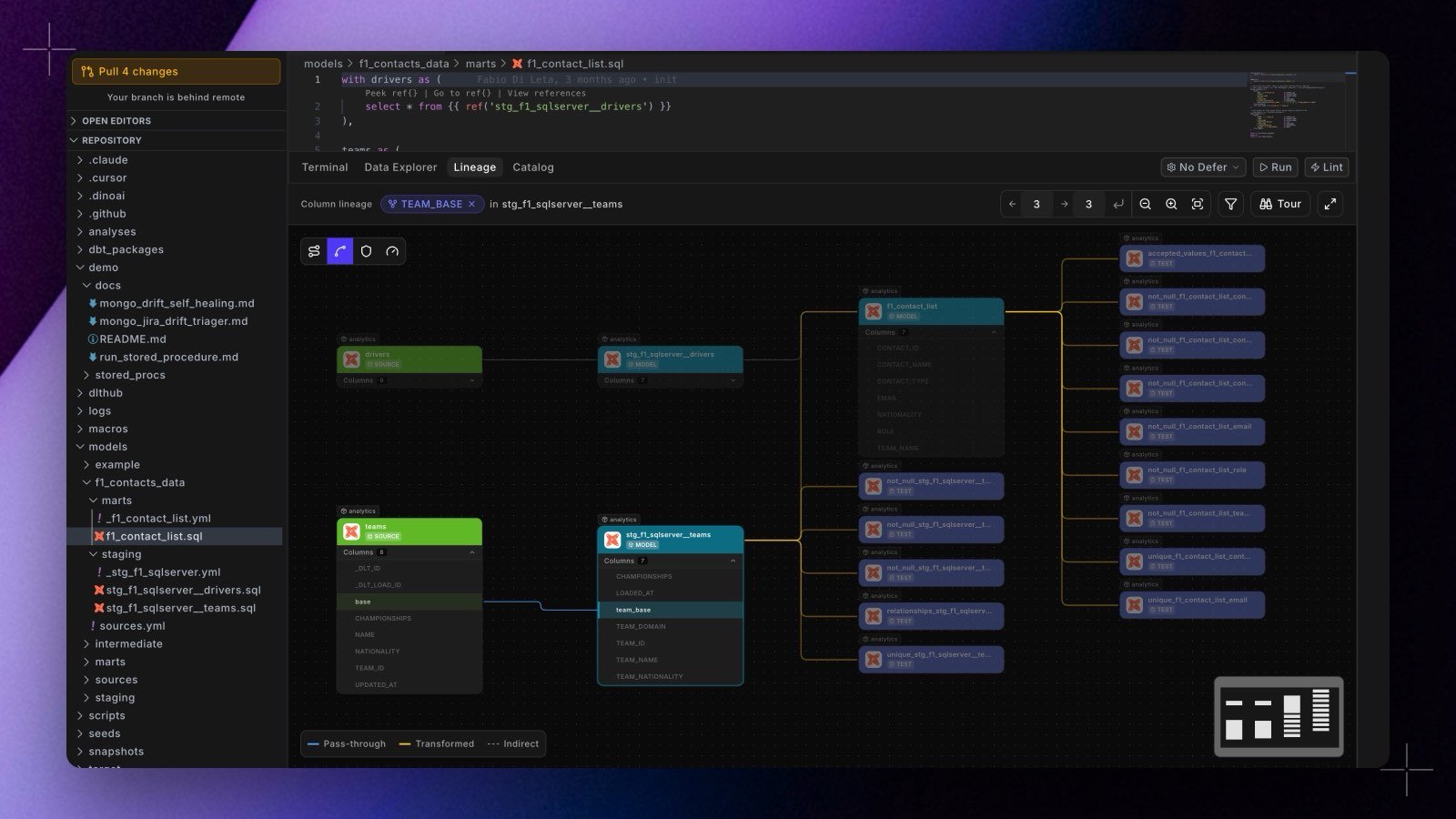 The **Lineage** tab in the Code IDE bottom panel used to be a separate graph that stopped at the model. It is now the same column-level canvas the Catalog uses, running against your development branch, with the depth controls, node-type filter, legend, and minimap that come with it.
* **Click any column on any card** to trace where that value comes from and where it goes, without leaving the editor. The trace runs against your development catalog, so it reflects the branch you are working on.
* **Click a card's model name** to open that model's file in the editor.
* **Lenses are on the canvas now**, as a layer strip rather than a menu: one icon per lens, filled when applied, with its name and description on hover. Your selection is remembered between sessions.
* **A new lens, "Only this column's path"**, strips the graph to the cards the traced value actually flows through and refits the view. Everything the column does not touch leaves the canvas. The walk follows column-to-column edges only, so an edge ending at a dataset no longer drags unrelated models onto the path.
* **A guided tour** of the canvas is one click away from the **Tour** button in the lineage bar, in both the editor and the [Catalog](/products/data-catalog/lineage/index).
Because both surfaces now render the same component, they cannot drift apart: a lens or control added to one appears in the other. Large graphs got faster with it, with a thousand-node graph going from a roughly 900ms freeze on every interaction to an instant relayout.
See [Lineage in the Code IDE](/products/code-ide/explore/lineage) and [Column-level lineage](/products/data-catalog/lineage/column-level-lineage). Shipped in Paradime v6.13.0.
## Related topics
- [Changelog](/changelog/overview.md)
- [Column-level lineage](/products/data-catalog/lineage/column-level-lineage.md)
- [Column Level Lineage](/products/dino-ai/tools-and-features/column-level-lineage.md)
- [Column-Level Lineage Diff on BitBucket](/products/bolt/ci-cd/lineage-diff/bitbucket.md)
- [Lineage](/products/data-catalog/lineage/index.md)
The **Lineage** tab in the Code IDE bottom panel used to be a separate graph that stopped at the model. It is now the same column-level canvas the Catalog uses, running against your development branch, with the depth controls, node-type filter, legend, and minimap that come with it.
* **Click any column on any card** to trace where that value comes from and where it goes, without leaving the editor. The trace runs against your development catalog, so it reflects the branch you are working on.
* **Click a card's model name** to open that model's file in the editor.
* **Lenses are on the canvas now**, as a layer strip rather than a menu: one icon per lens, filled when applied, with its name and description on hover. Your selection is remembered between sessions.
* **A new lens, "Only this column's path"**, strips the graph to the cards the traced value actually flows through and refits the view. Everything the column does not touch leaves the canvas. The walk follows column-to-column edges only, so an edge ending at a dataset no longer drags unrelated models onto the path.
* **A guided tour** of the canvas is one click away from the **Tour** button in the lineage bar, in both the editor and the [Catalog](/products/data-catalog/lineage/index).
Because both surfaces now render the same component, they cannot drift apart: a lens or control added to one appears in the other. Large graphs got faster with it, with a thousand-node graph going from a roughly 900ms freeze on every interaction to an instant relayout.
See [Lineage in the Code IDE](/products/code-ide/explore/lineage) and [Column-level lineage](/products/data-catalog/lineage/column-level-lineage). Shipped in Paradime v6.13.0.
## Related topics
- [Changelog](/changelog/overview.md)
- [Column-level lineage](/products/data-catalog/lineage/column-level-lineage.md)
- [Column Level Lineage](/products/dino-ai/tools-and-features/column-level-lineage.md)
- [Column-Level Lineage Diff on BitBucket](/products/bolt/ci-cd/lineage-diff/bitbucket.md)
- [Lineage](/products/data-catalog/lineage/index.md)