> ## Documentation Index
> Fetch the complete documentation index at: https://docs.paradime.io/llms.txt
> Use this file to discover all available pages before exploring further.
# Star the Bolt schedules you check most
> Star Bolt schedules to pin them above the rest of the list on every page, and narrow the list to your favourites in one click. Favourites are private to you.
*September 30, 2026*
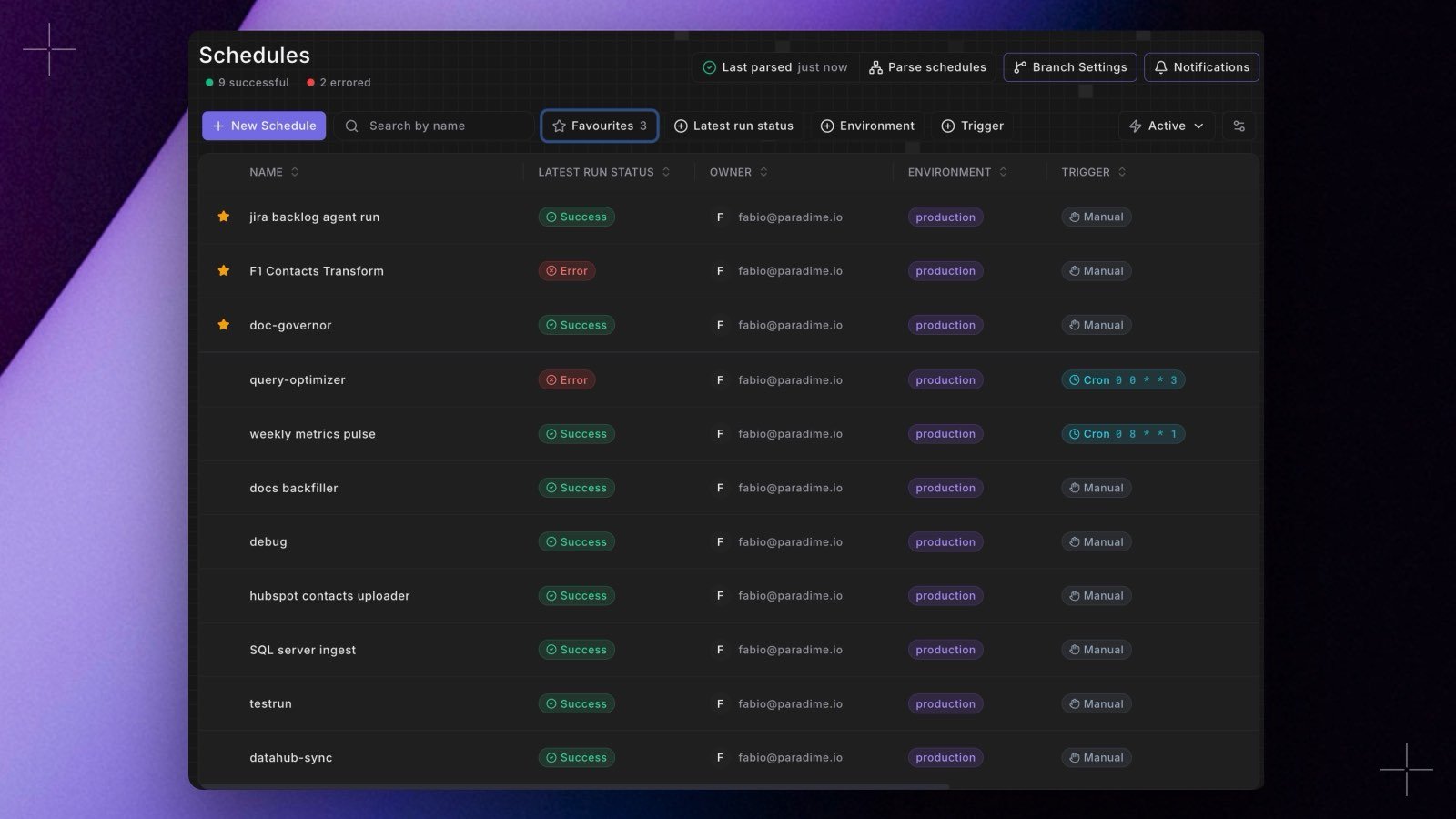 You can now star Bolt schedules to keep them at the top of the **Schedules** list. Hover a schedule and click its star, or right-click the row and choose **Add to favourites**.
* **Always in view.** Favourites are pinned above the other schedules on every page, and they still follow your search and filters.
* **Only your favourites.** The **Favourites** button next to the search box shows how many you have and narrows the list to them.
* **Yours alone.** Favourites are private to you and saved per workspace. Anyone who can view Bolt can star schedules, viewers included.
See [Managing schedules](/products/bolt/managing-schedules/index). Shipped in Paradime v6.17.0.
## Related topics
- [Changelog](/changelog/overview.md)
- [Managing Schedules](/products/bolt/managing-schedules/index.md)
- [Working with Sources](/guides/dbt-fundamentals/getting-started-with-dbt/working-with-sources.md)
- [For read-only users](/start-here/quickstart/for-read-only-users.md)
- [Manage schedules as code](/guides/orchestrate-data-pipelines/manage-schedules-as-code.md)
This documentation is built and hosted on [Mintlify](https://mintlify.com), a developer documentation platform.
You can now star Bolt schedules to keep them at the top of the **Schedules** list. Hover a schedule and click its star, or right-click the row and choose **Add to favourites**.
* **Always in view.** Favourites are pinned above the other schedules on every page, and they still follow your search and filters.
* **Only your favourites.** The **Favourites** button next to the search box shows how many you have and narrows the list to them.
* **Yours alone.** Favourites are private to you and saved per workspace. Anyone who can view Bolt can star schedules, viewers included.
See [Managing schedules](/products/bolt/managing-schedules/index). Shipped in Paradime v6.17.0.
## Related topics
- [Changelog](/changelog/overview.md)
- [Managing Schedules](/products/bolt/managing-schedules/index.md)
- [Working with Sources](/guides/dbt-fundamentals/getting-started-with-dbt/working-with-sources.md)
- [For read-only users](/start-here/quickstart/for-read-only-users.md)
- [Manage schedules as code](/guides/orchestrate-data-pipelines/manage-schedules-as-code.md)
This documentation is built and hosted on [Mintlify](https://mintlify.com), a developer documentation platform.