> ## Documentation Index
> Fetch the complete documentation index at: https://docs.paradime.io/llms.txt
> Use this file to discover all available pages before exploring further.
# Describe an agent and DinoAI drafts it
> Describe the DinoAI agent you need in plain words and the builder opens with its role, goal, backstory, and tools filled in. Change it later with a prompt.
*October 8, 2026*
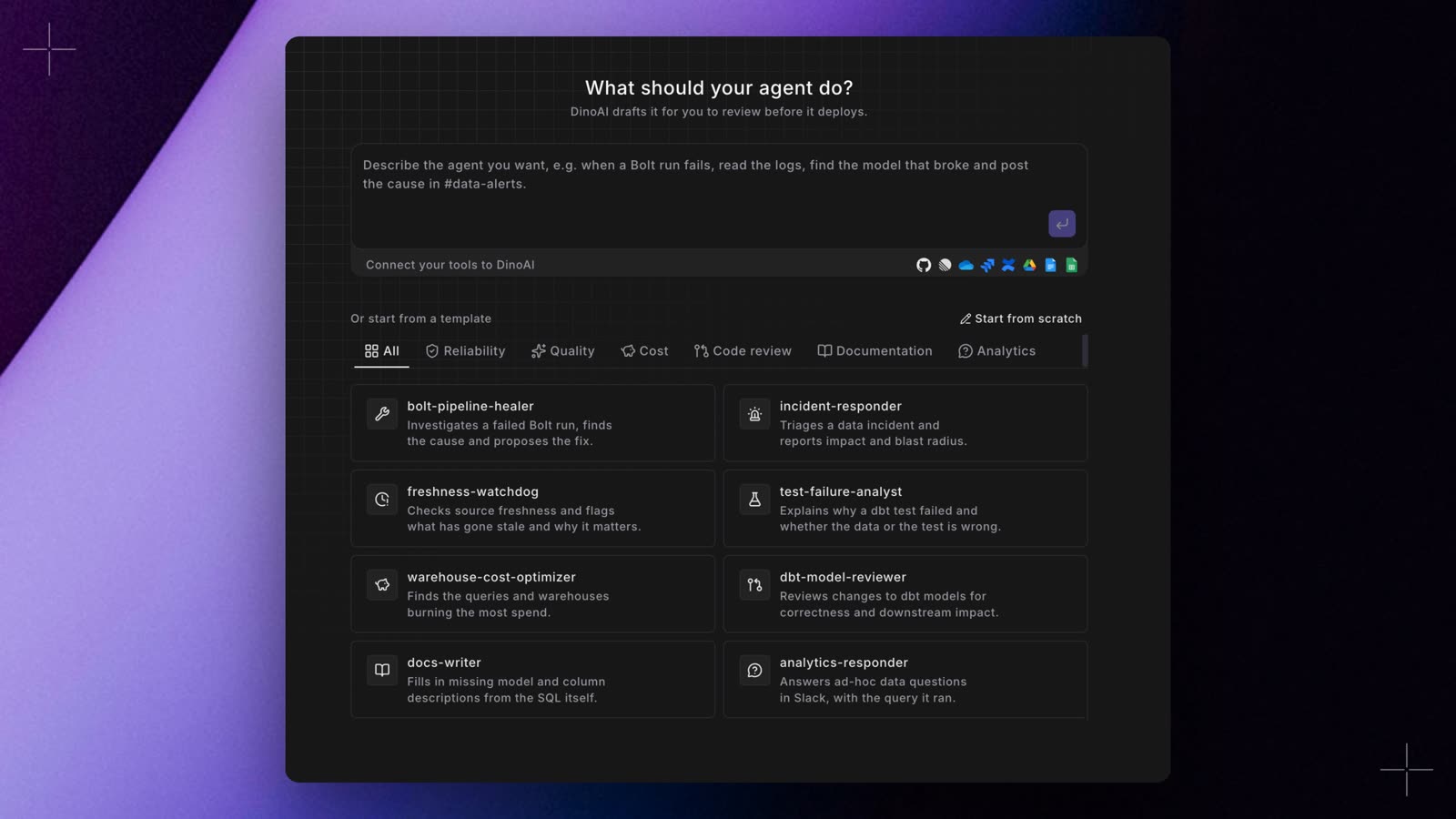 Creating a DinoAI agent now starts with a sentence. Click **New agent**, describe the job under **What should your agent do?**, and press Enter. For example: *when a Bolt run fails, read the logs, find the model that broke and post the cause in #data-alerts*.
* **A full draft to review.** The builder opens with **Name**, **Role**, **Goal**, **Backstory**, and **Allowed tools** filled in, using the integrations and MCP servers your workspace has connected. A notice names any integration the job needs that isn't connected yet. Nothing is saved until you deploy.
* **Change it with a prompt.** The box under the form takes a change in plain words, such as *also check source freshness first*. DinoAI updates only the fields that need it and marks them, and **Undo** puts them back.
* **A clearer agents list.** Each agent is a row with its role, model, tools, squad, whether it came from the UI or Git, and when it last ran. **Chat** and **Schedule** are always in view.
Templates and **Start from scratch** are still there under the description box. Drafting uses your DinoAI credits. See [Creating Agents in the App](/products/dino-ai/programmable-agents/creating-agents-in-the-app). Shipped in Paradime v6.18.0.
## Related topics
- [Changelog](/changelog/overview.md)
- [Run DinoAI Background Agent](/products/bolt/creating-schedules/command-settings/paradime-dinoai-agent-trigger.md)
- [DinoAI in the Code IDE](/products/code-ide/write-code/dinoai.md)
- [DinoAI Programmable Agents](/developers/python-sdk/modules/dinoai-programmable-agents.md)
- [Upgrade with the DinoAI agent](/guides/migrations/dbt-version-upgrades/upgrade-with-the-dinoai-agent.md)
This documentation is built and hosted on [Mintlify](https://mintlify.com), a developer documentation platform.
Creating a DinoAI agent now starts with a sentence. Click **New agent**, describe the job under **What should your agent do?**, and press Enter. For example: *when a Bolt run fails, read the logs, find the model that broke and post the cause in #data-alerts*.
* **A full draft to review.** The builder opens with **Name**, **Role**, **Goal**, **Backstory**, and **Allowed tools** filled in, using the integrations and MCP servers your workspace has connected. A notice names any integration the job needs that isn't connected yet. Nothing is saved until you deploy.
* **Change it with a prompt.** The box under the form takes a change in plain words, such as *also check source freshness first*. DinoAI updates only the fields that need it and marks them, and **Undo** puts them back.
* **A clearer agents list.** Each agent is a row with its role, model, tools, squad, whether it came from the UI or Git, and when it last ran. **Chat** and **Schedule** are always in view.
Templates and **Start from scratch** are still there under the description box. Drafting uses your DinoAI credits. See [Creating Agents in the App](/products/dino-ai/programmable-agents/creating-agents-in-the-app). Shipped in Paradime v6.18.0.
## Related topics
- [Changelog](/changelog/overview.md)
- [Run DinoAI Background Agent](/products/bolt/creating-schedules/command-settings/paradime-dinoai-agent-trigger.md)
- [DinoAI in the Code IDE](/products/code-ide/write-code/dinoai.md)
- [DinoAI Programmable Agents](/developers/python-sdk/modules/dinoai-programmable-agents.md)
- [Upgrade with the DinoAI agent](/guides/migrations/dbt-version-upgrades/upgrade-with-the-dinoai-agent.md)
This documentation is built and hosted on [Mintlify](https://mintlify.com), a developer documentation platform.