> ## Documentation Index
> Fetch the complete documentation index at: https://docs.paradime.io/llms.txt
> Use this file to discover all available pages before exploring further.
# Copy a warehouse connection to another environment
> Admins can copy a warehouse connection, secrets included, into another Bolt or Agent environment or the Code IDE instead of typing every setting again.
*October 16, 2026*
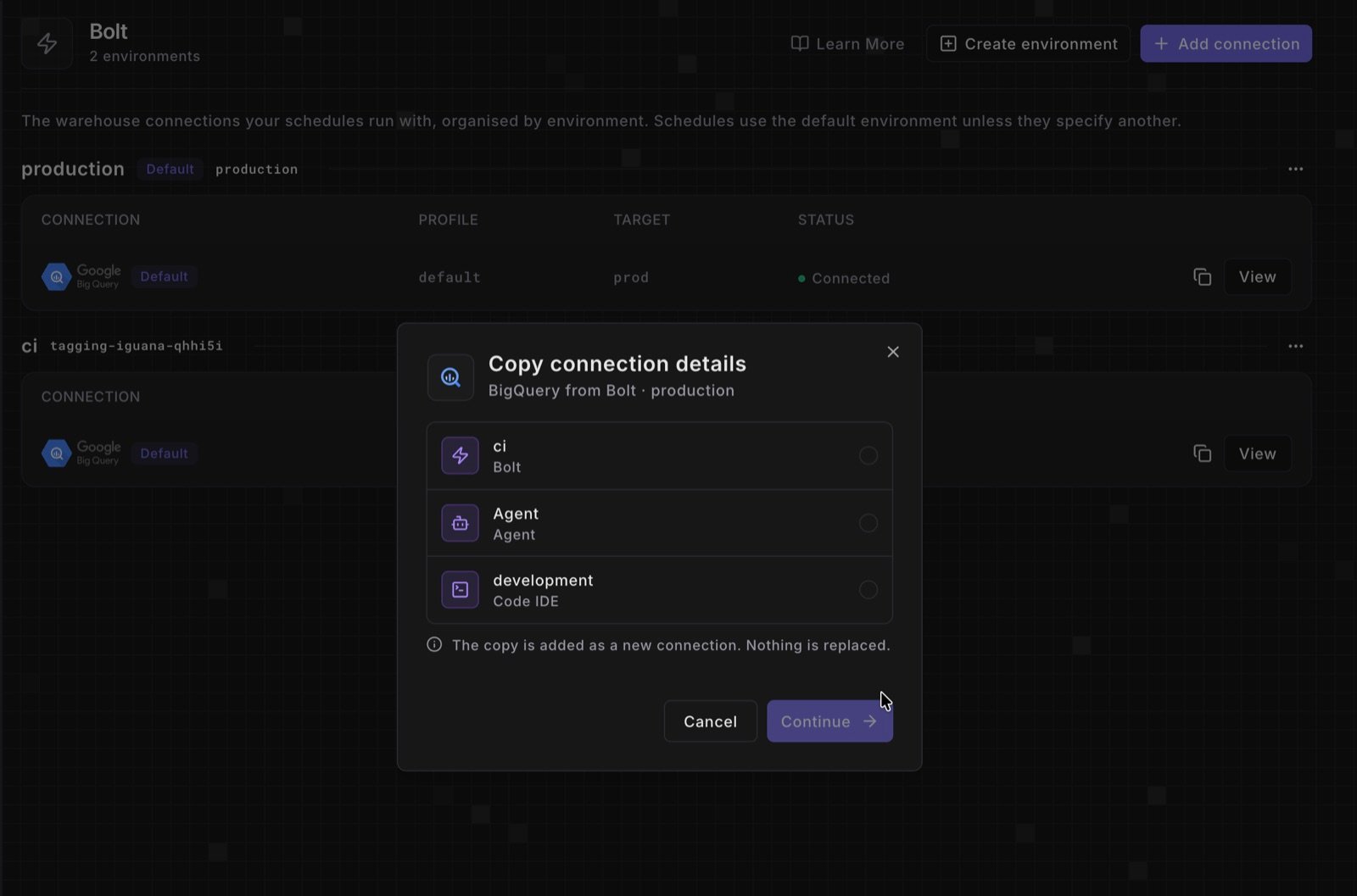 Adding an environment meant typing every warehouse setting again, secrets included. Admins can now copy an existing connection instead.
* **Start a copy.** In **Settings** > **Environments**, click the copy icon next to **View** on a connection. On a connection's page, it's **Copy to another environment** in the **More (...)** menu.
* **Pick the target.** Choose any other Bolt or Agent environment, or the Code IDE. The copy is added next to any existing connection and never replaces it.
* **Review and save.** The target's new-connection form opens with the source's settings and secrets filled in. Check the schema, database, and target, then test the connection to save it.
Auth methods that Bolt and Agent environments don't offer (Snowflake OAuth, BigQuery OAuth, and Redshift IAM) switch to one they do, with those credentials left empty. A MotherDuck token always has to be entered again.
See [Copy a connection to another environment](/guides/data-warehouse-essentials/manage-connections/copy-a-connection). Shipped in Paradime v6.19.0.
## Related topics
- [Changelog](/changelog/overview.md)
- [Copy a connection to another environment](/guides/data-warehouse-essentials/manage-connections/copy-a-connection.md)
- [Manage connections](/guides/data-warehouse-essentials/manage-connections/index.md)
- [Connect your data warehouse to each environment](/products/settings/connections/index.md)
- [Environments and connections](/guides/foundations/environments-and-connections.md)
This documentation is built and hosted on [Mintlify](https://mintlify.com), a developer documentation platform.
Adding an environment meant typing every warehouse setting again, secrets included. Admins can now copy an existing connection instead.
* **Start a copy.** In **Settings** > **Environments**, click the copy icon next to **View** on a connection. On a connection's page, it's **Copy to another environment** in the **More (...)** menu.
* **Pick the target.** Choose any other Bolt or Agent environment, or the Code IDE. The copy is added next to any existing connection and never replaces it.
* **Review and save.** The target's new-connection form opens with the source's settings and secrets filled in. Check the schema, database, and target, then test the connection to save it.
Auth methods that Bolt and Agent environments don't offer (Snowflake OAuth, BigQuery OAuth, and Redshift IAM) switch to one they do, with those credentials left empty. A MotherDuck token always has to be entered again.
See [Copy a connection to another environment](/guides/data-warehouse-essentials/manage-connections/copy-a-connection). Shipped in Paradime v6.19.0.
## Related topics
- [Changelog](/changelog/overview.md)
- [Copy a connection to another environment](/guides/data-warehouse-essentials/manage-connections/copy-a-connection.md)
- [Manage connections](/guides/data-warehouse-essentials/manage-connections/index.md)
- [Connect your data warehouse to each environment](/products/settings/connections/index.md)
- [Environments and connections](/guides/foundations/environments-and-connections.md)
This documentation is built and hosted on [Mintlify](https://mintlify.com), a developer documentation platform.