> ## Documentation Index
> Fetch the complete documentation index at: https://docs.paradime.io/llms.txt
> Use this file to discover all available pages before exploring further.
# Defer Bolt schedules and the Code IDE to an environment
> Turbo CI, deferred Bolt schedules, and the Code IDE can compare against the latest runs of a whole Bolt environment, not just one schedule.
*October 16, 2026*
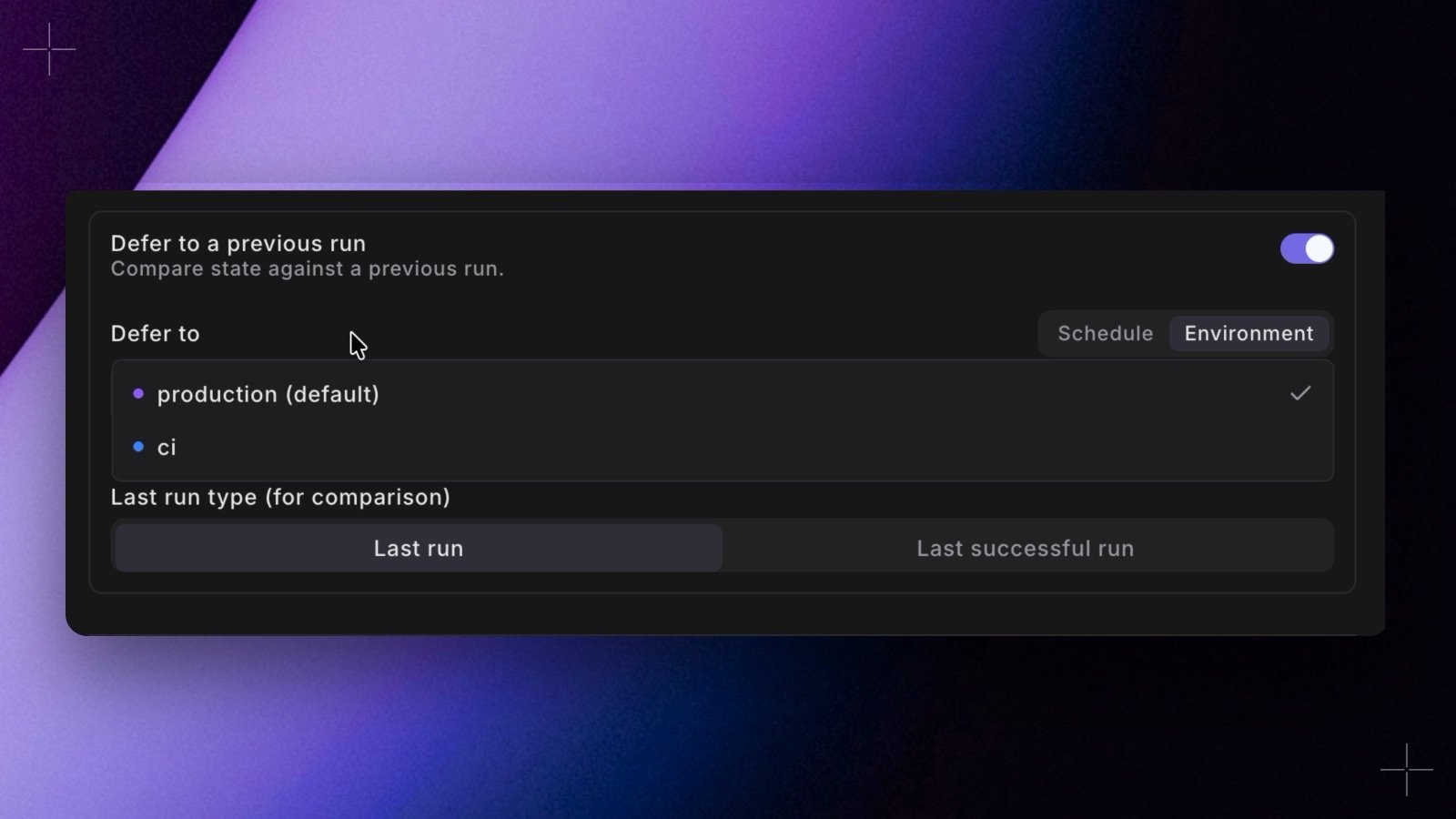 You can now defer to a whole Bolt environment instead of one schedule. Paradime picks the latest artifacts from across every job in that environment, so Turbo CI and deferred schedules compare against the environment's most recent run, not one schedule's runs. Renaming, splitting, or retiring a production schedule no longer breaks the comparison.
* **In Bolt.** In **Schedule settings**, set **Defer to** to **Environment** and pick one, such as Production. It's there on Turbo CI schedules and under **Defer to a previous run**. Turbo CI schedules never count, and neither does the schedule that defers.
* **In YAML.** Set `defer_environment_slug` in `turbo_ci` or `deferred_schedule` instead of `deferred_schedule_slug`. `paradime bolt verify` accepts it from Paradime CLI 6.9.0.
* **In the Code IDE.** In the **Defer to production** menu, set **Defer to** to **Environment**. Terminal commands and data previews then defer to that environment's latest successful run.
* **See the target.** The **Deferred to** pill on the schedule page names what a schedule defers to, Turbo CI schedules included.
The schedule's environment and the one it defers to must run the same dbt™ version. See [Defer to an environment](/products/bolt/creating-schedules/schedule-settings#defer-to-an-environment). Shipped in Paradime v6.19.0.
## Related topics
- [Changelog](/changelog/overview.md)
- [Defer to Production](/products/code-ide/run-and-preview/defer-to-production.md)
- [Defer to production](/guides/paradime-fundamentals/dbt-tm-defer-to-production.md)
- [Configuration Reference](/products/bolt/creating-schedules/schedules-as-code/configuration-reference.md)
- [Code IDE Environment Variables](/products/settings/environment-variables/code-ide-env-variables.md)
This documentation is built and hosted on [Mintlify](https://mintlify.com), a developer documentation platform.
You can now defer to a whole Bolt environment instead of one schedule. Paradime picks the latest artifacts from across every job in that environment, so Turbo CI and deferred schedules compare against the environment's most recent run, not one schedule's runs. Renaming, splitting, or retiring a production schedule no longer breaks the comparison.
* **In Bolt.** In **Schedule settings**, set **Defer to** to **Environment** and pick one, such as Production. It's there on Turbo CI schedules and under **Defer to a previous run**. Turbo CI schedules never count, and neither does the schedule that defers.
* **In YAML.** Set `defer_environment_slug` in `turbo_ci` or `deferred_schedule` instead of `deferred_schedule_slug`. `paradime bolt verify` accepts it from Paradime CLI 6.9.0.
* **In the Code IDE.** In the **Defer to production** menu, set **Defer to** to **Environment**. Terminal commands and data previews then defer to that environment's latest successful run.
* **See the target.** The **Deferred to** pill on the schedule page names what a schedule defers to, Turbo CI schedules included.
The schedule's environment and the one it defers to must run the same dbt™ version. See [Defer to an environment](/products/bolt/creating-schedules/schedule-settings#defer-to-an-environment). Shipped in Paradime v6.19.0.
## Related topics
- [Changelog](/changelog/overview.md)
- [Defer to Production](/products/code-ide/run-and-preview/defer-to-production.md)
- [Defer to production](/guides/paradime-fundamentals/dbt-tm-defer-to-production.md)
- [Configuration Reference](/products/bolt/creating-schedules/schedules-as-code/configuration-reference.md)
- [Code IDE Environment Variables](/products/settings/environment-variables/code-ide-env-variables.md)
This documentation is built and hosted on [Mintlify](https://mintlify.com), a developer documentation platform.