> ## Documentation Index
> Fetch the complete documentation index at: https://docs.paradime.io/llms.txt
> Use this file to discover all available pages before exploring further.
# Start a Bolt schedule from any tool with an incoming webhook
> Give a Bolt schedule an incoming webhook so Jira, Zapier, a CI job, or curl can start it with one POST request, and check every request in Bolt.
*October 16, 2026*
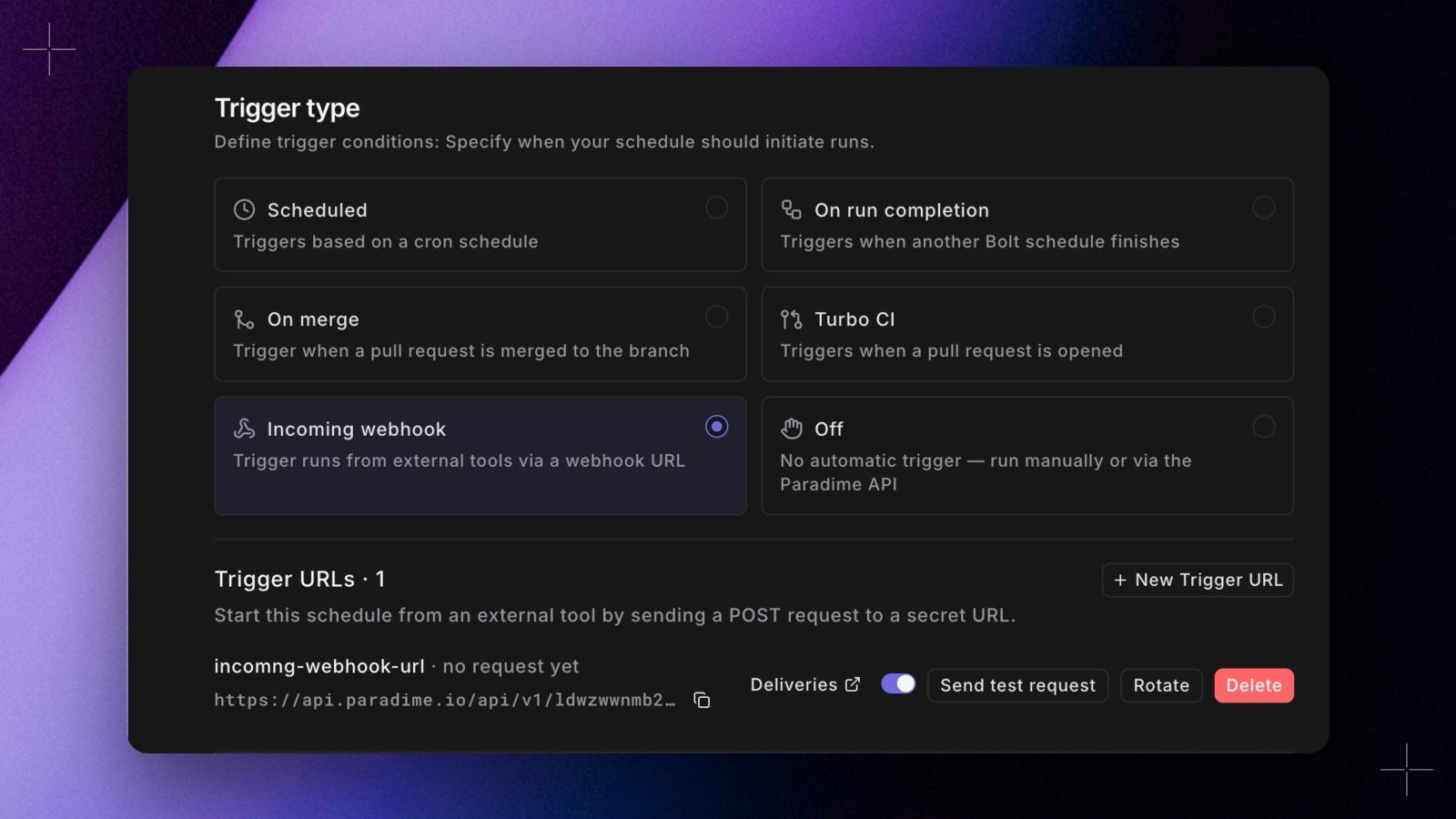 A Bolt schedule can now start from a single `POST` request. Pick the new **Incoming webhook** trigger, create a webhook (the app lists it as a **Trigger URL**), and give its URL and secret to any tool that can send a request with a header: Jira Automation, Zapier, a CI job, or `curl`. Each request runs the schedule's own commands, and the run shows the webhook's name, so you know what started it.
* **Manage it from the schedule.** Create, pause, rotate, and delete incoming webhooks in the schedule's edit form. The secret shows once, with a curl command ready to copy.
* **Test it.** **Send test request** checks a webhook without waiting for the other tool. It starts a real run.
* **See every request.** **Bolt** > **Webhooks** has a new **Incoming** tab that lists every incoming webhook in the workspace and each request it received: **Run started**, **Skipped**, **Rejected**, or **Failed**.
A request that arrives while the schedule is already running is skipped, not queued. See [Incoming webhooks](/products/bolt/external-triggers/incoming-webhooks). Shipped in Paradime v6.19.0.
## Related topics
- [Changelog](/changelog/overview.md)
- [Incoming webhooks](/products/bolt/external-triggers/incoming-webhooks.md)
- [Start Bolt schedules from outside Paradime](/products/bolt/external-triggers/index.md)
- [Triggers](/products/bolt/creating-schedules/trigger-types.md)
- [Bolt API](/products/bolt/bolt-api.md)
This documentation is built and hosted on [Mintlify](https://mintlify.com), a developer documentation platform.
A Bolt schedule can now start from a single `POST` request. Pick the new **Incoming webhook** trigger, create a webhook (the app lists it as a **Trigger URL**), and give its URL and secret to any tool that can send a request with a header: Jira Automation, Zapier, a CI job, or `curl`. Each request runs the schedule's own commands, and the run shows the webhook's name, so you know what started it.
* **Manage it from the schedule.** Create, pause, rotate, and delete incoming webhooks in the schedule's edit form. The secret shows once, with a curl command ready to copy.
* **Test it.** **Send test request** checks a webhook without waiting for the other tool. It starts a real run.
* **See every request.** **Bolt** > **Webhooks** has a new **Incoming** tab that lists every incoming webhook in the workspace and each request it received: **Run started**, **Skipped**, **Rejected**, or **Failed**.
A request that arrives while the schedule is already running is skipped, not queued. See [Incoming webhooks](/products/bolt/external-triggers/incoming-webhooks). Shipped in Paradime v6.19.0.
## Related topics
- [Changelog](/changelog/overview.md)
- [Incoming webhooks](/products/bolt/external-triggers/incoming-webhooks.md)
- [Start Bolt schedules from outside Paradime](/products/bolt/external-triggers/index.md)
- [Triggers](/products/bolt/creating-schedules/trigger-types.md)
- [Bolt API](/products/bolt/bolt-api.md)
This documentation is built and hosted on [Mintlify](https://mintlify.com), a developer documentation platform.