> ## Documentation Index
> Fetch the complete documentation index at: https://docs.paradime.io/llms.txt
> Use this file to discover all available pages before exploring further.
# Configure Project dependencies
> dbt™ Mesh enables managing dependencies by referencing models as APIs without importing them as packages.
dbt™ Mesh introduces a new method to manage dependencies in your dbt™ project. This allow you to reference models from another project without having to import these as a dbt™️ package.
Instead, you treat your dependency on those models as an API that returns a dataset. The maintainer of the public model is responsible for ensuring its quality and stability.
## Prerequisites
* Use a supported version of dbt 1.7 or greater for both the upstream ("producer") project and the downstream ("consumer") project.
* Define models in an upstream ("producer") project that are configured with [`access: public`](/guides/data-mesh-setup/model-access). You need at least one successful job run after defining their `access`.
* Have at least one Bolt schedule with a successful run.
## Setup your consumer project
To get started, you will to crate a configuration file in your dbt™️ consumer project for Paradime to fetch public models definition from your "producer" project. You will need to provide:
* The name of your "producer" project, as defined in your `dbt_project.yml`.
* The name of a Bolt schedule in your "producer" project, Paradime will use this to fetch and inject model metadata in your "consumer" project.
* [API credentials from your "producer" project](/developers/generate-api-keys-legacy). The API keys must have the *Bolt schedules metadata viewer* capability*.*
### 1. Add configuration file
To enable cross-project dependencies add a new file named `dbt_loom.config.yml` in your "consumer" project git repository and provide the "producer" project configuration.
Make sure that this file sits in you dbt™️ project root level, this is usually in the same directory where your `dbt_project.yml` sits.
```yaml title="dbt_loom.config.yml" theme={"system"}
manifests:
- name: jaffle_shop_platform # The name of your "producer" project
type: paradime
config:
schedule_name: hourly_bolt_schedule #The name of the Bolt schedule in your "producer" project
# Set the environment variables name which we will use to provide API credentials from the "producer" project.
# You can set a name that is reppresentative for your producer dbt™️ project name
api_key: ${PRODUCER_PROJECT_API_KEY}
api_secret: ${PRODUCER_PROJECT_API_SECRET}
api_endpoint: ${PRODUCER_PROJECT_API_ENDPOINT}
```
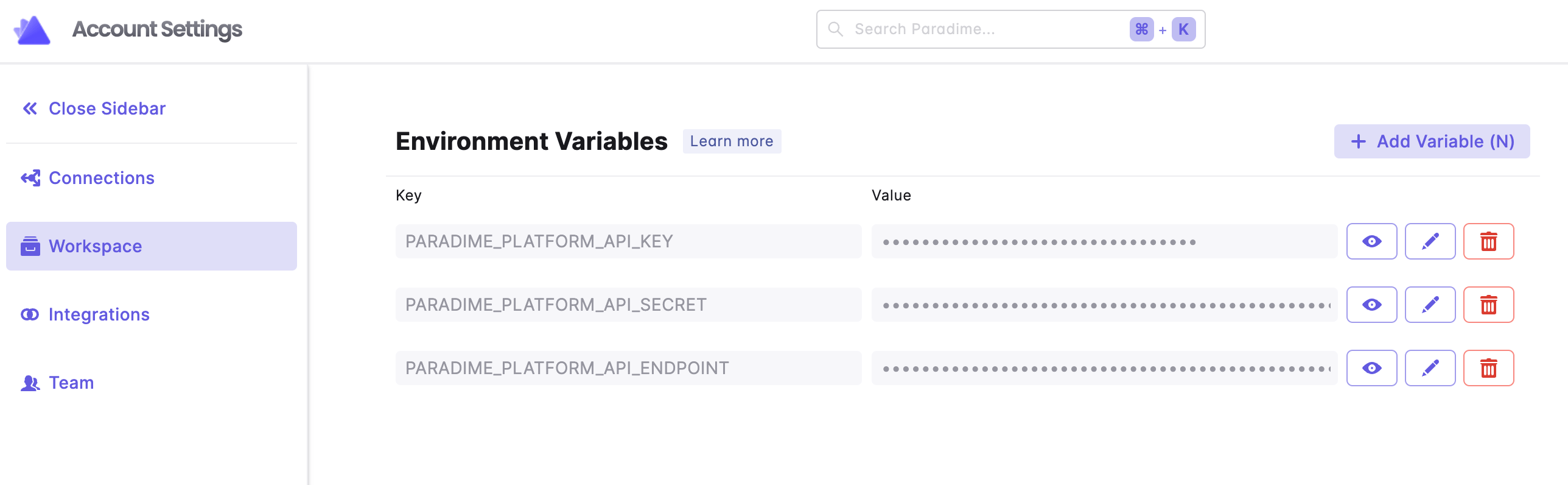
### 2. Setup Workspace level API credentials
Ensure the environment variable names match those defined in your `dbt_loom.config.yml`
After generating the API credentials from your "producer" project, you will need to set these as an environment variable name in the workspace settings of the "consumer" project.
This step is required to enable Bolt to run dbt™️ schedules referencing models in your "producer" project.
 ### 3. Setup User-level level API credentials
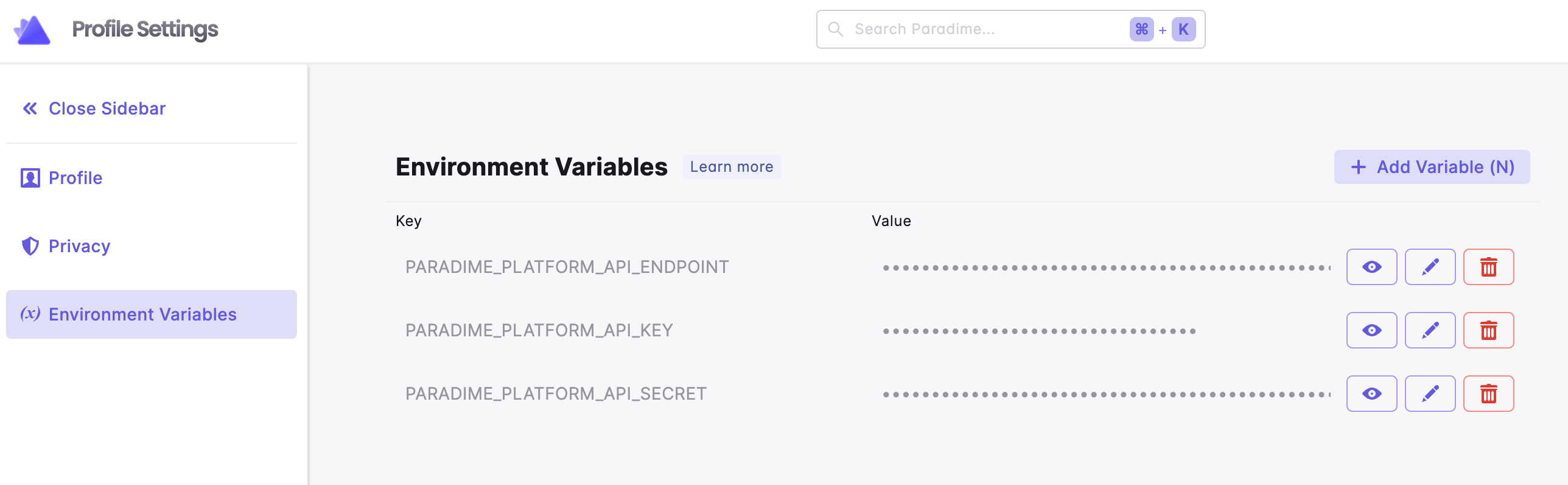
Ensure the environment variable names match those defined in your `dbt_loom.config.yml`
After generating the API credentials from your "producer" project, each user developing in the "consumer" project **MUST** set the API credentials as an environment variable.
This will allow user to reference "producer" project models while developing in the Paradime Code IDE.
### 3. Setup User-level level API credentials
Ensure the environment variable names match those defined in your `dbt_loom.config.yml`
After generating the API credentials from your "producer" project, each user developing in the "consumer" project **MUST** set the API credentials as an environment variable.
This will allow user to reference "producer" project models while developing in the Paradime Code IDE.
 ## How to use cross-project model ref
When referencing models from a project-type dependency, always use the two-argument `ref` that includes the project name.
```sql theme={"system"}
with monthly_revenue as (
select * from {{ ref('jaffle_finance', 'monthly_revenue') }}
),
...
```
Only models with [`access: public`](/guides/data-mesh-setup/model-access) can be referenced from your "producer" project.
## Related topics
- [Using Poetry](/developers/virtual-environments/using-poetry.md)
- [PII Anonymization with dbt™ Mesh Setup](/guides/pii-anonymization-with-dbt-tm-mesh-setup.md)
- [SQLFluff Hooks](/integrations/pre-commit/sqlfluff-hooks.md)
- [dbt™ Commands](/products/bolt/creating-schedules/command-settings/dbt-tm-commands.md)
- [GitHub Native Continuous Deployment](/products/bolt/ci-cd/continuous-deployment-with-bolt/continuous-deployment.md)
## How to use cross-project model ref
When referencing models from a project-type dependency, always use the two-argument `ref` that includes the project name.
```sql theme={"system"}
with monthly_revenue as (
select * from {{ ref('jaffle_finance', 'monthly_revenue') }}
),
...
```
Only models with [`access: public`](/guides/data-mesh-setup/model-access) can be referenced from your "producer" project.
## Related topics
- [Using Poetry](/developers/virtual-environments/using-poetry.md)
- [PII Anonymization with dbt™ Mesh Setup](/guides/pii-anonymization-with-dbt-tm-mesh-setup.md)
- [SQLFluff Hooks](/integrations/pre-commit/sqlfluff-hooks.md)
- [dbt™ Commands](/products/bolt/creating-schedules/command-settings/dbt-tm-commands.md)
- [GitHub Native Continuous Deployment](/products/bolt/ci-cd/continuous-deployment-with-bolt/continuous-deployment.md)