> ## Documentation Index
> Fetch the complete documentation index at: https://docs.paradime.io/llms.txt
> Use this file to discover all available pages before exploring further.
# Graph Operators
> Learn how to use dbt graph operators with the --select flag to navigate your project's execution graph, targeting specific models and their dependencies for precise execution in data pipelines.
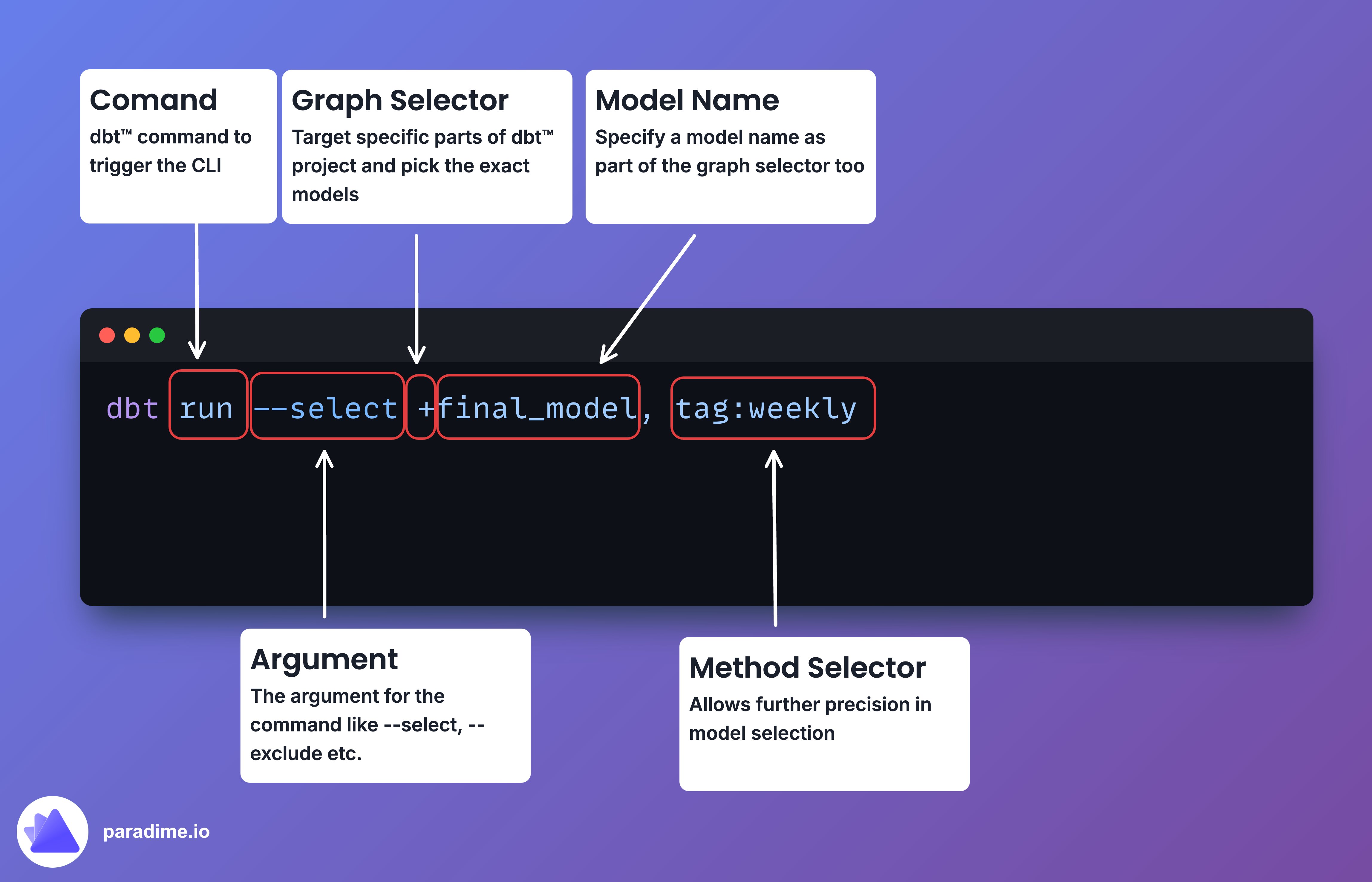
Graph operators in dbt are special syntax used with the `--select` flag to target specific parts of your project's execution graph (DAG). This graph represents the dependencies between your models, with each model as a node and the dependencies as edges.
The graph operators allow you to navigate this execution graph and select subsets of your project's resources. They're like secret codes to tell dbt exactly which models you want to work with, whether it's running, testing, or listing them.
 ### Operators
#### Wildcard Operator (`*`)
Run all models in a schema.
```bash theme={"system"}
dbt run --select my_schema.*
```
#### Path Operator
No special character needed, just use the path.
```bash theme={"system"}
dbt run --select models/staging
```
#### Parent/Child Operator (`+`)
The plus before a model name selects the model and its parents. The plus after a model name selects the model and its children.
```bash theme={"system"}
dbt run --select +final_model
dbt run --select parent_model+
```
#### Exclusion Operator (`@`)
Select parents or children, without the original model.
```bash theme={"system"}
dbt run --select @model_name
dbt run --select model_name@
```
#### Selection Operator (`,`)
Run multiple models.
```bash theme={"system"}
dbt run --select model1,model2,model3
```
#### Intersection Operator (`,`)
Get the intersection of multiple selectors.
```bash theme={"system"}
dbt run --select tag:nightly,staging.*
```
### Pro Tips
* Combine operators for laser-focused selection:
```bash theme={"system"}
dbt run --select tag:nightly,+final_model
```
* Use `dbt ls` to preview your selection:
```bash theme={"system"}
dbt ls --select tag:nightly,+final_model
```
* Refresh two generations of parents and all children of critical models:
```bash theme={"system"}
dbt run --select +2tag:critical+
```
* Test everything related to final reports except the reports themselves:
```bash theme={"system"}
dbt test --select @tag:final_report@
```
* Remember, the order of operators matters, as dbt processes them from left to right.
With these graph operators, you can create powerful, precise dbt commands to execute exactly the models you need in your data transformation pipelines.
## Related topics
- [Mastering the dbt™ CLI](/guides/dbt-fundamentals/running-dbt/mastering-the-dbt-cli/index.md)
- [Running dbt™](/guides/dbt-fundamentals/running-dbt/index.md)
- [dbt™ Commands](/products/bolt/creating-schedules/command-settings/dbt-tm-commands.md)
- [Selector Methods](/guides/dbt-fundamentals/running-dbt/mastering-the-dbt-cli/selector-methods.md)
- [dbt™ fundamentals](/guides/dbt-fundamentals/index.md)
### Operators
#### Wildcard Operator (`*`)
Run all models in a schema.
```bash theme={"system"}
dbt run --select my_schema.*
```
#### Path Operator
No special character needed, just use the path.
```bash theme={"system"}
dbt run --select models/staging
```
#### Parent/Child Operator (`+`)
The plus before a model name selects the model and its parents. The plus after a model name selects the model and its children.
```bash theme={"system"}
dbt run --select +final_model
dbt run --select parent_model+
```
#### Exclusion Operator (`@`)
Select parents or children, without the original model.
```bash theme={"system"}
dbt run --select @model_name
dbt run --select model_name@
```
#### Selection Operator (`,`)
Run multiple models.
```bash theme={"system"}
dbt run --select model1,model2,model3
```
#### Intersection Operator (`,`)
Get the intersection of multiple selectors.
```bash theme={"system"}
dbt run --select tag:nightly,staging.*
```
### Pro Tips
* Combine operators for laser-focused selection:
```bash theme={"system"}
dbt run --select tag:nightly,+final_model
```
* Use `dbt ls` to preview your selection:
```bash theme={"system"}
dbt ls --select tag:nightly,+final_model
```
* Refresh two generations of parents and all children of critical models:
```bash theme={"system"}
dbt run --select +2tag:critical+
```
* Test everything related to final reports except the reports themselves:
```bash theme={"system"}
dbt test --select @tag:final_report@
```
* Remember, the order of operators matters, as dbt processes them from left to right.
With these graph operators, you can create powerful, precise dbt commands to execute exactly the models you need in your data transformation pipelines.
## Related topics
- [Mastering the dbt™ CLI](/guides/dbt-fundamentals/running-dbt/mastering-the-dbt-cli/index.md)
- [Running dbt™](/guides/dbt-fundamentals/running-dbt/index.md)
- [dbt™ Commands](/products/bolt/creating-schedules/command-settings/dbt-tm-commands.md)
- [Selector Methods](/guides/dbt-fundamentals/running-dbt/mastering-the-dbt-cli/selector-methods.md)
- [dbt™ fundamentals](/guides/dbt-fundamentals/index.md)