> ## Documentation Index
> Fetch the complete documentation index at: https://docs.paradime.io/llms.txt
> Use this file to discover all available pages before exploring further.
# Selector Methods
> Explore dbt selector methods to filter resources based on properties like tags, sources, and configurations, with wildcard support for precise targeting during data transformations.
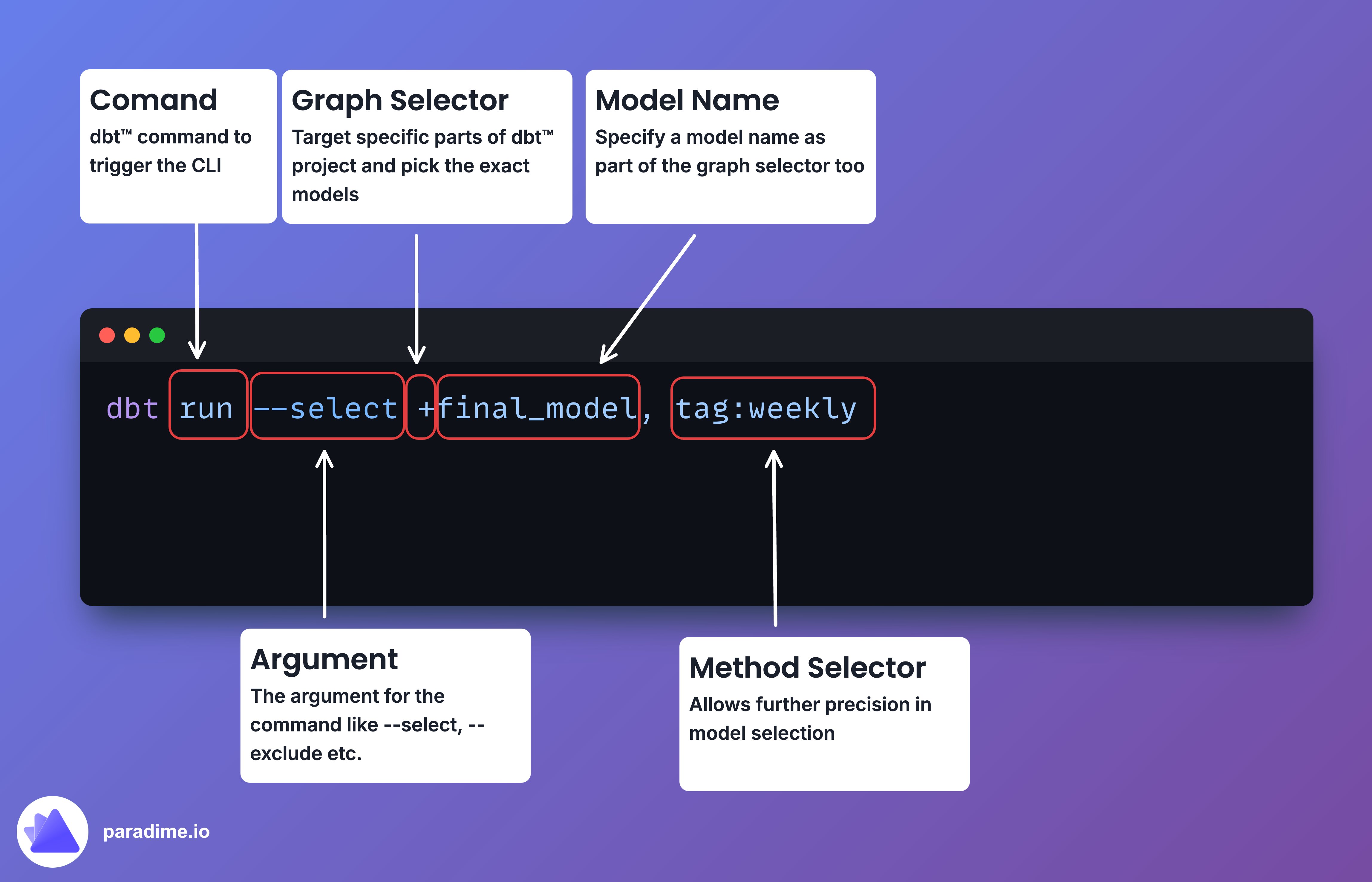
Selector methods in dbt allow you to filter resources based on specific properties using the `method:value` syntax. This gives you the power to target exactly what you need during your data transformations.
 ### Wildcard Magic
Most selector methods support Unix-style wildcards, which can help you target a broader set of resources:
* `*`: Matches any number of characters (including none)
* `?`: Matches any single character
* `[abc]`: Matches one character listed in the bracket
* `[a-z]`: Matches one character from the specified range in the bracket
For example:
```bash theme={"system"}
dbt list --select "*.folder_name.*"
dbt list --select "model_[a-z].sql"
```
### The Selectors
#### Tag Selector
Use `tag:` to select models with a specific tag.
```bash theme={"system"}
dbt run --select "tag:hourly"
```
#### Source Selector
Use `source:` to select models that reference a specified source.
```bash theme={"system"}
dbt run --select "source:fivetran+"
```
#### Resource Type Selector
Use `resource_type:` to select nodes of a specific type (e.g., model, test, exposure).
```bash theme={"system"}
dbt run --select "resource_type:exposure"
dbt list --select "resource_type:test"
```
#### Path Selector
Use `path:` to select models/sources defined at or under a specific path.
```bash theme={"system"}
dbt run --select "path:models/marts"
dbt run --select "path:models/marts/customers.sql"
```
#### File Selector
Use `file:` to select a model by filename.
```bash theme={"system"}
dbt run --select "file:model_name.sql"
```
#### FQN (Fully Qualified Name) Selector
Use `fqn:` to select nodes based on their fully qualified name.
```bash theme={"system"}
dbt run --select "fqn:example_model"
dbt run --select "fqn:project_name.example_path.example_model"
```
#### Package Selector
Use `package:` to select models defined within the root project or an installed dbt package.
```bash theme={"system"}
dbt run --select "package:fivetran"
```
#### Config Selector
Use `config:` to select models that match a specified node config.
```bash theme={"system"}
dbt run --select "config.materialized:table"
dbt run --select "config.cluster_by:zip_code"
```
#### Test Type Selector
Use `test_type:` to select tests based on type (generic, singular, unit, data).
```bash theme={"system"}
dbt test --select "test_type:generic"
dbt test --select "test_type:singular"
```
#### Test Name Selector
Use `test_name:` to select tests based on the name of the test defined.
```bash theme={"system"}
dbt test --select "test_name:not_null"
```
#### State Selector
Use `state:` to select nodes by comparing them against a previous version of the project.
```bash theme={"system"}
dbt test --select "state:new" --state path/to/artifacts
dbt run --select "state:modified" --state path/to/artifacts
```
#### Exposure Selector
Use `exposure:` to select the parent resources of an exposure.
```bash theme={"system"}
dbt test --select "exposure:monthly_reports"
dbt run --select "+exposure:*"
```
#### Metric Selector
Use `metric:` to select parent resources of a metric.
```bash theme={"system"}
dbt run --select "+metric:monthly_qualified_leads"
```
#### Results Selector
Use `result:` to select resources based on their results status from a previous execution.
```bash theme={"system"}
dbt run --select "result:success" --state path/to/project/artifacts
dbt test --select "result:warn" --state /path/to/project/artifacts
```
#### Source Status Selector
Use `source_status:` to select based on the freshness of sources.
```bash theme={"system"}
dbt source freshness
dbt build --select "source_status:fresher+" --state path/to/prod/artifacts
```
#### Group Selector
Use `group:` to select models defined within a specified group.
```bash theme={"system"}
dbt run --select "group:marketing"
```
#### Access Selector
Use `access:` to select models based on their access property.
```bash theme={"system"}
dbt list --select "access:public"
```
#### Version Selector
Use `version:` to select versioned models.
```bash theme={"system"}
dbt list --select "version:old"
dbt list --select "version:latest"
```
#### Semantic Model Selector
Use `semantic_model:` to select semantic models.
```bash theme={"system"}
dbt ls --select "semantic_model:sales"
```
#### Saved Query Selector
Use `saved_query:` to select saved queries.
```bash theme={"system"}
dbt list --select "saved_query:*"
```
#### Unit Test Selector
Use `unit_test:` to select dbt unit tests.
```bash theme={"system"}
dbt list --select "unit_test:*"
```
### Pro Tips
* Combine selectors for laser-focused selection:
```bash theme={"system"}
dbt run --select "tag:nightly,config.materialized:table"
```
* Use graph operators like `+` and `@` for complex selections:
```bash theme={"system"}
dbt run --select "source:raw_data+,@tag:critical"
```
* Exclude models using the `--exclude` flag:
```bash theme={"system"}
dbt run --select "path:models/mart" --exclude "tag:deprecated"
```
* If you omit the method, dbt will default to one of `path`, `file`, or `fqn`.
Remember, the more targeted your selector methods, the more precisely you can execute your dbt transformations.
## Related topics
- [Methods](/guides/dbt-fundamentals/running-dbt/mastering-the-dbt-cli/methods.md)
- [Mastering the dbt™ CLI](/guides/dbt-fundamentals/running-dbt/mastering-the-dbt-cli/index.md)
- [Running dbt™](/guides/dbt-fundamentals/running-dbt/index.md)
- [dbt™ fundamentals](/guides/dbt-fundamentals/index.md)
- [CLI Commands and Usage](/integrations/elementary-data/cli-commands-and-usage.md)
### Wildcard Magic
Most selector methods support Unix-style wildcards, which can help you target a broader set of resources:
* `*`: Matches any number of characters (including none)
* `?`: Matches any single character
* `[abc]`: Matches one character listed in the bracket
* `[a-z]`: Matches one character from the specified range in the bracket
For example:
```bash theme={"system"}
dbt list --select "*.folder_name.*"
dbt list --select "model_[a-z].sql"
```
### The Selectors
#### Tag Selector
Use `tag:` to select models with a specific tag.
```bash theme={"system"}
dbt run --select "tag:hourly"
```
#### Source Selector
Use `source:` to select models that reference a specified source.
```bash theme={"system"}
dbt run --select "source:fivetran+"
```
#### Resource Type Selector
Use `resource_type:` to select nodes of a specific type (e.g., model, test, exposure).
```bash theme={"system"}
dbt run --select "resource_type:exposure"
dbt list --select "resource_type:test"
```
#### Path Selector
Use `path:` to select models/sources defined at or under a specific path.
```bash theme={"system"}
dbt run --select "path:models/marts"
dbt run --select "path:models/marts/customers.sql"
```
#### File Selector
Use `file:` to select a model by filename.
```bash theme={"system"}
dbt run --select "file:model_name.sql"
```
#### FQN (Fully Qualified Name) Selector
Use `fqn:` to select nodes based on their fully qualified name.
```bash theme={"system"}
dbt run --select "fqn:example_model"
dbt run --select "fqn:project_name.example_path.example_model"
```
#### Package Selector
Use `package:` to select models defined within the root project or an installed dbt package.
```bash theme={"system"}
dbt run --select "package:fivetran"
```
#### Config Selector
Use `config:` to select models that match a specified node config.
```bash theme={"system"}
dbt run --select "config.materialized:table"
dbt run --select "config.cluster_by:zip_code"
```
#### Test Type Selector
Use `test_type:` to select tests based on type (generic, singular, unit, data).
```bash theme={"system"}
dbt test --select "test_type:generic"
dbt test --select "test_type:singular"
```
#### Test Name Selector
Use `test_name:` to select tests based on the name of the test defined.
```bash theme={"system"}
dbt test --select "test_name:not_null"
```
#### State Selector
Use `state:` to select nodes by comparing them against a previous version of the project.
```bash theme={"system"}
dbt test --select "state:new" --state path/to/artifacts
dbt run --select "state:modified" --state path/to/artifacts
```
#### Exposure Selector
Use `exposure:` to select the parent resources of an exposure.
```bash theme={"system"}
dbt test --select "exposure:monthly_reports"
dbt run --select "+exposure:*"
```
#### Metric Selector
Use `metric:` to select parent resources of a metric.
```bash theme={"system"}
dbt run --select "+metric:monthly_qualified_leads"
```
#### Results Selector
Use `result:` to select resources based on their results status from a previous execution.
```bash theme={"system"}
dbt run --select "result:success" --state path/to/project/artifacts
dbt test --select "result:warn" --state /path/to/project/artifacts
```
#### Source Status Selector
Use `source_status:` to select based on the freshness of sources.
```bash theme={"system"}
dbt source freshness
dbt build --select "source_status:fresher+" --state path/to/prod/artifacts
```
#### Group Selector
Use `group:` to select models defined within a specified group.
```bash theme={"system"}
dbt run --select "group:marketing"
```
#### Access Selector
Use `access:` to select models based on their access property.
```bash theme={"system"}
dbt list --select "access:public"
```
#### Version Selector
Use `version:` to select versioned models.
```bash theme={"system"}
dbt list --select "version:old"
dbt list --select "version:latest"
```
#### Semantic Model Selector
Use `semantic_model:` to select semantic models.
```bash theme={"system"}
dbt ls --select "semantic_model:sales"
```
#### Saved Query Selector
Use `saved_query:` to select saved queries.
```bash theme={"system"}
dbt list --select "saved_query:*"
```
#### Unit Test Selector
Use `unit_test:` to select dbt unit tests.
```bash theme={"system"}
dbt list --select "unit_test:*"
```
### Pro Tips
* Combine selectors for laser-focused selection:
```bash theme={"system"}
dbt run --select "tag:nightly,config.materialized:table"
```
* Use graph operators like `+` and `@` for complex selections:
```bash theme={"system"}
dbt run --select "source:raw_data+,@tag:critical"
```
* Exclude models using the `--exclude` flag:
```bash theme={"system"}
dbt run --select "path:models/mart" --exclude "tag:deprecated"
```
* If you omit the method, dbt will default to one of `path`, `file`, or `fqn`.
Remember, the more targeted your selector methods, the more precisely you can execute your dbt transformations.
## Related topics
- [Methods](/guides/dbt-fundamentals/running-dbt/mastering-the-dbt-cli/methods.md)
- [Mastering the dbt™ CLI](/guides/dbt-fundamentals/running-dbt/mastering-the-dbt-cli/index.md)
- [Running dbt™](/guides/dbt-fundamentals/running-dbt/index.md)
- [dbt™ fundamentals](/guides/dbt-fundamentals/index.md)
- [CLI Commands and Usage](/integrations/elementary-data/cli-commands-and-usage.md)