> ## Documentation Index
> Fetch the complete documentation index at: https://docs.paradime.io/llms.txt
> Use this file to discover all available pages before exploring further.
# Run several Turbo CI checks on a pull request
> Run two or more Turbo CI schedules side by side on each pull request, with one GitHub check per schedule and one overall check to gate the merge.
Split your pull request checks into separate Turbo CI schedules, for example one that lints your SQL and one that builds your changed dbt™ models. When a pull request opens, all of them start at the same time, and GitHub shows one check for each schedule plus an overall `Paradime Turbo CI` check.
**Prerequisites**
* The [Paradime GitHub app](/integrations/github/github-app) installed on your dbt™ repository. Paradime posts a check for each schedule only through the app.
* [Turbo CI set up](/guides/orchestrate-data-pipelines/set-up-turbo-ci): a CI environment, the custom schema macro, and a production schedule to defer to.
* The Admin or Developer [role](/products/settings/users/roles-and-permissions) in Paradime, to create Bolt schedules.
* Admin access to the GitHub repository, to change its branch protection.
Estimated time: 15 minutes.
## Steps
Each Turbo CI schedule becomes one check on the pull request. Give each schedule a different job, for example:
| Schedule | Commands | What it checks |
| - | - | - |
| `CI - lint` | `pre-commit run --from-ref origin/main --to-ref HEAD` | SQL style and project rules in the changed files. See [pre-commit](/integrations/pre-commit). |
| `CI - dbt build` | `dbt build --select state:modified+` | The changed models and everything downstream of them. |
All the Turbo CI schedules of a pull request write to the same temporary schemas: `paradime_turbo_ci_pr_` followed by the pull request number. If two schedules select the same model, both runs build the same table at the same time. Give each schedule a different model selection, or [chain the schedules](/guides/orchestrate-data-pipelines/chain-turbo-ci-checks) so that they run one after another.
Your current Turbo CI schedule can be the first check. For each other check, create a schedule in Bolt with these settings:
* **Name**: a short name. GitHub shows the check as `Paradime Turbo CI / `.
* **Environment**: your CI environment.
* **Git branch**: the branch that your pull requests merge into, for example `main`. A Turbo CI schedule runs only on pull requests into its Git branch.
* **Commands**: the commands for this check.
* **Trigger type**: **Turbo CI**. Leave **Run after another schedule** off, so that the schedule starts as soon as the pull request opens.
* **Deferred schedule**: your production schedule. This field shows in **Schedule settings** after you select the **Turbo CI** trigger.
Select **Deploy**.
To start from your current Turbo CI schedule, open it and select the copy icon (**Duplicate schedule**). Then change the name and the commands.
In your GitHub repository, go to **Settings** > **Branches** and edit the protection rule for your base branch. Under **Require status checks to pass before merging**, add `Paradime Turbo CI`.
`Paradime Turbo CI` passes only when all your schedules pass, and it fails as soon as one of them fails. One required check covers all your schedules.
Do not require the `Paradime Turbo CI / ` checks. A check name changes when you rename a schedule, and GitHub blocks the merge while a required check is missing.
Change a model in your dbt™ project folder and open a pull request into your base branch. Turbo CI does not run on draft pull requests, or on pull requests that change no file in your dbt™ project folder.
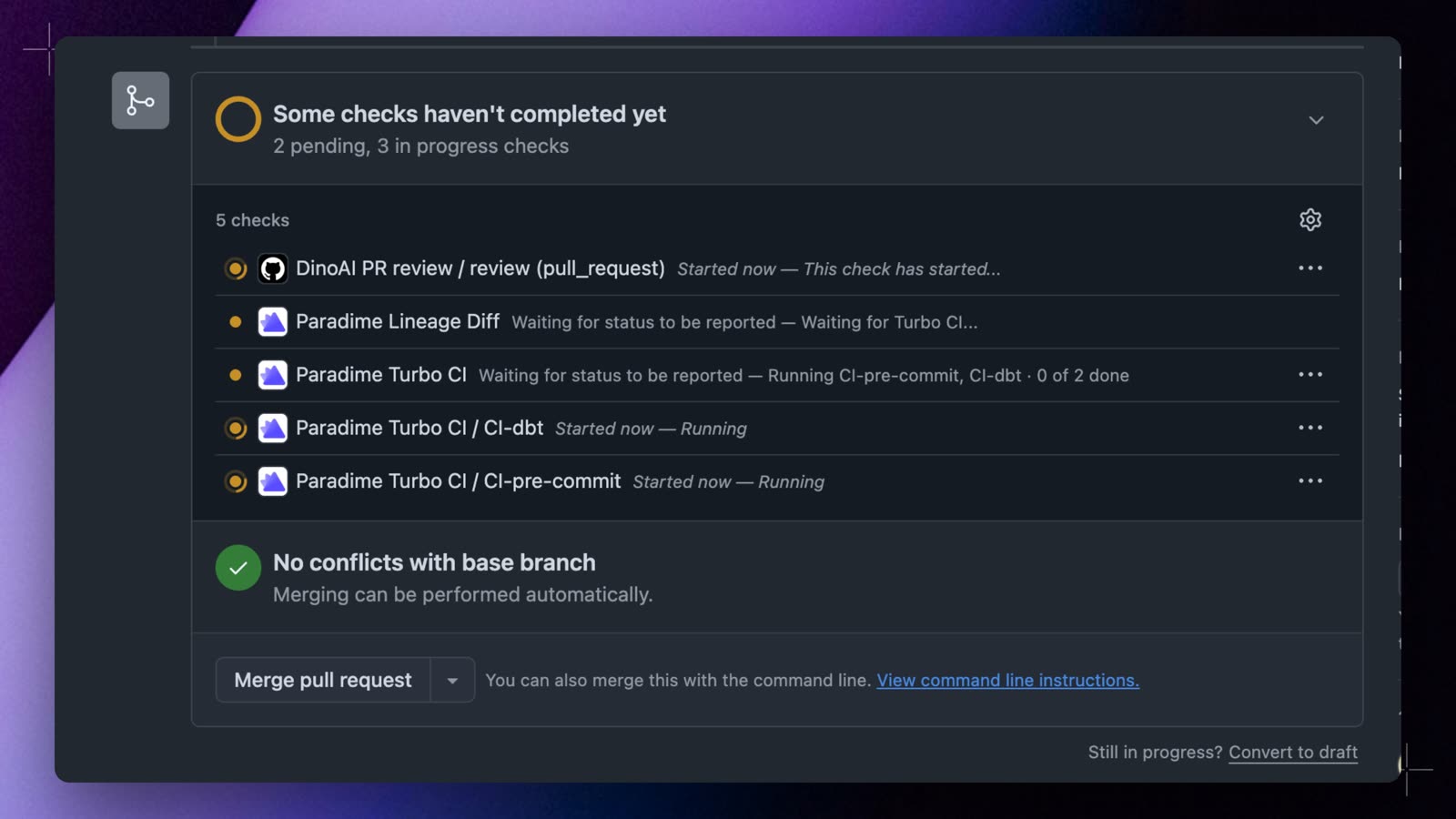 The pull request shows one check for each schedule, for example `Paradime Turbo CI / CI - lint` and `Paradime Turbo CI / CI - dbt build`, and both run at the same time. While they run, `Paradime Turbo CI` names the running checks, for example `Running CI - lint, CI - dbt build · 0 of 2 done`. When both pass, it shows `2 of 2 passed`.
If you see only `Paradime Turbo CI`, Paradime found only one Turbo CI schedule for the pull request. Make sure that each schedule's **Git branch** is the base branch of the pull request. A schedule that you deploy from the form applies from the next pull request event, so push a new commit to a pull request that is already open.
## When a check fails
Each schedule runs on its own. If one check fails, the other checks continue, so you see all the results in one round. `Paradime Turbo CI` fails at once and names the failed checks, for example `1 of 2 passed · failed: CI - lint`.
To run one check again, select **Re-run** on that check in GitHub. Paradime runs only that schedule again, on the same commit. When you push a new commit, all the checks run again.
Re-run works after all the checks of the pull request finish. While a check still runs, GitHub's **Re-run** does nothing, and **Retry** on the run page in Paradime shows `This step can't be retried now: a chain is running`.
## Set it up in YAML
If you manage your schedules as code, add one Turbo CI schedule for each check to `paradime_schedules.yml`. Neither schedule has `run_after`, so both start when a pull request opens:
```yaml paradime_schedules.yml theme={"system"}
schedules:
- name: "CI - lint"
description: "Lint the files that the pull request changes"
owner_email: data-platform@acme.io
environment: ci # your CI environment's slug
git_branch: main
schedule: "OFF"
commands:
- pre-commit run --from-ref origin/main --to-ref HEAD
turbo_ci:
enabled: true
deferred_schedule_slug: prod-nightly-a7c2e9 # your production schedule's slug
successful_run_only: true
- name: "CI - dbt build"
description: "Build and test the changed models and everything downstream"
owner_email: data-platform@acme.io
environment: ci
git_branch: main
schedule: "OFF"
commands:
- dbt build --select state:modified+
turbo_ci:
enabled: true
deferred_schedule_slug: prod-nightly-a7c2e9
successful_run_only: true
```
Run `paradime schedule verify` before you commit. It checks the file and adds a `slug` to each new schedule. Paradime reads Turbo CI schedules from your deployed schedules, so a change in a pull request applies after the pull request merges and Bolt deploys your schedules. See [Manage schedules as code](/guides/orchestrate-data-pipelines/manage-schedules-as-code).
## Next steps
Build the changed models only after the lint check passes.
A ready-made pre-commit configuration for the lint check.
Every status that the checks can show.
Environment variables, temporary schemas, and schema cleanup.
## Troubleshooting
* **Only `Paradime Turbo CI` shows.** Paradime found one Turbo CI schedule for the base branch of the pull request. Check the **Git branch** of each schedule, and push a new commit after you deploy a schedule.
* **A required check never reports.** The check name in your branch protection rule does not match a check that Paradime posts, often after a schedule was renamed. Require only `Paradime Turbo CI`.
* **No check runs.** The pull request is a draft, or it changes no file in your dbt™ project folder.
* **There is no Re-run button on a check.** The Paradime GitHub app cannot create checks in your repository, so Paradime posts each schedule as a commit status, and GitHub cannot re-run a commit status. Ask a GitHub organization owner to accept any pending permission request from the Paradime app. Until then, use **Retry** on the run page in Paradime.
## Related topics
- [Chain Turbo CI checks to run in order](/guides/orchestrate-data-pipelines/chain-turbo-ci-checks.md)
- [Run Bolt schedules in order on pull requests and merges](/products/bolt/ci-cd/chains.md)
- [Turbo CI for dbt™ pull requests](/products/bolt/ci-cd/turbo-ci/index.md)
- [Turbo CI on GitHub pull requests](/products/bolt/ci-cd/turbo-ci/github.md)
- [Run several jobs when a pull request merges](/guides/orchestrate-data-pipelines/run-several-jobs-on-merge.md)
This documentation is built and hosted on [Mintlify](https://mintlify.com), a developer documentation platform.
The pull request shows one check for each schedule, for example `Paradime Turbo CI / CI - lint` and `Paradime Turbo CI / CI - dbt build`, and both run at the same time. While they run, `Paradime Turbo CI` names the running checks, for example `Running CI - lint, CI - dbt build · 0 of 2 done`. When both pass, it shows `2 of 2 passed`.
If you see only `Paradime Turbo CI`, Paradime found only one Turbo CI schedule for the pull request. Make sure that each schedule's **Git branch** is the base branch of the pull request. A schedule that you deploy from the form applies from the next pull request event, so push a new commit to a pull request that is already open.
## When a check fails
Each schedule runs on its own. If one check fails, the other checks continue, so you see all the results in one round. `Paradime Turbo CI` fails at once and names the failed checks, for example `1 of 2 passed · failed: CI - lint`.
To run one check again, select **Re-run** on that check in GitHub. Paradime runs only that schedule again, on the same commit. When you push a new commit, all the checks run again.
Re-run works after all the checks of the pull request finish. While a check still runs, GitHub's **Re-run** does nothing, and **Retry** on the run page in Paradime shows `This step can't be retried now: a chain is running`.
## Set it up in YAML
If you manage your schedules as code, add one Turbo CI schedule for each check to `paradime_schedules.yml`. Neither schedule has `run_after`, so both start when a pull request opens:
```yaml paradime_schedules.yml theme={"system"}
schedules:
- name: "CI - lint"
description: "Lint the files that the pull request changes"
owner_email: data-platform@acme.io
environment: ci # your CI environment's slug
git_branch: main
schedule: "OFF"
commands:
- pre-commit run --from-ref origin/main --to-ref HEAD
turbo_ci:
enabled: true
deferred_schedule_slug: prod-nightly-a7c2e9 # your production schedule's slug
successful_run_only: true
- name: "CI - dbt build"
description: "Build and test the changed models and everything downstream"
owner_email: data-platform@acme.io
environment: ci
git_branch: main
schedule: "OFF"
commands:
- dbt build --select state:modified+
turbo_ci:
enabled: true
deferred_schedule_slug: prod-nightly-a7c2e9
successful_run_only: true
```
Run `paradime schedule verify` before you commit. It checks the file and adds a `slug` to each new schedule. Paradime reads Turbo CI schedules from your deployed schedules, so a change in a pull request applies after the pull request merges and Bolt deploys your schedules. See [Manage schedules as code](/guides/orchestrate-data-pipelines/manage-schedules-as-code).
## Next steps
Build the changed models only after the lint check passes.
A ready-made pre-commit configuration for the lint check.
Every status that the checks can show.
Environment variables, temporary schemas, and schema cleanup.
## Troubleshooting
* **Only `Paradime Turbo CI` shows.** Paradime found one Turbo CI schedule for the base branch of the pull request. Check the **Git branch** of each schedule, and push a new commit after you deploy a schedule.
* **A required check never reports.** The check name in your branch protection rule does not match a check that Paradime posts, often after a schedule was renamed. Require only `Paradime Turbo CI`.
* **No check runs.** The pull request is a draft, or it changes no file in your dbt™ project folder.
* **There is no Re-run button on a check.** The Paradime GitHub app cannot create checks in your repository, so Paradime posts each schedule as a commit status, and GitHub cannot re-run a commit status. Ask a GitHub organization owner to accept any pending permission request from the Paradime app. Until then, use **Retry** on the run page in Paradime.
## Related topics
- [Chain Turbo CI checks to run in order](/guides/orchestrate-data-pipelines/chain-turbo-ci-checks.md)
- [Run Bolt schedules in order on pull requests and merges](/products/bolt/ci-cd/chains.md)
- [Turbo CI for dbt™ pull requests](/products/bolt/ci-cd/turbo-ci/index.md)
- [Turbo CI on GitHub pull requests](/products/bolt/ci-cd/turbo-ci/github.md)
- [Run several jobs when a pull request merges](/guides/orchestrate-data-pipelines/run-several-jobs-on-merge.md)
This documentation is built and hosted on [Mintlify](https://mintlify.com), a developer documentation platform.