> ## Documentation Index
> Fetch the complete documentation index at: https://docs.paradime.io/llms.txt
> Use this file to discover all available pages before exploring further.
# Make merges take turns with a merge queue
> Set an on-merge Bolt schedule to Wait in line, so merges run it one at a time in merge order, and manage the waiting merges from the schedule page.
When two pull requests merge close together, their deploys can run at the same time, and the second deploy can expect the first one to be in production already. A merge queue makes merges run your deploy one at a time, in merge order. Every merge still runs.
**Prerequisites**
* The [Paradime GitHub app](/integrations/github/github-app) installed on your dbt™ repository.
* An on-merge deploy job. See [Set up continuous deployment](/guides/orchestrate-data-pipelines/set-up-continuous-deployment), and [Run several jobs when a pull request merges](/guides/orchestrate-data-pipelines/run-several-jobs-on-merge) for the jobs after the deploy.
* The Admin or Developer [role](/products/settings/users/roles-and-permissions) in Paradime, to edit the schedule.
Estimated time: 5 minutes.
The Bolt merge queue orders the runs that Paradime starts after each merge. It is separate from [GitHub's merge queue](/guides/working-with-git/github-merge-queue), which orders the merges themselves.
## Steps
Set the queue on the first job of your merge chain, usually the deploy job. A merge keeps its turn until that job and all the jobs after it finish. Then the next merge starts. The setting has no effect on the jobs after the first one.
Each queue belongs to one job. A merge that waits for the deploy does not delay the other jobs that start with the merge.
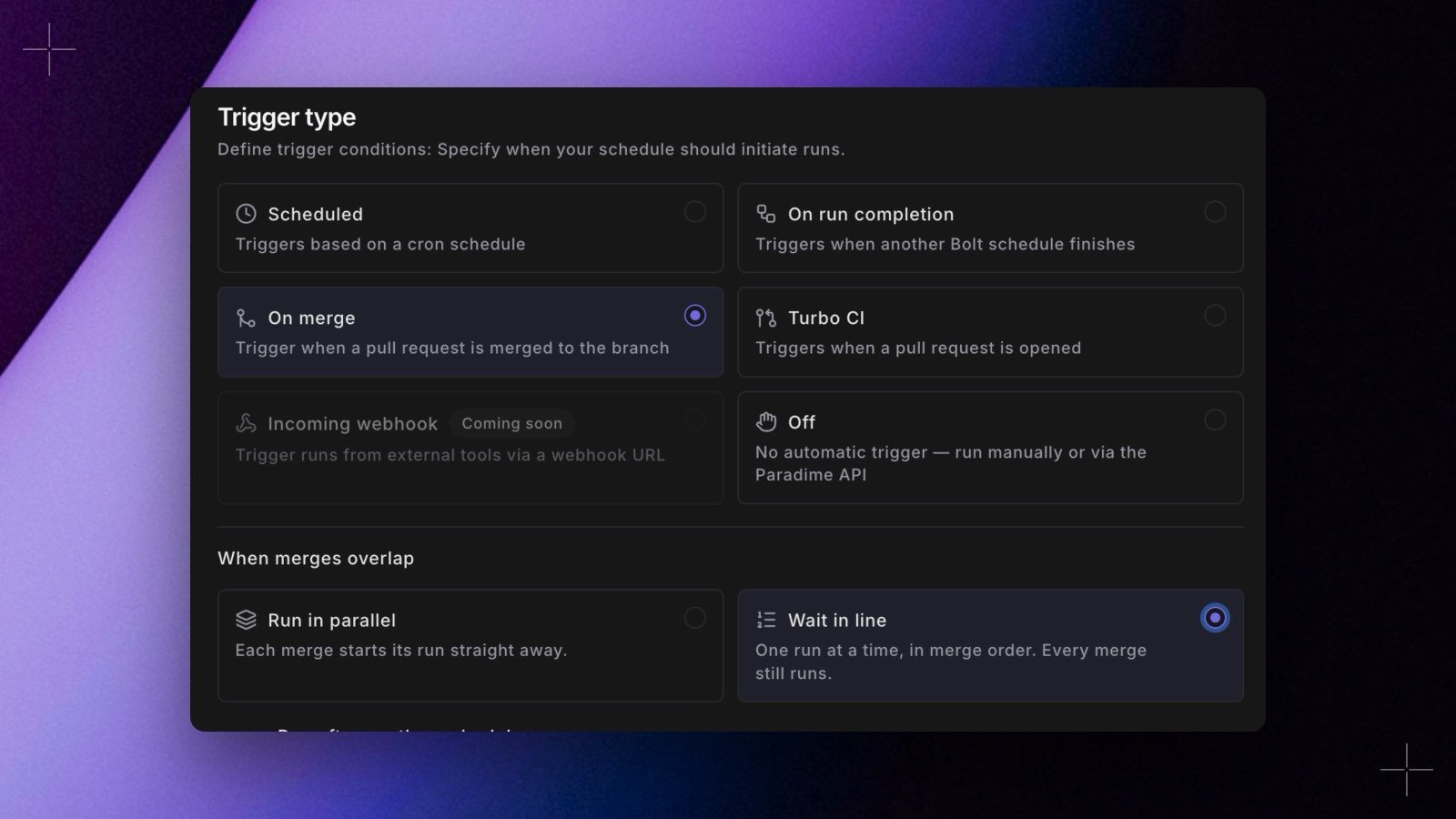
In Bolt, open the deploy job and select **Edit**. In **Trigger type**, keep **On merge** selected. Under **When merges overlap**, select **Wait in line**. Then select **Deploy**.
 Merge a pull request into the branch of the deploy job. While its deploy runs, merge a second pull request. Both pull requests must change a file in your dbt™ project folder.
In Bolt, open the deploy job. The **Merge queue** card above the run history shows the merge that is running and the merges that wait, next first. Each row shows the pull request number, the merge commit, and when the merge joined the queue.
A waiting merge has no run in the run history yet. Its run shows when its turn comes. On GitHub, the **Paradime Merge Run Summary** comment of a waiting merge shows its place in the queue, for example `Queued (1st in line): waiting for the merge of #482`.
The deploy of the second merge starts only after the deploy of the first merge, and the jobs after it, finish. When both merges finish, the **Merge queue** card shows `No merge is running or waiting`.
If the second deploy starts at once, check that **When merges overlap** is **Wait in line** on the first job of the chain, and not on a job after it.
## Manage the waiting merges
Each waiting merge on the **Merge queue** card has two actions. Paradime asks you to confirm each one.
* **Remove** takes the merge out of the queue. For that merge, Paradime skips the job and the jobs after it, and the summary comment shows `Skipped: removed from the merge queue in Paradime`. You need permission to run the schedule.
* **Run now** starts the merge out of turn, next to the merge that is running. Two merges then run the job at the same time. You need permission to edit the schedule.
Paradime records both actions in the [audit log](/products/settings/configuration/audit-logs), as `merge_queue_removed` and `merge_queue_run_now`.
## Things to know
* **Every merge runs, in merge order.** Each merge builds its own merge commit.
* **A failure does not block the queue.** If a deploy fails, the next merge still takes its turn, because it can contain the fix.
* **A merge waits for up to 24 hours.** After that, its jobs stop with `Couldn't run: still waiting for the merge queue after 24 hours`.
* **Time in the queue does not count toward the 6-hour limit** for the jobs of a merge.
* **A retry does not wait in line.** **Retry** on a run page starts the job at once, even while another merge has its turn.
## Set it up in YAML
If you manage your schedules as code, set `concurrency: queue` on the on-merge job:
```yaml paradime_schedules.yml theme={"system"}
schedules:
- name: "Deploy - changed models"
slug: deploy-changed-models-c4d5e6
description: "Deploy the models that changed since the last successful deploy"
owner_email: data-platform@acme.io
environment: production
git_branch: main
schedule: "OFF"
trigger_on_merge: true
concurrency: queue # merges take turns; the default is parallel
commands:
- dbt build --select state:modified+
deferred_schedule:
enabled: true
deferred_schedule_slug: deploy-changed-models-c4d5e6
successful_run_only: true
```
`concurrency: queue` is valid only together with `trigger_on_merge: true`. The Paradime CLI checks it from version 6.8.0, when you run `paradime schedule verify`.
## Next steps
Add the jobs that run after the deploy.
Every rule for the queue and its actions.
Test pull requests as GitHub batches them, before they merge.
See who removed a merge or ran one out of turn.
## Troubleshooting
* **The second deploy starts at once.** The queue is on a job after the first one, or the deploy job is still on **Run in parallel**.
* **There is no Merge queue card.** The card shows only on an on-merge job with **Wait in line**.
* **Remove or Run now shows `Merge queue not updated`.** The merge is no longer waiting: its turn came, or someone removed it. The card refreshes every 30 seconds.
* **A merge waits for a long time.** The merge ahead of it still runs its jobs. Open the running merge's runs to check their progress, or select **Run now** to start the waiting merge out of turn.
## Related topics
- [Run several jobs when a pull request merges](/guides/orchestrate-data-pipelines/run-several-jobs-on-merge.md)
- [Run Bolt schedules in order on pull requests and merges](/products/bolt/ci-cd/chains.md)
- [Continuous Deployment with GitHub for dbt™](/products/bolt/ci-cd/continuous-deployment/github.md)
- [Let merges take turns with a merge queue](/changelog/2026-10-08/merge-queue.md)
- [Set up a GitHub merge queue with Paradime Turbo CI](/guides/working-with-git/github-merge-queue.md)
This documentation is built and hosted on [Mintlify](https://mintlify.com), a developer documentation platform.
Merge a pull request into the branch of the deploy job. While its deploy runs, merge a second pull request. Both pull requests must change a file in your dbt™ project folder.
In Bolt, open the deploy job. The **Merge queue** card above the run history shows the merge that is running and the merges that wait, next first. Each row shows the pull request number, the merge commit, and when the merge joined the queue.
A waiting merge has no run in the run history yet. Its run shows when its turn comes. On GitHub, the **Paradime Merge Run Summary** comment of a waiting merge shows its place in the queue, for example `Queued (1st in line): waiting for the merge of #482`.
The deploy of the second merge starts only after the deploy of the first merge, and the jobs after it, finish. When both merges finish, the **Merge queue** card shows `No merge is running or waiting`.
If the second deploy starts at once, check that **When merges overlap** is **Wait in line** on the first job of the chain, and not on a job after it.
## Manage the waiting merges
Each waiting merge on the **Merge queue** card has two actions. Paradime asks you to confirm each one.
* **Remove** takes the merge out of the queue. For that merge, Paradime skips the job and the jobs after it, and the summary comment shows `Skipped: removed from the merge queue in Paradime`. You need permission to run the schedule.
* **Run now** starts the merge out of turn, next to the merge that is running. Two merges then run the job at the same time. You need permission to edit the schedule.
Paradime records both actions in the [audit log](/products/settings/configuration/audit-logs), as `merge_queue_removed` and `merge_queue_run_now`.
## Things to know
* **Every merge runs, in merge order.** Each merge builds its own merge commit.
* **A failure does not block the queue.** If a deploy fails, the next merge still takes its turn, because it can contain the fix.
* **A merge waits for up to 24 hours.** After that, its jobs stop with `Couldn't run: still waiting for the merge queue after 24 hours`.
* **Time in the queue does not count toward the 6-hour limit** for the jobs of a merge.
* **A retry does not wait in line.** **Retry** on a run page starts the job at once, even while another merge has its turn.
## Set it up in YAML
If you manage your schedules as code, set `concurrency: queue` on the on-merge job:
```yaml paradime_schedules.yml theme={"system"}
schedules:
- name: "Deploy - changed models"
slug: deploy-changed-models-c4d5e6
description: "Deploy the models that changed since the last successful deploy"
owner_email: data-platform@acme.io
environment: production
git_branch: main
schedule: "OFF"
trigger_on_merge: true
concurrency: queue # merges take turns; the default is parallel
commands:
- dbt build --select state:modified+
deferred_schedule:
enabled: true
deferred_schedule_slug: deploy-changed-models-c4d5e6
successful_run_only: true
```
`concurrency: queue` is valid only together with `trigger_on_merge: true`. The Paradime CLI checks it from version 6.8.0, when you run `paradime schedule verify`.
## Next steps
Add the jobs that run after the deploy.
Every rule for the queue and its actions.
Test pull requests as GitHub batches them, before they merge.
See who removed a merge or ran one out of turn.
## Troubleshooting
* **The second deploy starts at once.** The queue is on a job after the first one, or the deploy job is still on **Run in parallel**.
* **There is no Merge queue card.** The card shows only on an on-merge job with **Wait in line**.
* **Remove or Run now shows `Merge queue not updated`.** The merge is no longer waiting: its turn came, or someone removed it. The card refreshes every 30 seconds.
* **A merge waits for a long time.** The merge ahead of it still runs its jobs. Open the running merge's runs to check their progress, or select **Run now** to start the waiting merge out of turn.
## Related topics
- [Run several jobs when a pull request merges](/guides/orchestrate-data-pipelines/run-several-jobs-on-merge.md)
- [Run Bolt schedules in order on pull requests and merges](/products/bolt/ci-cd/chains.md)
- [Continuous Deployment with GitHub for dbt™](/products/bolt/ci-cd/continuous-deployment/github.md)
- [Let merges take turns with a merge queue](/changelog/2026-10-08/merge-queue.md)
- [Set up a GitHub merge queue with Paradime Turbo CI](/guides/working-with-git/github-merge-queue.md)
This documentation is built and hosted on [Mintlify](https://mintlify.com), a developer documentation platform.