> ## Documentation Index
> Fetch the complete documentation index at: https://docs.paradime.io/llms.txt
> Use this file to discover all available pages before exploring further.
# Create Azure DevOps Items
> Bolt template that automatically creates an Azure DevOps work item whenever a dbt™ production run fails, so the failure is tracked in your backlog.
export const Arcade = ({src, title}) =>
;
Learn how to automatically create Azure DevOps work items when dbt™ runs fail in Bolt. This integration helps data teams track and respond to pipeline failures efficiently by connecting Bolt's pipeline monitoring with Azure DevOps' work item management system.
### What You'll Get
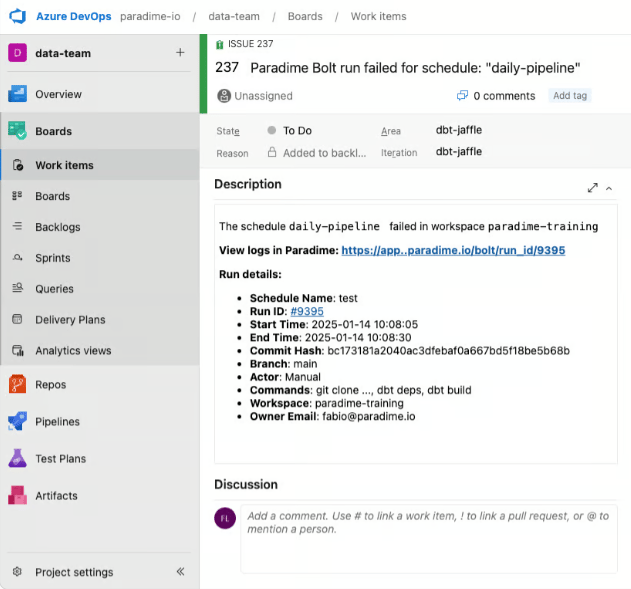
When a run fails, Bolt automatically creates an Azure DevOps work item containing:
* Issue title with schedule name
* Description including:
* Link to Paradime run logs
* Run details: Run ID, Start and end time, Commands executed, Branch information, etc.
 **Key Benefits for Data Teams**
* Automatic work item creation when dbt™ pipelines fail
* Real-time pipeline monitoring in Azure DevOps
* Streamlined workflow between dbt™ runs and Azure DevOps
* Faster response time to pipeline failures
**Prerequisites for Azure Devops Integration**
* Existing [Bolt schedule](https://app.paradime.io/bolt)
* Admin access to [Azure DevOps](https://azure.microsoft.com/en-gb/products/devops) and access to: Organization Name, Project Name, and Personal Access Token (PAT)
***
### Getting Started
Set up Azure DevOps work item creation for failed runs. Follow the steps below, and watch our interactive tutorial.
#### Step 1: Gather Your Azure DevOps Information
1. **Get Organization and Project Names**:
* Open your Azure DevOps project
* From the URL `https://dev.azure.com/YOUR-ORG-NAME/YOUR-PROJECT-NAME`:
* Copy your organization name (`YOUR-ORG-NAME`)
* Copy your project name (`YOUR-PROJECT-NAME`)
2. **Get Organization and Project Names**:
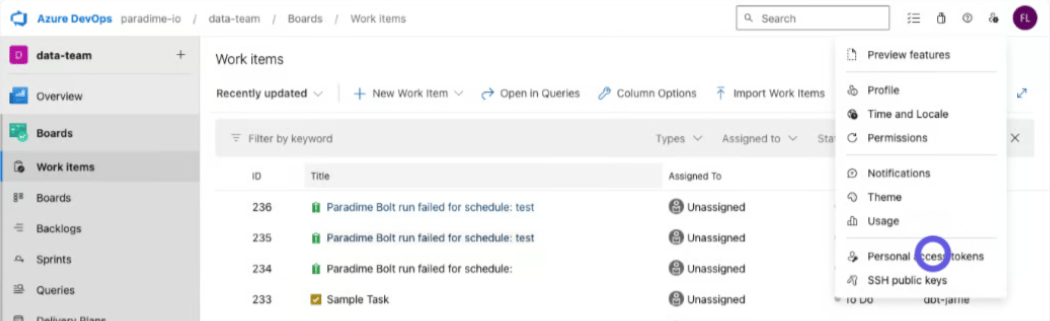
* In Azure DevOps, go to **User Settings** and select **Personal Access Tokens**
* Create a new token with work item permissions
* Save this token securely
Need help generating Access Tokens? Follow [Azure Devops official documentation](https://learn.microsoft.com/en-us/azure/devops/organizations/accounts/use-personal-access-tokens-to-authenticate?view=azure-devops\&tabs=Windows).
**Key Benefits for Data Teams**
* Automatic work item creation when dbt™ pipelines fail
* Real-time pipeline monitoring in Azure DevOps
* Streamlined workflow between dbt™ runs and Azure DevOps
* Faster response time to pipeline failures
**Prerequisites for Azure Devops Integration**
* Existing [Bolt schedule](https://app.paradime.io/bolt)
* Admin access to [Azure DevOps](https://azure.microsoft.com/en-gb/products/devops) and access to: Organization Name, Project Name, and Personal Access Token (PAT)
***
### Getting Started
Set up Azure DevOps work item creation for failed runs. Follow the steps below, and watch our interactive tutorial.
#### Step 1: Gather Your Azure DevOps Information
1. **Get Organization and Project Names**:
* Open your Azure DevOps project
* From the URL `https://dev.azure.com/YOUR-ORG-NAME/YOUR-PROJECT-NAME`:
* Copy your organization name (`YOUR-ORG-NAME`)
* Copy your project name (`YOUR-PROJECT-NAME`)
2. **Get Organization and Project Names**:
* In Azure DevOps, go to **User Settings** and select **Personal Access Tokens**
* Create a new token with work item permissions
* Save this token securely
Need help generating Access Tokens? Follow [Azure Devops official documentation](https://learn.microsoft.com/en-us/azure/devops/organizations/accounts/use-personal-access-tokens-to-authenticate?view=azure-devops\&tabs=Windows).
 ### Step 2: Configure the Webhook
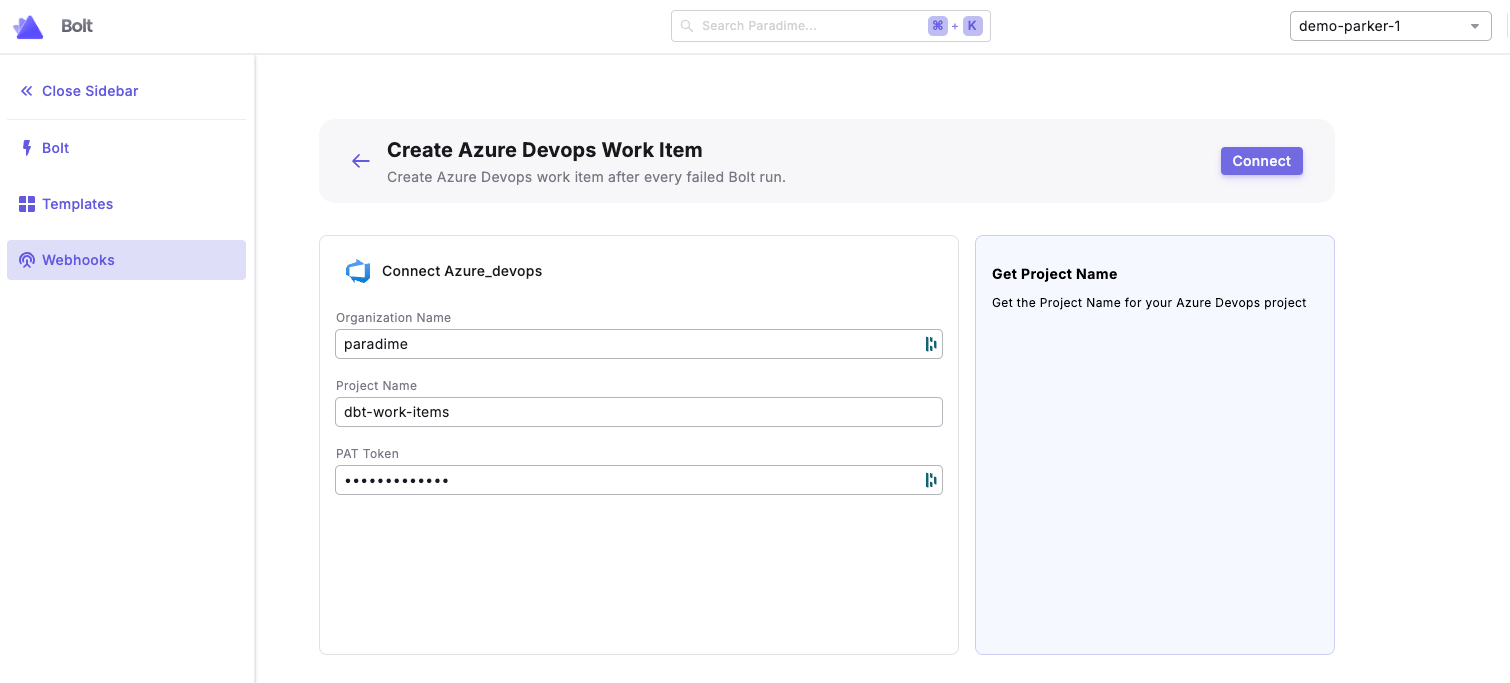
1. From the [Bolt](https://app.paradime.io/bolt) home screen, go to [Templates](https://app.paradime.io/bolt/templates)
2. Click **Ticketing** and use the **Create Azure DevOps Work Item** template
3. Enter your Azure DevOps credentials:
* Organization Name
* Project Name
* PAT Token
4. Click "Connect"
### Step 2: Configure the Webhook
1. From the [Bolt](https://app.paradime.io/bolt) home screen, go to [Templates](https://app.paradime.io/bolt/templates)
2. Click **Ticketing** and use the **Create Azure DevOps Work Item** template
3. Enter your Azure DevOps credentials:
* Organization Name
* Project Name
* PAT Token
4. Click "Connect"
 #### Step 3: Test the Integration
1. [Run a Bolt schedule manually](/products/bolt/managing-schedules/schedule-details#trigger-a-run-manually) (the webhook triggers only on failed runs)
2. After the run fails, check your Azure DevOps project for the new work item
3. Verify the work item contains run failure details
## Related topics
- [Azure DevOps](/integrations/azure-devops.md)
- [Turbo CI on Azure DevOps pull requests](/products/bolt/ci-cd/turbo-ci/azure-devops.md)
- [Column-Level Lineage Diff on Azure DevOps](/products/bolt/ci-cd/lineage-diff/azure-devops.md)
- [Ticketing Templates](/guides/orchestrate-data-pipelines/templates/ticketing-templates/index.md)
- [Connecting a repository asynchronously](/guides/working-with-git/connecting-a-repository-asynchronously.md)
#### Step 3: Test the Integration
1. [Run a Bolt schedule manually](/products/bolt/managing-schedules/schedule-details#trigger-a-run-manually) (the webhook triggers only on failed runs)
2. After the run fails, check your Azure DevOps project for the new work item
3. Verify the work item contains run failure details
## Related topics
- [Azure DevOps](/integrations/azure-devops.md)
- [Turbo CI on Azure DevOps pull requests](/products/bolt/ci-cd/turbo-ci/azure-devops.md)
- [Column-Level Lineage Diff on Azure DevOps](/products/bolt/ci-cd/lineage-diff/azure-devops.md)
- [Ticketing Templates](/guides/orchestrate-data-pipelines/templates/ticketing-templates/index.md)
- [Connecting a repository asynchronously](/guides/working-with-git/connecting-a-repository-asynchronously.md)