> ## Documentation Index
> Fetch the complete documentation index at: https://docs.paradime.io/llms.txt
> Use this file to discover all available pages before exploring further.
# Building Intermediate/Marts Models
> This guide demonstrates how DinoAI Agent helps create analytical models that join multiple tables with proper relationships and business logic.
Developing intermediate and marts models requires understanding table relationships, writing complex joins, applying business logic, and ensuring consistent formatting. This process demands careful consideration of data relationships and performance implications.
DinoAI Agent can analyze your existing models, understand their relationships, and create properly structured intermediate models with appropriate joins.
### Example Prompt
> I want to create an intermediate model which makes use of or allows me to understand data across races as well as constructor and driver standings for the season.
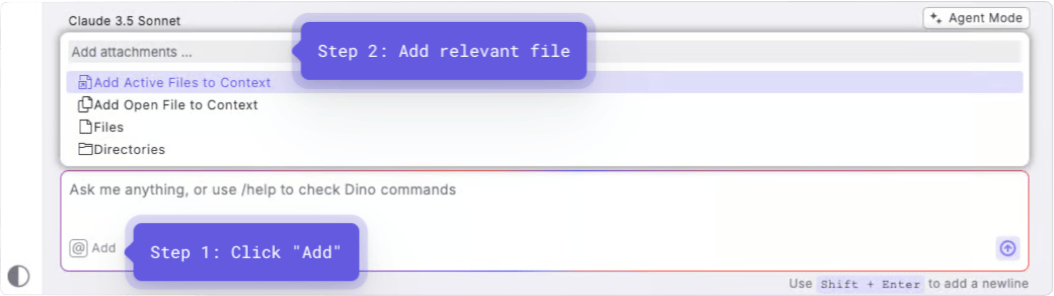
**Optional**: Add context by selecting the relevant base models you want to join. Adding specific files as context helps DinoAI understand exactly which tables to include and how they should be related.
After you enter your prompt:
1. DinoAI analyzes the structure of your provided models
2. It identifies the relationships between tables (e.g., foreign keys)
3. It creates a new model with properly structured CTEs and join conditions
4. If configured, DinoAI applies your .dinorules preferences
### Example Output
DinoAI will generate professional quality model(s). See example below:
```sql theme={"system"}
{{ config(materialized='table') }}
WITH races AS (
SELECT * FROM {{ ref('stg_f1_races') }}
),
circuits AS (
SELECT * FROM {{ ref('stg_f1_circuits') }}
),
results AS (
SELECT * FROM {{ ref('stg_f1_results') }}
),
constructors AS (
SELECT * FROM {{ ref('stg_f1_constructors') }}
),
driver_standings AS (
SELECT * FROM {{ ref('stg_f1_driver_standings') }}
),
-- Join race data with circuit information
race_details AS (
SELECT
r.race_id,
r.year,
r.round,
r.name AS race_name,
c.circuit_name,
c.location,
c.country,
r.date AS race_date
FROM races r
LEFT JOIN circuits c ON r.circuit_id = c.circuit_id
),
-- Join results with constructors
race_results AS (
SELECT
res.race_id,
res.driver_id,
res.constructor_id,
con.constructor_name,
con.nationality AS constructor_nationality,
res.grid,
res.position,
res.points
FROM results res
LEFT JOIN constructors con ON res.constructor_id = con.constructor_id
)
-- Final combined query
SELECT
rd.race_id,
rd.year,
rd.round,
rd.race_name,
rd.circuit_name,
rd.country,
rd.race_date,
rr.constructor_id,
rr.constructor_name,
rr.constructor_nationality,
rr.driver_id,
rr.grid,
rr.position,
rr.points,
ds.position AS driver_standing_position,
ds.points AS driver_total_points
FROM race_details rd
JOIN race_results rr ON rd.race_id = rr.race_id
LEFT JOIN driver_standings ds ON rr.driver_id = ds.driver_id AND rd.race_id = ds.race_id
ORDER BY rd.year, rd.round, rr.position
```
### Key Benefits
* **Relationship Understanding**: Correctly identifies and implements join conditions
* **Code Organization**: Creates well-structured CTEs that make the logic easy to follow
* **Proper Formatting**: Maintains consistent SQL style according to your standards
* **Time Savings**: Reduces complex model development from hours to minutes
* **Visualization**: Can generate mermaid diagrams to visualize data flow when using .dinorules
### When to Use This
* When building analytical models that combine multiple data sources
* When implementing complex business logic across several tables
* When standardizing existing intermediate/marts models
* When exploring new analytical capabilities from your existing data
## Related topics
- [DinoAI Agent](/guides/paradime-101/getting-started-with-the-paradime-ide/dinoai-accelerating-your-analytics-engineering-workflow/dinoai-agent/index.md)
- [Models and Transformations](/guides/dbt-fundamentals/getting-started-with-dbt/models-and-transformations.md)
- [Bolt API](/developers/graphql-api/api-reference/bolt-api.md)
- [Project Strucuture](/guides/dbt-fundamentals/getting-started-with-dbt/project-strucuture.md)
- [Generating dbt™ models](/products/dino-ai/copilot/use-cases/generating-dbt-tm-models.md)
 After you enter your prompt:
1. DinoAI analyzes the structure of your provided models
2. It identifies the relationships between tables (e.g., foreign keys)
3. It creates a new model with properly structured CTEs and join conditions
4. If configured, DinoAI applies your .dinorules preferences
### Example Output
DinoAI will generate professional quality model(s). See example below:
After you enter your prompt:
1. DinoAI analyzes the structure of your provided models
2. It identifies the relationships between tables (e.g., foreign keys)
3. It creates a new model with properly structured CTEs and join conditions
4. If configured, DinoAI applies your .dinorules preferences
### Example Output
DinoAI will generate professional quality model(s). See example below: