> ## Documentation Index
> Fetch the complete documentation index at: https://docs.paradime.io/llms.txt
> Use this file to discover all available pages before exploring further.
# Documentation Generation
> This guide shows how DinoAI Agent automates the creation of documentation for multiple models simultaneously, saving hours of manual documentation work.
Documentation is often neglected in data projects because it's time-consuming to write descriptions for every model and column. Teams frequently postpone documentation or conduct separate "documentation sprints" that take days to complete.
DinoAI Agent can automatically generate comprehensive documentation for entire folders of models, complete with column descriptions and appropriate tests.
### Example Prompt
> I have a bunch of new files in my Marts folder. Can you document this for me?
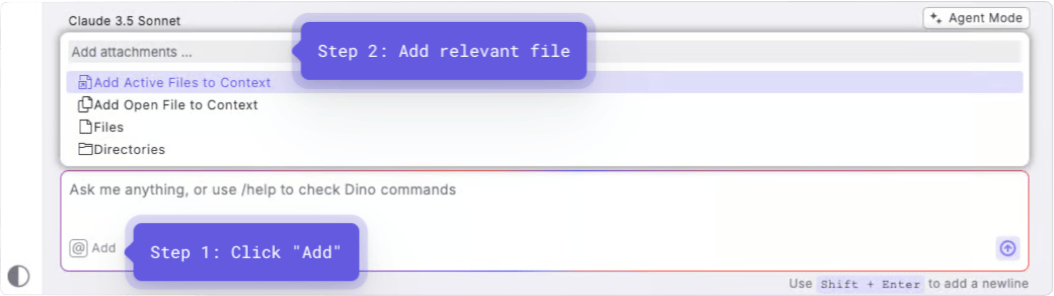
**Optional**: Add context by selecting a directory containing the models you want to document. Using directory context is especially powerful for documentation tasks as it allows DinoAI to document multiple models at once.
### How It Works
After you enter your prompt:
1. DinoAI scans all models in the specified directory
2. It analyzes each model's structure, column names, and relationships
3. It generates schema.yml files with model descriptions, column descriptions, and tests
4. If configured, DinoAI follows your .dinorules documentation standards
### Example Output
DinoAI will generate professional quality documentation (.yml files). See example below:
```yaml theme={"system"}
version: 2
models:
- name: int_f1_race_results_by_constructor
description: "This model combines race results with constructor information to analyze performance by constructor across different races and seasons."
columns:
- name: race_id
description: "Unique identifier for each race event"
tests:
- not_null
- name: year
description: "The year in which the race took place"
tests:
- not_null
- name: race_name
description: "The official name of the race event"
# Additional columns with descriptions and tests...
```
### Key Benefits
* **Comprehensive Coverage**: Generates documentation for all models at once
* **Consistency**: Maintains a uniform documentation style across projects
* **Test Integration**: Automatically adds appropriate tests based on data types and relationships
* **Time Savings**: Turns days of documentation work into minutes
* **Adoption**: Makes it easy to keep documentation up-to-date as models evolve
### When to Use This
* Before sharing models with stakeholders
* When preparing for project handovers
* During documentation clean-up efforts
* After creating new models or making significant changes
* When implementing testing strategies
## Related topics
- [DinoAI Agent](/guides/paradime-101/getting-started-with-the-paradime-ide/dinoai-accelerating-your-analytics-engineering-workflow/dinoai-agent/index.md)
- [Auto-generated Data Documentation](/guides/paradime-101/getting-started-with-the-paradime-ide/utilizing-advanced-developer-features/auto-generated-data-documentation.md)
- [Accelerating Data Governance](/guides/paradime-101/getting-started-with-the-paradime-ide/dinoai-accelerating-your-analytics-engineering-workflow/accelerating-data-governance.md)
- [Packages](/guides/dbt-fundamentals/configuring-your-dbt-project/packages.md)
- [DinoAI Copilot](/products/code-ide/left-panel/copilot.md)
 ### How It Works
After you enter your prompt:
1. DinoAI scans all models in the specified directory
2. It analyzes each model's structure, column names, and relationships
3. It generates schema.yml files with model descriptions, column descriptions, and tests
4. If configured, DinoAI follows your .dinorules documentation standards
### Example Output
DinoAI will generate professional quality documentation (.yml files). See example below:
### How It Works
After you enter your prompt:
1. DinoAI scans all models in the specified directory
2. It analyzes each model's structure, column names, and relationships
3. It generates schema.yml files with model descriptions, column descriptions, and tests
4. If configured, DinoAI follows your .dinorules documentation standards
### Example Output
DinoAI will generate professional quality documentation (.yml files). See example below: