> ## Documentation Index
> Fetch the complete documentation index at: https://docs.paradime.io/llms.txt
> Use this file to discover all available pages before exploring further.
# Enforce SQL and YAML Best Practices
Paradime offers integrated tools like SQLFluff and Prettier to help enforce best practices for SQL and YAML files, ensuring high-quality code and reducing errors in your dbt™ project.\
\
**Estimated completion time:** 20 minutes
**Prerequisites**
* [A dbt™ project set up in Paradime](/guides/paradime-101/getting-started-with-the-paradime-ide/setting-up-a-dbt-project)
* [At least one .sql and .yml file in your dbt™ project](/guides/paradime-101/getting-started-with-the-paradime-ide/creating-a-dbt-model#id-4.-materialize-your-dbt-tm-model)
* Basic understanding of SQL and YAML syntax
### What You'll Learn
In this guide, you'll learn how to:
* Use SQLFluff to lint and format SQL files
* Utilize Prettier to format and debug your YAML files
* Customize settings for both tools to match your team's standards
***
### 1. SQLFluff
SQLFluff is an integrated linting tool in Paradime that helps maintain consistent, high-quality SQL code. The [pre-configured template](/integrations/sql-fluff#set-your-configuration-file-by-adding-supported-rules) is for Snowflake and dbt, setting basic rules for SQL formatting such as line length, indentation, aliasing, and capitalization. It provides a foundation for consistent SQL styling that can be easily customized to fit specific project needs.
**Key Features:**
* **Integrated Linting**: Automatically check SQL code against standard or custom rules.
* **Pre-configured for dbt™**: Comes ready to use with basic rules tailored for dbt™ projects.
* **Real-time Formatting**: Use the 'Prettier' button in Paradime's IDE for instant code corrections.
**How to Use SQLFluff:**
1. Select a .sql file within your dbt™ project.
2. Click the `Prettier` button in the commands panel to automatically format your .yml file.
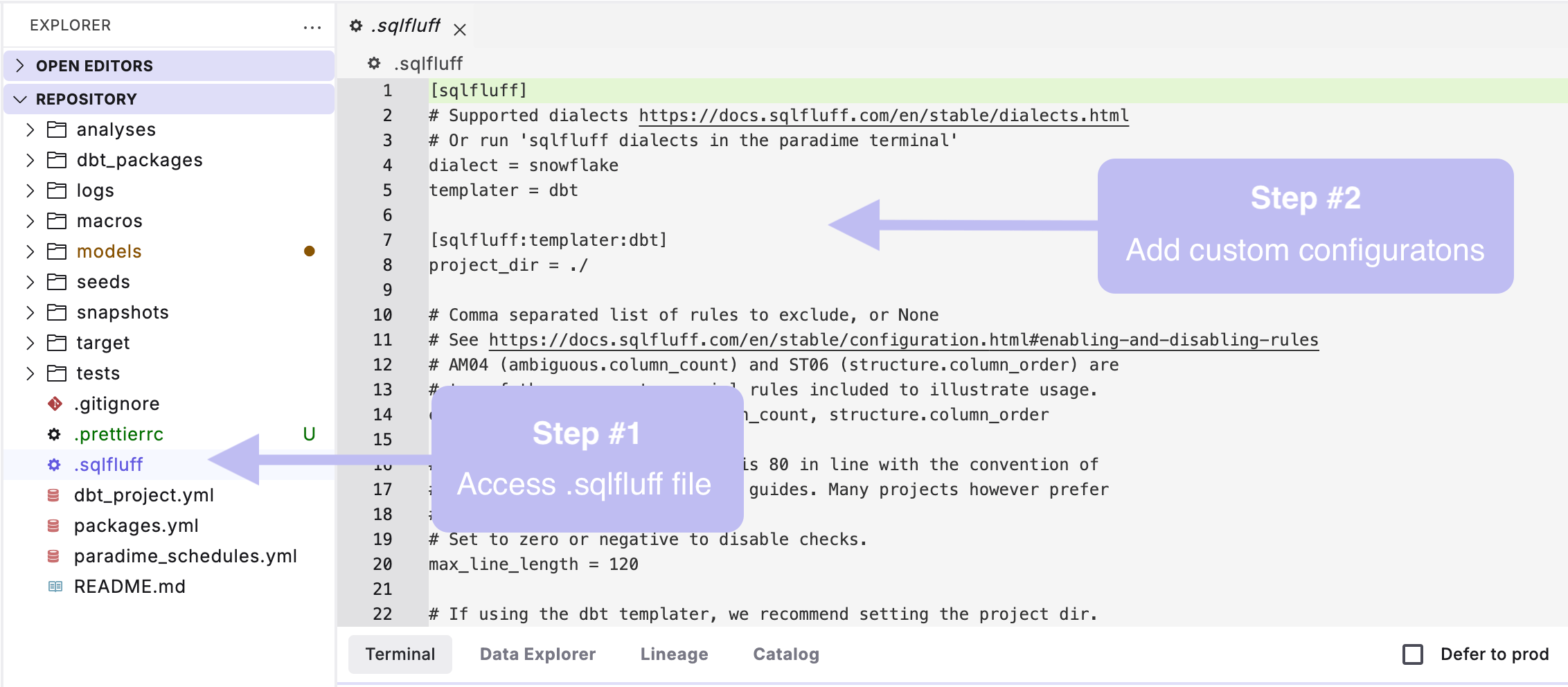
3. **Optional:** Customize your SQL formatting by creating a .sqlfluff file in your dbt™ root directory (this is in the same directory where your dbt\_project.yml lives).
If you don't have a `.sqlfluff` file in your project, simply create new file with the exact name ".sqlfluff" in the same directory where your `dbt_project.yml` lives.
#### Example SQLFluff Formatting
```sql theme={"system"}
WITH player_info AS (SELECT * FROM {{ ref('nba_player_info') }})
, player_salaries AS (SELECT player_id, salary, season FROM {{ ref('nba_player_salaries') }})
, joined AS (SELECT pi.*, ps.salary, ps.season FROM player_info AS pi LEFT JOIN player_salaries AS ps ON pi.player_id = ps.player_id)
SELECT * FROM joined
```
```sql theme={"system"}
with player_info as (
select *
from {{ ref('nba_player_info') }}
),
player_salaries as (
select
player_id,
salary,
season
from {{ ref('nba_player_salaries') }}
),
joined as (
select
pi.*,
ps.salary,
ps.season
from player_info as pi
left join player_salaries as ps on pi.player_id = ps.player_id
)
select *
from joined
```
***
### 2. Prettier
Prettier is an integrated code formatter in Paradime that helps maintain consistent, error-free YAML files in your dbt™ project. Prettier comes pre-installed in your project and uses default configurations provided by the [Prettier library](https://prettier.io/docs/en/configuration.html), which can be easily customized to fit specific YAML preferences.
**Key Features:**
* **Automatic Formatting**: Formats YAML files for improved readability and code quality.
* **Error Detection**: Highlights severe formatting errors and assists in debugging.
* **Customization**: Allows custom configurations through a .prettierrc file.
**How to Use:**
1. Select a .yml file within your dbt™ project.
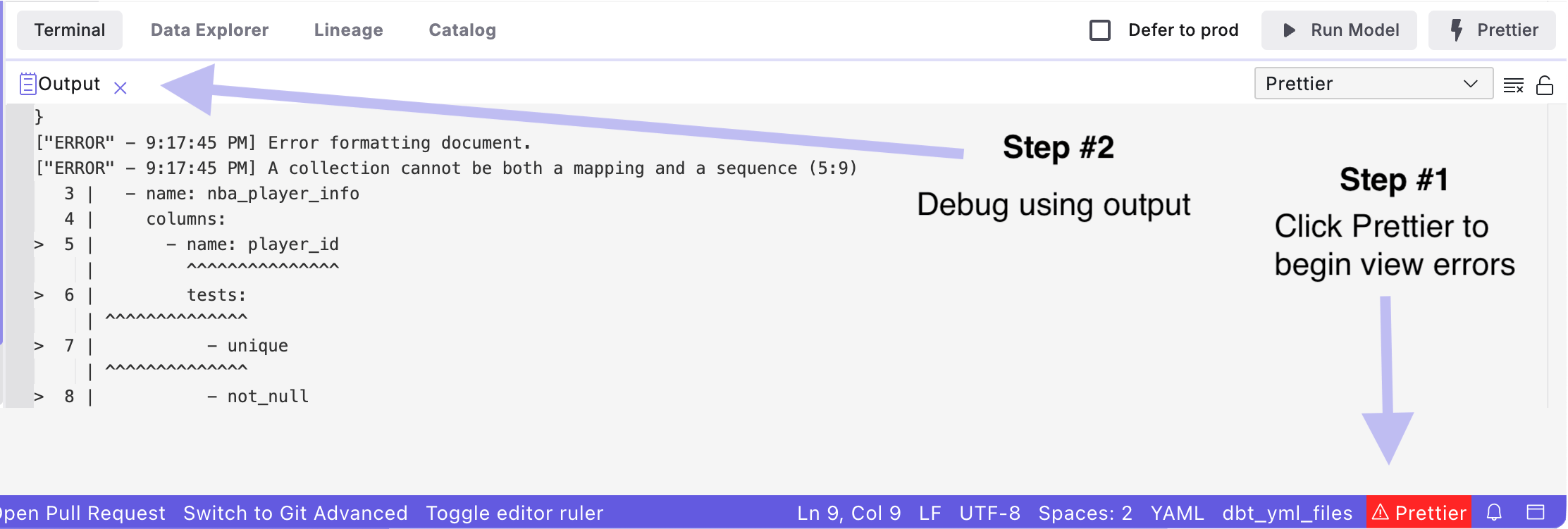
2. Click the `Prettier` button in the commands panel to automatically format your .yml file.
3. If more severe errors are detected, click the `Prettier` button in the toolbar to debug.
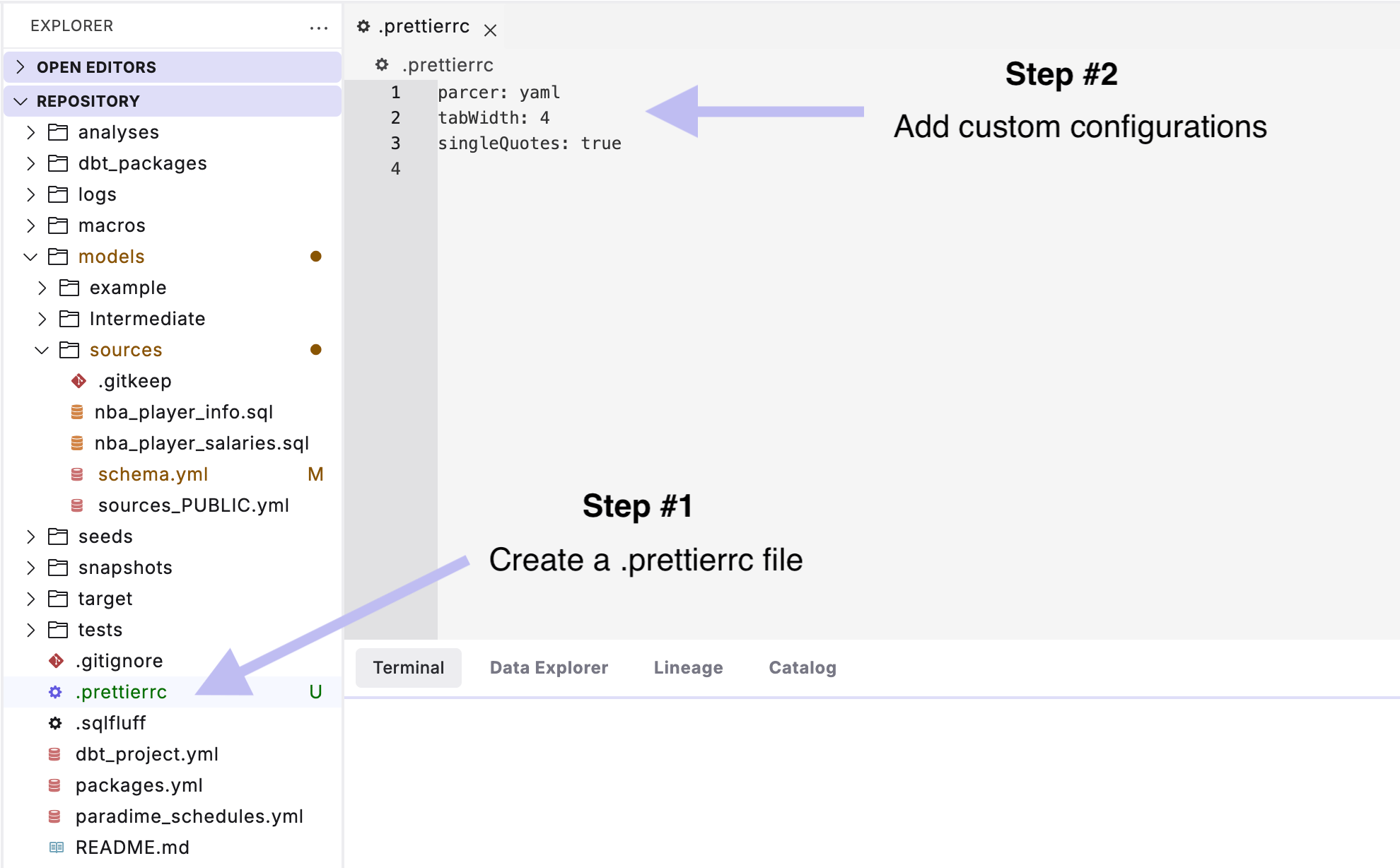
4. **Optional**: Customize your YAML formatting by creating a .prettierrc file in your dbt™ root directory (this is in the same directory where your dbt\_project.yml lives).
#### Example YAML Formatting
```yaml theme={"system"}
version: 2
models:
- name: nba_player_info
columns:
- name: player_id
tests:
- unique
- not_null
- name: first_name
- name: last_name
- name: team_name
- name: position
- name: height
- name: weight
- name: nba_player_salaries
columns:
- name: player_id
- name: player_name
- name: salary
- name: season
```
```yaml theme={"system"}
version: 2
models:
- name: nba_player_info
columns:
- name: player_id
tests:
- unique
- not_null
- name: first_name
- name: last_name
- name: team_name
- name: position
- name: height
- name: weight
- name: nba_player_salaries
columns:
- name: player_id
- name: player_name
- name: salary
- name: season
```
***
**Related Documentation**
* [SQL Fluff](/integrations/sql-fluff)
* [Code Quality](/products/code-ide/command-panel/code-quality)
* [Prettier](/integrations/prettier)
***
### Summary
By using SQLFluff and Prettier in Paradime, you enforce best practices across your SQL and YAML files. These tools help maintain consistent, clean, and high-quality code, improving your project's readability and reducing errors. Customize them to fit your team's coding standards, streamline your workflow, and keep your dbt™ project error-free.
Next, we'll explore [how to work with CSV files in Paradime](/guides/paradime-101/getting-started-with-the-paradime-ide/utilizing-advanced-developer-features/working-with-csv-files).
## Related topics
- [Utilizing Advanced Developer Features](/guides/paradime-101/getting-started-with-the-paradime-ide/utilizing-advanced-developer-features/index.md)
- [Auto-generated Data Documentation](/guides/paradime-101/getting-started-with-the-paradime-ide/utilizing-advanced-developer-features/auto-generated-data-documentation.md)
- [dbt™ Script Checks](/integrations/pre-commit/dbt-tm-checkpoint-hooks/dbt-tm-script-checks.md)
- [File Context](/products/dino-ai/copilot/context/file-context.md)
- [SQL Server Tools](/products/dino-ai/tools-and-features/warehouse-tool/sql-server-tools.md)
 3. **Optional:** Customize your SQL formatting by creating a .sqlfluff file in your dbt™ root directory (this is in the same directory where your dbt\_project.yml lives).
 4. **Optional**: Customize your YAML formatting by creating a .prettierrc file in your dbt™ root directory (this is in the same directory where your dbt\_project.yml lives).
 #### Example YAML Formatting