> ## Documentation Index
> Fetch the complete documentation index at: https://docs.paradime.io/llms.txt
> Use this file to discover all available pages before exploring further.
# Bolt Pipeline Healer
When a Bolt run fails, Paradime's [Self-Healing ](/products/dino-ai/bolt-pipeline-agent/self-healing)feature can automatically trigger a DinoAI programmable agent against the failure. This guide walks you through wiring up a `bolt-pipeline-healer` agent that does more than blindly fix every failure — it **deduplicates** against prior self-healing attempts and existing open PRs before opening a new one.
The result is an autopilot that opens a fix PR when one is genuinely needed and stays quiet when an earlier attempt is already waiting for review.
**Before You Start**
**Integrations**
The following must already be connected in Paradime:
* [**Slack**](/integrations/slack) — Self-Healing posts and the agent's progress run in the configured `slack_channel`
**Recommended reading**
Before proceeding, read the Programmable Agents section under **Products → DinoAI**:
* [Quick Start](/products/dino-ai/programmable-agents/quick-start)
* [YAML Configuration](/products/dino-ai/programmable-agents/yaml-configuration)
* [Tools Reference](/products/dino-ai/programmable-agents/tools-reference)
And the Self-Healing flow:
* [Bolt Self-Healing — how to enable Self-Healing on a schedule](/products/dino-ai/bolt-pipeline-agent/self-healing)
### What You'll Build
By the end of this guide you'll have:
* A `bolt-pipeline-healer` DinoAI agent YAML committed under `.dinoai/agents/`
* A Bolt schedule with `self_healing.enabled = true` pointing at this agent
* A safe-by-default autopilot that **only** opens a new PR when no prior PR already addresses the same error
#### What Happens When a Run Fails
Once Self-Healing is enabled on a Bolt schedule:
```
Bolt run fails on schedule "hourly_marts"
└─ Paradime posts the standard failure notification to #data-alerts and #agent-demo
└─ In #agent-demo (the configured self_healing.slack_channel):
└─ "🦖 Self-healing enabled — starting healing session..."
└─ DinoAI agent `bolt-pipeline-healer` is triggered with:
prompt = "Review the run log and fix run_id 15732"
context = Prior self-healing attempts for this schedule (recent sessions)
└─ Agent runs the dedup check:
1. Get current run logs (get_bolt_run_logs)
2. Inspect prior healing runs (sessions listed in initial context)
3. List open PRs (list_pull_requests)
4. If same error + open PR exists ─► STOP, post Slack pointer, exit
5. Otherwise ─► implement fix, open PR, post link
```
The dedup check is the heart of this agent. Without it, every failed run of the same broken model would create a new PR — burying the team in duplicate fix attempts.
### Architecture Overview
```mermaid theme={"system"}
flowchart TD
BR([Bolt run fails])
BR --> SH{self_healing.enabled?}
SH -- no --> END([Standard failure notification only])
SH -- yes --> S1[#agent-demo: '🦖 Self-healing enabled...']
S1 --> AG([bolt-pipeline-healer\nagent session])
AG --> T1[get_bolt_run_logs\nfetch current error]
AG --> T2[Prior sessions context\nfrom initial prompt]
AG --> T3[list_pull_requests\nopen PRs for repo]
T1 & T2 & T3 --> DEDUP{Same error +\nopen PR exists?}
DEDUP -- yes --> NOFIX([Post Slack pointer to existing PR\nExit without changes])
DEDUP -- no --> FIX[Implement fix in repo]
FIX --> PR([Open PR and post link in #agent-demo])
```
Commit this file at `.dinoai/agents/bolt-pipeline-healer.yml`:
```yaml title=".dinoai/agents/bolt-pipeline-healer.yml" lineNumbers theme={"system"}
name: bolt-pipeline-healer
version: 1
role: >
Bolt Run Recovery Specialist focused on diagnosing and fixing failed
dbt runs in the analytics repo.
goal: >
When a Bolt run fails, identify the failing model/test, propose a minimal
fix, and open a PR with the change.
Before attempting any fix, perform a deduplication check:
1. Fetch the logs of the current failed run and extract the exact error message.
2. Fetch the logs of the previous self-healing runs for the same schedule and
compare their error messages to the current one.
3. Check whether an open pull request already exists that references the same
error or failing model.
4. If the same error was seen in a previous self-healing run AND an open PR
already exists, stop immediately — do NOT open a new PR. Instead, post a
Slack message explaining that a fix is already in progress, include the
existing PR link, and ask a human to review it before retrying.
5. Only proceed with the fix if the error is genuinely new or no open PR
addresses it.
backstory: >
You know dbt deeply, prefer surgical edits over rewrites, and always cite
the failing command's error message in your reasoning. You are disciplined
about avoiding duplicate fix attempts — you never open a second PR for the
same error while one is still open for review, because doing so wastes
engineer time and can create conflicting changes. When in doubt, you surface
the situation to a human rather than acting autonomously.
tools:
mode: allowlist
list:
- read_file
- search_files_and_directories
- ripgrep_search
- run_sql_query
- list_bolt_schedules
- get_bolt_run_logs
- list_pull_requests
- run_terminal_command
```
**Tool allowlist is deliberately narrow.** The agent has read access (`read_file`, `ripgrep_search`, `run_sql_query`), Bolt observability (`list_bolt_schedules`, `get_bolt_run_logs`), PR awareness (`list_pull_requests`), and a terminal (`run_terminal_command`) to commit changes and open the PR. No `post_slack_message` is needed — Self-Healing already threads the agent into a Slack channel, and the agent's stdout shows up there automatically.
In the Bolt schedule editor for the schedule you want to heal:
1. Open the **Self-Healing** section.
2. Toggle **Enable Self-Healing**.
3. Pick the **Slack channel** the agent should run in — e.g. `#agent-demo`. It must already be configured under Notification Settings on this schedule.
4. From the **Agent Name** dropdown, pick `bolt-pipeline-healer`. The list is populated from `.dinoai/agents/*.yml` on the schedule's git branch — so make sure the YAML from Step 1 has been merged before configuring this.
5. Save the schedule.
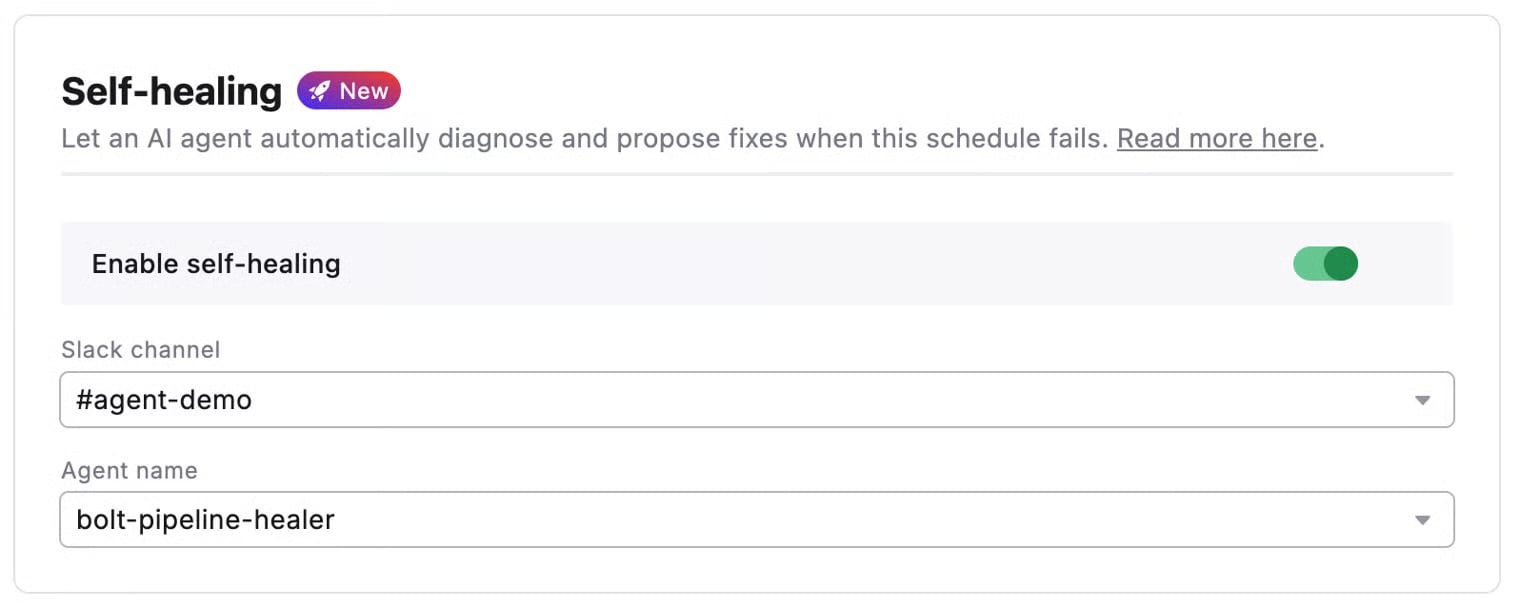 [See Bolt → Self-Healing for the full UI walkthrough.](/products/dino-ai/bolt-pipeline-agent/self-healing)
If you manage Bolt schedules as code, add the `self_healing` block to the schedule entry:
```yaml title="paradime_schedules.yml" lineNumbers theme={"system"}
schedules:
- name: hourly marts
slug: hourly-marts-i9j1k2
description: Hourly build of marts models
environment: production
git_branch: main
commands:
- dbt build --select tag:marts
schedule: "0 * * * *"
timezone: UTC
notifications:
slack_channels:
- channel: '#data-alerts'
events:
- failed
- channel: '#agent-demo'
events:
- failed
self_healing:
enabled: true
slack_channel: '#agent-demo'
agent_name: bolt-pipeline-healer
```
`self_healing.slack_channel` **must also appear** in this schedule's `notifications.slack_channels`. The deployer rejects the schedule otherwise — the agent threads into the existing failure notification, so the notification has to exist for the agent to find it.
[See the full schema at Schedules as Code → Configuration Reference → Self-Healing.](/products/bolt/creating-schedules/schedules-as-code/index)
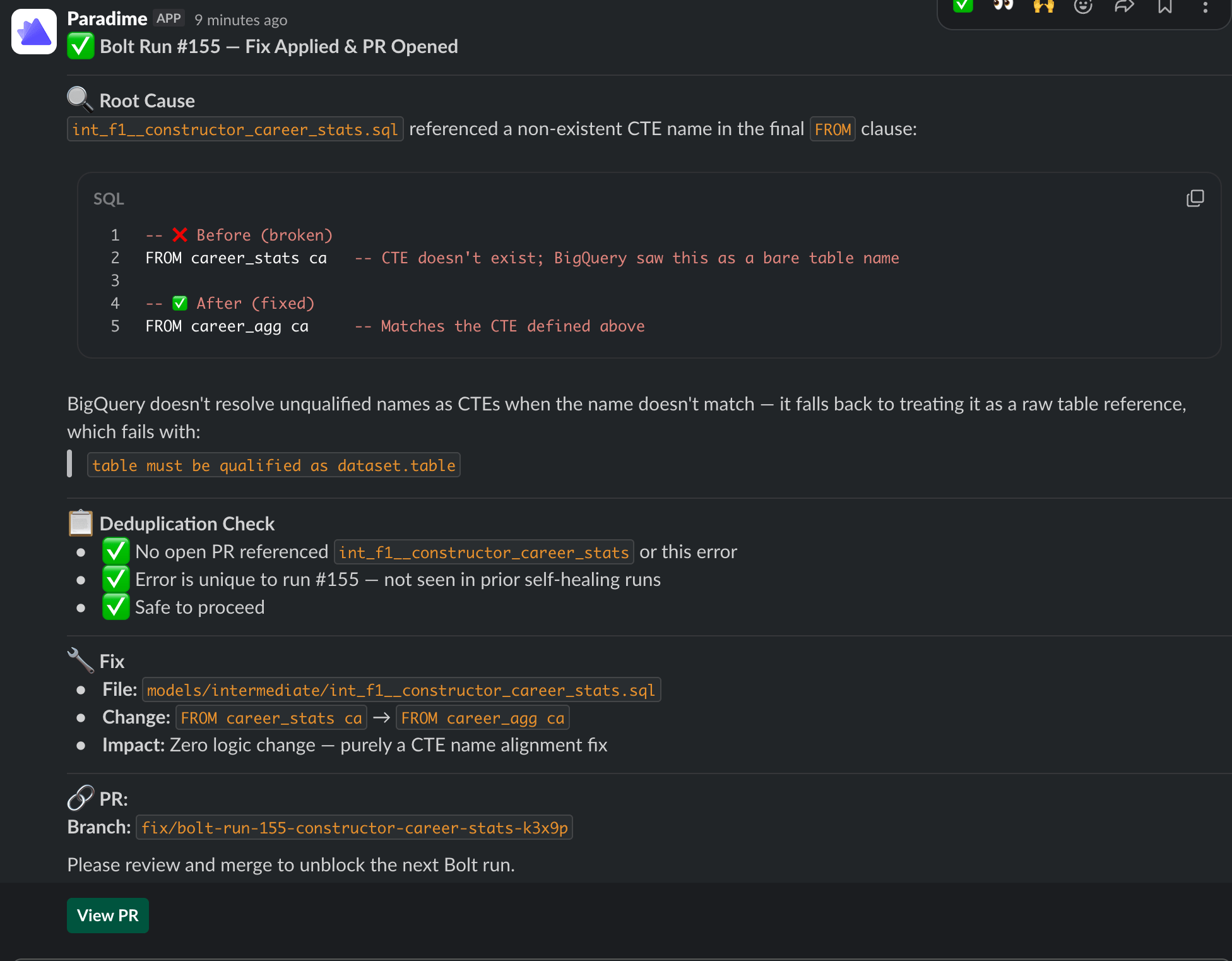
The next time the schedule fails:
1. Open `#agent-demo` in Slack and find the failure notification for the run.
2. Inside that thread you'll see:
* `🦖 Self-healing enabled — starting healing session...`
* A series of agent messages showing the dedup check in action (current logs → prior sessions → open PRs)
* Either:
* A **"fix already in progress"** post linking the existing PR (when the dedup check trips), or
* A **PR link** to the freshly opened fix branch (when the failure is new)
3. Review the PR, merge if you're happy, then retry the Bolt run from the Run Details page.
[See Bolt → Self-Healing for the full UI walkthrough.](/products/dino-ai/bolt-pipeline-agent/self-healing)
If you manage Bolt schedules as code, add the `self_healing` block to the schedule entry:
```yaml title="paradime_schedules.yml" lineNumbers theme={"system"}
schedules:
- name: hourly marts
slug: hourly-marts-i9j1k2
description: Hourly build of marts models
environment: production
git_branch: main
commands:
- dbt build --select tag:marts
schedule: "0 * * * *"
timezone: UTC
notifications:
slack_channels:
- channel: '#data-alerts'
events:
- failed
- channel: '#agent-demo'
events:
- failed
self_healing:
enabled: true
slack_channel: '#agent-demo'
agent_name: bolt-pipeline-healer
```
`self_healing.slack_channel` **must also appear** in this schedule's `notifications.slack_channels`. The deployer rejects the schedule otherwise — the agent threads into the existing failure notification, so the notification has to exist for the agent to find it.
[See the full schema at Schedules as Code → Configuration Reference → Self-Healing.](/products/bolt/creating-schedules/schedules-as-code/index)
The next time the schedule fails:
1. Open `#agent-demo` in Slack and find the failure notification for the run.
2. Inside that thread you'll see:
* `🦖 Self-healing enabled — starting healing session...`
* A series of agent messages showing the dedup check in action (current logs → prior sessions → open PRs)
* Either:
* A **"fix already in progress"** post linking the existing PR (when the dedup check trips), or
* A **PR link** to the freshly opened fix branch (when the failure is new)
3. Review the PR, merge if you're happy, then retry the Bolt run from the Run Details page.
 ### How the dedup check works
The dedup check is what makes this agent safe to leave running unattended. It's driven by three pieces of context the agent reasons over:
| Input | Source | Used to answer |
| ------------------------------- | ------------------------------------------------------------------------------------------- | ------------------------------------------------------------ |
| **Current error** | `get_bolt_run_logs(run_id=)` | What is failing right now? |
| **Prior self-healing attempts** | Initial context block prepended automatically by Paradime when this schedule has prior runs | Has the agent already seen this exact failure recently? |
| **Open pull requests** | `list_pull_requests` | Is there already an unmerged fix attempt waiting for review? |
The agent stops with a Slack pointer instead of opening a duplicate PR if **both** conditions hold:
1. The current error matches an error from a prior self-healing attempt.
2. An open PR already exists referencing that error or the failing model.
If either condition fails — the error is genuinely new, or the prior PR was already merged / closed — the agent proceeds with the fix.
### How the dedup check works
The dedup check is what makes this agent safe to leave running unattended. It's driven by three pieces of context the agent reasons over:
| Input | Source | Used to answer |
| ------------------------------- | ------------------------------------------------------------------------------------------- | ------------------------------------------------------------ |
| **Current error** | `get_bolt_run_logs(run_id=)` | What is failing right now? |
| **Prior self-healing attempts** | Initial context block prepended automatically by Paradime when this schedule has prior runs | Has the agent already seen this exact failure recently? |
| **Open pull requests** | `list_pull_requests` | Is there already an unmerged fix attempt waiting for review? |
The agent stops with a Slack pointer instead of opening a duplicate PR if **both** conditions hold:
1. The current error matches an error from a prior self-healing attempt.
2. An open PR already exists referencing that error or the failing model.
If either condition fails — the error is genuinely new, or the prior PR was already merged / closed — the agent proceeds with the fix.
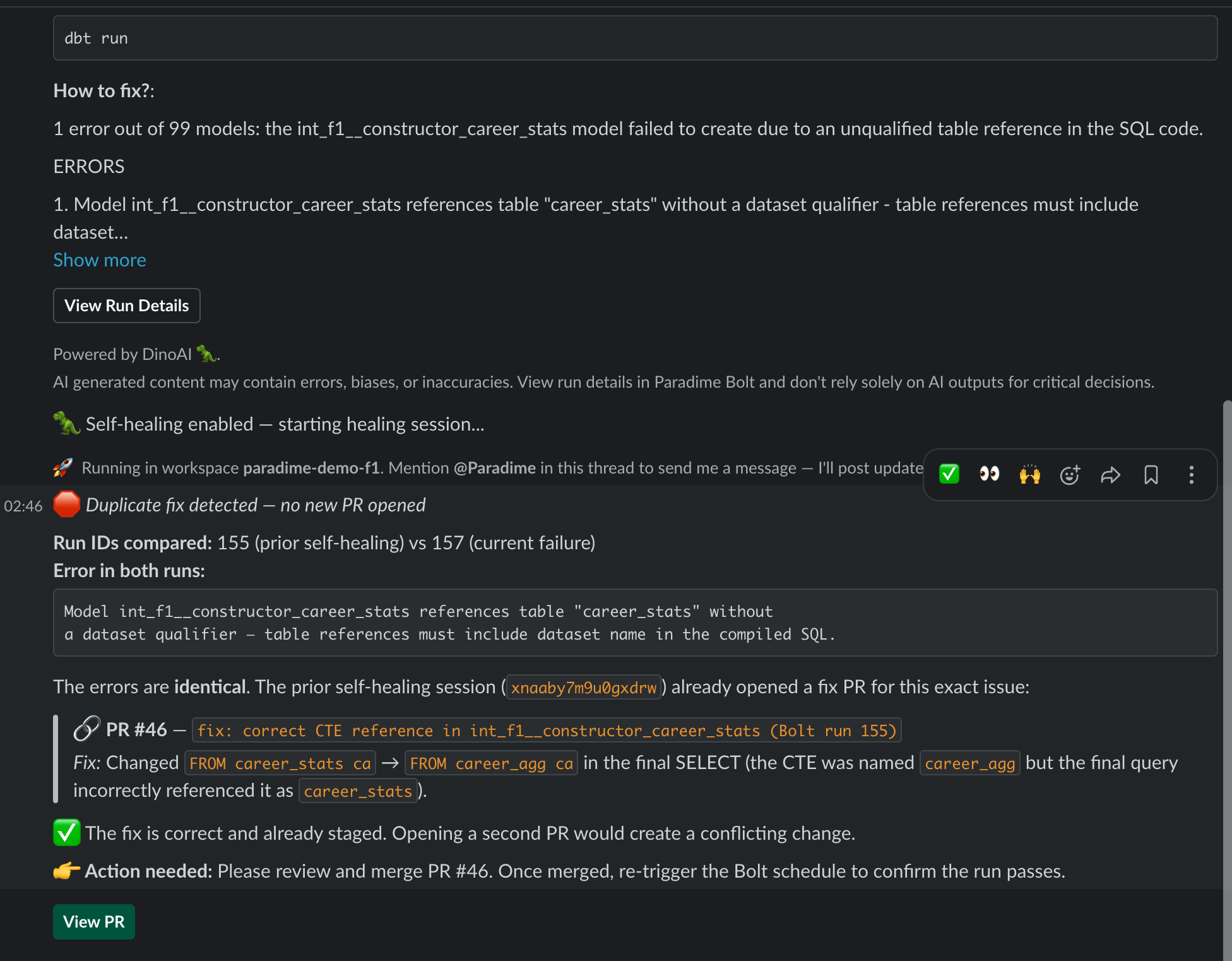 **Why the initial context matters.** Paradime injects a "Prior self-healing attempts for this schedule" block into the agent's prompt automatically when prior sessions exist for the same `schedule_name_uuid`. This is what gives the agent recall across runs without needing its own memory tool.
### File Structure
Your repository should look like this after completing the setup:
```
your-repo/
├── dbt_project.yml
├── .bolt/
│ └── daily_run.yml ← optional, only if managing schedules as code
├── .dinoai/
│ └── agents/
│ └── bolt-pipeline-healer.yml
└── models/
└── ...
```
### Related Docs
* [**Bolt → Self-Healing** — enabling the feature on a schedule](/products/bolt/creating-schedules/2.-self-healing)
* [**DinoAI → Self-Healing** — what the agent receives and how the prior-attempts context is built](/products/dino-ai/bolt-pipeline-agent/self-healing)
* [**DinoAI → Fix with DinoAI** — the manual one-click equivalent](/products/dino-ai/bolt-pipeline-agent/fix-with-dinoai)
* [**Programmable Agents — Quick Start**](/products/dino-ai/programmable-agents/quick-start)
* [**Programmable Agents — YAML Configuration**](/products/dino-ai/programmable-agents/yaml-configuration)
* [**Programmable Agents — Tools Reference**](/products/dino-ai/programmable-agents/tools-reference)
* [**Schedules as Code — Configuration Reference**](/products/bolt/creating-schedules/schedules-as-code/index)
## Related topics
- [bolt-ci-healer](/guides/programmable-agents/bolt-ci-healer.md)
- [Bolt Pipelines](/products/bolt/index.md)
- [Bolt Pipeline Agent](/products/dino-ai/bolt-pipeline-agent/index.md)
- [Bolt Pipeline Retry Agent](/guides/programmable-agents/bolt-pipeline-retry-agent.md)
- [2. Self-Healing](/products/bolt/creating-schedules/2.-self-healing.md)
**Why the initial context matters.** Paradime injects a "Prior self-healing attempts for this schedule" block into the agent's prompt automatically when prior sessions exist for the same `schedule_name_uuid`. This is what gives the agent recall across runs without needing its own memory tool.
### File Structure
Your repository should look like this after completing the setup:
```
your-repo/
├── dbt_project.yml
├── .bolt/
│ └── daily_run.yml ← optional, only if managing schedules as code
├── .dinoai/
│ └── agents/
│ └── bolt-pipeline-healer.yml
└── models/
└── ...
```
### Related Docs
* [**Bolt → Self-Healing** — enabling the feature on a schedule](/products/bolt/creating-schedules/2.-self-healing)
* [**DinoAI → Self-Healing** — what the agent receives and how the prior-attempts context is built](/products/dino-ai/bolt-pipeline-agent/self-healing)
* [**DinoAI → Fix with DinoAI** — the manual one-click equivalent](/products/dino-ai/bolt-pipeline-agent/fix-with-dinoai)
* [**Programmable Agents — Quick Start**](/products/dino-ai/programmable-agents/quick-start)
* [**Programmable Agents — YAML Configuration**](/products/dino-ai/programmable-agents/yaml-configuration)
* [**Programmable Agents — Tools Reference**](/products/dino-ai/programmable-agents/tools-reference)
* [**Schedules as Code — Configuration Reference**](/products/bolt/creating-schedules/schedules-as-code/index)
## Related topics
- [bolt-ci-healer](/guides/programmable-agents/bolt-ci-healer.md)
- [Bolt Pipelines](/products/bolt/index.md)
- [Bolt Pipeline Agent](/products/dino-ai/bolt-pipeline-agent/index.md)
- [Bolt Pipeline Retry Agent](/guides/programmable-agents/bolt-pipeline-retry-agent.md)
- [2. Self-Healing](/products/bolt/creating-schedules/2.-self-healing.md)