> ## Documentation Index
> Fetch the complete documentation index at: https://docs.paradime.io/llms.txt
> Use this file to discover all available pages before exploring further.
# GitHub Issues Backlog Agent
> Automate GitHub backlog execution with a DinoAI agent that picks up Agent Ready issues, builds dbt™ models with tests and docs, opens one PR per issue, and posts progress to Slack.
Automate your analytics engineering backlog with a native DinoAI agent that reads every open GitHub issue labelled **Agent Ready**, implements the required dbt™ models with tests and YAML docs, opens a PR per issue and posts the link to Slack.
No custom Python, no SDK glue, no orchestrator. The agent is a single YAML file in your repo, triggered on a schedule by Bolt.
**Before You Start**
**Paradime**
* Your Paradime API endpoint, API key, and API secret. — You can generate under [Workspce Settings → API](/developers/generate-api-keys-legacy). Make sure to have `DinoAI agent API` capabilities. Requires Admin access to generate API keys.
**GitHub**
* Write access to the repository you want to review PRs on
* Ability to add repository secrets and create GitHub Actions workflows
**Integrations**
The following must already be connected in Paradime:
* [**Slack**](/integrations/slack) — the agent posts reviews to `#pr-reviews` via `post_slack_message`
**Labelling**
* Issues you want automated must be **open** and carry the label **`agent-ready`**.
### What You'll Build
By the end of this guide you'll have:
* A `github-backlog-agent` DinoAI agent YAML committed under `.dinoai/agents/`
* A Bolt schedule that triggers the agent on a cron cadence using the **Run Paradime DinoAI Agent** command — no scripts to maintain
#### What the Agent Does Per Issue
Once triggered, the agent works through the backlog and, for each open **Agent Ready** issue:
```
1. Reads the issue
2. Identifies source tables and implied metrics
3. Explores the repo to understand existing models and sources
4. Drafts staging (and mart) dbt™ models with tests and YAML docs
5. Branches + commits + pushes (gh--…)
6. Opens a PR (Closes #) and posts "✅ Done: " to Slack
```
The agent never invents a column that isn't in the source. When an issue is ambiguous it surfaces explicit **Open questions** in the PR description rather than guessing.
#### Architecture Overview
```mermaid theme={"system"}
flowchart LR
A[Bolt schedule\nRun Paradime DinoAI Agent]
B[Paradime API\ntriggerDinoaiAgentRun]
C[Agent pod\ngithub-backlog-agent]
D[GitHub\nissues + PRs]
E[Slack\nstatus updates]
A --> B --> C
C -->|run_terminal_command| D
C --> E
```
### How It Works
Bolt runs a single `paradime dinoai` command on your chosen cadence. That spins up one agent pod with a task message telling it to process the **Agent Ready** backlog. The agent list issues, create branch, implement each issue, push, and open a PR - then posts to Slack. Bolt blocks until the agent reaches a terminal state and inherits its success or failure, and the agent's messages stream into the Bolt run logs.
Create the following file in your repository at `.dinoai/agents/github-backlog-agent.yml`. This defines the agent's role, goal, tools, and Slack output channel.
```yaml title=".dinoai/agents/github-backlog-agent.yml" lineNumbers theme={"system"}
name: github-backlog-agent
version: 1
role: >
Analytics Engineer turning GitHub issues into well-scoped dbt model PRs,
using the gh CLI.
goal: >
For each open GitHub issue labelled "agent-ready" — or the specific issue
number in the trigger message: read it, implement the dbt
models it needs (staging, plus a mart where appropriate) with tests and YAML
docs on a new branch, open a PR that closes the issue, and post the PR link
to Slack. One branch and one PR per issue. Skip any issue that already has an
open PR.
backstory: >
You never invent a column that isn't in the source. When an issue is
ambiguous, you flag it under "Open questions" in the PR instead of guessing.
You follow the project's dinorules conventions and implement everything
yourself — no delegation.
tools:
mode: allowlist
list:
- read_file
- write_file
- replace_in_file
- search_files_and_directories
- ripgrep_search
- run_sql_query
- run_terminal_command
- post_slack_message
slack:
channel: "#analytics-eng"
```
Commit the YAML to the git branch your Bolt schedule will run against (e.g. `main`):
```bash theme={"system"}
git add .dinoai/agents/github-backlog-agent.yml
git commit -m "Add github-backlog-agent"
git push
```
The agent now appears in the **Agent Name** dropdown when you configure a Bolt command - the list is populated from `.dinoai/agents/*.yml` on the configured branch.
The `paradime dinoai` command authenticates with your Paradime API credentials. Store them on the schedule (or at the workspace level under **Workspace Settings → Environment Variables** to share across all schedules):
| Variable | Value |
| ----------------------- | ------------------------------ |
| `PARADIME_API_ENDPOINT` | Your Paradime GraphQL endpoint |
| `PARADIME_API_KEY` | Your Paradime API key |
| `PARADIME_API_SECRET` | Your Paradime API secret |
Make sure the API key has **DinoAI Agent** capabilities enabled (Workspace Settings → API). These are the only secrets you manage.
Go to **Bolt → Schedules** and click **New Schedule**. Name it something like `GitHub Backlog Agent`, then add a command using the **Run Paradime DinoAI Agent** command type.
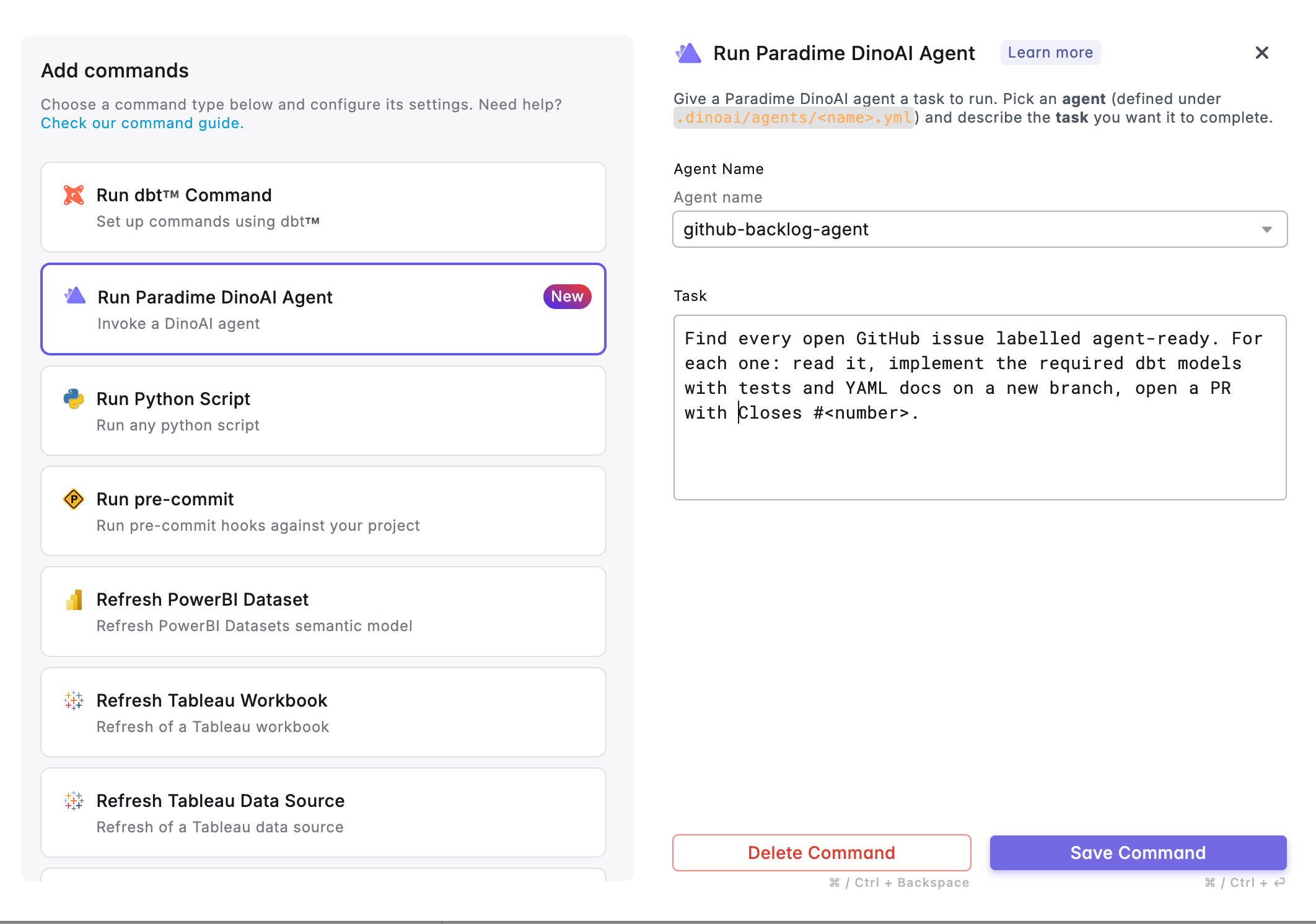 **Option 1: From the Bolt UI**
Click **Add command** → **Run Paradime DinoAI Agent**, then fill in:
* **Agent Name** — pick `github-backlog-agent` from the dropdown.
* **Task** — the agent's opening message. For a full backlog sweep:
```
Find every open GitHub issue labelled agent-ready. For each one: read it, implement the required dbt models with tests and YAML docs on a new branch, open a PR with Closes #.
```
**Save Command**, then set the trigger type (cron, on-merge, on-completion) and deploy.
**Option 2 Schedules as Code**
If you manage Bolt schedules with YAML, add the same command directly. The UI just writes a `paradime dinoai` invocation under `commands:`:
```yaml theme={"system"}
schedules:
- name: github backlog agent
slug: github-backlog-agent-l3m4n5
description: "Sweep open Agent Ready GitHub issues into dbt PRs"
owner_email: data-team@acme.io
environment: production
git_branch: main
commands:
- >-
paradime dinoai --agent="github-backlog-agent" --message="Find
every open GitHub issue labelled agent-ready. For each one: read it,
implement the required dbt models with tests and YAML docs on a new branch,
open a PR with Closes #."
schedule: "0 9 * * 1-5"
timezone: UTC
```
| UI field | CLI flag | Notes |
| ---------- | -------------------- | ---------------------------------------------------------------------------- |
| Agent Name | `--agent=` | Must match an existing `.dinoai/agents/.yml` on the schedule's branch. |
| Task | `--message=""` | The agent's opening user message. Use a single quoted string. |
Pick the cadence that matches how often your team labels new issues as **Agent Ready**:
| Cadence | Cron expression | When it runs |
| ------------------------- | --------------- | ---------------------------- |
| Every day at 9 AM | `0 9 * * *` | Monday–Sunday, 9:00 AM |
| Weekdays at 9 AM | `0 9 * * 1-5` | Monday–Friday, 9:00 AM |
| Once a week (Monday 9 AM) | `0 9 * * 1` | Every Monday, 9:00 AM |
| Twice a week (Mon & Thu) | `0 9 * * 1,4` | Monday and Thursday, 9:00 AM |
| Every 6 hours | `0 */6 * * *` | 12 AM, 6 AM, 12 PM, 6 PM |
For most teams, **weekdays at 9 AM** (`0 9 * * 1-5`) is a good default. If there are no Agent Ready issues, the agent reports an empty backlog and the run completes cleanly.
### File Structure
The only file you author lives in your repo:
```
your-repo/
├── dbt_project.yml
└── .dinoai/
└── agents/
└── github-backlog-agent.yml
```
Everything else — triggering, polling, notifications — is handled natively by Bolt and the agent runtime.
### Related Docs
* [**Programmable Agents — Quick Start** — getting started with DinoAI agents](/products/dino-ai/programmable-agents/quick-start)
* [**Programmable Agents — YAML Configuration** — full reference for agent config options](/products/dino-ai/programmable-agents/yaml-configuration)
* [**Programmable Agents — Tools Reference** — all available tools including `read_file`, `get_linear_issue`, and `post_slack_message`](/products/dino-ai/programmable-agents/tools-reference)
* [**Running from Bolt** — trigger agents from a Bolt schedule (UI and YAML)\`](/products/bolt/index)
* [**Slack Integration** — connecting Slack to Paradime](/integrations/slack)
* [**Paradime API & Credentials** — where to find your API endpoint, key, and secret](/developers/generate-api-keys-legacy)
## Related topics
- [jira-backlog-agent](/guides/programmable-agents/jira-backlog-agent.md)
- [GitHub Merge Queue](/guides/working-with-git/github-merge-queue.md)
- [GitHub PR Management Tool](/products/dino-ai/tools-and-features/github-pr-management-tool.md)
- [Linear Backlog Agent](/guides/programmable-agents/linear-backlog-agent.md)
- [GitHub](/integrations/github.md)
**Option 1: From the Bolt UI**
Click **Add command** → **Run Paradime DinoAI Agent**, then fill in:
* **Agent Name** — pick `github-backlog-agent` from the dropdown.
* **Task** — the agent's opening message. For a full backlog sweep:
```
Find every open GitHub issue labelled agent-ready. For each one: read it, implement the required dbt models with tests and YAML docs on a new branch, open a PR with Closes #.
```
**Save Command**, then set the trigger type (cron, on-merge, on-completion) and deploy.
**Option 2 Schedules as Code**
If you manage Bolt schedules with YAML, add the same command directly. The UI just writes a `paradime dinoai` invocation under `commands:`:
```yaml theme={"system"}
schedules:
- name: github backlog agent
slug: github-backlog-agent-l3m4n5
description: "Sweep open Agent Ready GitHub issues into dbt PRs"
owner_email: data-team@acme.io
environment: production
git_branch: main
commands:
- >-
paradime dinoai --agent="github-backlog-agent" --message="Find
every open GitHub issue labelled agent-ready. For each one: read it,
implement the required dbt models with tests and YAML docs on a new branch,
open a PR with Closes #."
schedule: "0 9 * * 1-5"
timezone: UTC
```
| UI field | CLI flag | Notes |
| ---------- | -------------------- | ---------------------------------------------------------------------------- |
| Agent Name | `--agent=` | Must match an existing `.dinoai/agents/.yml` on the schedule's branch. |
| Task | `--message=""` | The agent's opening user message. Use a single quoted string. |
Pick the cadence that matches how often your team labels new issues as **Agent Ready**:
| Cadence | Cron expression | When it runs |
| ------------------------- | --------------- | ---------------------------- |
| Every day at 9 AM | `0 9 * * *` | Monday–Sunday, 9:00 AM |
| Weekdays at 9 AM | `0 9 * * 1-5` | Monday–Friday, 9:00 AM |
| Once a week (Monday 9 AM) | `0 9 * * 1` | Every Monday, 9:00 AM |
| Twice a week (Mon & Thu) | `0 9 * * 1,4` | Monday and Thursday, 9:00 AM |
| Every 6 hours | `0 */6 * * *` | 12 AM, 6 AM, 12 PM, 6 PM |
For most teams, **weekdays at 9 AM** (`0 9 * * 1-5`) is a good default. If there are no Agent Ready issues, the agent reports an empty backlog and the run completes cleanly.
### File Structure
The only file you author lives in your repo:
```
your-repo/
├── dbt_project.yml
└── .dinoai/
└── agents/
└── github-backlog-agent.yml
```
Everything else — triggering, polling, notifications — is handled natively by Bolt and the agent runtime.
### Related Docs
* [**Programmable Agents — Quick Start** — getting started with DinoAI agents](/products/dino-ai/programmable-agents/quick-start)
* [**Programmable Agents — YAML Configuration** — full reference for agent config options](/products/dino-ai/programmable-agents/yaml-configuration)
* [**Programmable Agents — Tools Reference** — all available tools including `read_file`, `get_linear_issue`, and `post_slack_message`](/products/dino-ai/programmable-agents/tools-reference)
* [**Running from Bolt** — trigger agents from a Bolt schedule (UI and YAML)\`](/products/bolt/index)
* [**Slack Integration** — connecting Slack to Paradime](/integrations/slack)
* [**Paradime API & Credentials** — where to find your API endpoint, key, and secret](/developers/generate-api-keys-legacy)
## Related topics
- [jira-backlog-agent](/guides/programmable-agents/jira-backlog-agent.md)
- [GitHub Merge Queue](/guides/working-with-git/github-merge-queue.md)
- [GitHub PR Management Tool](/products/dino-ai/tools-and-features/github-pr-management-tool.md)
- [Linear Backlog Agent](/guides/programmable-agents/linear-backlog-agent.md)
- [GitHub](/integrations/github.md)