> ## Documentation Index
> Fetch the complete documentation index at: https://docs.paradime.io/llms.txt
> Use this file to discover all available pages before exploring further.
# Linear Backlog Agent
> Automate Linear backlog execution with a DinoAI agent that picks up Agent Ready issues, builds dbt™ models with tests and docs, opens PRs, and posts progress to Slack.
Automate your analytics engineering backlog with a DinoAI agent that reads every open Linear ticket labelled **Agent Ready**, spins up a Paradime development session, implements the required dbt™ models with tests and YAML docs, and opens a PR — all in parallel, one session per ticket.
**Before You Start**
**Paradime**
* Your Paradime API endpoint, API key, and API secret — generate these under Workspace Settings → API. Make sure to enable `DinoAI agent API` capabilities. Requires Admin access.
**Linear**
* A Linear personal API key — generate one under **Settings → API → Personal API keys**
* The team key for the team whose backlog you want to process (e.g. `"DNA"`)
* Issues you want to automate must carry the label **Agent Ready** and have a state type that is not `completed`
**Integrations**
The following must already be connected in Paradime:
* **Linear** — the agent calls `get_linear_issue` to fetch linked tickets
* **Slack** — the agent posts status updates to `#analytics-eng` via `post_slack_message`
## What You'll Build
By the end of this guide you'll have:
* A Poetry project wired to the Paradime SDK and the Linear GraphQL API
* A `LinearClient` that paginates through all non-completed, label-filtered issues
* An `AgentInvoker` that fires one DinoAI session per issue in parallel and polls until completion
* A `run_notifier.py` entry point that ties everything together
* A `linear-backlog-agent` DinoAI agent YAML that reads the ticket, implements the dbt™ models, and opens a PR
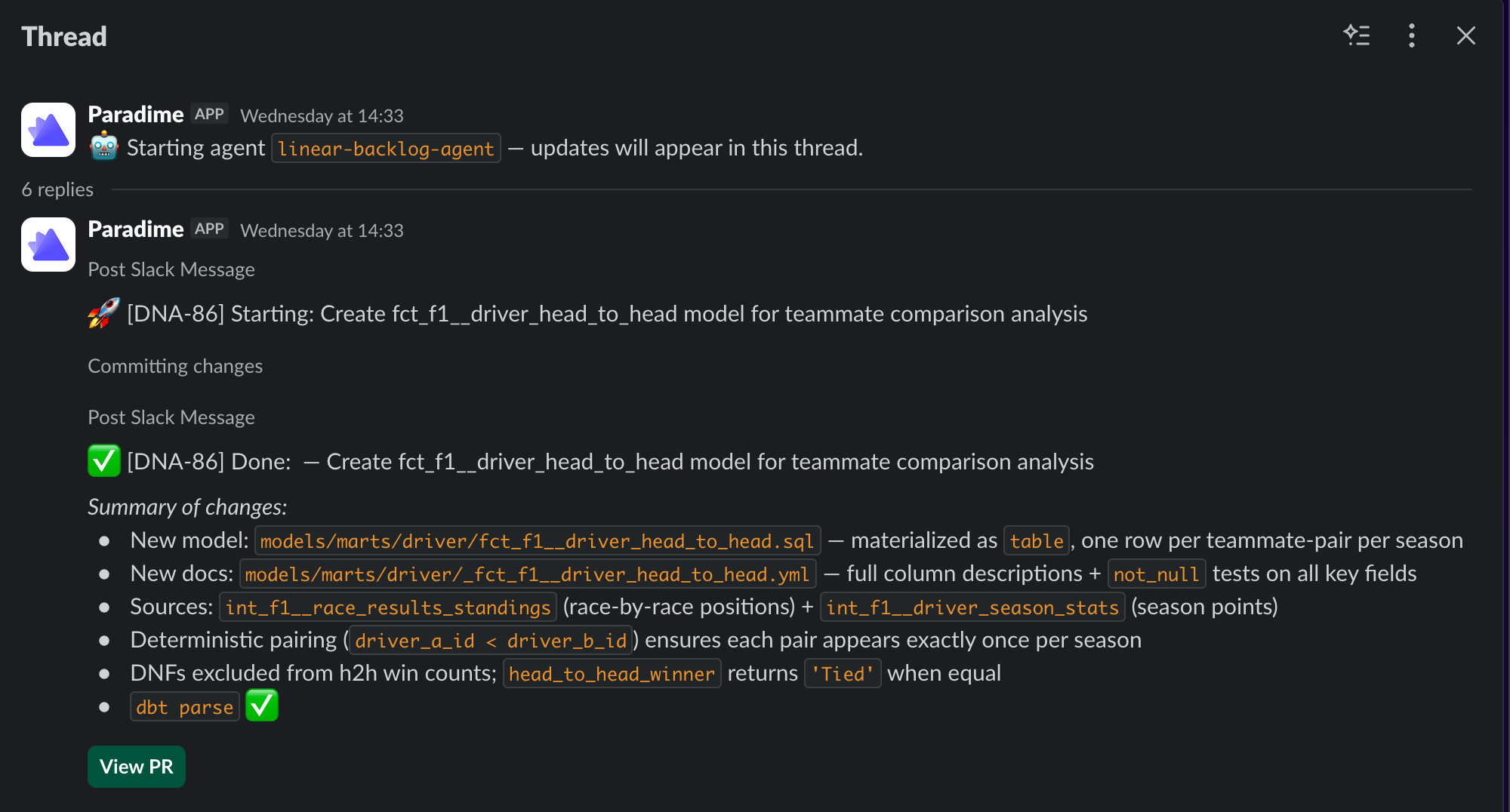
### What the Agent Does Per Ticket
Once triggered, the agent follows this sequence for each Linear issue:
```
1. Posts a "🚀 Starting" message to #analytics-eng
2. Reads the Linear ticket via get_linear_issue
3. Identifies source tables and implied metrics
4. Drafts staging (and mart) dbt™ models with tests and YAML docs
5. Commits changes on a new branch
6. Opens a PR and posts a "✅ Done: " message to #analytics-eng
```
The agent never invents a column that isn't in the source. When a ticket is ambiguous it surfaces explicit **Open questions** in the PR description rather than guessing.
 ### Architecture Overview
```mermaid theme={"system"}
flowchart TD
A[run_notifier.py\nOrchestrator]
B[LinearClient\nlinear_client.py]
C[AgentInvoker\nslack_notifier.py]
D[Paradime SDK\nparadime-io]
A --> B
A --> C
C --> D
```
## How It Works
When `run_notifier.py` is executed it loads environment variables, fetches all non-completed Linear issues labelled **Agent Ready**, then fires one DinoAI agent session per issue using a `ThreadPoolExecutor`. All sessions run concurrently — total wall-clock time is bounded by the slowest single ticket, not the sum of all tickets. Each session is polled every 20 seconds for up to 30 minutes.
Create the following `pyproject.toml` at the **same directory level as your `dbt_project.yml`**. This is required so the agent can locate and write dbt™ model files correctly.
```toml title="pyproject.toml" lineNumbers theme={"system"}
[tool.poetry]
name = "linear-dinoai-orchestrator"
version = "0.1.0"
description = "Linear → DinoAI Agent Orchestrator"
authors = ["Your Name "]
package-mode = false
[tool.poetry.dependencies]
python = ">=3.11,<3.13"
requests = "^2.28.1"
paradime-io = "^5.3.0"
[build-system]
requires = ["poetry-core>=1.0.0"]
build-backend = "poetry.core.masonry.api"
```
Install dependencies by running:
```bash theme={"system"}
poetry install
```
The only two third-party dependencies are `requests` (for the Linear GraphQL API) and `paradime-io` (the Paradime SDK). All other imports — `concurrent.futures`, `os`, `sys`, `time`, `typing` — are part of the Python standard library.
Create the following file in your repository at `.dinoai/agents/linear-backlog-agent.yml`. This defines the agent's role, goal, tools, and Slack output channel.
```yaml title=".dinoai/agents/linear-backlog-agent.yml" lineNumbers theme={"system"}
name: linear-backlog-agent
version: 1
role: >
Analytics Engineer translating product / business requests in Linear
into well-scoped dbt™ model PRs.
goal: >
For the Linear issue referenced in the trigger message: read the ticket,
identify the source tables and metrics implied, draft a staging model
(and a mart model when appropriate) with tests and YAML docs, commit
the changes on a new branch, and post the PR link back to the Linear
ticket and to Slack.
backstory: >
You are a careful translator. You never invent a column that isn't in
the source. When the ticket is ambiguous you call it out in the PR
description with explicit "Open questions" rather than guessing.
tools:
mode: allowlist
list:
- get_linear_issue
- read_file
- write_file
- search_files_and_directories
- ripgrep_search
- run_sql_query
- run_terminal_command
- post_slack_message
slack:
channel: "#analytics-eng"
```
`tools.mode: allowlist` means the agent can only call the tools explicitly listed. This keeps each session focused and prevents unintended side effects across your repository.
The Slack channel is set to `#analytics-eng` by default. Update `slack.channel` before committing if your team uses a different channel.
Create `python/linear_slack_notifier/linear_client.py`. This module communicates with the Linear GraphQL API and handles automatic pagination so no issues are missed regardless of backlog size.
```python title="python/linear:slack:notifier/linear:client.py" lineNumbers theme={"system"}
"""
Linear API client for fetching issues by team and label.
"""
from typing import List, Dict, Any, Optional
import requests
LINEAR_API_URL = "https://api.linear.app/graphql"
ISSUES_QUERY = """
query($teamKey: String!, $labelName: String!, $cursor: String) {
issues(
first: 50
after: $cursor
filter: {
team: { key: { eq: $teamKey } }
labels: { some: { name: { eq: $labelName } } }
state: { type: { neq: "completed" } }
}
) {
pageInfo {
hasNextPage
endCursor
}
nodes {
id
identifier
title
url
description
state {
name
type
}
assignee {
id
name
displayName
}
labels {
nodes {
name
}
}
}
}
}
"""
class LinearClient:
"""Thin client for the Linear GraphQL API."""
def __init__(self, api_key: str) -> None:
self._headers = {
"Authorization": api_key, # Linear accepts the key directly (no "Bearer" prefix needed)
"Content-Type": "application/json",
}
def _run_query(self, query: str, variables: Dict[str, Any]) -> Dict[str, Any]:
"""Execute a GraphQL query and return the parsed response."""
resp = requests.post(
LINEAR_API_URL,
json={"query": query, "variables": variables},
headers=self._headers,
timeout=30,
)
resp.raise_for_status()
payload = resp.json()
if "errors" in payload:
for err in payload["errors"]:
print(f"❌ Linear API error: {err.get('message')}")
raise RuntimeError("Linear API returned errors — see above.")
return payload["data"]
def get_incomplete_issues_by_label(
self,
team_id: str,
label_name: str,
) -> List[Dict[str, Any]]:
"""
Fetch all non-completed issues in team_id that carry label_name.
Paginates automatically.
"""
issues: List[Dict[str, Any]] = []
cursor: Optional[str] = None
while True:
variables: Dict[str, Any] = {
"teamKey": team_id,
"labelName": label_name,
"cursor": cursor,
}
data = self._run_query(ISSUES_QUERY, variables)
page = data["issues"]
issues += page["nodes"]
page_info = page["pageInfo"]
if not page_info["hasNextPage"]:
break
cursor = page_info["endCursor"]
return issues
```
The client accepts both a Linear team UUID and a short team key (e.g. `"DNA"`). Pagination is handled automatically via `pageInfo.hasNextPage` and `endCursor` — all matching issues are returned regardless of backlog size.
Create `python/linear_slack_notifier/slack_notifier.py`. Despite the filename, this module no longer posts to Slack directly — it triggers and polls DinoAI agent sessions, one per issue, in parallel threads.
```python title="python/linear:slack:notifier/slack:notifier.py" lineNumbers theme={"system"}
"""
Agent Invoker — for each Linear issue, triggers a `linear-backlog-agent`
DinoAI session via the Paradime SDK and polls until completion.
All issues are processed in parallel — one thread per issue — so the total
wall-clock time is bounded by the slowest single ticket, not the sum of all.
"""
import time
from concurrent.futures import ThreadPoolExecutor, as_completed
from typing import Any, Dict, List
from paradime import Paradime
from paradime.apis.dinoai_agents.exception import DinoaiAgentRunFailedException
from paradime.apis.dinoai_agents.types import DinoaiAgentRunStatus
AGENT_NAME = "linear-backlog-agent"
TIMEOUT = 1800 # seconds to wait per agent session
POLL_INTERVAL = 20 # seconds between status polls
def _build_trigger_message(issue: Dict[str, Any]) -> str:
"""
Compose the opening message sent to the agent for a single Linear issue.
Embeds all available issue metadata so the agent can start immediately.
"""
identifier = issue.get("identifier", issue.get("id", "???"))
title = issue.get("title", "(no title)")
url = issue.get("url", "")
description = (issue.get("description") or "").strip()
state = issue.get("state", {}).get("name", "?")
assignee = (issue.get("assignee") or {}).get("displayName", "unassigned")
labels = ", ".join(
lbl["name"] for lbl in (issue.get("labels") or {}).get("nodes", [])
)
desc_block = (
f"\n**Description:**\n{description}\n"
if description
else "\n*(No description provided)*\n"
)
return (
f"Please tackle the following Linear issue end-to-end as described.\n\n"
f"**Issue:** [{identifier}] {title}\n"
f"**URL:** {url}\n"
f"**State:** {state}\n"
f"**Assignee:** {assignee}\n"
f"**Labels:** {labels or 'none'}\n"
f"{desc_block}\n"
f"IMPORTANT — follow these steps in order:\n\n"
f"1. **Before doing anything else**, post this exact message to #analytics-eng:\n"
f' "🚀 [{identifier}] Starting: {title}"\n'
f" This is critical — multiple issues are being processed in parallel and the\n"
f" team needs to see each session announce itself immediately.\n\n"
f"2. Read the ticket carefully, identify the source tables and metrics implied,\n"
f" implement the required dbt™ models with tests and YAML docs, and commit the\n"
f" changes on a new branch named `{identifier.lower()}--<5-char-random-string>`.\n\n"
f"3. Open a PR, then post a completion message to #analytics-eng:\n"
f' "✅ [{identifier}] Done: — {title}"\n\n'
f"Always prefix every Slack message you send with [{identifier}] so it is\n"
f"distinguishable from the other parallel sessions running at the same time."
)
class AgentInvoker:
"""
Triggers one `linear-backlog-agent` session per Linear issue and polls
each session concurrently until completion.
"""
def __init__(self, paradime: Paradime) -> None:
self._paradime = paradime
def invoke_for_issues(self, issues: List[Dict[str, Any]]) -> None:
"""Trigger all agent sessions in parallel and print a summary."""
if not issues:
print("ℹ️ No issues to process.")
return
print(f"\n🤖 Triggering '{AGENT_NAME}' for {len(issues)} issue(s) in parallel...\n")
success = 0
failed = 0
with ThreadPoolExecutor(max_workers=len(issues)) as executor:
future_to_issue = {
executor.submit(self._run_single_issue, issue): issue
for issue in issues
}
for future in as_completed(future_to_issue):
issue = future_to_issue[future]
identifier = issue.get("identifier", issue.get("id", "???"))
try:
last_msg = future.result()
print(f"{'─' * 60}")
print(f"✅ [{identifier}] Done.\n Agent output:\n{last_msg}\n")
success += 1
except (DinoaiAgentRunFailedException, TimeoutError) as exc:
print(f"{'─' * 60}")
print(f"❌ [{identifier}] {exc}\n")
failed += 1
print(f"{'=' * 60}")
print(f"📊 Done — ✅ {success} succeeded ❌ {failed} failed")
print(f"{'=' * 60}")
def _run_single_issue(self, issue: Dict[str, Any]) -> str:
identifier = issue.get("identifier", issue.get("id", "???"))
title = issue.get("title", "(no title)")
print(f"{'─' * 60}")
print(f"🚀 [{identifier}] {title}")
session_id = self._trigger(issue)
final_run = self._poll_until_done(session_id, label=identifier)
return (
final_run.messages[-1].content
if final_run.messages
else "(no output returned)"
)
def _trigger(self, issue: Dict[str, Any]) -> str:
message = _build_trigger_message(issue)
trigger = self._paradime.dinoai_agents.trigger_run(
agent=AGENT_NAME,
message=message,
)
session_id = trigger.agent_session_id
identifier = issue.get("identifier", "?")
print(f" 📋 Session ID: {session_id} (issue: {identifier})")
return session_id
def _poll_until_done(self, session_id: str, label: str) -> object:
start = time.time()
while True:
run = self._paradime.dinoai_agents.get_run(agent_session_id=session_id)
if run.status == DinoaiAgentRunStatus.COMPLETED:
return run
if run.status == DinoaiAgentRunStatus.FAILED:
last_msg = run.messages[-1].content if run.messages else "no messages returned"
raise DinoaiAgentRunFailedException(
f"Agent session {session_id} FAILED for [{label}]. "
f"Last message: {last_msg}"
)
elapsed = time.time() - start
if elapsed > TIMEOUT:
raise TimeoutError(
f"Timed out after {TIMEOUT}s waiting for session "
f"{session_id} ([{label}]) to complete."
)
print(
f" ⏳ [{label}] status: {run.status.value} "
f"(elapsed: {int(elapsed)}s) … retrying in {POLL_INTERVAL}s"
)
time.sleep(POLL_INTERVAL)
```
Sessions are polled every 20 seconds with a 30-minute timeout per issue. The `ThreadPoolExecutor` fires all sessions immediately — if you have 10 tickets, all 10 agent sessions start at the same time.
Create `python/linear_slack_notifier/run_notifier.py`. This is the entry point that loads configuration, fetches issues from Linear, and hands them to the `AgentInvoker`.
```python title="python/linear:slack:notifier/run:notifier.py" lineNumbers theme={"system"}
#!/usr/bin/env python3
"""
Linear → DinoAI Agent Orchestrator
Fetches all non-completed Linear issues with a given label in a team,
then triggers one `linear-backlog-agent` DinoAI session per issue via the
Paradime SDK — each session reads the ticket, implements the required dbt™
models, and opens a PR.
Usage (from the repo root):
poetry run python python/linear_slack_notifier/run_notifier.py
Required environment variables:
LINEAR_API_KEY — Linear personal API key
LINEAR_TEAM_ID — Linear team key (e.g. "DNA")
PARADIME_API_ENDPOINT — e.g. https://api.paradime.io/api/v1//graphql
PARADIME_API_KEY — Paradime API key
PARADIME_API_SECRET — Paradime API secret
Optional environment variables:
LINEAR_LABEL_NAME — Label to filter by (default: "Agent Ready")
"""
import os
import sys
sys.path.insert(0, os.path.dirname(os.path.abspath(__file__)))
from paradime import Paradime
from linear_client import LinearClient
from slack_notifier import AgentInvoker
DEFAULT_LABEL_NAME = "Agent Ready"
def load_config() -> dict:
errors = []
linear_api_key = os.getenv("LINEAR_API_KEY", "")
linear_team_id = os.getenv("LINEAR_TEAM_ID", "")
paradime_endpoint = os.getenv("PARADIME_API_ENDPOINT", "")
paradime_api_key = os.getenv("PARADIME_API_KEY", "")
paradime_api_secret = os.getenv("PARADIME_API_SECRET", "")
if not linear_api_key:
errors.append("LINEAR_API_KEY is not set.")
if not linear_team_id:
errors.append("LINEAR_TEAM_ID is not set.")
if not paradime_endpoint:
errors.append("PARADIME_API_ENDPOINT is not set.")
if not paradime_api_key:
errors.append("PARADIME_API_KEY is not set.")
if not paradime_api_secret:
errors.append("PARADIME_API_SECRET is not set.")
if errors:
for e in errors:
print(f"❌ {e}")
print(
"\n💡 Set the missing variables before running:\n"
" export LINEAR_API_KEY=\n"
" export LINEAR_TEAM_ID=\n"
" export PARADIME_API_ENDPOINT=\n"
" export PARADIME_API_KEY=\n"
" export PARADIME_API_SECRET=\n"
)
sys.exit(1)
return {
"linear_api_key": linear_api_key,
"linear_team_id": linear_team_id,
"label_name": os.getenv("LINEAR_LABEL_NAME", DEFAULT_LABEL_NAME),
"paradime_endpoint": paradime_endpoint,
"paradime_api_key": paradime_api_key,
"paradime_api_secret": paradime_api_secret,
}
def main() -> None:
print("🚀 Linear → DinoAI Agent Orchestrator starting...\n" + "=" * 60)
cfg = load_config()
print(f"📋 Config:")
print(f" Linear team : {cfg['linear_team_id']}")
print(f" Label filter : {cfg['label_name']}")
print(f" Agent : linear-backlog-agent (via Paradime SDK)")
paradime = Paradime(
api_endpoint=cfg["paradime_endpoint"],
api_key=cfg["paradime_api_key"],
api_secret=cfg["paradime_api_secret"],
)
print(
f"\n🔍 Fetching Linear issues "
f"(label='{cfg['label_name']}', team='{cfg['linear_team_id']}')..."
)
linear = LinearClient(cfg["linear_api_key"])
try:
issues = linear.get_incomplete_issues_by_label(
team_id = cfg["linear_team_id"],
label_name = cfg["label_name"],
)
except Exception as e:
print(f"❌ Failed to fetch Linear issues: {e}")
sys.exit(1)
print(f"📌 Found {len(issues)} incomplete issue(s) with label '{cfg['label_name']}'.")
if not issues:
print("✅ Nothing to process. Exiting.")
sys.exit(0)
print("\n Issues to process:")
for issue in issues:
state = issue.get("state", {}).get("name", "?")
print(f" • [{issue.get('identifier')}] {issue.get('title')} (state: {state})")
invoker = AgentInvoker(paradime=paradime)
invoker.invoke_for_issues(issues=issues)
if __name__ == "__main__":
main()
```
The orchestrator requires five environment variables. Set them in your shell before running:
```bash theme={"system"}
export LINEAR_API_KEY=
export LINEAR_TEAM_ID= # e.g. "DNA"
export PARADIME_API_ENDPOINT=
export PARADIME_API_KEY=
export PARADIME_API_SECRET=
# Optional — defaults to "Agent Ready"
export LINEAR_LABEL_NAME="Agent Ready"
```
| Variable | Description |
| ----------------------- | ------------------------------------------------------------- |
| `LINEAR_API_KEY` | Linear personal API key |
| `LINEAR_TEAM_ID` | Linear team key (e.g. `"DNA"`) |
| `PARADIME_API_ENDPOINT` | Paradime GraphQL endpoint |
| `PARADIME_API_KEY` | Paradime API key |
| `PARADIME_API_SECRET` | Paradime API secret |
| `LINEAR_LABEL_NAME` | *(optional)* Label to filter by — defaults to `"Agent Ready"` |
Your Paradime API endpoint, key, and secret are available under Workspace Settings → API. Make sure the key has `DinoAI agent API` capabilities enabled.
From the repository root, run:
```bash theme={"system"}
poetry run python python/linear_slack_notifier/run_notifier.py
```
You should see output like:
```
🚀 Linear → DinoAI Agent Orchestrator starting...
============================================================
📋 Config:
Linear team : DNA
Label filter : Agent Ready
Agent : linear-backlog-agent (via Paradime SDK)
🔍 Fetching Linear issues (label='Agent Ready', team='DNA')...
📌 Found 3 incomplete issue(s) with label 'Agent Ready'.
Issues to process:
• [DNA-42] Add revenue mart model (state: In Progress)
• [DNA-57] Backfill sessions table (state: Todo)
• [DNA-61] Create user_lifetime_value model (state: Todo)
🤖 Triggering 'linear-backlog-agent' for 3 issue(s) in parallel...
```
Each issue gets its own parallel agent session. The orchestrator polls every 20 seconds and prints a summary once all sessions have reached a terminal state.
### File Structure
Your repository should look like this after completing the setup:
```
your-repo/
├── dbt_project.yml
├── pyproject.toml ← same level as dbt_project.yml
├── .dinoai/
│ └── agents/
│ └── linear-backlog-agent.yml
└── python/
└── linear_slack_notifier/
├── run_notifier.py ← entry point
├── linear_client.py ← Linear GraphQL client
└── slack_notifier.py ← AgentInvoker (triggers DinoAI sessions)
```
`pyproject.toml` must sit at the same directory level as `dbt_project.yml`. The agent uses `run_terminal_command` and `read_file` to navigate the dbt™ project, so the working directory at session start must be the repo root.
## Schedule with Bolt
Instead of running the orchestrator manually, you can have Bolt execute it on a schedule — every morning, once a week, or at any cadence that suits your team's workflow. Bolt runs the two commands in sequence: first `poetry install` to ensure dependencies are up to date, then `poetry run` to trigger the agent sessions.
### Add Environment Variables to Paradime
Before creating the schedule, store your secrets as environment variables in Paradime so Bolt can access them at runtime. Go to **Account Settings → Environment Variables** and add the following:
| Variable | Value |
| ----------------------- | ---------------------------------------- |
| `LINEAR_API_KEY` | Your Linear personal API key |
| `LINEAR_TEAM_ID` | Your Linear team key (e.g. `"DNA"`) |
| `PARADIME_API_ENDPOINT` | Your Paradime GraphQL endpoint |
| `PARADIME_API_KEY` | Your Paradime API key |
| `PARADIME_API_SECRET` | Your Paradime API secret |
| `LINEAR_LABEL_NAME` | *(optional)* Defaults to `"Agent Ready"` |
Environment variables set in **Workspace Settings → Environment Variables** are available to all Bolt schedules in your workspace. You only need to set them once.
### Create the Bolt Schedule
Go to **Bolt → Schedules** and click **New Schedule**. Give it a name like `Linear Backlog Agent` and configure the two commands under the **Commands** section.
The schedule should run two commands in order:
```bash theme={"system"}
poetry install
```
```bash theme={"system"}
poetry run python python/linear_slack_notifier/run_notifier.py
```
`poetry install` is included as the first command so that any dependency updates committed to `pyproject.toml` are automatically picked up on every run — no manual intervention needed.
#### Choose a Schedule Frequency
Pick the cadence that matches how often your team labels new tickets as **Agent Ready**. The table below covers the most common options:
| Cadence | Cron expression | When it runs |
| ------------------------- | --------------- | ---------------------------- |
| Every day at 9 AM | `0 9 * * *` | Monday–Sunday, 9:00 AM |
| Weekdays at 9 AM | `0 9 * * 1-5` | Monday–Friday, 9:00 AM |
| Once a week (Monday 9 AM) | `0 9 * * 1` | Every Monday, 9:00 AM |
| Twice a week (Mon & Thu) | `0 9 * * 1,4` | Monday and Thursday, 9:00 AM |
| Every 6 hours | `0 */6 * * *` | 12 AM, 6 AM, 12 PM, 6 PM |
For most teams, **weekdays at 9 AM** (`0 9 * * 1-5`) is a good default. The orchestrator exits cleanly with `✅ Nothing to process` when there are no Agent Ready tickets, so there is no cost to running it on days with an empty queue.
Once saved, Bolt will run both commands on your chosen schedule, picking up any new **Agent Ready** Linear issues and spinning up the corresponding DinoAI sessions automatically.
## Related Docs
* [**Programmable Agents — Quick Start** — getting started with DinoAI agents](/products/dino-ai/programmable-agents/quick-start)
* [**Programmable Agents — YAML Configuration** — full reference for agent config options](/products/dino-ai/programmable-agents/yaml-configuration)
* [**Programmable Agents — Tools Reference** — all available tools including `read_file`, `get_linear_issue`, and `post_slack_message`](/products/dino-ai/programmable-agents/tools-reference)
* [**Linear Integration** — connecting Linear to Paradime](/integrations/linear)
* [**Slack Integration** — connecting Slack to Paradime](/integrations/slack)
* [**Paradime API & Credentials** — where to find your API endpoint, key, and secret](/developers/generate-api-keys-legacy)
## Related topics
- [jira-backlog-agent](/guides/programmable-agents/jira-backlog-agent.md)
- [GitHub Issues Backlog Agent](/guides/programmable-agents/github-issues-backlog-agent.md)
- [Linear](/integrations/linear.md)
- [Linear Tool](/products/dino-ai/tools-and-features/linear-tool.md)
- [End-to-end PR reviewer](/guides/programmable-agents/end-to-end-pr-reviewer.md)
### Architecture Overview
```mermaid theme={"system"}
flowchart TD
A[run_notifier.py\nOrchestrator]
B[LinearClient\nlinear_client.py]
C[AgentInvoker\nslack_notifier.py]
D[Paradime SDK\nparadime-io]
A --> B
A --> C
C --> D
```
## How It Works
When `run_notifier.py` is executed it loads environment variables, fetches all non-completed Linear issues labelled **Agent Ready**, then fires one DinoAI agent session per issue using a `ThreadPoolExecutor`. All sessions run concurrently — total wall-clock time is bounded by the slowest single ticket, not the sum of all tickets. Each session is polled every 20 seconds for up to 30 minutes.
Create the following `pyproject.toml` at the **same directory level as your `dbt_project.yml`**. This is required so the agent can locate and write dbt™ model files correctly.
```toml title="pyproject.toml" lineNumbers theme={"system"}
[tool.poetry]
name = "linear-dinoai-orchestrator"
version = "0.1.0"
description = "Linear → DinoAI Agent Orchestrator"
authors = ["Your Name "]
package-mode = false
[tool.poetry.dependencies]
python = ">=3.11,<3.13"
requests = "^2.28.1"
paradime-io = "^5.3.0"
[build-system]
requires = ["poetry-core>=1.0.0"]
build-backend = "poetry.core.masonry.api"
```
Install dependencies by running:
```bash theme={"system"}
poetry install
```
The only two third-party dependencies are `requests` (for the Linear GraphQL API) and `paradime-io` (the Paradime SDK). All other imports — `concurrent.futures`, `os`, `sys`, `time`, `typing` — are part of the Python standard library.
Create the following file in your repository at `.dinoai/agents/linear-backlog-agent.yml`. This defines the agent's role, goal, tools, and Slack output channel.
```yaml title=".dinoai/agents/linear-backlog-agent.yml" lineNumbers theme={"system"}
name: linear-backlog-agent
version: 1
role: >
Analytics Engineer translating product / business requests in Linear
into well-scoped dbt™ model PRs.
goal: >
For the Linear issue referenced in the trigger message: read the ticket,
identify the source tables and metrics implied, draft a staging model
(and a mart model when appropriate) with tests and YAML docs, commit
the changes on a new branch, and post the PR link back to the Linear
ticket and to Slack.
backstory: >
You are a careful translator. You never invent a column that isn't in
the source. When the ticket is ambiguous you call it out in the PR
description with explicit "Open questions" rather than guessing.
tools:
mode: allowlist
list:
- get_linear_issue
- read_file
- write_file
- search_files_and_directories
- ripgrep_search
- run_sql_query
- run_terminal_command
- post_slack_message
slack:
channel: "#analytics-eng"
```
`tools.mode: allowlist` means the agent can only call the tools explicitly listed. This keeps each session focused and prevents unintended side effects across your repository.
The Slack channel is set to `#analytics-eng` by default. Update `slack.channel` before committing if your team uses a different channel.
Create `python/linear_slack_notifier/linear_client.py`. This module communicates with the Linear GraphQL API and handles automatic pagination so no issues are missed regardless of backlog size.
```python title="python/linear:slack:notifier/linear:client.py" lineNumbers theme={"system"}
"""
Linear API client for fetching issues by team and label.
"""
from typing import List, Dict, Any, Optional
import requests
LINEAR_API_URL = "https://api.linear.app/graphql"
ISSUES_QUERY = """
query($teamKey: String!, $labelName: String!, $cursor: String) {
issues(
first: 50
after: $cursor
filter: {
team: { key: { eq: $teamKey } }
labels: { some: { name: { eq: $labelName } } }
state: { type: { neq: "completed" } }
}
) {
pageInfo {
hasNextPage
endCursor
}
nodes {
id
identifier
title
url
description
state {
name
type
}
assignee {
id
name
displayName
}
labels {
nodes {
name
}
}
}
}
}
"""
class LinearClient:
"""Thin client for the Linear GraphQL API."""
def __init__(self, api_key: str) -> None:
self._headers = {
"Authorization": api_key, # Linear accepts the key directly (no "Bearer" prefix needed)
"Content-Type": "application/json",
}
def _run_query(self, query: str, variables: Dict[str, Any]) -> Dict[str, Any]:
"""Execute a GraphQL query and return the parsed response."""
resp = requests.post(
LINEAR_API_URL,
json={"query": query, "variables": variables},
headers=self._headers,
timeout=30,
)
resp.raise_for_status()
payload = resp.json()
if "errors" in payload:
for err in payload["errors"]:
print(f"❌ Linear API error: {err.get('message')}")
raise RuntimeError("Linear API returned errors — see above.")
return payload["data"]
def get_incomplete_issues_by_label(
self,
team_id: str,
label_name: str,
) -> List[Dict[str, Any]]:
"""
Fetch all non-completed issues in team_id that carry label_name.
Paginates automatically.
"""
issues: List[Dict[str, Any]] = []
cursor: Optional[str] = None
while True:
variables: Dict[str, Any] = {
"teamKey": team_id,
"labelName": label_name,
"cursor": cursor,
}
data = self._run_query(ISSUES_QUERY, variables)
page = data["issues"]
issues += page["nodes"]
page_info = page["pageInfo"]
if not page_info["hasNextPage"]:
break
cursor = page_info["endCursor"]
return issues
```
The client accepts both a Linear team UUID and a short team key (e.g. `"DNA"`). Pagination is handled automatically via `pageInfo.hasNextPage` and `endCursor` — all matching issues are returned regardless of backlog size.
Create `python/linear_slack_notifier/slack_notifier.py`. Despite the filename, this module no longer posts to Slack directly — it triggers and polls DinoAI agent sessions, one per issue, in parallel threads.
```python title="python/linear:slack:notifier/slack:notifier.py" lineNumbers theme={"system"}
"""
Agent Invoker — for each Linear issue, triggers a `linear-backlog-agent`
DinoAI session via the Paradime SDK and polls until completion.
All issues are processed in parallel — one thread per issue — so the total
wall-clock time is bounded by the slowest single ticket, not the sum of all.
"""
import time
from concurrent.futures import ThreadPoolExecutor, as_completed
from typing import Any, Dict, List
from paradime import Paradime
from paradime.apis.dinoai_agents.exception import DinoaiAgentRunFailedException
from paradime.apis.dinoai_agents.types import DinoaiAgentRunStatus
AGENT_NAME = "linear-backlog-agent"
TIMEOUT = 1800 # seconds to wait per agent session
POLL_INTERVAL = 20 # seconds between status polls
def _build_trigger_message(issue: Dict[str, Any]) -> str:
"""
Compose the opening message sent to the agent for a single Linear issue.
Embeds all available issue metadata so the agent can start immediately.
"""
identifier = issue.get("identifier", issue.get("id", "???"))
title = issue.get("title", "(no title)")
url = issue.get("url", "")
description = (issue.get("description") or "").strip()
state = issue.get("state", {}).get("name", "?")
assignee = (issue.get("assignee") or {}).get("displayName", "unassigned")
labels = ", ".join(
lbl["name"] for lbl in (issue.get("labels") or {}).get("nodes", [])
)
desc_block = (
f"\n**Description:**\n{description}\n"
if description
else "\n*(No description provided)*\n"
)
return (
f"Please tackle the following Linear issue end-to-end as described.\n\n"
f"**Issue:** [{identifier}] {title}\n"
f"**URL:** {url}\n"
f"**State:** {state}\n"
f"**Assignee:** {assignee}\n"
f"**Labels:** {labels or 'none'}\n"
f"{desc_block}\n"
f"IMPORTANT — follow these steps in order:\n\n"
f"1. **Before doing anything else**, post this exact message to #analytics-eng:\n"
f' "🚀 [{identifier}] Starting: {title}"\n'
f" This is critical — multiple issues are being processed in parallel and the\n"
f" team needs to see each session announce itself immediately.\n\n"
f"2. Read the ticket carefully, identify the source tables and metrics implied,\n"
f" implement the required dbt™ models with tests and YAML docs, and commit the\n"
f" changes on a new branch named `{identifier.lower()}--<5-char-random-string>`.\n\n"
f"3. Open a PR, then post a completion message to #analytics-eng:\n"
f' "✅ [{identifier}] Done: — {title}"\n\n'
f"Always prefix every Slack message you send with [{identifier}] so it is\n"
f"distinguishable from the other parallel sessions running at the same time."
)
class AgentInvoker:
"""
Triggers one `linear-backlog-agent` session per Linear issue and polls
each session concurrently until completion.
"""
def __init__(self, paradime: Paradime) -> None:
self._paradime = paradime
def invoke_for_issues(self, issues: List[Dict[str, Any]]) -> None:
"""Trigger all agent sessions in parallel and print a summary."""
if not issues:
print("ℹ️ No issues to process.")
return
print(f"\n🤖 Triggering '{AGENT_NAME}' for {len(issues)} issue(s) in parallel...\n")
success = 0
failed = 0
with ThreadPoolExecutor(max_workers=len(issues)) as executor:
future_to_issue = {
executor.submit(self._run_single_issue, issue): issue
for issue in issues
}
for future in as_completed(future_to_issue):
issue = future_to_issue[future]
identifier = issue.get("identifier", issue.get("id", "???"))
try:
last_msg = future.result()
print(f"{'─' * 60}")
print(f"✅ [{identifier}] Done.\n Agent output:\n{last_msg}\n")
success += 1
except (DinoaiAgentRunFailedException, TimeoutError) as exc:
print(f"{'─' * 60}")
print(f"❌ [{identifier}] {exc}\n")
failed += 1
print(f"{'=' * 60}")
print(f"📊 Done — ✅ {success} succeeded ❌ {failed} failed")
print(f"{'=' * 60}")
def _run_single_issue(self, issue: Dict[str, Any]) -> str:
identifier = issue.get("identifier", issue.get("id", "???"))
title = issue.get("title", "(no title)")
print(f"{'─' * 60}")
print(f"🚀 [{identifier}] {title}")
session_id = self._trigger(issue)
final_run = self._poll_until_done(session_id, label=identifier)
return (
final_run.messages[-1].content
if final_run.messages
else "(no output returned)"
)
def _trigger(self, issue: Dict[str, Any]) -> str:
message = _build_trigger_message(issue)
trigger = self._paradime.dinoai_agents.trigger_run(
agent=AGENT_NAME,
message=message,
)
session_id = trigger.agent_session_id
identifier = issue.get("identifier", "?")
print(f" 📋 Session ID: {session_id} (issue: {identifier})")
return session_id
def _poll_until_done(self, session_id: str, label: str) -> object:
start = time.time()
while True:
run = self._paradime.dinoai_agents.get_run(agent_session_id=session_id)
if run.status == DinoaiAgentRunStatus.COMPLETED:
return run
if run.status == DinoaiAgentRunStatus.FAILED:
last_msg = run.messages[-1].content if run.messages else "no messages returned"
raise DinoaiAgentRunFailedException(
f"Agent session {session_id} FAILED for [{label}]. "
f"Last message: {last_msg}"
)
elapsed = time.time() - start
if elapsed > TIMEOUT:
raise TimeoutError(
f"Timed out after {TIMEOUT}s waiting for session "
f"{session_id} ([{label}]) to complete."
)
print(
f" ⏳ [{label}] status: {run.status.value} "
f"(elapsed: {int(elapsed)}s) … retrying in {POLL_INTERVAL}s"
)
time.sleep(POLL_INTERVAL)
```
Sessions are polled every 20 seconds with a 30-minute timeout per issue. The `ThreadPoolExecutor` fires all sessions immediately — if you have 10 tickets, all 10 agent sessions start at the same time.
Create `python/linear_slack_notifier/run_notifier.py`. This is the entry point that loads configuration, fetches issues from Linear, and hands them to the `AgentInvoker`.
```python title="python/linear:slack:notifier/run:notifier.py" lineNumbers theme={"system"}
#!/usr/bin/env python3
"""
Linear → DinoAI Agent Orchestrator
Fetches all non-completed Linear issues with a given label in a team,
then triggers one `linear-backlog-agent` DinoAI session per issue via the
Paradime SDK — each session reads the ticket, implements the required dbt™
models, and opens a PR.
Usage (from the repo root):
poetry run python python/linear_slack_notifier/run_notifier.py
Required environment variables:
LINEAR_API_KEY — Linear personal API key
LINEAR_TEAM_ID — Linear team key (e.g. "DNA")
PARADIME_API_ENDPOINT — e.g. https://api.paradime.io/api/v1//graphql
PARADIME_API_KEY — Paradime API key
PARADIME_API_SECRET — Paradime API secret
Optional environment variables:
LINEAR_LABEL_NAME — Label to filter by (default: "Agent Ready")
"""
import os
import sys
sys.path.insert(0, os.path.dirname(os.path.abspath(__file__)))
from paradime import Paradime
from linear_client import LinearClient
from slack_notifier import AgentInvoker
DEFAULT_LABEL_NAME = "Agent Ready"
def load_config() -> dict:
errors = []
linear_api_key = os.getenv("LINEAR_API_KEY", "")
linear_team_id = os.getenv("LINEAR_TEAM_ID", "")
paradime_endpoint = os.getenv("PARADIME_API_ENDPOINT", "")
paradime_api_key = os.getenv("PARADIME_API_KEY", "")
paradime_api_secret = os.getenv("PARADIME_API_SECRET", "")
if not linear_api_key:
errors.append("LINEAR_API_KEY is not set.")
if not linear_team_id:
errors.append("LINEAR_TEAM_ID is not set.")
if not paradime_endpoint:
errors.append("PARADIME_API_ENDPOINT is not set.")
if not paradime_api_key:
errors.append("PARADIME_API_KEY is not set.")
if not paradime_api_secret:
errors.append("PARADIME_API_SECRET is not set.")
if errors:
for e in errors:
print(f"❌ {e}")
print(
"\n💡 Set the missing variables before running:\n"
" export LINEAR_API_KEY=\n"
" export LINEAR_TEAM_ID=\n"
" export PARADIME_API_ENDPOINT=\n"
" export PARADIME_API_KEY=\n"
" export PARADIME_API_SECRET=\n"
)
sys.exit(1)
return {
"linear_api_key": linear_api_key,
"linear_team_id": linear_team_id,
"label_name": os.getenv("LINEAR_LABEL_NAME", DEFAULT_LABEL_NAME),
"paradime_endpoint": paradime_endpoint,
"paradime_api_key": paradime_api_key,
"paradime_api_secret": paradime_api_secret,
}
def main() -> None:
print("🚀 Linear → DinoAI Agent Orchestrator starting...\n" + "=" * 60)
cfg = load_config()
print(f"📋 Config:")
print(f" Linear team : {cfg['linear_team_id']}")
print(f" Label filter : {cfg['label_name']}")
print(f" Agent : linear-backlog-agent (via Paradime SDK)")
paradime = Paradime(
api_endpoint=cfg["paradime_endpoint"],
api_key=cfg["paradime_api_key"],
api_secret=cfg["paradime_api_secret"],
)
print(
f"\n🔍 Fetching Linear issues "
f"(label='{cfg['label_name']}', team='{cfg['linear_team_id']}')..."
)
linear = LinearClient(cfg["linear_api_key"])
try:
issues = linear.get_incomplete_issues_by_label(
team_id = cfg["linear_team_id"],
label_name = cfg["label_name"],
)
except Exception as e:
print(f"❌ Failed to fetch Linear issues: {e}")
sys.exit(1)
print(f"📌 Found {len(issues)} incomplete issue(s) with label '{cfg['label_name']}'.")
if not issues:
print("✅ Nothing to process. Exiting.")
sys.exit(0)
print("\n Issues to process:")
for issue in issues:
state = issue.get("state", {}).get("name", "?")
print(f" • [{issue.get('identifier')}] {issue.get('title')} (state: {state})")
invoker = AgentInvoker(paradime=paradime)
invoker.invoke_for_issues(issues=issues)
if __name__ == "__main__":
main()
```
The orchestrator requires five environment variables. Set them in your shell before running:
```bash theme={"system"}
export LINEAR_API_KEY=
export LINEAR_TEAM_ID= # e.g. "DNA"
export PARADIME_API_ENDPOINT=
export PARADIME_API_KEY=
export PARADIME_API_SECRET=
# Optional — defaults to "Agent Ready"
export LINEAR_LABEL_NAME="Agent Ready"
```
| Variable | Description |
| ----------------------- | ------------------------------------------------------------- |
| `LINEAR_API_KEY` | Linear personal API key |
| `LINEAR_TEAM_ID` | Linear team key (e.g. `"DNA"`) |
| `PARADIME_API_ENDPOINT` | Paradime GraphQL endpoint |
| `PARADIME_API_KEY` | Paradime API key |
| `PARADIME_API_SECRET` | Paradime API secret |
| `LINEAR_LABEL_NAME` | *(optional)* Label to filter by — defaults to `"Agent Ready"` |
Your Paradime API endpoint, key, and secret are available under Workspace Settings → API. Make sure the key has `DinoAI agent API` capabilities enabled.
From the repository root, run:
```bash theme={"system"}
poetry run python python/linear_slack_notifier/run_notifier.py
```
You should see output like:
```
🚀 Linear → DinoAI Agent Orchestrator starting...
============================================================
📋 Config:
Linear team : DNA
Label filter : Agent Ready
Agent : linear-backlog-agent (via Paradime SDK)
🔍 Fetching Linear issues (label='Agent Ready', team='DNA')...
📌 Found 3 incomplete issue(s) with label 'Agent Ready'.
Issues to process:
• [DNA-42] Add revenue mart model (state: In Progress)
• [DNA-57] Backfill sessions table (state: Todo)
• [DNA-61] Create user_lifetime_value model (state: Todo)
🤖 Triggering 'linear-backlog-agent' for 3 issue(s) in parallel...
```
Each issue gets its own parallel agent session. The orchestrator polls every 20 seconds and prints a summary once all sessions have reached a terminal state.
### File Structure
Your repository should look like this after completing the setup:
```
your-repo/
├── dbt_project.yml
├── pyproject.toml ← same level as dbt_project.yml
├── .dinoai/
│ └── agents/
│ └── linear-backlog-agent.yml
└── python/
└── linear_slack_notifier/
├── run_notifier.py ← entry point
├── linear_client.py ← Linear GraphQL client
└── slack_notifier.py ← AgentInvoker (triggers DinoAI sessions)
```
`pyproject.toml` must sit at the same directory level as `dbt_project.yml`. The agent uses `run_terminal_command` and `read_file` to navigate the dbt™ project, so the working directory at session start must be the repo root.
## Schedule with Bolt
Instead of running the orchestrator manually, you can have Bolt execute it on a schedule — every morning, once a week, or at any cadence that suits your team's workflow. Bolt runs the two commands in sequence: first `poetry install` to ensure dependencies are up to date, then `poetry run` to trigger the agent sessions.
### Add Environment Variables to Paradime
Before creating the schedule, store your secrets as environment variables in Paradime so Bolt can access them at runtime. Go to **Account Settings → Environment Variables** and add the following:
| Variable | Value |
| ----------------------- | ---------------------------------------- |
| `LINEAR_API_KEY` | Your Linear personal API key |
| `LINEAR_TEAM_ID` | Your Linear team key (e.g. `"DNA"`) |
| `PARADIME_API_ENDPOINT` | Your Paradime GraphQL endpoint |
| `PARADIME_API_KEY` | Your Paradime API key |
| `PARADIME_API_SECRET` | Your Paradime API secret |
| `LINEAR_LABEL_NAME` | *(optional)* Defaults to `"Agent Ready"` |
Environment variables set in **Workspace Settings → Environment Variables** are available to all Bolt schedules in your workspace. You only need to set them once.
### Create the Bolt Schedule
Go to **Bolt → Schedules** and click **New Schedule**. Give it a name like `Linear Backlog Agent` and configure the two commands under the **Commands** section.
The schedule should run two commands in order:
```bash theme={"system"}
poetry install
```
```bash theme={"system"}
poetry run python python/linear_slack_notifier/run_notifier.py
```
`poetry install` is included as the first command so that any dependency updates committed to `pyproject.toml` are automatically picked up on every run — no manual intervention needed.
#### Choose a Schedule Frequency
Pick the cadence that matches how often your team labels new tickets as **Agent Ready**. The table below covers the most common options:
| Cadence | Cron expression | When it runs |
| ------------------------- | --------------- | ---------------------------- |
| Every day at 9 AM | `0 9 * * *` | Monday–Sunday, 9:00 AM |
| Weekdays at 9 AM | `0 9 * * 1-5` | Monday–Friday, 9:00 AM |
| Once a week (Monday 9 AM) | `0 9 * * 1` | Every Monday, 9:00 AM |
| Twice a week (Mon & Thu) | `0 9 * * 1,4` | Monday and Thursday, 9:00 AM |
| Every 6 hours | `0 */6 * * *` | 12 AM, 6 AM, 12 PM, 6 PM |
For most teams, **weekdays at 9 AM** (`0 9 * * 1-5`) is a good default. The orchestrator exits cleanly with `✅ Nothing to process` when there are no Agent Ready tickets, so there is no cost to running it on days with an empty queue.
Once saved, Bolt will run both commands on your chosen schedule, picking up any new **Agent Ready** Linear issues and spinning up the corresponding DinoAI sessions automatically.
## Related Docs
* [**Programmable Agents — Quick Start** — getting started with DinoAI agents](/products/dino-ai/programmable-agents/quick-start)
* [**Programmable Agents — YAML Configuration** — full reference for agent config options](/products/dino-ai/programmable-agents/yaml-configuration)
* [**Programmable Agents — Tools Reference** — all available tools including `read_file`, `get_linear_issue`, and `post_slack_message`](/products/dino-ai/programmable-agents/tools-reference)
* [**Linear Integration** — connecting Linear to Paradime](/integrations/linear)
* [**Slack Integration** — connecting Slack to Paradime](/integrations/slack)
* [**Paradime API & Credentials** — where to find your API endpoint, key, and secret](/developers/generate-api-keys-legacy)
## Related topics
- [jira-backlog-agent](/guides/programmable-agents/jira-backlog-agent.md)
- [GitHub Issues Backlog Agent](/guides/programmable-agents/github-issues-backlog-agent.md)
- [Linear](/integrations/linear.md)
- [Linear Tool](/products/dino-ai/tools-and-features/linear-tool.md)
- [End-to-end PR reviewer](/guides/programmable-agents/end-to-end-pr-reviewer.md)