> ## Documentation Index
> Fetch the complete documentation index at: https://docs.paradime.io/llms.txt
> Use this file to discover all available pages before exploring further.
# Read Only Branches
> Paradime Read-Only Branches: Secure your dbt™ projects with read-only branches. Ensure integrity and control over code changes.
While developing your dbt™️ project, changes/edits should never made against your remote default branch (usually called main or master).
When working with git a new branch should be created in order to make any changes to your project so that a Pull Request can be opened to merge your changes into your default branch.
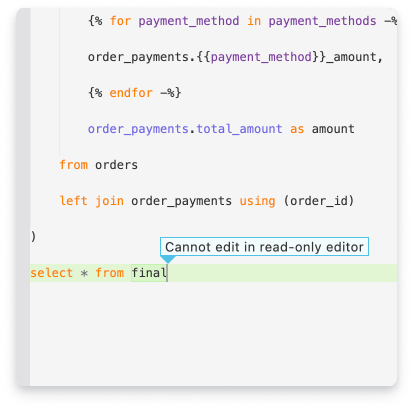
To prevent users to commit directly again main or master, whether you are using [Git Lite](/products/code-ide/left-panel/git-lite) or [Git Advanced](/guides/working-with-git/git-advanced) the default branch will be always protected in Paradime meaning that you wont be able to make edits to files in your dbt™️ project.
If you see the prompt below when trying to edit a file, simply create a new branch or switch to an existing one.
 ## Related topics
- [Working with Git](/guides/working-with-git/index.md)
- [Deploying YAML Schedules from a Custom Branch](/products/bolt/creating-schedules/schedules-as-code/deploying-yaml-schedules-from-a-custom-branch.md)
- [Delete Branches](/guides/working-with-git/delete-branches.md)
- [GitHub Branch Protection Guide: Preventing Direct Commits to Main](/guides/working-with-git/github-branch-protection-guide-preventing-direct-commits-to-main.md)
- [Getting started with the DinoAI background agent](/guides/paradime-101/getting-started-with-the-dinoai-background-agent/index.md)
## Related topics
- [Working with Git](/guides/working-with-git/index.md)
- [Deploying YAML Schedules from a Custom Branch](/products/bolt/creating-schedules/schedules-as-code/deploying-yaml-schedules-from-a-custom-branch.md)
- [Delete Branches](/guides/working-with-git/delete-branches.md)
- [GitHub Branch Protection Guide: Preventing Direct Commits to Main](/guides/working-with-git/github-branch-protection-guide-preventing-direct-commits-to-main.md)
- [Getting started with the DinoAI background agent](/guides/paradime-101/getting-started-with-the-dinoai-background-agent/index.md)