> ## Documentation Index
> Fetch the complete documentation index at: https://docs.paradime.io/llms.txt
> Use this file to discover all available pages before exploring further.
# Airbyte Cloud
To create API credentials and connect Airbyte Cloud to Paradime, you will need Account Administrator access. See also the [Airbyte documentation](https://docs.airbyte.com/).
### Generate API Credentials
Airbyte Cloud allows you to create multiple applications with separate client credentials. Each application can have its own client ID and secret for different integrations.
#### Prerequisites
Before generating API credentials, ensure you have:
* An active Airbyte Cloud workspace
* Account Administrator or workspace owner permissions in Airbyte
#### Steps to Generate Client ID and Secret
1. Log in to your Airbyte Cloud workspace as a user with Account Administrator or workspace owner role.
2. Navigate to **Settings** by clicking the gear icon in the bottom left corner of your screen.
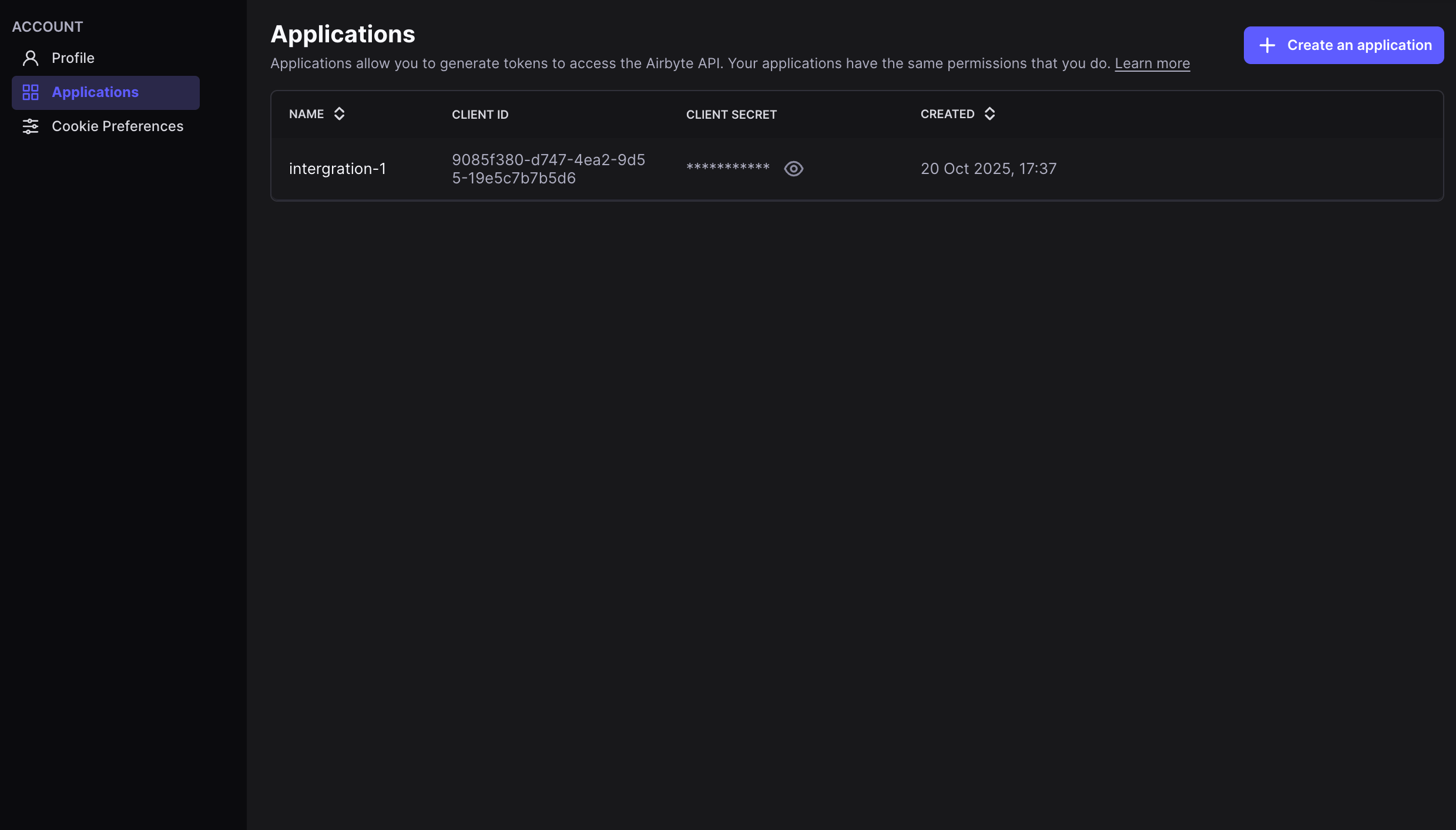
3. Select the **Applications** tab from the settings menu.
4. Click the **Create New Application** button.
5. Enter a name for your application (e.g., "Paradime Integration") and click **Create**.
6. Copy the **Client ID** and **Client Secret** from the application details page. Store these securely as we will need them to set up the Paradime integration. **Important:** The Client Secret will only be displayed once. Make sure to copy and store it in a secure location before closing this dialog.
 ### Connect the Airbyte Integration
The Airbyte Cloud integration can be connected by a Paradime Admin user. To enable the integration, you will need to set your Airbyte credentials as [environment variables](/products/settings/environment-variables/bolt-schedule-env-variables) in Paradime before connecting the integration.
#### Steps to Connect
1. In Paradime, go to **Account Settings** > **Environment Variables**.
2. Create two new environment variables with the following names and values:
* `AIRBYTE_CLIENT_ID` - Set this to your Airbyte Cloud Client ID
* `AIRBYTE_CLIENT_SECRET` - Set this to your Airbyte Cloud Client Secret
3. Click **Save** to store the environment variables.
### Authentication Parameters
Paradime reads your Airbyte credentials from the following environment variables:
| Environment Variable | Type | Required | Information |
| ----------------------- | ----------------- | -------- | --------------------------------------------------------------- |
| AIRBYTE\_CLIENT\_ID | string | Yes | The client ID generated from your Airbyte Cloud application |
| AIRBYTE\_CLIENT\_SECRET | string (password) | Yes | The client secret generated from your Airbyte Cloud application |
Make sure these environment variables are set in your [Paradime Account Settings > Environment Variables](/products/settings/environment-variables/bolt-schedule-env-variables) before attempting to connect the Airbyte integration.
### Airbyte Integration Capabilities
Paradime uses the Airbyte Cloud API to trigger [Airbyte syncs](/products/bolt/creating-schedules/command-settings/airbyte-connector-sync) from [Bolt](/products/bolt/creating-schedules/command-settings/airbyte-connector-sync). This allows you to orchestrate your Airbyte data pipelines as part of your Paradime workflows, enabling:
* Triggering Airbyte connections on-demand from Bolt
* Monitoring sync status and job execution
* Integrating Airbyte syncs into larger data orchestration workflows
* Error handling and retry logic for failed syncs
## Related topics
- [Airbyte CLI](/developers/paradime-cli/airbyte-cli.md)
- [Airbyte](/integrations/airbyte/index.md)
- [Airbyte Connector Sync](/products/bolt/creating-schedules/command-settings/airbyte-connector-sync.md)
- [Paradime CLI](/developers/paradime-cli/index.md)
- [Airbyte Server](/integrations/airbyte/airbyte-server.md)
### Connect the Airbyte Integration
The Airbyte Cloud integration can be connected by a Paradime Admin user. To enable the integration, you will need to set your Airbyte credentials as [environment variables](/products/settings/environment-variables/bolt-schedule-env-variables) in Paradime before connecting the integration.
#### Steps to Connect
1. In Paradime, go to **Account Settings** > **Environment Variables**.
2. Create two new environment variables with the following names and values:
* `AIRBYTE_CLIENT_ID` - Set this to your Airbyte Cloud Client ID
* `AIRBYTE_CLIENT_SECRET` - Set this to your Airbyte Cloud Client Secret
3. Click **Save** to store the environment variables.
### Authentication Parameters
Paradime reads your Airbyte credentials from the following environment variables:
| Environment Variable | Type | Required | Information |
| ----------------------- | ----------------- | -------- | --------------------------------------------------------------- |
| AIRBYTE\_CLIENT\_ID | string | Yes | The client ID generated from your Airbyte Cloud application |
| AIRBYTE\_CLIENT\_SECRET | string (password) | Yes | The client secret generated from your Airbyte Cloud application |
Make sure these environment variables are set in your [Paradime Account Settings > Environment Variables](/products/settings/environment-variables/bolt-schedule-env-variables) before attempting to connect the Airbyte integration.
### Airbyte Integration Capabilities
Paradime uses the Airbyte Cloud API to trigger [Airbyte syncs](/products/bolt/creating-schedules/command-settings/airbyte-connector-sync) from [Bolt](/products/bolt/creating-schedules/command-settings/airbyte-connector-sync). This allows you to orchestrate your Airbyte data pipelines as part of your Paradime workflows, enabling:
* Triggering Airbyte connections on-demand from Bolt
* Monitoring sync status and job execution
* Integrating Airbyte syncs into larger data orchestration workflows
* Error handling and retry logic for failed syncs
## Related topics
- [Airbyte CLI](/developers/paradime-cli/airbyte-cli.md)
- [Airbyte](/integrations/airbyte/index.md)
- [Airbyte Connector Sync](/products/bolt/creating-schedules/command-settings/airbyte-connector-sync.md)
- [Paradime CLI](/developers/paradime-cli/index.md)
- [Airbyte Server](/integrations/airbyte/airbyte-server.md)