> ## Documentation Index
> Fetch the complete documentation index at: https://docs.paradime.io/llms.txt
> Use this file to discover all available pages before exploring further.
# GitLab
> Connect a GitLab Git repository to Paradime using an SSH deploy key so you can develop, branch, and open merge requests for your dbt™ project.
[GitLab](https://gitlab.com/) hosts your dbt™ repositories. Connect a GitLab repository to Paradime using an SSH deploy key so Paradime can read and write files in your project, letting you develop in the [Code IDE](/products/code-ide/index), run [schedules](/products/bolt/index) in Bolt, and use CI/CD.
You must use the `git@...` or `ssh:...` version of your git URL, not the `https://...` version. Paradime uses the SSH protocol to clone repositories, so it cannot clone repos supplied with the HTTP protocol.
We advise creating a service account user in your GitLab account like **`paradime.gitlab.maintainer@yourcompany.com`** with write access to the repository, and letting this user own the deploy key.
## Add the deploy key
1. In Paradime, import your repository using its SSH URL to generate a deploy key. See [Importing a repository](/products/settings/git-repositories/importing-a-repository/index).
2. In GitLab, navigate to your project's **Settings**.
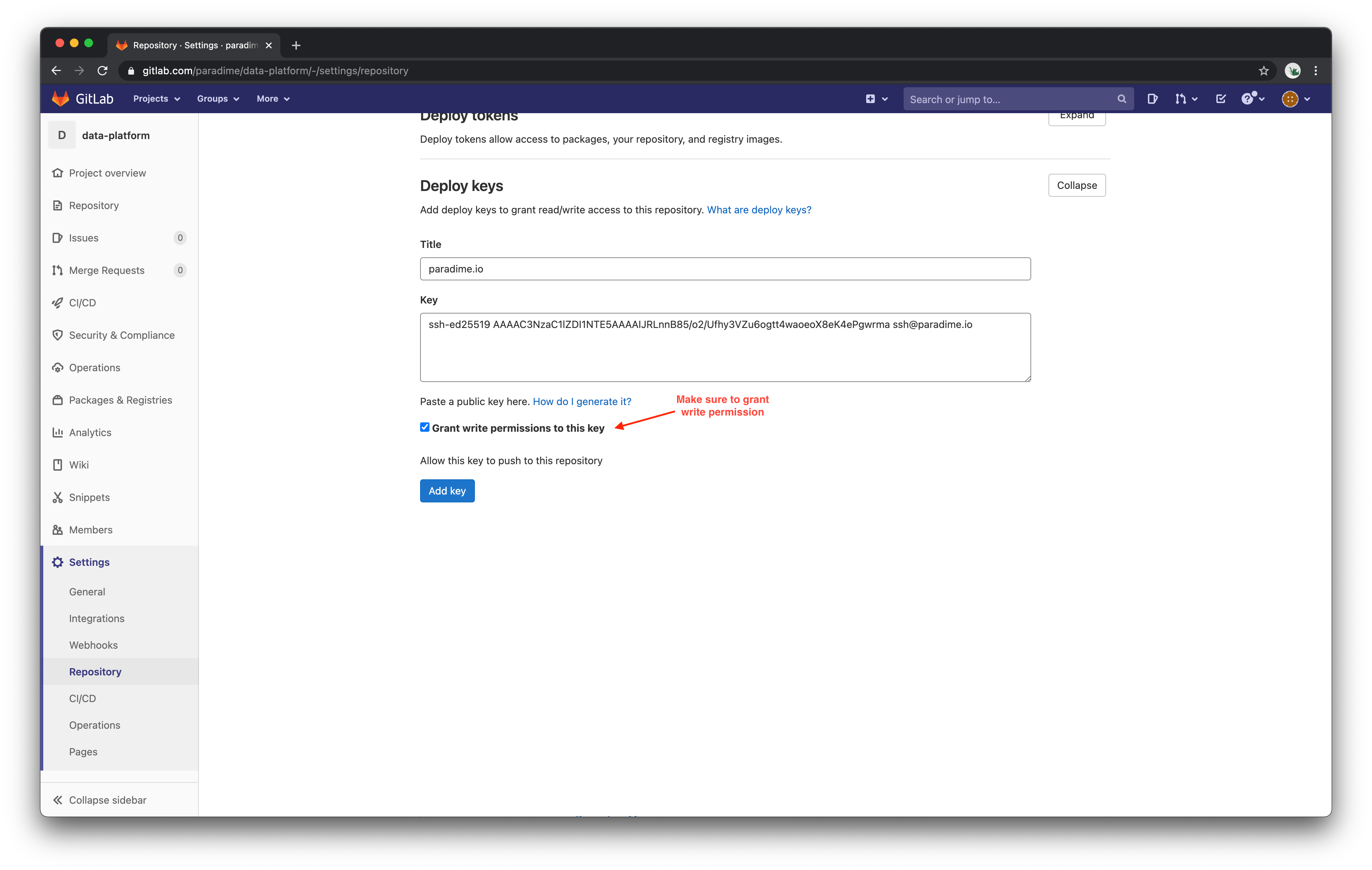
3. Expand the **Deploy keys** section and paste in the deploy key generated by Paradime.
4. Check **Grant write permissions**, then save the key.
After saving this SSH key, Paradime can read and write files in your GitLab repository.
 For more detail, see GitLab's guide on [deploy keys](https://docs.gitlab.com/ee/user/project/deploy_keys/).
## Related topics
- [Continuous Deployment with GitLab Pipelines](/products/bolt/ci-cd/continuous-deployment/gitlab.md)
- [Column-Level Lineage Diff on GitLab](/products/bolt/ci-cd/lineage-diff/gitlab.md)
- [Turbo CI on GitLab merge requests](/products/bolt/ci-cd/turbo-ci/gitlab.md)
- [Git Repositories](/products/settings/git-repositories/index.md)
- [Continuous Deployment](/products/bolt/ci-cd/continuous-deployment/index.md)
For more detail, see GitLab's guide on [deploy keys](https://docs.gitlab.com/ee/user/project/deploy_keys/).
## Related topics
- [Continuous Deployment with GitLab Pipelines](/products/bolt/ci-cd/continuous-deployment/gitlab.md)
- [Column-Level Lineage Diff on GitLab](/products/bolt/ci-cd/lineage-diff/gitlab.md)
- [Turbo CI on GitLab merge requests](/products/bolt/ci-cd/turbo-ci/gitlab.md)
- [Git Repositories](/products/settings/git-repositories/index.md)
- [Continuous Deployment](/products/bolt/ci-cd/continuous-deployment/index.md)