> ## Documentation Index
> Fetch the complete documentation index at: https://docs.paradime.io/llms.txt
> Use this file to discover all available pages before exploring further.
# Class Diagrams
### What are Class Diagrams?
Mermaid's class diagrams help you visualize data structures and their relationships in your projects. For analytics engineers, they're particularly useful for documenting data models, transformation logic, and system architectures.
### Creating Your First Class Diagram
1. **Launch DinoAI:** From Code IDE, access [DinoAI](/products/dino-ai/index) to start creating diagrams.
2. **Use a Simple Prompt:** Tell DinoAI what kind of Class Diagram you want to create. For example:
```text theme={"system"}
- "Create a mermaid class diagram showing my data model classes with attributes and methods"
- "Generate a mermaid class diagram for my dbt™ transformation logic with class relationships"
- "Build a mermaid class diagram showing my data pipeline components and their interactions"
```
3. **Get Your Diagram:** DinoAI will generate a complete `.mmd` file with proper Mermaid syntax.
4. **Preview Your Work:** Click the eye icon (👁️) to preview your diagram in real-time as you edit.
5. **Iterate and Refine:** Modify the generated `.mmd` file directly, or ask DinoAI to make specific changes.
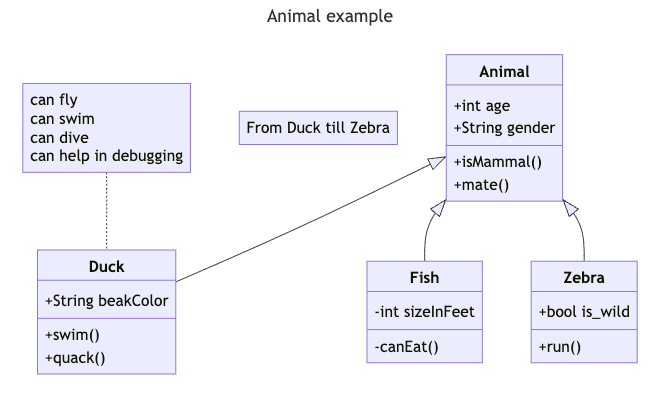
#### Example:
```mermaid theme={"system"}
---
title: Animal example
---
classDiagram
note "From Duck till Zebra"
Animal <|-- Duck
note for Duck "can fly\ncan swim\ncan dive\ncan help in debugging"
Animal <|-- Fish
Animal <|-- Zebra
Animal : +int age
Animal : +String gender
Animal: +isMammal()
Animal: +mate()
class Duck{
+String beakColor
+swim()
+quack()
}
class Fish{
-int sizeInFeet
-canEat()
}
class Zebra{
+bool is_wild
+run()
}
```
 **Reusable Class Diagrams prompts for you and your team**
You can create custom, standardized [.dinoprompts](/products/dino-ai/copilot/dino-prompts) for Mermaid's Class Diagrams that ensure consistency across your data team. See [step-by-step guide.](/integrations/mermaid-js/index#creating-mermaid-diagrams-with-.dinoprompts)
***
### Diagram Syntax Guide
#### Class Structure
A class diagram represents data objects and their relationships. Each class shows:
* The class name
* Its attributes (properties)
* Its methods (operations)
#### Basic Syntax
```mermaid theme={"system"}
classDiagram
class DataModel {
+tableName: string
+schema: string
+refreshData()
-validateSchema()
}
```
#### Access Levels
Show visibility with these symbols:
* `+` : Public access
* `-` : Private access
* `#` : Protected access
* `~` : Internal access
#### Connections
Show relationships between classes:
```mermaid theme={"system"}
classDiagram
FactTable --> DimensionTable
BaseModel <|-- CustomModel
```
Common relationships:
* Parent-child: `<|--`
* Contains: `*--`
* Uses: `-->`
* Optional: `o--`
### Data Team Examples
#### Data Models
```mermaid theme={"system"}
classDiagram
class FactSales {
+order_date: date
+customer_key: int
+product_key: int
+calculateRevenue()
}
class DimCustomer {
+customer_key: int
+customer_name: string
+getLTV()
}
FactSales --> DimCustomer
```
#### Transformation Pipeline
```mermaid theme={"system"}
classDiagram
class Staging {
+raw_data: table
+clean()
+validate()
}
class Warehouse {
+processed_data: table
+transform()
+loadData()
}
Staging --> Warehouse
```
### Best Practices
1. Name classes clearly and consistently
2. Show only relevant attributes and methods
3. Group related classes together
4. Add notes for complex relationships
5. Keep diagrams focused on one aspect of your system
**Additional Resources**
For more syntax options and advanced features, visit the [official Mermaid documentation](https://mermaid.js.org/syntax/classDiagram.html)
## Related topics
- [Mermaid](/integrations/mermaid-js/index.md)
- [State Diagrams](/integrations/mermaid-js/state-diagrams.md)
- [Zenuml](/integrations/mermaid-js/zenuml.md)
- [Architecture Diagrams](/integrations/mermaid-js/architecture-diagrams.md)
- [Timeline Diagrams](/integrations/mermaid-js/timeline-diagrams.md)
**Reusable Class Diagrams prompts for you and your team**
You can create custom, standardized [.dinoprompts](/products/dino-ai/copilot/dino-prompts) for Mermaid's Class Diagrams that ensure consistency across your data team. See [step-by-step guide.](/integrations/mermaid-js/index#creating-mermaid-diagrams-with-.dinoprompts)
***
### Diagram Syntax Guide
#### Class Structure
A class diagram represents data objects and their relationships. Each class shows:
* The class name
* Its attributes (properties)
* Its methods (operations)
#### Basic Syntax
```mermaid theme={"system"}
classDiagram
class DataModel {
+tableName: string
+schema: string
+refreshData()
-validateSchema()
}
```
#### Access Levels
Show visibility with these symbols:
* `+` : Public access
* `-` : Private access
* `#` : Protected access
* `~` : Internal access
#### Connections
Show relationships between classes:
```mermaid theme={"system"}
classDiagram
FactTable --> DimensionTable
BaseModel <|-- CustomModel
```
Common relationships:
* Parent-child: `<|--`
* Contains: `*--`
* Uses: `-->`
* Optional: `o--`
### Data Team Examples
#### Data Models
```mermaid theme={"system"}
classDiagram
class FactSales {
+order_date: date
+customer_key: int
+product_key: int
+calculateRevenue()
}
class DimCustomer {
+customer_key: int
+customer_name: string
+getLTV()
}
FactSales --> DimCustomer
```
#### Transformation Pipeline
```mermaid theme={"system"}
classDiagram
class Staging {
+raw_data: table
+clean()
+validate()
}
class Warehouse {
+processed_data: table
+transform()
+loadData()
}
Staging --> Warehouse
```
### Best Practices
1. Name classes clearly and consistently
2. Show only relevant attributes and methods
3. Group related classes together
4. Add notes for complex relationships
5. Keep diagrams focused on one aspect of your system
**Additional Resources**
For more syntax options and advanced features, visit the [official Mermaid documentation](https://mermaid.js.org/syntax/classDiagram.html)
## Related topics
- [Mermaid](/integrations/mermaid-js/index.md)
- [State Diagrams](/integrations/mermaid-js/state-diagrams.md)
- [Zenuml](/integrations/mermaid-js/zenuml.md)
- [Architecture Diagrams](/integrations/mermaid-js/architecture-diagrams.md)
- [Timeline Diagrams](/integrations/mermaid-js/timeline-diagrams.md)