> ## Documentation Index
> Fetch the complete documentation index at: https://docs.paradime.io/llms.txt
> Use this file to discover all available pages before exploring further.
# PagerDuty
Connect PagerDuty to Paradime to receive real-time alerts for your Bolt Pipelines.
**Prerequisites**
Before connecting PagerDuty to Paradime, make sure you have:
* Admin or manager permissions in PagerDuty
* Access to create API Access Key
### Generate an API Key in PagerDuty
1. Log in to your PagerDuty account and navigate to **Integrations → API Access Keys**.
2. Click on **Generate API Keys.**
3. Copy the generated **API Key**. You will need this to complete the setup in Paradime.
**Important:** Store the integration key securely. You will need it to configure the Paradime integration.
### Connect PagerDuty to Paradime
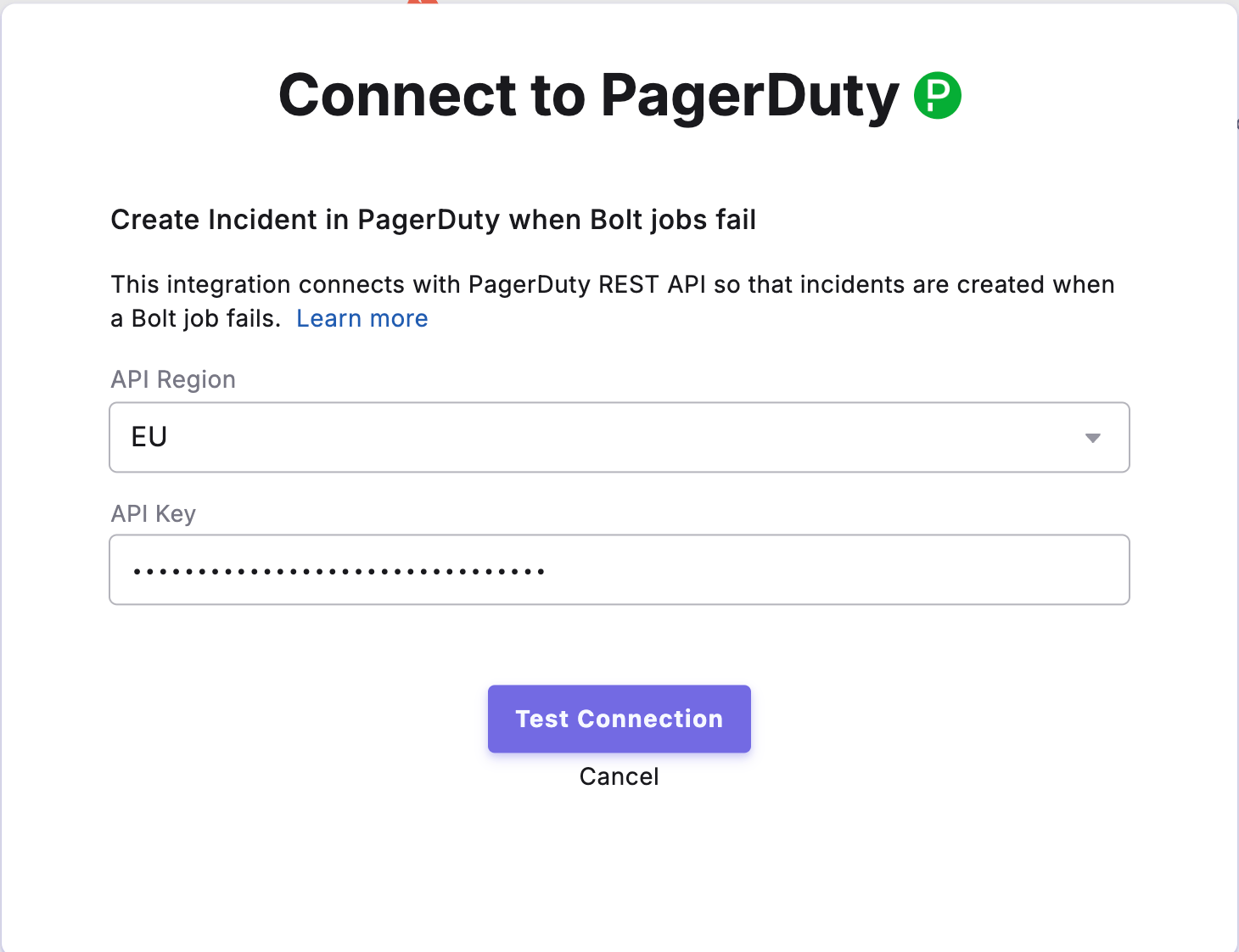
1. In Paradime, navigate to **Settings → Integrations → PagerDuty.**
2. Select the API region where your PagerDuty account is located
3. Paste the PagerDuty integration key into the field provided.
4. Click **Connect** to establish the connection.
Once connected, Paradime will send alerts to your configured PagerDuty service whenever pipeline or task failures occur.
 ### Enable PagerDuty for Your Bolt Schedules
After enabling the integration, you can configure which Bolt Schedules should create incidents in PagerDuty when they fail.
To configure incident creation:
1. Navigate to **Bolt** > **Schedules** in the Paradime interface.
2. Select the schedule you want to monitor.
3. Open the [**Integration Settings**](/products/bolt/creating-schedules/trigger-integrations/trigger-pagerduty-alarms) for that schedule.
4. Enable **PagerDuty Incident Creation** to automatically create incidents in PagerDuty when the schedule fails.
Once enabled, any failures in the configured Bolt Schedules will automatically trigger incident creation in PagerDuty, allowing your team to respond quickly to data pipeline issues.
### PagerDuty Integration Capabilities
Paradime uses the PagerDuty Events API v2 to send real-time alerts for [Bolt Schedules](/products/bolt/index).
This integration enables you to:
* Receive immediate notifications when pipelines fail
* Automatically create incidents in PagerDuty for orchestration errors
* Leverage PagerDuty's on-call schedules and escalation policies
* Track and respond to data pipeline issues through your existing incident management workflow
## Related topics
- [Trigger PagerDuty Alarms](/products/bolt/creating-schedules/trigger-integrations/trigger-pagerduty-alarms.md)
- [Create PagerDuty Incident](/products/bolt/creating-schedules/templates/incident-templates/create-pagerduty-incident.md)
- [7. Trigger Integrations](/products/bolt/creating-schedules/trigger-integrations/index.md)
- [Incident Templates](/products/bolt/creating-schedules/templates/incident-templates/index.md)
- [Webhooks](/developers/webhooks/index.md)
### Enable PagerDuty for Your Bolt Schedules
After enabling the integration, you can configure which Bolt Schedules should create incidents in PagerDuty when they fail.
To configure incident creation:
1. Navigate to **Bolt** > **Schedules** in the Paradime interface.
2. Select the schedule you want to monitor.
3. Open the [**Integration Settings**](/products/bolt/creating-schedules/trigger-integrations/trigger-pagerduty-alarms) for that schedule.
4. Enable **PagerDuty Incident Creation** to automatically create incidents in PagerDuty when the schedule fails.
Once enabled, any failures in the configured Bolt Schedules will automatically trigger incident creation in PagerDuty, allowing your team to respond quickly to data pipeline issues.
### PagerDuty Integration Capabilities
Paradime uses the PagerDuty Events API v2 to send real-time alerts for [Bolt Schedules](/products/bolt/index).
This integration enables you to:
* Receive immediate notifications when pipelines fail
* Automatically create incidents in PagerDuty for orchestration errors
* Leverage PagerDuty's on-call schedules and escalation policies
* Track and respond to data pipeline issues through your existing incident management workflow
## Related topics
- [Trigger PagerDuty Alarms](/products/bolt/creating-schedules/trigger-integrations/trigger-pagerduty-alarms.md)
- [Create PagerDuty Incident](/products/bolt/creating-schedules/templates/incident-templates/create-pagerduty-incident.md)
- [7. Trigger Integrations](/products/bolt/creating-schedules/trigger-integrations/index.md)
- [Incident Templates](/products/bolt/creating-schedules/templates/incident-templates/index.md)
- [Webhooks](/developers/webhooks/index.md)