> ## Documentation Index
> Fetch the complete documentation index at: https://docs.paradime.io/llms.txt
> Use this file to discover all available pages before exploring further.
# Paradime Setup and Configuration
## **Overview**
Paradime comes pre-installed with pre-commits, making it easy to get started with code quality checks. You only need to configure the hooks you want to use, and Paradime handles the rest.
## **Getting Started**
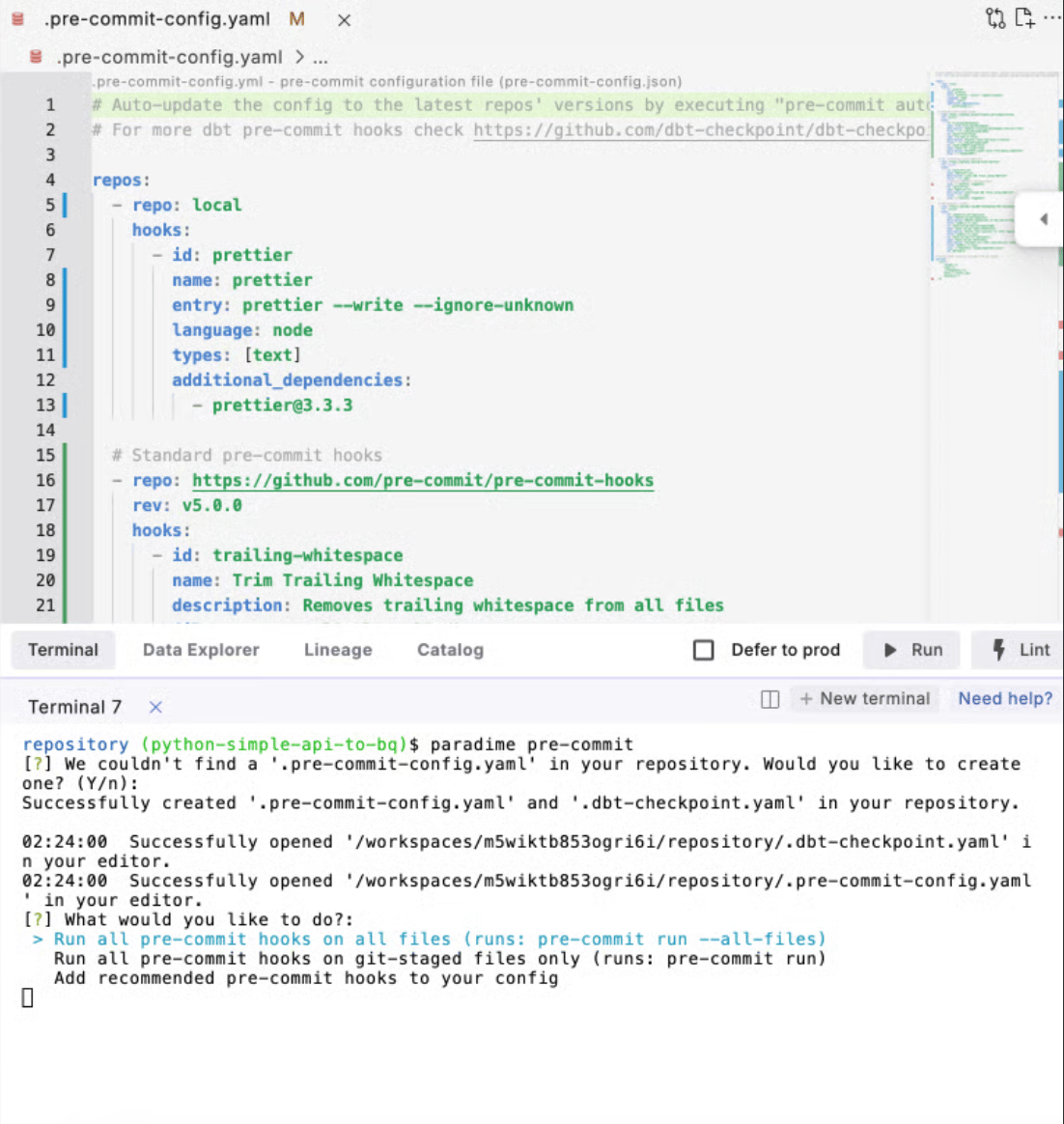
To get started, Run `paradime pre-commit` in the terminal
 ## **Initial Setup**
If your repository doesn't have existing pre-commit configurations, Paradime offers standard recommended hooks to get you started.
These include:
* [SQL formatting and linting using SQLFluff](/integrations/pre-commit/sqlfluff-hooks)
* [dbt models checks using dbt-checkpoint](/integrations/pre-commit/dbt-tm-checkpoint-hooks/index)
* [YAML validation using Prettier](/integrations/pre-commit/prettier-hooks)
* General code quality checks
**Example pre commit hooks template**
```yaml title=".pre-commit-config.yaml" theme={"system"}
# Auto-update the config to the latest repos' versions by executing "pre-commit autoupdate"
# For more dbt pre-commit hooks check https://docs.paradime.io/app-help/documentation/integrations/code-ide/pre-commit
repos:
# YAML formatting using Prettier
- repo: https://github.com/pre-commit/mirrors-prettier
rev: v3.1.0
hooks:
- id: prettier
types: [yaml] # Only run on YAML files
additional_dependencies:
- prettier@3.1.0
args: [--write]
# Standard pre-commit hooks
- repo: https://github.com/pre-commit/pre-commit-hooks
rev: v5.0.0
hooks:
- id: trailing-whitespace
name: Trim Trailing Whitespace
description: Removes trailing whitespace from all files
files: ^.*\.(sql|yml|yaml|md)$
- id: end-of-file-fixer
name: Fix End of Files
description: Ensures files end with a newline
files: ^.*\.(sql|yml|yaml|md)$
- id: check-added-large-files
name: Check for Large Files
description: Prevents giant files from being committed
args: ["--maxkb=500"]
# SQL formatting using SQLFluff
- repo: https://github.com/sqlfluff/sqlfluff
rev: 3.3.0
hooks:
- id: sqlfluff-lint
name: SQLFluff Lint
description: Lints SQL files using SQLFluff
files: ^.*\.sql$
additional_dependencies: ["sqlfluff-templater-dbt"]
args: ["--dialect", "bigquery", "--templater", "dbt"]
- id: sqlfluff-fix
name: SQLFluff Fix
description: Auto-fixes SQL files using SQLFluff
files: ^.*\.sql$
additional_dependencies: ["sqlfluff-templater-dbt"]
args: ["--dialect", "bigquery", "--templater", "dbt"]
# dbt™️ specific checks
- repo: https://github.com/dbt-checkpoint/dbt-checkpoint
rev: v2.0.6
hooks:
# Model checks
- id: check-model-has-description
name: Check Model Descriptions
description: Ensures models have descriptons
- id: check-model-has-tests
name: Check Model Tests
description: Ensures models have minimum test coverage
args: ["--test-cnt", "2"]
# Script checks
- id: remove-script-semicolon
name: Remove Script Semicolon
description: Remove semicolons at the end of the script
files: models/.*\.sql$
- id: check-script-has-no-table-name
name: Check Script Table References
description: Ensure only source() or ref() macros are used for table references
files: models/.*\.sql$
- id: check-script-ref-and-source
name: Check Script References
description: Validate all ref() and source() references exist
files: models/.*\.sql$
args: [--manifest, target/manifest.json]
- id: dbt-parse
# Define what files to exclude from all hooks
exclude: |
(?x)^(
target/.*|
logs/.*|
.*/snapshots/.*|
tests/.*_test\.sql|
analysis/.*
)$
```
## **Running Pre-commit**
You can run pre-commit checks in two ways:
1. **All Files**: Run checks on all files in your project
2. **Staged Files**: Run checks only on files staged for commit
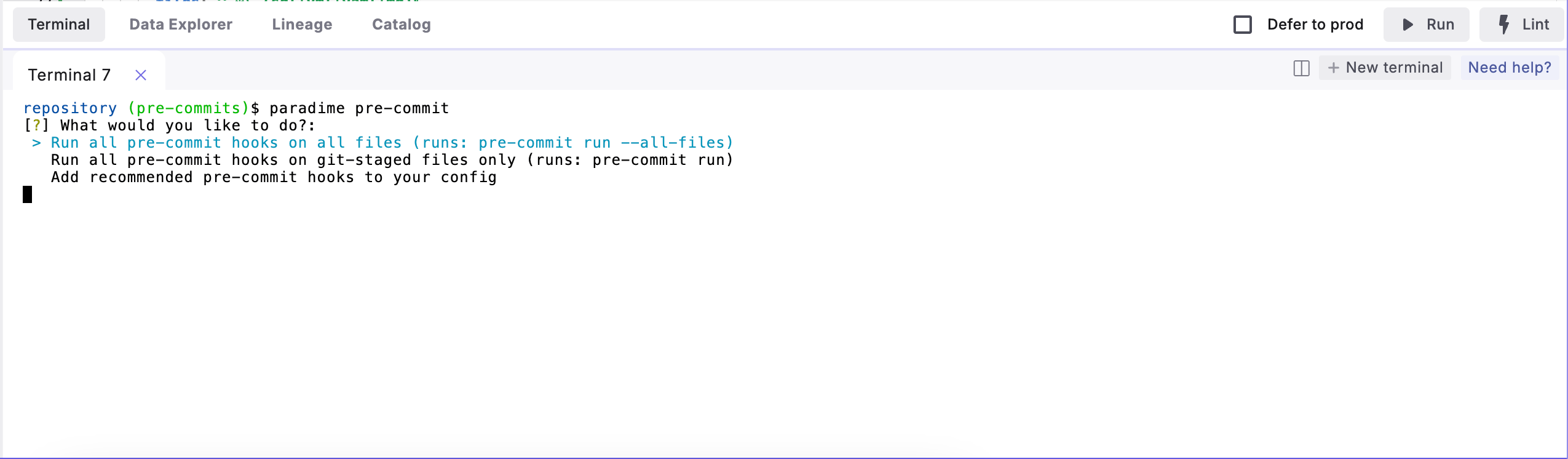
To run checks, use the same command and select the option from the menu:
```bash theme={"system"}
paradime pre-commit
```
## **Initial Setup**
If your repository doesn't have existing pre-commit configurations, Paradime offers standard recommended hooks to get you started.
These include:
* [SQL formatting and linting using SQLFluff](/integrations/pre-commit/sqlfluff-hooks)
* [dbt models checks using dbt-checkpoint](/integrations/pre-commit/dbt-tm-checkpoint-hooks/index)
* [YAML validation using Prettier](/integrations/pre-commit/prettier-hooks)
* General code quality checks
**Example pre commit hooks template**
```yaml title=".pre-commit-config.yaml" theme={"system"}
# Auto-update the config to the latest repos' versions by executing "pre-commit autoupdate"
# For more dbt pre-commit hooks check https://docs.paradime.io/app-help/documentation/integrations/code-ide/pre-commit
repos:
# YAML formatting using Prettier
- repo: https://github.com/pre-commit/mirrors-prettier
rev: v3.1.0
hooks:
- id: prettier
types: [yaml] # Only run on YAML files
additional_dependencies:
- prettier@3.1.0
args: [--write]
# Standard pre-commit hooks
- repo: https://github.com/pre-commit/pre-commit-hooks
rev: v5.0.0
hooks:
- id: trailing-whitespace
name: Trim Trailing Whitespace
description: Removes trailing whitespace from all files
files: ^.*\.(sql|yml|yaml|md)$
- id: end-of-file-fixer
name: Fix End of Files
description: Ensures files end with a newline
files: ^.*\.(sql|yml|yaml|md)$
- id: check-added-large-files
name: Check for Large Files
description: Prevents giant files from being committed
args: ["--maxkb=500"]
# SQL formatting using SQLFluff
- repo: https://github.com/sqlfluff/sqlfluff
rev: 3.3.0
hooks:
- id: sqlfluff-lint
name: SQLFluff Lint
description: Lints SQL files using SQLFluff
files: ^.*\.sql$
additional_dependencies: ["sqlfluff-templater-dbt"]
args: ["--dialect", "bigquery", "--templater", "dbt"]
- id: sqlfluff-fix
name: SQLFluff Fix
description: Auto-fixes SQL files using SQLFluff
files: ^.*\.sql$
additional_dependencies: ["sqlfluff-templater-dbt"]
args: ["--dialect", "bigquery", "--templater", "dbt"]
# dbt™️ specific checks
- repo: https://github.com/dbt-checkpoint/dbt-checkpoint
rev: v2.0.6
hooks:
# Model checks
- id: check-model-has-description
name: Check Model Descriptions
description: Ensures models have descriptons
- id: check-model-has-tests
name: Check Model Tests
description: Ensures models have minimum test coverage
args: ["--test-cnt", "2"]
# Script checks
- id: remove-script-semicolon
name: Remove Script Semicolon
description: Remove semicolons at the end of the script
files: models/.*\.sql$
- id: check-script-has-no-table-name
name: Check Script Table References
description: Ensure only source() or ref() macros are used for table references
files: models/.*\.sql$
- id: check-script-ref-and-source
name: Check Script References
description: Validate all ref() and source() references exist
files: models/.*\.sql$
args: [--manifest, target/manifest.json]
- id: dbt-parse
# Define what files to exclude from all hooks
exclude: |
(?x)^(
target/.*|
logs/.*|
.*/snapshots/.*|
tests/.*_test\.sql|
analysis/.*
)$
```
## **Running Pre-commit**
You can run pre-commit checks in two ways:
1. **All Files**: Run checks on all files in your project
2. **Staged Files**: Run checks only on files staged for commit
To run checks, use the same command and select the option from the menu:
```bash theme={"system"}
paradime pre-commit
```
 ## **First-Time Installation**
Note: When running pre-commits for the first time, Paradime will install all necessary hooks. This initial setup might take a minute to complete as it downloads and configures the required components.
**Automatic Pre-commit Checks**
To enable automatic pre-commit checks when creating commits via terminal, run:
```bash theme={"system"}
pre-commit install
```
**Important:** This is recommended only if you use git in the terminal to create commits. For commits made through Git Lite or Git Advanced panel, hook errors/warnings are not currently displayed.
To disable automatic pre-commit checks when creating commits via terminal, run:
```bash theme={"system"}
pre-commit uninstall
```
**Best Practices**
1. Start with Paradime's recommended hooks
2. Gradually customize configurations as needed
3. Run checks manually before committing large changes
4. Keep hook configurations in version control
**Common Workflows**
1. **Manual Check Before Commit**
```bash theme={"system"}
paradime pre-commit
# Review and fix any issues
git commit -m "Your message"
```
2. **Checking Specific Files**
```bash theme={"system"}
git add your_files
paradime pre-commit
```
3. **Updating Hook Configurations**
* Modify `.pre-commit-config.yaml`
* Auto-update the config to the latest repos' versions by executing `pre-commit autoupdate`
* Run `paradime pre-commit` to apply changes
Remember: Paradime's pre-commit integration makes it easy to maintain code quality without complex setup or configuration steps.
## Related topics
- [Setup](/products/dino-ai/slack-agent/setup.md)
- [PII Anonymization with dbt™ Mesh Setup](/guides/pii-anonymization-with-dbt-tm-mesh-setup.md)
- [Snowflake PrivateLink](/products/settings/connections/connection-security/aws-privatelink/snowflake-privatelink.md)
- [Fivetran CLI](/developers/paradime-cli/fivetran-cli.md)
- [Paradime Docs Tool](/products/dino-ai/tools-and-features/paradime-docs-tool.md)
## **First-Time Installation**
Note: When running pre-commits for the first time, Paradime will install all necessary hooks. This initial setup might take a minute to complete as it downloads and configures the required components.
**Automatic Pre-commit Checks**
To enable automatic pre-commit checks when creating commits via terminal, run:
```bash theme={"system"}
pre-commit install
```
**Important:** This is recommended only if you use git in the terminal to create commits. For commits made through Git Lite or Git Advanced panel, hook errors/warnings are not currently displayed.
To disable automatic pre-commit checks when creating commits via terminal, run:
```bash theme={"system"}
pre-commit uninstall
```
**Best Practices**
1. Start with Paradime's recommended hooks
2. Gradually customize configurations as needed
3. Run checks manually before committing large changes
4. Keep hook configurations in version control
**Common Workflows**
1. **Manual Check Before Commit**
```bash theme={"system"}
paradime pre-commit
# Review and fix any issues
git commit -m "Your message"
```
2. **Checking Specific Files**
```bash theme={"system"}
git add your_files
paradime pre-commit
```
3. **Updating Hook Configurations**
* Modify `.pre-commit-config.yaml`
* Auto-update the config to the latest repos' versions by executing `pre-commit autoupdate`
* Run `paradime pre-commit` to apply changes
Remember: Paradime's pre-commit integration makes it easy to maintain code quality without complex setup or configuration steps.
## Related topics
- [Setup](/products/dino-ai/slack-agent/setup.md)
- [PII Anonymization with dbt™ Mesh Setup](/guides/pii-anonymization-with-dbt-tm-mesh-setup.md)
- [Snowflake PrivateLink](/products/settings/connections/connection-security/aws-privatelink/snowflake-privatelink.md)
- [Fivetran CLI](/developers/paradime-cli/fivetran-cli.md)
- [Paradime Docs Tool](/products/dino-ai/tools-and-features/paradime-docs-tool.md)