> ## Documentation Index
> Fetch the complete documentation index at: https://docs.paradime.io/llms.txt
> Use this file to discover all available pages before exploring further.
# Rainbow CSV
export const Arcade = ({src, title}) =>
;
Rainbow CSV is an extension designed to enhance CSV file readability and management. By providing color-coded column separation and various functionalities like autocompletion, delimiter detection, and query execution, this extension significantly improves data handling efficiency.
## Use cases
* **Data Exploration**: Quickly scan and understand the structure of large CSV files.
* **Data Quality & Cleaning**: Easily spot inconsistencies and efficiently edit columns using built-in functions.
* **dbt Development**: Enhance your ability to work with CSV sources and outputs in Paradime projects.
* **Collaborative Work**: Improve readability of shared CSV files among team members.
## Tutorial
Access All Rainbow CSV features via the Command Panel in the Code IDE:
* Mac: ⌘+Shift+P
* Windows: Ctrl+Shift+P
## Key Features
These functionalities, when used within Paradime, can significantly streamline your data preparation and analysis tasks, making your dbt development process more efficient and error-free.
| Feature | Description | Usecase | Where to Find it |
| ---------------------------- | -------------------------------------------------------------------------------------- | ----------------------------------------------------------- | -------------------------------- |
| **Set Header Line** | Designates the current line as the header | Improves column identification while scrolling | Command Panel |
| **Align CSV Columns** | Visually aligns columns without modifying the original file | Enhances readability, making it easier to analyze data | Command Panel or Status bar (UI) |
| **Set Rainbow Separator** | Allows selection of predefined separators (comma, tab, semicolon, pipe) or custom ones | Adapts to various CSV formats, improving column distinction | Command Panel |
| **Edit Column Before/After** | Enables multi-cursor column editing | Facilitates efficient bulk edits in specific columns | Command Panel |
| **CSVLint** | Automatically checks for consistency in quotes usage and field count | Helps maintain data integrity and spot formatting errors | Status Bar (UI) |
***
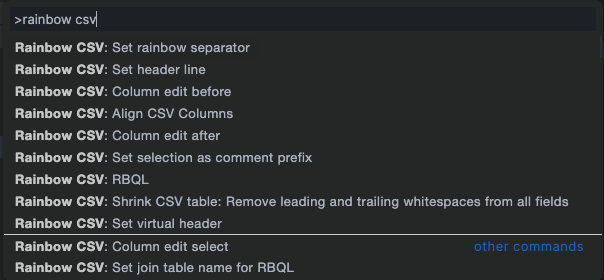
Discover all Rainbow CSV features via the command panel:
 ## Related topics
- [Working with CSV Files](/guides/paradime-101/getting-started-with-the-paradime-ide/utilizing-advanced-developer-features/working-with-csv-files.md)
- [Managing Seeds](/guides/dbt-fundamentals/configuring-your-dbt-project/managing-seeds.md)
- [Utilizing Advanced Developer Features](/guides/paradime-101/getting-started-with-the-paradime-ide/utilizing-advanced-developer-features/index.md)
- [Bulk CSV Upload](/products/settings/environment-variables/bulk-csv-upload.md)
- [Bolt Schedules Environment Variables](/products/settings/environment-variables/bolt-schedule-env-variables.md)
## Related topics
- [Working with CSV Files](/guides/paradime-101/getting-started-with-the-paradime-ide/utilizing-advanced-developer-features/working-with-csv-files.md)
- [Managing Seeds](/guides/dbt-fundamentals/configuring-your-dbt-project/managing-seeds.md)
- [Utilizing Advanced Developer Features](/guides/paradime-101/getting-started-with-the-paradime-ide/utilizing-advanced-developer-features/index.md)
- [Bulk CSV Upload](/products/settings/environment-variables/bulk-csv-upload.md)
- [Bolt Schedules Environment Variables](/products/settings/environment-variables/bolt-schedule-env-variables.md)