> ## Documentation Index
> Fetch the complete documentation index at: https://docs.paradime.io/llms.txt
> Use this file to discover all available pages before exploring further.
# SQLFluff
export const Arcade = ({src, title}) =>
;
Paradime provides native integration with SQLFluff, enabling automatic linting and formatting of SQL files in your dbt™ project directly from the IDE. This integration helps maintain consistent code style and catch potential SQL issues early, with built-in support for dbt™ and Jinja templating.
### Integration Features
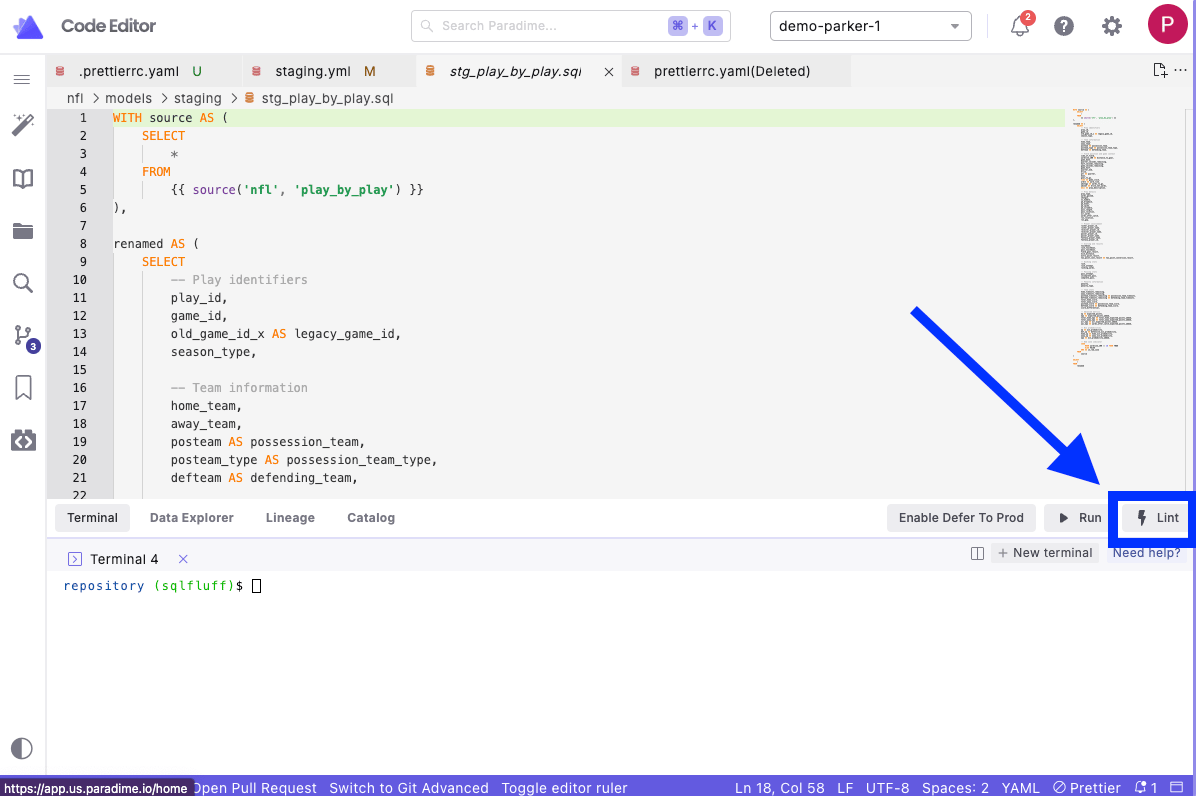
* One-click SQL linting through the Lint button
* Built-in dbt™ templating support
* Native IDE integration
* Customizable linting rules
* Auto-fix capabilities for common issues
***
### Using the Integration
1. Open a `.sql` file in your editor
2. Click the **Lint** button in the [Command Panel](/products/code-ide/command-panel/index)
3. Review the changes made in [Git Lite](/products/code-ide/left-panel/git-lite)
* Syntax errors
* Style violations
* Formatting suggestions
4. If satisfied with Lint updates, [Commit and Push](/products/code-ide/left-panel/git-lite#commit-and-push-your-changes) your changes to your remote branch.
 ### Configuration
Configure SQLFluff by creating a `.sqlfluff` file in your dbt™ project root directory:
1. Create a `.sqlfluff` file in your dbt™ project root directory (same location as your `dbt_project.yml`)
2. Add your configuration:
```yaml title=".sqlfluff example file" theme={"system"}
[sqlfluff]
# Supported dialects https://docs.sqlfluff.com/en/stable/dialects.html
dialect = snowflake
templater = dbt
# Comma separated list of rules to exclude, or None
# See https://docs.sqlfluff.com/en/stable/configuration.html#enabling-and-disabling-rules
# AM04 (ambiguous.column_count) and ST06 (structure.column_order) are
# two of the more controversial rules included to illustrate usage.
exclude_rules = ambiguous.column_count, structure.column_order
# The standard max_line_length is 80 in line with the convention of
# other tools and several style guides. Many projects however prefer
# something a little longer.
# Set to zero or negative to disable checks.
max_line_length = 120
# If using the dbt templater, we recommend setting the project dir.
[sqlfluff:templater:dbt]
project_dir = ./
[sqlfluff:indentation]
# While implicit indents are not enabled by default. Many of the
# SQLFluff maintainers do use them in their projects.
allow_implicit_indents = true
# The default configuration for aliasing rules is "consistent"
# which will auto-detect the setting from the rest of the file. This
# is less desirable in a new project and you may find this (slightly
# more strict) setting more useful.
[sqlfluff:rules:aliasing.table]
aliasing = explicit
[sqlfluff:rules:aliasing.column]
aliasing = explicit
[sqlfluff:rules:aliasing.length]
min_alias_length = 3
# The default configuration for capitalization rules is "consistent"
# which will auto-detect the setting from the rest of the file. This
# is less desirable in a new project and you may find this (slightly
# more strict) setting more useful.
# Typically we find users rely on syntax highlighting rather than
# capitalization to distinguish between keywords and identifiers.
# Clearly, if your organization has already settled on uppercase
# formatting for any of these syntax elements then set them to "upper".
# See https://stackoverflow.com/questions/608196/why-should-i-capitalize-my-sql-keywords-is-there-a-good-reason
[sqlfluff:rules:capitalisation.keywords]
capitalisation_policy = upper
[sqlfluff:rules:capitalisation.identifiers]
capitalisation_policy = lower
[sqlfluff:rules:capitalisation.functions]
extended_capitalisation_policy = lower
[sqlfluff:rules:capitalisation.literals]
capitalisation_policy = lower
[sqlfluff:rules:capitalisation.types]
extended_capitalisation_policy = lower
```
Visit [SQLfluff documentation](https://docs.sqlfluff.com/en/stable/configuration.html) for a complete list of configuration options.
Want to automate SQLfluff linting? Learn how to set up [SQLfluff pre-commit hooks](/integrations/pre-commit/sqlfluff-hooks) to automatically lint SQL files before each commit.
***
### Common Rules
SQLFluff enforces several key formatting rules:
* Consistent keyword capitalization
* Required table aliasing
* Maximum line length
* Proper indentation
* Column ordering
### dbt™ Support
The integration automatically handles dbt™-specific features:
* Jinja templating
* ref() and source() functions
* dbt™ macros
* Project configurations
## Related topics
- [Enforce SQL and YAML Best Practices](/guides/paradime-101/getting-started-with-the-paradime-ide/utilizing-advanced-developer-features/enforce-sql-and-yaml-best-practices.md)
- [Lint](/products/code-ide/command-panel/code-quality.md)
- [SQLFluff Hooks](/integrations/pre-commit/sqlfluff-hooks.md)
- [Paradime Setup and Configuration](/integrations/pre-commit/paradime-setup-and-configuration.md)
- [bolt-ci-healer](/guides/programmable-agents/bolt-ci-healer.md)
### Configuration
Configure SQLFluff by creating a `.sqlfluff` file in your dbt™ project root directory:
1. Create a `.sqlfluff` file in your dbt™ project root directory (same location as your `dbt_project.yml`)
2. Add your configuration:
```yaml title=".sqlfluff example file" theme={"system"}
[sqlfluff]
# Supported dialects https://docs.sqlfluff.com/en/stable/dialects.html
dialect = snowflake
templater = dbt
# Comma separated list of rules to exclude, or None
# See https://docs.sqlfluff.com/en/stable/configuration.html#enabling-and-disabling-rules
# AM04 (ambiguous.column_count) and ST06 (structure.column_order) are
# two of the more controversial rules included to illustrate usage.
exclude_rules = ambiguous.column_count, structure.column_order
# The standard max_line_length is 80 in line with the convention of
# other tools and several style guides. Many projects however prefer
# something a little longer.
# Set to zero or negative to disable checks.
max_line_length = 120
# If using the dbt templater, we recommend setting the project dir.
[sqlfluff:templater:dbt]
project_dir = ./
[sqlfluff:indentation]
# While implicit indents are not enabled by default. Many of the
# SQLFluff maintainers do use them in their projects.
allow_implicit_indents = true
# The default configuration for aliasing rules is "consistent"
# which will auto-detect the setting from the rest of the file. This
# is less desirable in a new project and you may find this (slightly
# more strict) setting more useful.
[sqlfluff:rules:aliasing.table]
aliasing = explicit
[sqlfluff:rules:aliasing.column]
aliasing = explicit
[sqlfluff:rules:aliasing.length]
min_alias_length = 3
# The default configuration for capitalization rules is "consistent"
# which will auto-detect the setting from the rest of the file. This
# is less desirable in a new project and you may find this (slightly
# more strict) setting more useful.
# Typically we find users rely on syntax highlighting rather than
# capitalization to distinguish between keywords and identifiers.
# Clearly, if your organization has already settled on uppercase
# formatting for any of these syntax elements then set them to "upper".
# See https://stackoverflow.com/questions/608196/why-should-i-capitalize-my-sql-keywords-is-there-a-good-reason
[sqlfluff:rules:capitalisation.keywords]
capitalisation_policy = upper
[sqlfluff:rules:capitalisation.identifiers]
capitalisation_policy = lower
[sqlfluff:rules:capitalisation.functions]
extended_capitalisation_policy = lower
[sqlfluff:rules:capitalisation.literals]
capitalisation_policy = lower
[sqlfluff:rules:capitalisation.types]
extended_capitalisation_policy = lower
```
Visit [SQLfluff documentation](https://docs.sqlfluff.com/en/stable/configuration.html) for a complete list of configuration options.
Want to automate SQLfluff linting? Learn how to set up [SQLfluff pre-commit hooks](/integrations/pre-commit/sqlfluff-hooks) to automatically lint SQL files before each commit.
***
### Common Rules
SQLFluff enforces several key formatting rules:
* Consistent keyword capitalization
* Required table aliasing
* Maximum line length
* Proper indentation
* Column ordering
### dbt™ Support
The integration automatically handles dbt™-specific features:
* Jinja templating
* ref() and source() functions
* dbt™ macros
* Project configurations
## Related topics
- [Enforce SQL and YAML Best Practices](/guides/paradime-101/getting-started-with-the-paradime-ide/utilizing-advanced-developer-features/enforce-sql-and-yaml-best-practices.md)
- [Lint](/products/code-ide/command-panel/code-quality.md)
- [SQLFluff Hooks](/integrations/pre-commit/sqlfluff-hooks.md)
- [Paradime Setup and Configuration](/integrations/pre-commit/paradime-setup-and-configuration.md)
- [bolt-ci-healer](/guides/programmable-agents/bolt-ci-healer.md)