> ## Documentation Index
> Fetch the complete documentation index at: https://docs.paradime.io/llms.txt
> Use this file to discover all available pages before exploring further.
# Run Bolt schedules in order on pull requests and merges
> Chain Turbo CI and on-merge Bolt schedules to run in order on pull requests and merges, stop at the first failure, and queue merges. GitHub only.
Without links, every Turbo CI schedule starts at the same time when a pull request opens, and every on-merge schedule starts at the same time when it merges. A **chain** runs them in the order you choose instead: each step starts only after the step before it finishes with the result you picked, so a failure stops the rest of the chain. You can build a chain in the schedule form or in your schedule YAML.
Chains work with the [Paradime GitHub app](/integrations/github/github-app) only.
## Prerequisites
1. [Install the Paradime GitHub app](/integrations/github/github-app) and authorize access to your dbt™ repository.
2. For pull request chains, complete the [Turbo CI setup](/products/bolt/ci-cd/turbo-ci/index): the CI environment, the custom schema macro, and a production schedule to defer to.
3. For merge chains, configure a [production environment](/products/settings/connections/scheduler-environment/index).
## Define a chain
Chains use the schedule settings you already know. You link schedules together, and nothing else changes:
* **Pull request chain:** a set of [Turbo CI](/products/bolt/ci-cd/turbo-ci/index) schedules. A Turbo CI schedule that doesn't run after another Turbo CI schedule is a first step: it starts when a pull request opens or gets a new commit. Every later step is a Turbo CI schedule that runs after the step before it.
* **Merge chain:** the first step is an [on-merge](/products/bolt/ci-cd/continuous-deployment/index) schedule. Every later step runs after the step before it. Later steps can be on-merge schedules or any other schedule in the same workspace.
* **Independent schedules:** schedules with no link between them run at the same time.
To reorder a chain or add a step, change which schedule each step runs after.
### In the schedule form
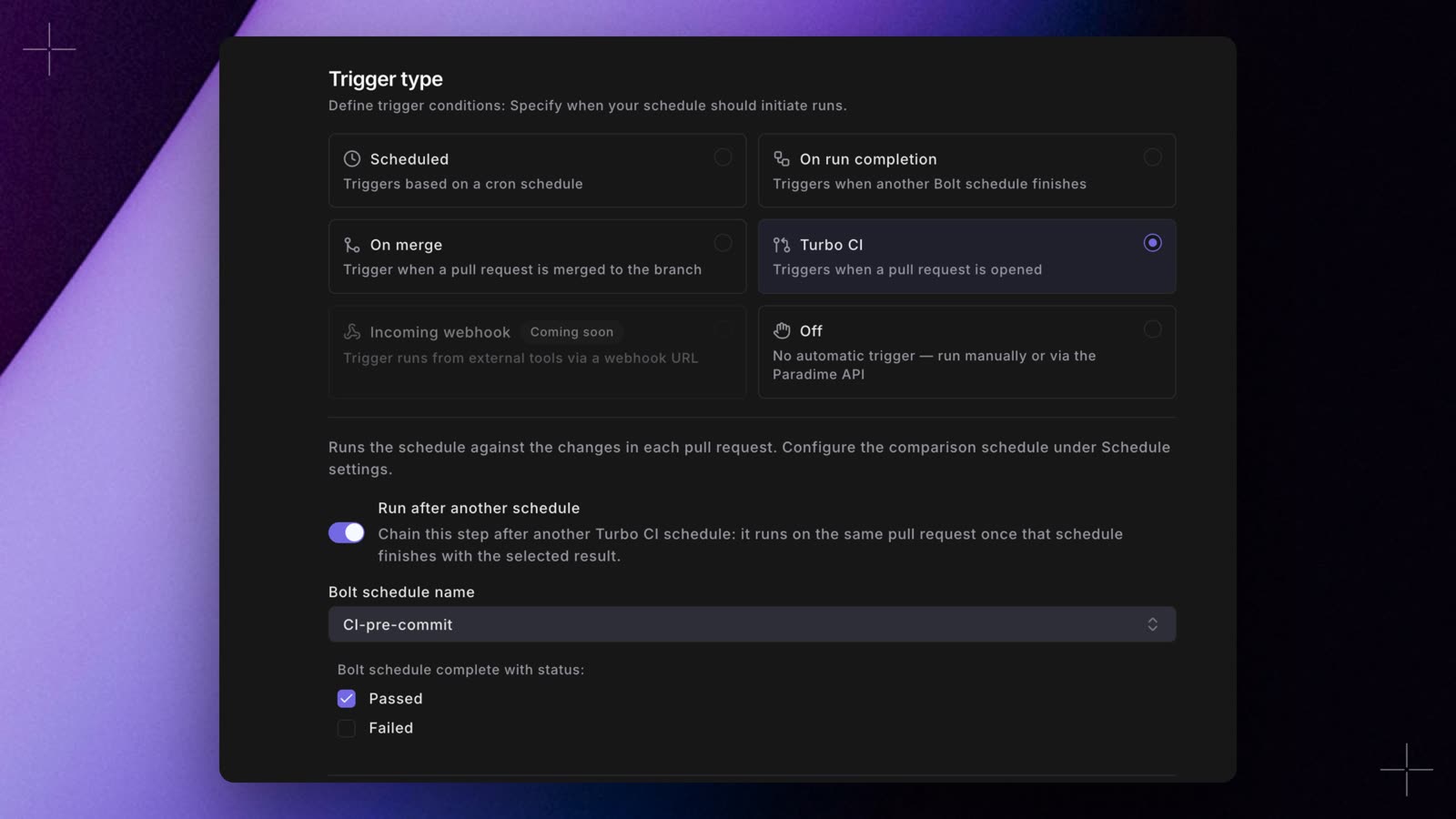 1. Open the schedule that should be a later step, and select the **Turbo CI** or **On merge** trigger.
2. Turn on **Run after another schedule**.
3. In **Bolt schedule name**, pick the step before this one. Only schedules in the current workspace are listed.
4. Under **Bolt schedule complete with status:**, pick **Passed**, **Failed**, or both.
5. Save the schedule.
A Turbo CI schedule saved in the form applies from the next pull request event.
### In YAML
Add `run_after` to each later step. `run_after` is a shorter way to write `schedule_trigger`, and existing `schedule_trigger` blocks keep working. Paradime reads chains from your deployed schedules, so a pull request that changes a chain takes effect once it merges and your schedules redeploy.
This `paradime_schedules.yml` has a nightly production build, a two-step pull request chain and a two-step merge chain. Replace the slugs with the ones `paradime schedule verify` generates, and the commands with your own.
```yaml paradime_schedules.yml theme={"system"}
schedules:
# Production baseline: pull request runs compare against it
- name: "Prod - nightly build"
slug: prod-nightly-a7c2e9
description: "Full production build"
owner_email: data-platform@acme.io
environment: production
git_branch: main
schedule: "0 4 * * *"
timezone: UTC
commands:
- dbt build
# Pull request chain, step 1: starts when a pull request into main opens or gets a new commit
- name: "PR 1 - build changed models"
slug: pr-build-b3d8f1
description: "Build and test changed models and everything downstream"
owner_email: data-platform@acme.io
environment: ci # your CI environment's slug
git_branch: main
schedule: "OFF"
commands:
- dbt build --select state:modified+
turbo_ci:
enabled: true
deferred_schedule_slug: prod-nightly-a7c2e9
successful_run_only: true
# Pull request chain, step 2: runs only if step 1 passed, in the same pull request schemas
- name: "PR 2 - validate dashboards"
slug: pr-dashboards-e2g6k8
description: "Check BI content still works with the changed models"
owner_email: data-platform@acme.io
environment: ci
git_branch: main
schedule: "OFF"
commands:
- lightdash validate
turbo_ci:
enabled: true
deferred_schedule_slug: prod-nightly-a7c2e9
successful_run_only: true
run_after:
schedule: pr-build-b3d8f1 # the step before this one
on: [passed] # the default
# Merge chain, step 1: starts when a pull request merges into main
- name: "Merge 1 - deploy changed models"
slug: merge-deploy-f4h8m2
description: "Deploy models changed since the last successful deploy"
owner_email: data-platform@acme.io
environment: production
git_branch: main
schedule: "OFF"
trigger_on_merge: true
concurrency: queue # optional: merges take turns, see Merge queue
commands:
- dbt build --select state:modified+
deferred_schedule:
enabled: true
deferred_schedule_slug: merge-deploy-f4h8m2
successful_run_only: true
# Merge chain, step 2: runs only if step 1 passed, on the same merge commit
- name: "Merge 2 - data quality monitoring"
slug: merge-monitor-g7j3n5
description: "Run Elementary monitors on the deployed models"
owner_email: data-platform@acme.io
environment: production
git_branch: main
schedule: "OFF"
commands:
- edr monitor
run_after:
schedule: merge-deploy-f4h8m2
```
See the [configuration reference](/products/bolt/creating-schedules/schedules-as-code/configuration-reference) for every schedule key.
To run a step when the step before it fails (for example, to notify a channel), set `on: [failed]` in its `run_after` (or `trigger_on: [failed]` in `schedule_trigger`), or pick **Failed** in the form.
## How a chain runs
### On a pull request
* Each pull request runs its own chain in its own temporary schemas (`paradime_turbo_ci_pr_` followed by the pull request number), so any number of pull requests can run at the same time.
* Every step runs on the pull request's latest commit. Later steps write to the same schemas, so they can build on what earlier steps created.
* A step starts only after the step before it finishes with a result you picked. When a step fails, the steps after it are skipped, and other running steps of that chain are cancelled. Schedules that aren't linked to that chain keep running.
* A suspended step is skipped.
* Pushing a new commit cancels the chain's runs for the previous commit and starts again from the first step.
* Closing the pull request, or converting it to a draft, cancels its runs. Reopening it, or marking it ready for review, starts a new chain. When it closes, Paradime deletes its temporary schemas as usual.
### On merge
* A merge chain runs once per merge. Steps on the branch that was merged into run on the merge commit, even if more commits land on the branch while the chain runs. A step whose schedule is on another branch runs that branch's latest commit.
* Each merge starts its own chain straight away, so two merges close together run at the same time. To make merges take turns, use a [merge queue](#merge-queue).
* A running merge chain is never cancelled, so a deploy is never stopped halfway.
* A failure stops that merge's chain. The next merge still runs, since it may contain the fix.
## Merge queue
If your merge jobs take long, a second merge can start deploying while the first is still running, even though it assumes the first is already in production. A merge queue makes merges run a schedule one at a time, in merge order. Every merge still runs.
1. Open the schedule that should be a later step, and select the **Turbo CI** or **On merge** trigger.
2. Turn on **Run after another schedule**.
3. In **Bolt schedule name**, pick the step before this one. Only schedules in the current workspace are listed.
4. Under **Bolt schedule complete with status:**, pick **Passed**, **Failed**, or both.
5. Save the schedule.
A Turbo CI schedule saved in the form applies from the next pull request event.
### In YAML
Add `run_after` to each later step. `run_after` is a shorter way to write `schedule_trigger`, and existing `schedule_trigger` blocks keep working. Paradime reads chains from your deployed schedules, so a pull request that changes a chain takes effect once it merges and your schedules redeploy.
This `paradime_schedules.yml` has a nightly production build, a two-step pull request chain and a two-step merge chain. Replace the slugs with the ones `paradime schedule verify` generates, and the commands with your own.
```yaml paradime_schedules.yml theme={"system"}
schedules:
# Production baseline: pull request runs compare against it
- name: "Prod - nightly build"
slug: prod-nightly-a7c2e9
description: "Full production build"
owner_email: data-platform@acme.io
environment: production
git_branch: main
schedule: "0 4 * * *"
timezone: UTC
commands:
- dbt build
# Pull request chain, step 1: starts when a pull request into main opens or gets a new commit
- name: "PR 1 - build changed models"
slug: pr-build-b3d8f1
description: "Build and test changed models and everything downstream"
owner_email: data-platform@acme.io
environment: ci # your CI environment's slug
git_branch: main
schedule: "OFF"
commands:
- dbt build --select state:modified+
turbo_ci:
enabled: true
deferred_schedule_slug: prod-nightly-a7c2e9
successful_run_only: true
# Pull request chain, step 2: runs only if step 1 passed, in the same pull request schemas
- name: "PR 2 - validate dashboards"
slug: pr-dashboards-e2g6k8
description: "Check BI content still works with the changed models"
owner_email: data-platform@acme.io
environment: ci
git_branch: main
schedule: "OFF"
commands:
- lightdash validate
turbo_ci:
enabled: true
deferred_schedule_slug: prod-nightly-a7c2e9
successful_run_only: true
run_after:
schedule: pr-build-b3d8f1 # the step before this one
on: [passed] # the default
# Merge chain, step 1: starts when a pull request merges into main
- name: "Merge 1 - deploy changed models"
slug: merge-deploy-f4h8m2
description: "Deploy models changed since the last successful deploy"
owner_email: data-platform@acme.io
environment: production
git_branch: main
schedule: "OFF"
trigger_on_merge: true
concurrency: queue # optional: merges take turns, see Merge queue
commands:
- dbt build --select state:modified+
deferred_schedule:
enabled: true
deferred_schedule_slug: merge-deploy-f4h8m2
successful_run_only: true
# Merge chain, step 2: runs only if step 1 passed, on the same merge commit
- name: "Merge 2 - data quality monitoring"
slug: merge-monitor-g7j3n5
description: "Run Elementary monitors on the deployed models"
owner_email: data-platform@acme.io
environment: production
git_branch: main
schedule: "OFF"
commands:
- edr monitor
run_after:
schedule: merge-deploy-f4h8m2
```
See the [configuration reference](/products/bolt/creating-schedules/schedules-as-code/configuration-reference) for every schedule key.
To run a step when the step before it fails (for example, to notify a channel), set `on: [failed]` in its `run_after` (or `trigger_on: [failed]` in `schedule_trigger`), or pick **Failed** in the form.
## How a chain runs
### On a pull request
* Each pull request runs its own chain in its own temporary schemas (`paradime_turbo_ci_pr_` followed by the pull request number), so any number of pull requests can run at the same time.
* Every step runs on the pull request's latest commit. Later steps write to the same schemas, so they can build on what earlier steps created.
* A step starts only after the step before it finishes with a result you picked. When a step fails, the steps after it are skipped, and other running steps of that chain are cancelled. Schedules that aren't linked to that chain keep running.
* A suspended step is skipped.
* Pushing a new commit cancels the chain's runs for the previous commit and starts again from the first step.
* Closing the pull request, or converting it to a draft, cancels its runs. Reopening it, or marking it ready for review, starts a new chain. When it closes, Paradime deletes its temporary schemas as usual.
### On merge
* A merge chain runs once per merge. Steps on the branch that was merged into run on the merge commit, even if more commits land on the branch while the chain runs. A step whose schedule is on another branch runs that branch's latest commit.
* Each merge starts its own chain straight away, so two merges close together run at the same time. To make merges take turns, use a [merge queue](#merge-queue).
* A running merge chain is never cancelled, so a deploy is never stopped halfway.
* A failure stops that merge's chain. The next merge still runs, since it may contain the fix.
## Merge queue
If your merge jobs take long, a second merge can start deploying while the first is still running, even though it assumes the first is already in production. A merge queue makes merges run a schedule one at a time, in merge order. Every merge still runs.
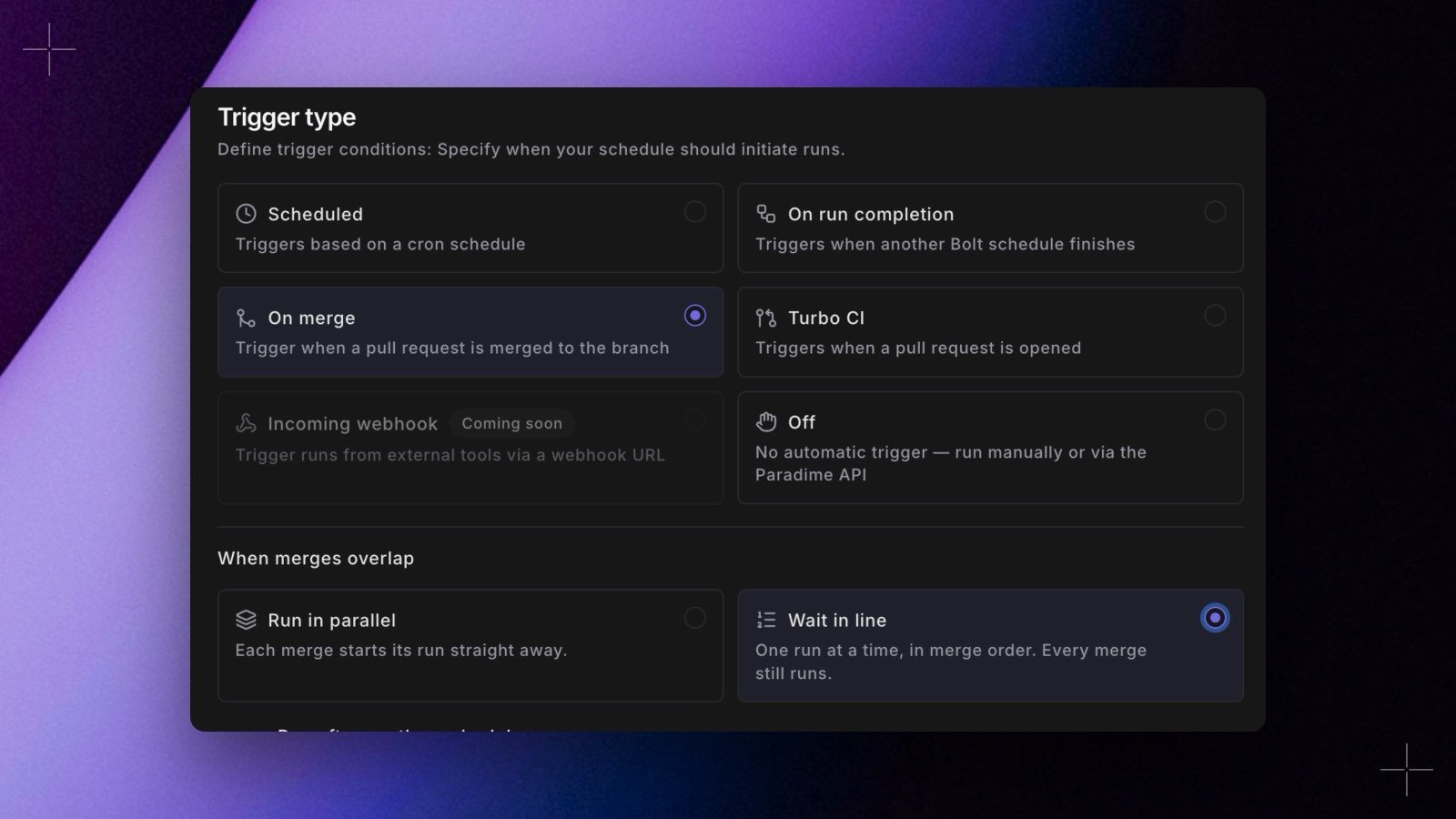 To turn it on, open the on-merge schedule, select the **On merge** trigger and, under **When merges overlap**, choose **Wait in line**. **Run in parallel** is the default. In YAML, set `concurrency: queue` next to `trigger_on_merge: true`.
* Set it on the first step of a merge chain. The steps after it run as part of each merge's chain, and the setting has no effect on them.
* `concurrency: queue` is allowed only on on-merge schedules.
* A merge that waits more than 24 hours stops with **Couldn't run: still waiting for the merge queue after 24 hours**.
The schedule's page shows a **Merge queue** card with the merge that is running and the merges waiting, next first, each with its pull request, commit and when it joined.
* **Remove** takes a merge out of the queue. Its steps are skipped. You need permission to run the schedule.
* **Run now** starts a waiting merge out of turn, so two merges build the schedule at the same time. You need permission to edit the schedule.
Both actions are recorded in the [audit log](/products/settings/configuration/audit-logs) as `merge_queue_removed` and `merge_queue_run_now`.
The Bolt merge queue orders Paradime's on-merge runs. It's separate from [GitHub's merge queue](/guides/working-with-git/github-merge-queue), which orders the merges themselves.
## What you see on GitHub
To turn it on, open the on-merge schedule, select the **On merge** trigger and, under **When merges overlap**, choose **Wait in line**. **Run in parallel** is the default. In YAML, set `concurrency: queue` next to `trigger_on_merge: true`.
* Set it on the first step of a merge chain. The steps after it run as part of each merge's chain, and the setting has no effect on them.
* `concurrency: queue` is allowed only on on-merge schedules.
* A merge that waits more than 24 hours stops with **Couldn't run: still waiting for the merge queue after 24 hours**.
The schedule's page shows a **Merge queue** card with the merge that is running and the merges waiting, next first, each with its pull request, commit and when it joined.
* **Remove** takes a merge out of the queue. Its steps are skipped. You need permission to run the schedule.
* **Run now** starts a waiting merge out of turn, so two merges build the schedule at the same time. You need permission to edit the schedule.
Both actions are recorded in the [audit log](/products/settings/configuration/audit-logs) as `merge_queue_removed` and `merge_queue_run_now`.
The Bolt merge queue orders Paradime's on-merge runs. It's separate from [GitHub's merge queue](/guides/working-with-git/github-merge-queue), which orders the merges themselves.
## What you see on GitHub
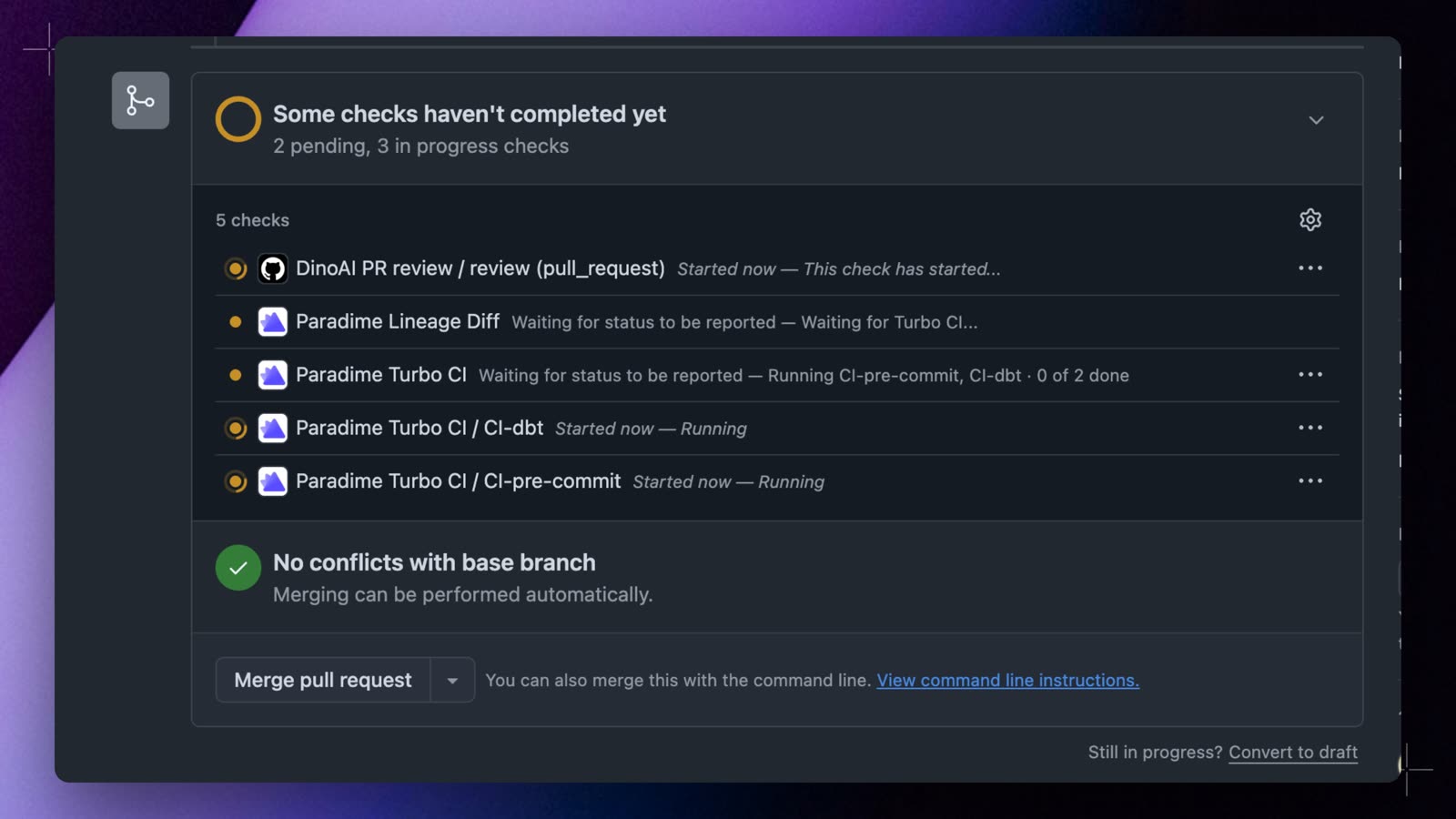 The **`Paradime Turbo CI`** check is the overall result of the pull request's Turbo CI runs. It stays pending until every step has finished, and fails if any step fails.
When a pull request's base branch has two or more Turbo CI schedules, each one also gets its own check, named `Paradime Turbo CI / `. A step shows as queued while it waits for the step before it, then running with a link to the run, and finally passed, failed, cancelled, or skipped. With a single Turbo CI schedule, `Paradime Turbo CI` stays the only check.
```text theme={"system"}
✗ Paradime Turbo CI 1 of 2 passed · failed: PR 2 - validate dashboards
✓ Paradime Turbo CI / PR 1 - build changed models Passed
✗ Paradime Turbo CI / PR 2 - validate dashboards Failed
```
[Lineage Diff](/products/bolt/ci-cd/lineage-diff/index) runs once per commit, from the first step that produces a dbt™ manifest.
After a merge, the pull request gets one **Paradime Merge Run Summary** comment that lists every step of the merge chain and updates as the chain runs.
In your branch protection rules, require only **`Paradime Turbo CI`**. Step names change when you edit a chain, and a required check that is never posted blocks the merge.
## Re-run or retry a step
### From GitHub
Select **Re-run** on a step's check in GitHub to run that step again, and the steps after it, on the same commit. The steps before it keep their results. Step checks, and so **Re-run**, appear when the pull request's base branch has two or more Turbo CI schedules.
* Re-running a step that was skipped because an earlier step failed re-runs the failed step first.
* Re-run works while the pull request is open, ready for review, and on the commit the check belongs to. A new push runs the whole chain again on its own.
* If the pull request's chain hasn't run for a day, Paradime no longer has its earlier results. Re-run still runs the step and the steps after it. The step's check says it ran without the steps before it, and `Paradime Turbo CI` keeps its earlier result.
* Re-run needs the GitHub app's checks permission. Without it, steps show as commit statuses, which GitHub can't re-run.
### From Paradime
The **`Paradime Turbo CI`** check is the overall result of the pull request's Turbo CI runs. It stays pending until every step has finished, and fails if any step fails.
When a pull request's base branch has two or more Turbo CI schedules, each one also gets its own check, named `Paradime Turbo CI / `. A step shows as queued while it waits for the step before it, then running with a link to the run, and finally passed, failed, cancelled, or skipped. With a single Turbo CI schedule, `Paradime Turbo CI` stays the only check.
```text theme={"system"}
✗ Paradime Turbo CI 1 of 2 passed · failed: PR 2 - validate dashboards
✓ Paradime Turbo CI / PR 1 - build changed models Passed
✗ Paradime Turbo CI / PR 2 - validate dashboards Failed
```
[Lineage Diff](/products/bolt/ci-cd/lineage-diff/index) runs once per commit, from the first step that produces a dbt™ manifest.
After a merge, the pull request gets one **Paradime Merge Run Summary** comment that lists every step of the merge chain and updates as the chain runs.
In your branch protection rules, require only **`Paradime Turbo CI`**. Step names change when you edit a chain, and a required check that is never posted blocks the merge.
## Re-run or retry a step
### From GitHub
Select **Re-run** on a step's check in GitHub to run that step again, and the steps after it, on the same commit. The steps before it keep their results. Step checks, and so **Re-run**, appear when the pull request's base branch has two or more Turbo CI schedules.
* Re-running a step that was skipped because an earlier step failed re-runs the failed step first.
* Re-run works while the pull request is open, ready for review, and on the commit the check belongs to. A new push runs the whole chain again on its own.
* If the pull request's chain hasn't run for a day, Paradime no longer has its earlier results. Re-run still runs the step and the steps after it. The step's check says it ran without the steps before it, and `Paradime Turbo CI` keeps its earlier result.
* Re-run needs the GitHub app's checks permission. Without it, steps show as commit statuses, which GitHub can't re-run.
### From Paradime
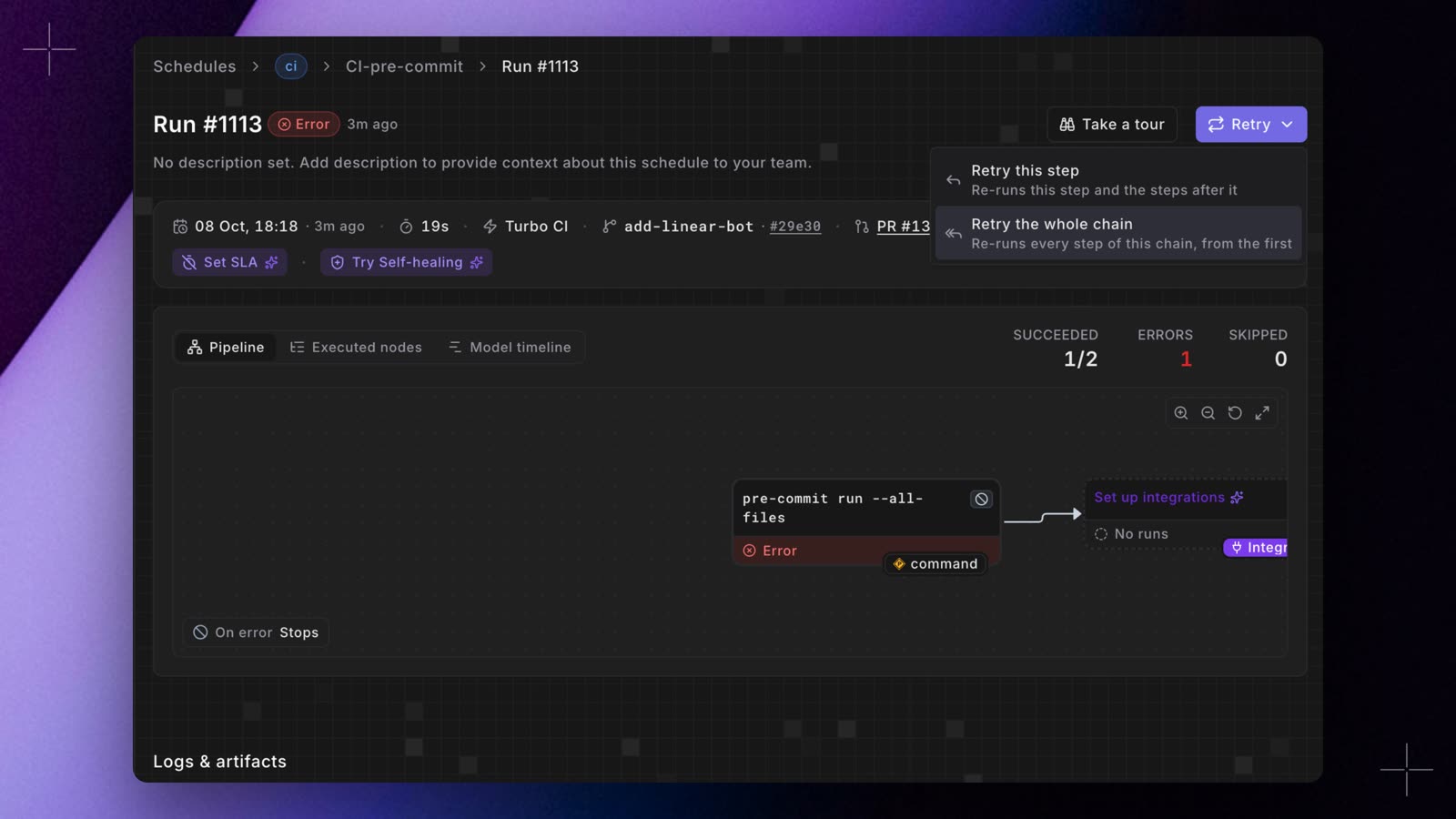 Turbo CI runs and merge runs are chain steps, even when the chain has a single step. On a chain step's run page, **Retry** offers:
* **Retry this step**: runs this step again in full, then the steps after it.
* **Retry the whole chain**: runs every step of the chain again, from the first.
The chain starts the new runs, so you see **Chain resumed** and stay on the run you retried. A pull request step runs again on the same commit. A merge chain step runs again on its branch's latest commit. If the pull request has new commits since, retry a step of its latest chain instead.
Retrying a chain step from the [API](/developers/graphql-api/api-reference/bolt-api), the [CLI](/developers/paradime-cli/bolt-cli), or the [Python SDK](/developers/python-sdk/modules/bolt) is refused, because the steps after it wouldn't run. Use the run page or GitHub's **Re-run** button instead. See [Retrying a run](/products/bolt/managing-schedules/retrying-a-run).
## Things to know
* **Keep merge-chain schedules on `schedule: "OFF"`.** A cron run starts on its own clock, so it can't wait for a merge chain and could overlap one.
* **Changes outside your dbt™ project folder trigger nothing.** Pull requests and merges that don't change files in the folder are ignored.
* **Independent Turbo CI schedules share the pull request's schemas.** Give them different model selections (for example, one per project or tag), or chain them, so two runs don't build the same model at the same time.
* **All the steps of a chain must be in the same workspace.**
* **A Turbo CI run doesn't start schedules that aren't Turbo CI.** A schedule that runs after a Turbo CI schedule but has no Turbo CI of its own starts only after that schedule's scheduled, manual, or API runs. The `Paradime Schedule Parse` check flags it as **Passed with warnings**. Turn on Turbo CI for it to make it a step of the pull request chain.
* **Chains have a time limit.** A pull request chain stops after 12 hours and a merge chain after 6 hours. Steps still running are cancelled.
## Related topics
- [Run Turbo CI and merge schedules in order](/changelog/2026-10-08/ci-cd-chains.md)
- [Bolt CI/CD for dbt™ pull requests and deploys](/products/bolt/ci-cd/index.md)
- [Configuration Reference](/products/bolt/creating-schedules/schedules-as-code/configuration-reference.md)
- [Triggers](/products/bolt/creating-schedules/trigger-types.md)
- [Continuous Deployment with GitHub for dbt™](/products/bolt/ci-cd/continuous-deployment/github.md)
This documentation is built and hosted on [Mintlify](https://mintlify.com), a developer documentation platform.
Turbo CI runs and merge runs are chain steps, even when the chain has a single step. On a chain step's run page, **Retry** offers:
* **Retry this step**: runs this step again in full, then the steps after it.
* **Retry the whole chain**: runs every step of the chain again, from the first.
The chain starts the new runs, so you see **Chain resumed** and stay on the run you retried. A pull request step runs again on the same commit. A merge chain step runs again on its branch's latest commit. If the pull request has new commits since, retry a step of its latest chain instead.
Retrying a chain step from the [API](/developers/graphql-api/api-reference/bolt-api), the [CLI](/developers/paradime-cli/bolt-cli), or the [Python SDK](/developers/python-sdk/modules/bolt) is refused, because the steps after it wouldn't run. Use the run page or GitHub's **Re-run** button instead. See [Retrying a run](/products/bolt/managing-schedules/retrying-a-run).
## Things to know
* **Keep merge-chain schedules on `schedule: "OFF"`.** A cron run starts on its own clock, so it can't wait for a merge chain and could overlap one.
* **Changes outside your dbt™ project folder trigger nothing.** Pull requests and merges that don't change files in the folder are ignored.
* **Independent Turbo CI schedules share the pull request's schemas.** Give them different model selections (for example, one per project or tag), or chain them, so two runs don't build the same model at the same time.
* **All the steps of a chain must be in the same workspace.**
* **A Turbo CI run doesn't start schedules that aren't Turbo CI.** A schedule that runs after a Turbo CI schedule but has no Turbo CI of its own starts only after that schedule's scheduled, manual, or API runs. The `Paradime Schedule Parse` check flags it as **Passed with warnings**. Turn on Turbo CI for it to make it a step of the pull request chain.
* **Chains have a time limit.** A pull request chain stops after 12 hours and a merge chain after 6 hours. Steps still running are cancelled.
## Related topics
- [Run Turbo CI and merge schedules in order](/changelog/2026-10-08/ci-cd-chains.md)
- [Bolt CI/CD for dbt™ pull requests and deploys](/products/bolt/ci-cd/index.md)
- [Configuration Reference](/products/bolt/creating-schedules/schedules-as-code/configuration-reference.md)
- [Triggers](/products/bolt/creating-schedules/trigger-types.md)
- [Continuous Deployment with GitHub for dbt™](/products/bolt/ci-cd/continuous-deployment/github.md)
This documentation is built and hosted on [Mintlify](https://mintlify.com), a developer documentation platform.