> ## Documentation Index
> Fetch the complete documentation index at: https://docs.paradime.io/llms.txt
> Use this file to discover all available pages before exploring further.
# Column-Level Lineage Diff [deprecated]
> Paradime Lineage Diff: Analyze differences in dbt™ data lineage. Track changes and ensure data consistency across versions.
export const Arcade = ({src, title}) =>
;
### **Overview**
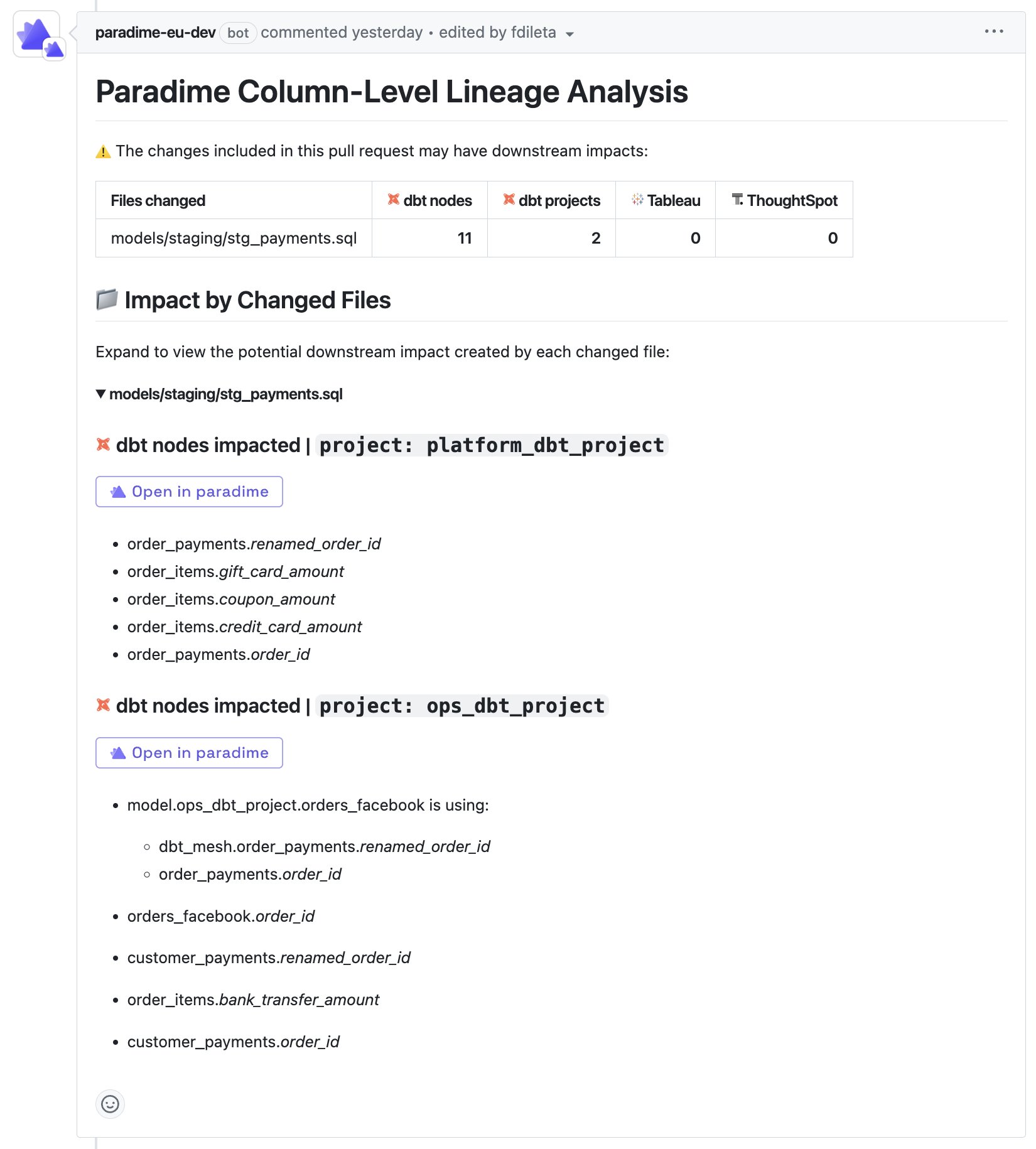
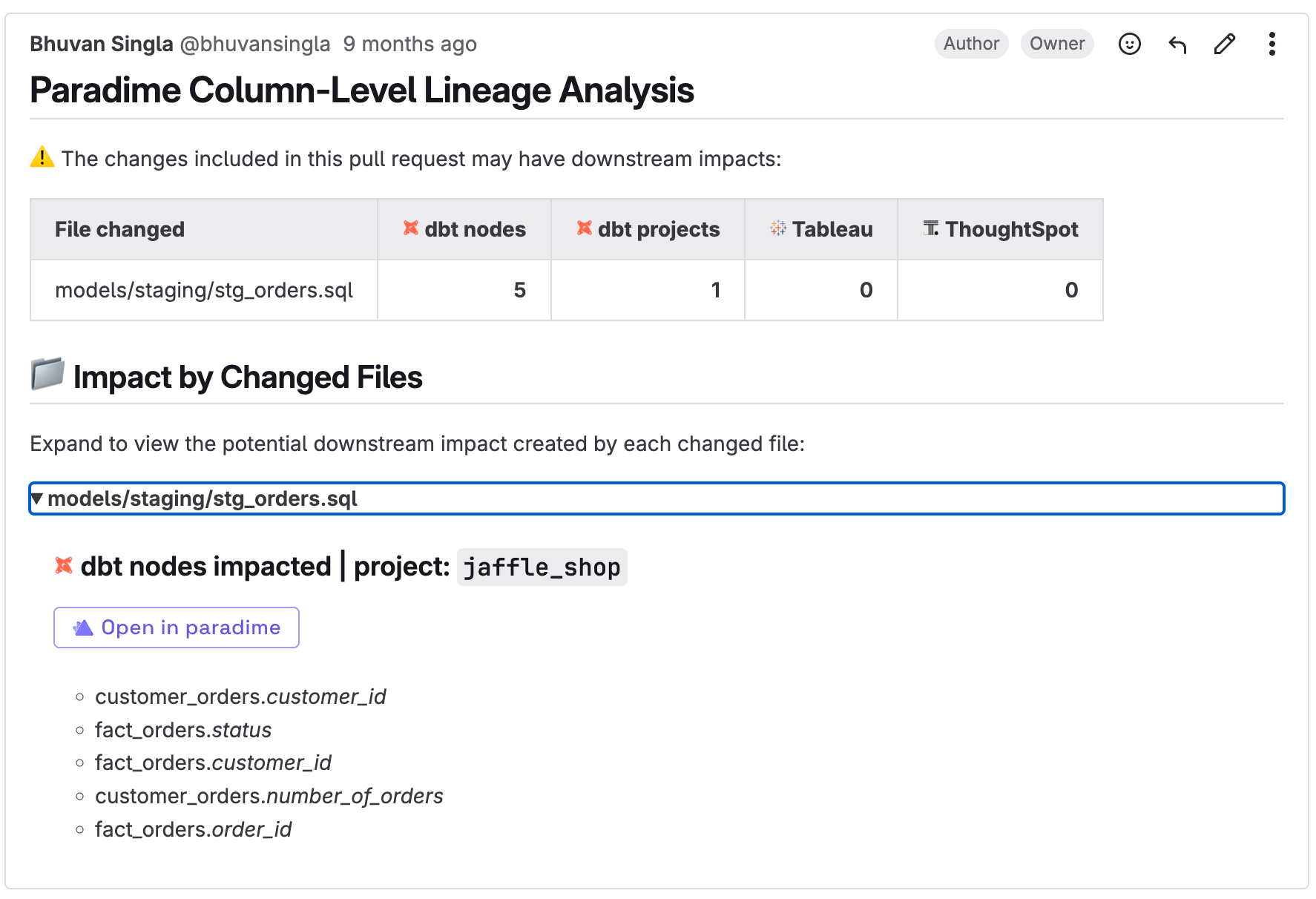
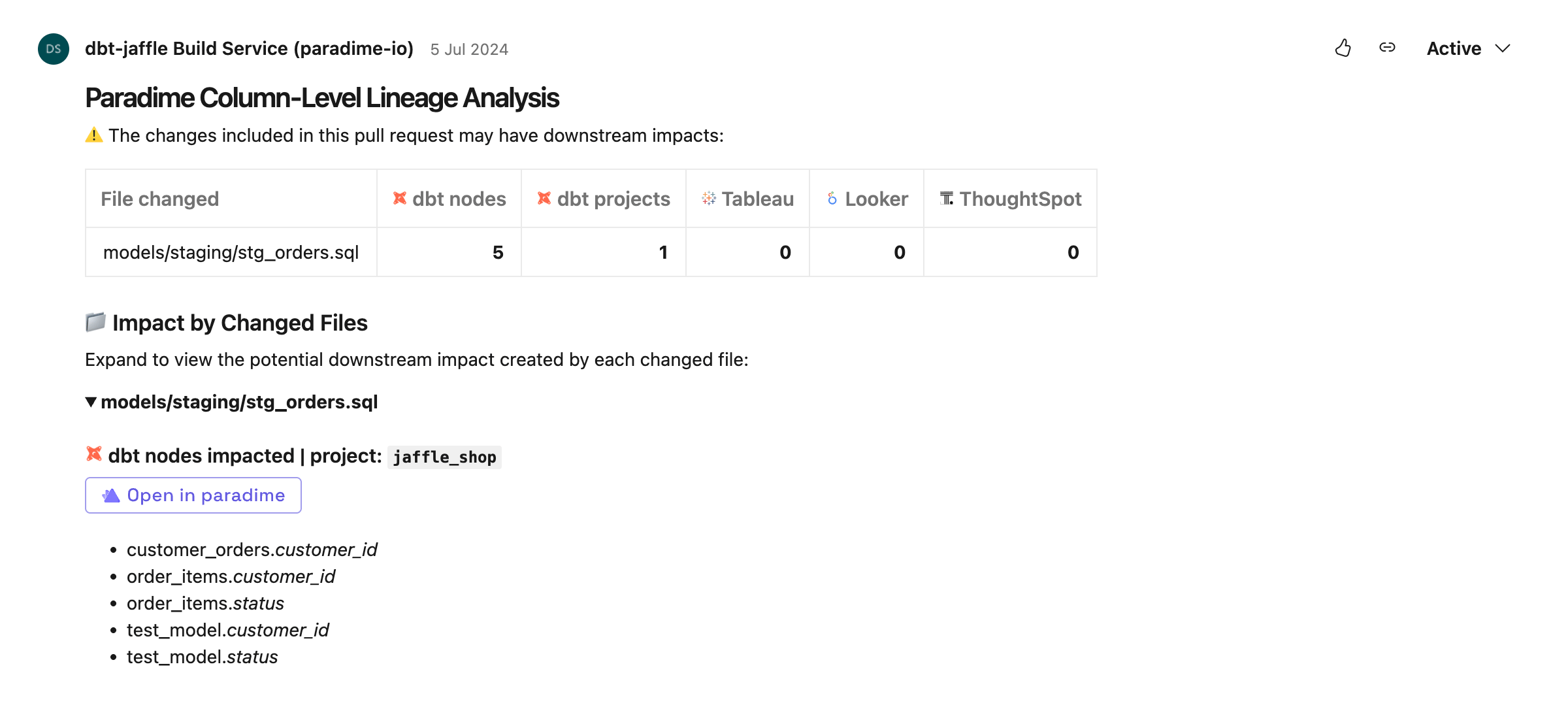
The Column-Level Lineage Diff Analysis feature in Paradime enables users to understand the blast radius of their changes directly within pull requests (PRs). By leveraging field-level lineage, this CI check identifies changes to columns in your dbt™ models and creates a report for all impacted downstream objects. This includes renaming or removing columns and changes to the underlying logic of columns in your dbt™ models.
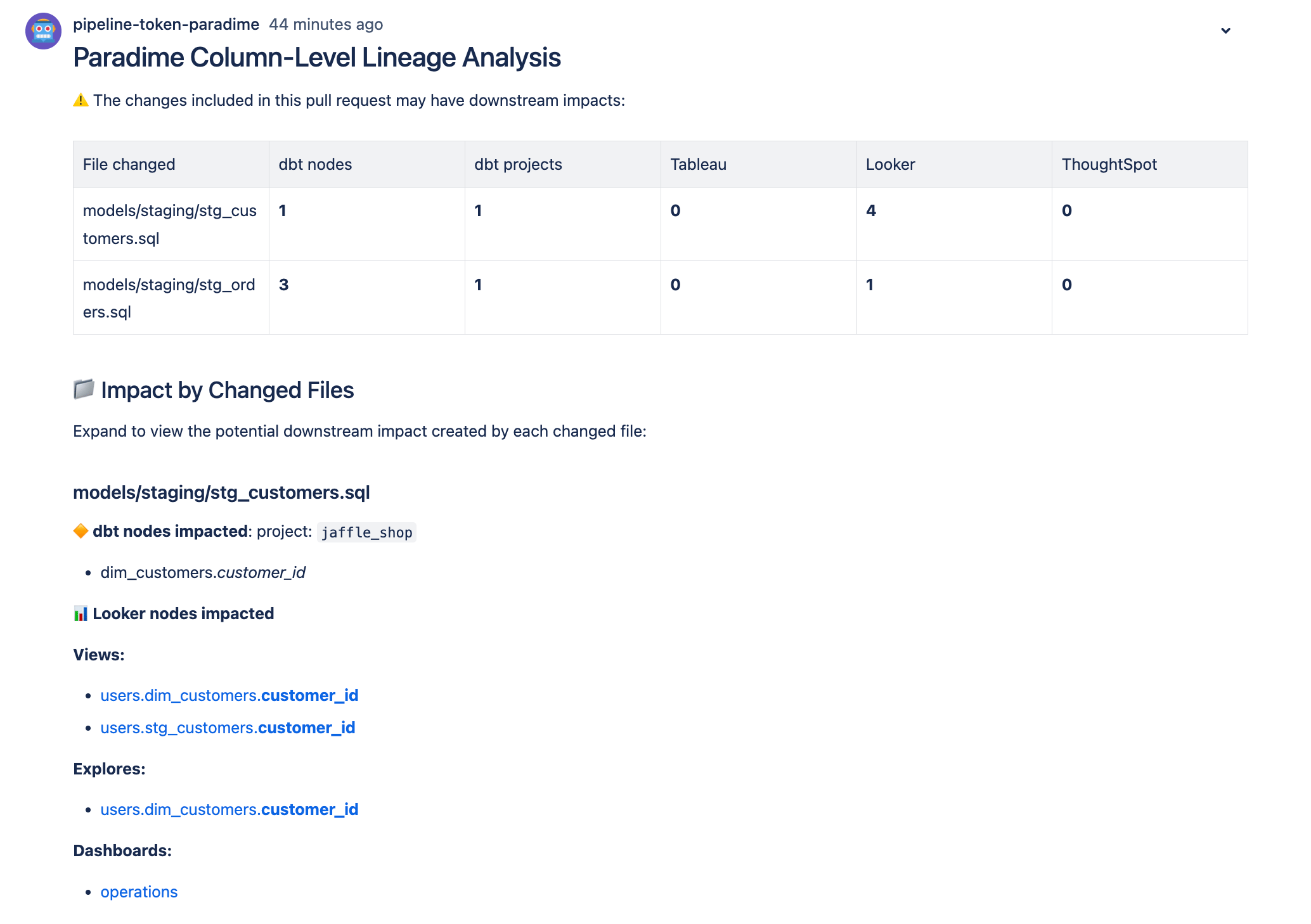
When a PR is opened it GitHub, an automated comment is generated listing all downstream nodes. This allows users to understand the changes introduced at a column level and assess the potential impact on downstream dbt™ models. BI dashboards, and other downstream elements.
## **Key Features**
* **Field-Level Lineage**: Identify changes to columns in your dbt™ models and generate a detailed report of all impacted downstream objects.
* **Automated Comments**: Receive automated comments in your PRs listing all downstream dbt™ models and BI nodes affected by the changes.
* **Impact Assessment**: Understand what nodes and other elements might be impacted by the changes introduced in the PR.
## Use cases
* Assess all downstream nodes nodes impacted by changes both within a dbt project and in downstream application (example: BI)
* For Data Mesh architectures, see how your current project's changes impact other project changes.
## Tutorial
## Prerequisites
To use theColumn-Level Lineage Diff Analysis features, ensure the following prerequisites are met:
1. **Git Integration**: Install the Paradime GitHub app and authorize access to the dbt™ repository used in Paradime or use alternative methods based on your Git Provider. See [setup instructions](/products/bolt/ci-cd/lineage-diff-deprecated/index#setup-instructions).
2. **Production Connection**: Add a production connection with access to your sources and models generated when running production jobs. This allows Paradime to run information schema queries and build field-level lineage. See [connection guide](/products/settings/connections/scheduler-environment/index) for instructions based on your data warehouse provider.
3. **Have at least one Bolt Schedule configured**. This is required to generate field-level lineage for your dbt™ project. See [Bolt Scheduler](/products/bolt/creating-schedules/index) for configuration.
To get the most value out of Lineage Diff Analysis, connect you BI tools ([Tableau](https://docs.paradime.io/app-help/integrations/tableau), [Thoughtspot](https://docs.paradime.io/app-help/integrations/thoughtspot-beta), [Looker](https://docs.paradime.io/app-help/integrations/looker), etc.) to see all downstream nodes impacted.
## Setup Instructions
 ***
**GitHub Integration**: Install the Paradime GitHub app and authorize access to the dbt™ repository used in Paradime. See [installation guide](https://docs.paradime.io/app-help/integrations/github#github-user-level-oauth) for instructions.
### Troubleshooting
#### Unable to find public GitHub email address
If a user GitHub is not configured correctly when opening a PR the user will see the below comment in the Pull Request:
***
**GitHub Integration**: Install the Paradime GitHub app and authorize access to the dbt™ repository used in Paradime. See [installation guide](https://docs.paradime.io/app-help/integrations/github#github-user-level-oauth) for instructions.
### Troubleshooting
#### Unable to find public GitHub email address
If a user GitHub is not configured correctly when opening a PR the user will see the below comment in the Pull Request:
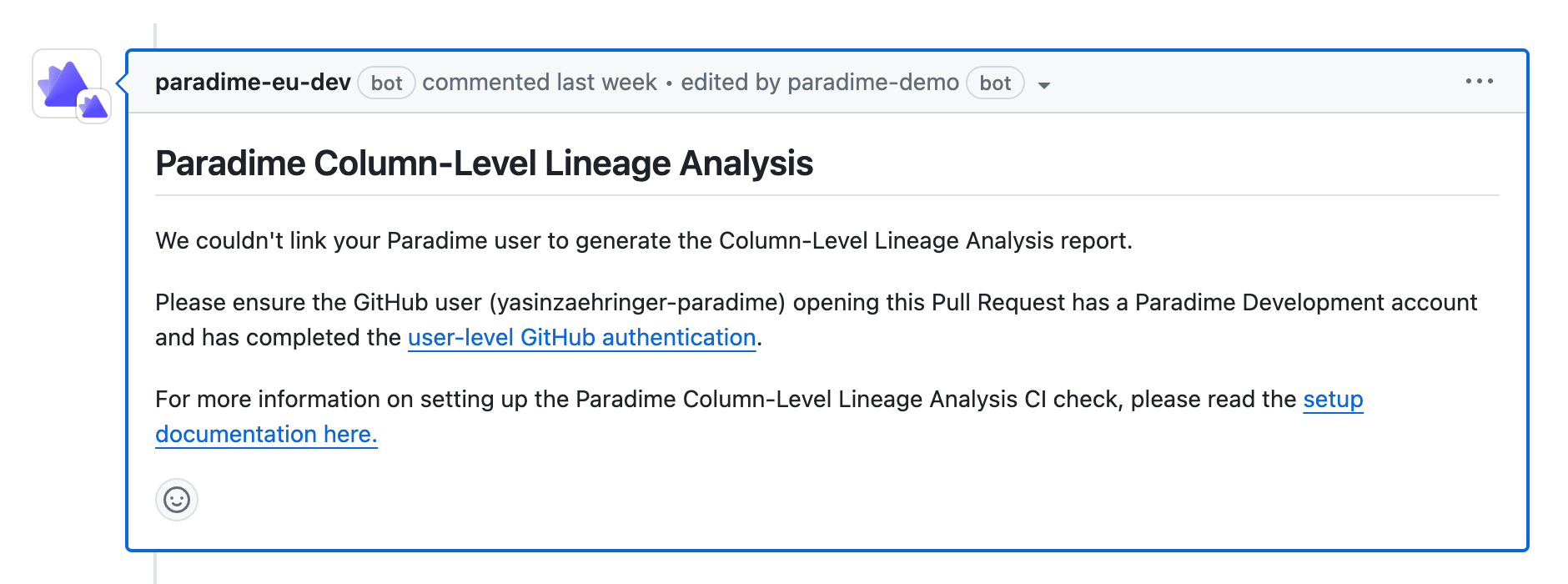 To fix this issue, make sure the user opening the Pull Request completed the [#github-user-level-oauth](/products/settings/git-repositories/importing-a-repository/github#github-user-level-oauth "mention") in Paradime.
 ***
#### 1. Generate API keys
**API keys are generate at a workspace level.**
To be able to trigger Bolt using the API, you will first need to generate API keys for your workspace. Got to account settings and generate your API keys, make sure to save in your password manager:
* API key
* API secret
* API Endpoint
You will need this later when setting up the secrets in GitLab.
#### 2. Create a Pipeline
Now you will need to create a new `.gitlab-ci.yml` file in your dbt™️ repository. Copy the code below.
```yaml theme={"system"}
stages:
- lineage_diff_report
lineage_diff_report:
stage: lineage_diff_report
image: python:3.11
tags:
- gitlab-org
rules:
- if: $CI_PIPELINE_SOURCE == "merge_request_event"
when: always
variables:
PARADIME_API_KEY: ${PARADIME_API_KEY}
PARADIME_API_SECRET: ${PARADIME_API_SECRET}
PARADIME_API_ENDPOINT: ${PARADIME_API_ENDPOINT}
GITLAB_TOKEN: ${GITLAB_TOKEN}
GIT_DEPTH: 0
before_script:
- pip install paradime-io==4.5.0
script: |
# Echo the relevant environment variables
echo "Head Commit Hash: $CI_COMMIT_SHA"
echo "Base Commit Hash: $CI_MERGE_REQUEST_DIFF_BASE_SHA"
echo "Pull Request Number: $CI_MERGE_REQUEST_IID"
echo "Repository Full Name: $CI_PROJECT_PATH"
echo "Pull Request Author Email: $GITLAB_USER_EMAIL"
# Get the list of changed files in this MR
export CHANGED_FILES=$(git diff --name-only $CI_MERGE_REQUEST_DIFF_BASE_SHA $CI_COMMIT_SHA)
echo "Files changed in this MR:"
echo "$CHANGED_FILES"
# Generate a random report file name
export REPORT_FILE="report_$(openssl rand -hex 12).json"
echo "Report file: $REPORT_FILE"
# Install jq
apt-get update -y && apt-get install -y jq
# Run the Paradime lineage diff analysis
python3 -u < Access Tokens** in the left sidebar
2. Enter a name for your token (e.g., "API Comment Access")
3. Select the appropriate scopes:
* `api` (for general API access)
* Specifically for comments, you'll need at least `api` scope, which includes the ability to write comments
**Create a GitLab personal access token**
If using a GitLab personal access token, we suggest creating a new user, called "Paradime" and create the access token attached to this user.
Log in to your GitLab account
1. Go to your user profile > Preferences > Access Tokens (or navigate to `https://gitlab.com/-/profile/personal_access_tokens`)
2. Enter a name for your token (e.g., "API Comment Access")
3. Select the appropriate scopes:
* `api` (for general API access)
* Specifically for comments, you'll need at least `api` scope, which includes the ability to write comments
#### 4. Add the API key and Credential in the GitLab variables
Finally you need to add the API key and Credentials generated in the [previous step](/products/bolt/ci-cd/lineage-diff-deprecated/index#generate-api-keys-and-find-you-workspace-token) in GitLab CI/CD pipelines as well as the [GitLab Token](/products/bolt/ci-cd/lineage-diff-deprecated/index#id-3.-create-a-gitlab-access-token).
Set the corresponding values using your credentials for the variable names:
* `PARADIME_API_KEY`
* `PARADIME_API_SECRET`
* `PARADIME_API_ENDPOINT`
* `GITLAB_TOKEN`
***
#### 1. Generate API keys
**API keys are generate at a workspace level.**
To be able to trigger Bolt using the API, you will first need to generate API keys for your workspace. Got to account settings and generate your API keys, make sure to save in your password manager:
* API key
* API secret
* API Endpoint
You will need this later when setting up the secrets in GitLab.
#### 2. Create a Pipeline
Now you will need to create a new `.gitlab-ci.yml` file in your dbt™️ repository. Copy the code below.
```yaml theme={"system"}
stages:
- lineage_diff_report
lineage_diff_report:
stage: lineage_diff_report
image: python:3.11
tags:
- gitlab-org
rules:
- if: $CI_PIPELINE_SOURCE == "merge_request_event"
when: always
variables:
PARADIME_API_KEY: ${PARADIME_API_KEY}
PARADIME_API_SECRET: ${PARADIME_API_SECRET}
PARADIME_API_ENDPOINT: ${PARADIME_API_ENDPOINT}
GITLAB_TOKEN: ${GITLAB_TOKEN}
GIT_DEPTH: 0
before_script:
- pip install paradime-io==4.5.0
script: |
# Echo the relevant environment variables
echo "Head Commit Hash: $CI_COMMIT_SHA"
echo "Base Commit Hash: $CI_MERGE_REQUEST_DIFF_BASE_SHA"
echo "Pull Request Number: $CI_MERGE_REQUEST_IID"
echo "Repository Full Name: $CI_PROJECT_PATH"
echo "Pull Request Author Email: $GITLAB_USER_EMAIL"
# Get the list of changed files in this MR
export CHANGED_FILES=$(git diff --name-only $CI_MERGE_REQUEST_DIFF_BASE_SHA $CI_COMMIT_SHA)
echo "Files changed in this MR:"
echo "$CHANGED_FILES"
# Generate a random report file name
export REPORT_FILE="report_$(openssl rand -hex 12).json"
echo "Report file: $REPORT_FILE"
# Install jq
apt-get update -y && apt-get install -y jq
# Run the Paradime lineage diff analysis
python3 -u < Access Tokens** in the left sidebar
2. Enter a name for your token (e.g., "API Comment Access")
3. Select the appropriate scopes:
* `api` (for general API access)
* Specifically for comments, you'll need at least `api` scope, which includes the ability to write comments
**Create a GitLab personal access token**
If using a GitLab personal access token, we suggest creating a new user, called "Paradime" and create the access token attached to this user.
Log in to your GitLab account
1. Go to your user profile > Preferences > Access Tokens (or navigate to `https://gitlab.com/-/profile/personal_access_tokens`)
2. Enter a name for your token (e.g., "API Comment Access")
3. Select the appropriate scopes:
* `api` (for general API access)
* Specifically for comments, you'll need at least `api` scope, which includes the ability to write comments
#### 4. Add the API key and Credential in the GitLab variables
Finally you need to add the API key and Credentials generated in the [previous step](/products/bolt/ci-cd/lineage-diff-deprecated/index#generate-api-keys-and-find-you-workspace-token) in GitLab CI/CD pipelines as well as the [GitLab Token](/products/bolt/ci-cd/lineage-diff-deprecated/index#id-3.-create-a-gitlab-access-token).
Set the corresponding values using your credentials for the variable names:
* `PARADIME_API_KEY`
* `PARADIME_API_SECRET`
* `PARADIME_API_ENDPOINT`
* `GITLAB_TOKEN`
 ***
#### 1. Generate API keys
**API keys are generate at a workspace level.**
To be able to trigger Bolt using the API, you will first need to generate API keys for your workspace. Got to account settings and generate your API keys, make sure to save in your password manager:
* API key
* API secret
* API Endpoint
You will need this later when setting up the secrets in Azure pipelines.
#### 2. Create an Azure Pipeline
Now you will need to create a new `azure-pipeline.yml` file in your dbt™️ repository. Copy the code below.
```yaml theme={"system"}
trigger:
- none
pr:
- "*"
steps:
- task: UsePythonVersion@0
inputs:
versionSpec: "3.11"
addToPath: true
displayName: Use Python 3.11
- checkout: self
fetchDepth: 0
displayName: Clone repository
- script: |
# Install paradime python sdk
pip install paradime-io==4.5.0
# Export Paradime API Credentials
export PARADIME_API_ENDPOINT=$(PARADIME_API_ENDPOINT)
export PARADIME_API_KEY=$(PARADIME_API_KEY)
export PARADIME_API_SECRET=$(PARADIME_API_SECRET)
# Set the relevant environment variables
export HEAD_COMMIT_SHA=$(System.PullRequest.SourceCommitId)
export BASE_COMMIT_SHA=$(git rev-parse origin/$(System.PullRequest.TargetBranchName))
export PULL_REQUEST_NUMBER=$(System.PullRequest.PullRequestId)
export REPO_NAME=$(Build.Repository.Name)
export USER_EMAIL=$(Build.RequestedForEmail)
# Get the list of changed files in this PR
export CHANGED_FILES=$(git diff --name-only $BASE_COMMIT_SHA $HEAD_COMMIT_SHA)
# Echo env variables
echo "Head Commit Hash: $HEAD_COMMIT_SHA"
echo "Base Commit Hash: $BASE_COMMIT_SHA"
echo "Pull Request Number: $PULL_REQUEST_NUMBER"
echo "Repository Full Name: $REPO_NAME"
echo "Pull Request Author Email: $USER_EMAIL"
echo "Files changed in this PR: \n $CHANGED_FILES"
# Generate a random report file name
export REPORT_FILE="report_$(openssl rand -hex 12).json"
echo "Report file: $REPORT_FILE"
python3 -u <
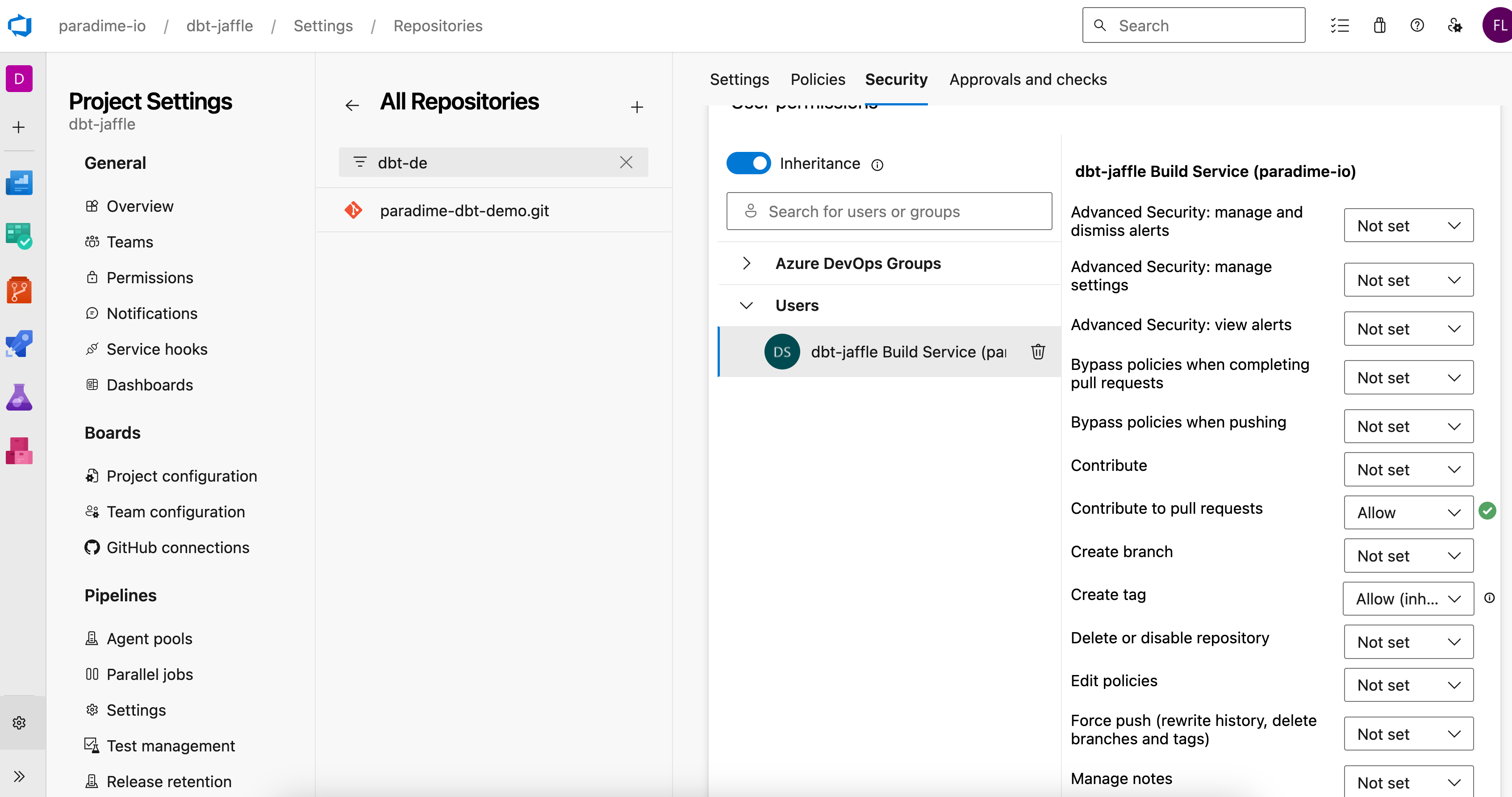
#### 4. Update Build Service User Permissions
You will need to add the Contribute to pull requests permission to enable Comments to be generated when opening the Pull Request.
Go to Project Settings in Azure DevOps
* Navigate to "Repositories" under Repos
* Select your repository
* Click "Security"
* Find "Project Collection Build Service" or "\[Project Name] Build Service"
* Set "Contribute to pull requests" to **allowed**
***
#### 1. Generate API keys
**API keys are generate at a workspace level.**
To be able to trigger Bolt using the API, you will first need to generate API keys for your workspace. Got to account settings and generate your API keys, make sure to save in your password manager:
* API key
* API secret
* API Endpoint
You will need this later when setting up the secrets in Azure pipelines.
#### 2. Create an Azure Pipeline
Now you will need to create a new `azure-pipeline.yml` file in your dbt™️ repository. Copy the code below.
```yaml theme={"system"}
trigger:
- none
pr:
- "*"
steps:
- task: UsePythonVersion@0
inputs:
versionSpec: "3.11"
addToPath: true
displayName: Use Python 3.11
- checkout: self
fetchDepth: 0
displayName: Clone repository
- script: |
# Install paradime python sdk
pip install paradime-io==4.5.0
# Export Paradime API Credentials
export PARADIME_API_ENDPOINT=$(PARADIME_API_ENDPOINT)
export PARADIME_API_KEY=$(PARADIME_API_KEY)
export PARADIME_API_SECRET=$(PARADIME_API_SECRET)
# Set the relevant environment variables
export HEAD_COMMIT_SHA=$(System.PullRequest.SourceCommitId)
export BASE_COMMIT_SHA=$(git rev-parse origin/$(System.PullRequest.TargetBranchName))
export PULL_REQUEST_NUMBER=$(System.PullRequest.PullRequestId)
export REPO_NAME=$(Build.Repository.Name)
export USER_EMAIL=$(Build.RequestedForEmail)
# Get the list of changed files in this PR
export CHANGED_FILES=$(git diff --name-only $BASE_COMMIT_SHA $HEAD_COMMIT_SHA)
# Echo env variables
echo "Head Commit Hash: $HEAD_COMMIT_SHA"
echo "Base Commit Hash: $BASE_COMMIT_SHA"
echo "Pull Request Number: $PULL_REQUEST_NUMBER"
echo "Repository Full Name: $REPO_NAME"
echo "Pull Request Author Email: $USER_EMAIL"
echo "Files changed in this PR: \n $CHANGED_FILES"
# Generate a random report file name
export REPORT_FILE="report_$(openssl rand -hex 12).json"
echo "Report file: $REPORT_FILE"
python3 -u <
#### 4. Update Build Service User Permissions
You will need to add the Contribute to pull requests permission to enable Comments to be generated when opening the Pull Request.
Go to Project Settings in Azure DevOps
* Navigate to "Repositories" under Repos
* Select your repository
* Click "Security"
* Find "Project Collection Build Service" or "\[Project Name] Build Service"
* Set "Contribute to pull requests" to **allowed**
 ***
#### 1. Generate API keys
**API keys are generate at a workspace level.**
To be able to trigger Bolt using the API, you will first need to generate API keys for your workspace. Got to account settings and generate your API keys, make sure to save in your password manager:
* API key
* API secret
* API Endpoint
You will need this later when setting up the secrets in BitBucket.
#### 2. Create a BitBucket Pipeline
Now you will need to create a new `bitbucket-pipelines.yml` file in your dbt™️ repository. Copy the code block below.
```yaml theme={"system"}
image: python:3.11
definitions:
steps:
- step: ¶dime-lineage-diff-report
name: Generate Lineage Diff Report
size: 2x
max-time: 30
script:
- apt-get update && apt-get install -y curl jq git
- pip install paradime-io==4.7.1
- export PARADIME_API_KEY=$PARADIME_API_KEY
- export PARADIME_API_SECRET=$PARADIME_API_SECRET
- export PARADIME_API_ENDPOINT=$PARADIME_API_ENDPOINT
- git fetch origin $BITBUCKET_PR_DESTINATION_BRANCH
- export HEAD_COMMIT_SHA=$(git rev-parse $BITBUCKET_PR_DESTINATION_COMMIT)
- export BASE_COMMIT_SHA=$BITBUCKET_COMMIT
- export PULL_REQUEST_NUMBER=$BITBUCKET_PR_ID
- export REPO_NAME=$BITBUCKET_REPO_FULL_NAME
- export USER_EMAIL=$(git log -1 --pretty=format:"%ae" $BITBUCKET_COMMIT)
- export CHANGED_FILES=$(git diff --name-only $BASE_COMMIT_SHA $HEAD_COMMIT_SHA)
- echo "Head Commit Hash $HEAD_COMMIT_SHA"
- echo "Base Commit Hash $BASE_COMMIT_SHA"
- echo "Pull Request Number $PULL_REQUEST_NUMBER"
- echo "Repository Full Name $REPO_NAME"
- echo "Pull Request Author Email $USER_EMAIL"
- echo "Files changed in this PR $CHANGED_FILES"
- export REPORT_FILE="report_$(openssl rand -hex 12).json"
- echo "Report file $REPORT_FILE"
- |
cat > generate_report.py << 'EOL'
import os
import json
from pathlib import Path
from paradime import Paradime
def format_json_to_markdown(report_json):
"""
Convert the JSON report into formatted markdown for Bitbucket comments.
"""
formatted_output = []
# 1. Title and Warning
formatted_output.append("# Paradime Column-Level Lineage Analysis\n")
formatted_output.append("⚠️ The changes included in this pull request may have downstream impacts:\n")
# 2. Table headers and data
formatted_output.append("| File changed | dbt nodes | dbt projects | Tableau | Looker | ThoughtSpot |")
formatted_output.append("| :- | -: | -: | -: | -: | -: |")
# Process each file's impact summary
for file_path, file_data in report_json["changed_files"].items():
summary = file_data["impact_summary"]
row = [
file_path,
f"**{summary['dbt_nodes_count']}**",
f"**{summary['dbt_projects_count']}**",
f"**{summary['tableau_nodes_count']}**",
f"**{summary['looker_nodes_count']}**",
f"**{summary['thoughtspot_nodes_count']}**"
]
formatted_output.append(f"| {' | '.join(row)} |")
# 3. Impact Details Section
formatted_output.append("\n## 📁 Impact by Changed Files\n")
formatted_output.append("Expand to view the potential downstream impact created by each changed file:\n")
# Process each file's detailed impacts
for file_path, file_data in report_json["changed_files"].items():
# File header
formatted_output.append(f"\n### {file_path}\n")
impacted_nodes = file_data["impacted_nodes"]
# DBT impacts
if impacted_nodes["dbt"]["nodes"]:
formatted_output.append(f"**🔶 dbt nodes impacted**: \n")
for node in impacted_nodes["dbt"]["nodes"]:
formatted_output.append(f"- {node['model_name']}.*{node['column_name']}*\n")
# Looker impacts
if any([
impacted_nodes["looker"]["views"],
impacted_nodes["looker"]["explores"],
impacted_nodes["looker"]["dashboards"]
]):
formatted_output.append(f"**📊 Looker nodes impacted**\n")
if impacted_nodes["looker"]["views"]:
formatted_output.append("**Views:**\n")
for view in impacted_nodes["looker"]["views"]:
node_text = f"{view['model_name']}.{view['view_id']}.**{view['field_id']}**"
if 'url' in view and view['url']:
formatted_output.append(f"- [{node_text}]({view['url']})\n")
else:
formatted_output.append(f"- {node_text}\n")
if impacted_nodes["looker"]["explores"]:
formatted_output.append("**Explores:**\n")
for explore in impacted_nodes["looker"]["explores"]:
node_text = f"{explore['model_name']}.{explore['explore_id']}.**{explore['field_id']}**"
if 'url' in explore and explore['url']:
formatted_output.append(f"- [{node_text}]({explore['url']})\n")
else:
formatted_output.append(f"- {node_text}\n")
if impacted_nodes["looker"]["dashboards"]:
formatted_output.append("**Dashboards:**\n")
for dashboard in impacted_nodes["looker"]["dashboards"]:
if 'url' in dashboard and dashboard['url']:
formatted_output.append(f"- [{dashboard['name']}]({dashboard['url']})\n")
else:
formatted_output.append(f"- {dashboard['name']}\n")
# Tableau impacts
if any([
impacted_nodes["tableau"]["dashboards"],
impacted_nodes["tableau"]["datasources"],
impacted_nodes["tableau"]["worksheets"]
]):
formatted_output.append(f"**📊 Tableau nodes impacted**\n")
if impacted_nodes["tableau"]["dashboards"]:
formatted_output.append("**Dashboards:**\n")
for dashboard in impacted_nodes["tableau"]["dashboards"]:
if 'url' in dashboard and dashboard['url']:
formatted_output.append(f"- [{dashboard['name']}]({dashboard['url']})\n")
else:
formatted_output.append(f"- {dashboard['name']}\n")
if impacted_nodes["tableau"]["datasources"]:
formatted_output.append("**Datasources:**\n")
for datasource in impacted_nodes["tableau"]["datasources"]:
if 'url' in datasource and datasource['url']:
formatted_output.append(f"- [{datasource['name']}]({datasource['url']})\n")
else:
formatted_output.append(f"- {datasource['name']}\n")
if impacted_nodes["tableau"]["worksheets"]:
formatted_output.append("**Worksheets:**\n")
for worksheet in impacted_nodes["tableau"]["worksheets"]:
if 'url' in worksheet and worksheet['url']:
formatted_output.append(f"- [{worksheet['name']}]({worksheet['url']})\n")
else:
formatted_output.append(f"- {worksheet['name']}\n")
# ThoughtSpot impacts
if any([
impacted_nodes["thoughtspot"]["answers"],
impacted_nodes["thoughtspot"]["liveboards"],
impacted_nodes["thoughtspot"]["visualizations"],
impacted_nodes["thoughtspot"]["worksheets"]
]):
formatted_output.append(f"**📊 ThoughtSpot nodes impacted**\n")
if impacted_nodes["thoughtspot"]["answers"]:
formatted_output.append("**Answers:**\n")
for answer in impacted_nodes["thoughtspot"]["answers"]:
if 'url' in answer and answer['url']:
formatted_output.append(f"- [{answer['name']}]({answer['url']})\n")
else:
formatted_output.append(f"- {answer['name']}\n")
if impacted_nodes["thoughtspot"]["liveboards"]:
formatted_output.append("**Liveboards:**\n")
for liveboard in impacted_nodes["thoughtspot"]["liveboards"]:
if 'url' in liveboard and liveboard['url']:
formatted_output.append(f"- [{liveboard['name']}]({liveboard['url']})\n")
else:
formatted_output.append(f"- {liveboard['name']}\n")
if impacted_nodes["thoughtspot"]["visualizations"]:
formatted_output.append("**Visualizations:**\n")
for viz in impacted_nodes["thoughtspot"]["visualizations"]:
if 'url' in viz and viz['url']:
formatted_output.append(f"- [{viz['name']}]({viz['url']})\n")
else:
formatted_output.append(f"- {viz['name']}\n")
if impacted_nodes["thoughtspot"]["worksheets"]:
formatted_output.append("**Worksheets:**\n")
for worksheet in impacted_nodes["thoughtspot"]["worksheets"]:
if 'url' in worksheet and worksheet['url']:
formatted_output.append(f"- [{worksheet['name']}]({worksheet['url']})\n")
else:
formatted_output.append(f"- {worksheet['name']}\n")
return '\n'.join(formatted_output)
paradime = Paradime(
api_key=os.environ["PARADIME_API_KEY"],
api_secret=os.environ["PARADIME_API_SECRET"],
api_endpoint=os.environ["PARADIME_API_ENDPOINT"]
)
report = paradime.lineage_diff.trigger_report_and_wait(
base_commit_sha=os.environ["BASE_COMMIT_SHA"],
head_commit_sha=os.environ["HEAD_COMMIT_SHA"],
changed_file_paths=os.environ["CHANGED_FILES"].split("\n"),
pull_request_number=int(os.environ["PULL_REQUEST_NUMBER"]),
repository_name=os.environ["REPO_NAME"],
user_email=os.environ["USER_EMAIL"]
)
print("Lineage Diff Report Message: ", report.message)
if report.result_json:
# Convert JSON string to Python dict and format as markdown
report_data = json.loads(report.result_json)
formatted_markdown = format_json_to_markdown(report_data)
Path(os.environ["REPORT_FILE"]).write_text(formatted_markdown)
EOL
- python3 generate_report.py
- |
if [ -f "$REPORT_FILE" ]; then
# Create the JSON payload with properly escaped content
FORMATTED_CONTENT=$(cat "$REPORT_FILE")
JSON_PAYLOAD=$(jq -n \
--arg content "$FORMATTED_CONTENT" \
'{content:{raw:$content}}')
# Send to Bitbucket API
curl -X POST \
"https://api.bitbucket.org/2.0/repositories/$BITBUCKET_REPO_FULL_NAME/pullrequests/$BITBUCKET_PR_ID/comments" \
-H "Authorization: Bearer $BITBUCKET_ACCESS_TOKEN" \
-H "Content-Type: application/json" \
-d "$JSON_PAYLOAD"
else
echo "Report file not found, skipping comment."
fi
pipelines:
pull-requests:
'**':
- step:
<<: *paradime-lineage-diff-report
variables:
PARADIME_API_KEY: $PARADIME_API_KEY
PARADIME_API_SECRET: $PARADIME_API_SECRET
PARADIME_API_ENDPOINT: $PARADIME_API_ENDPOINT
```
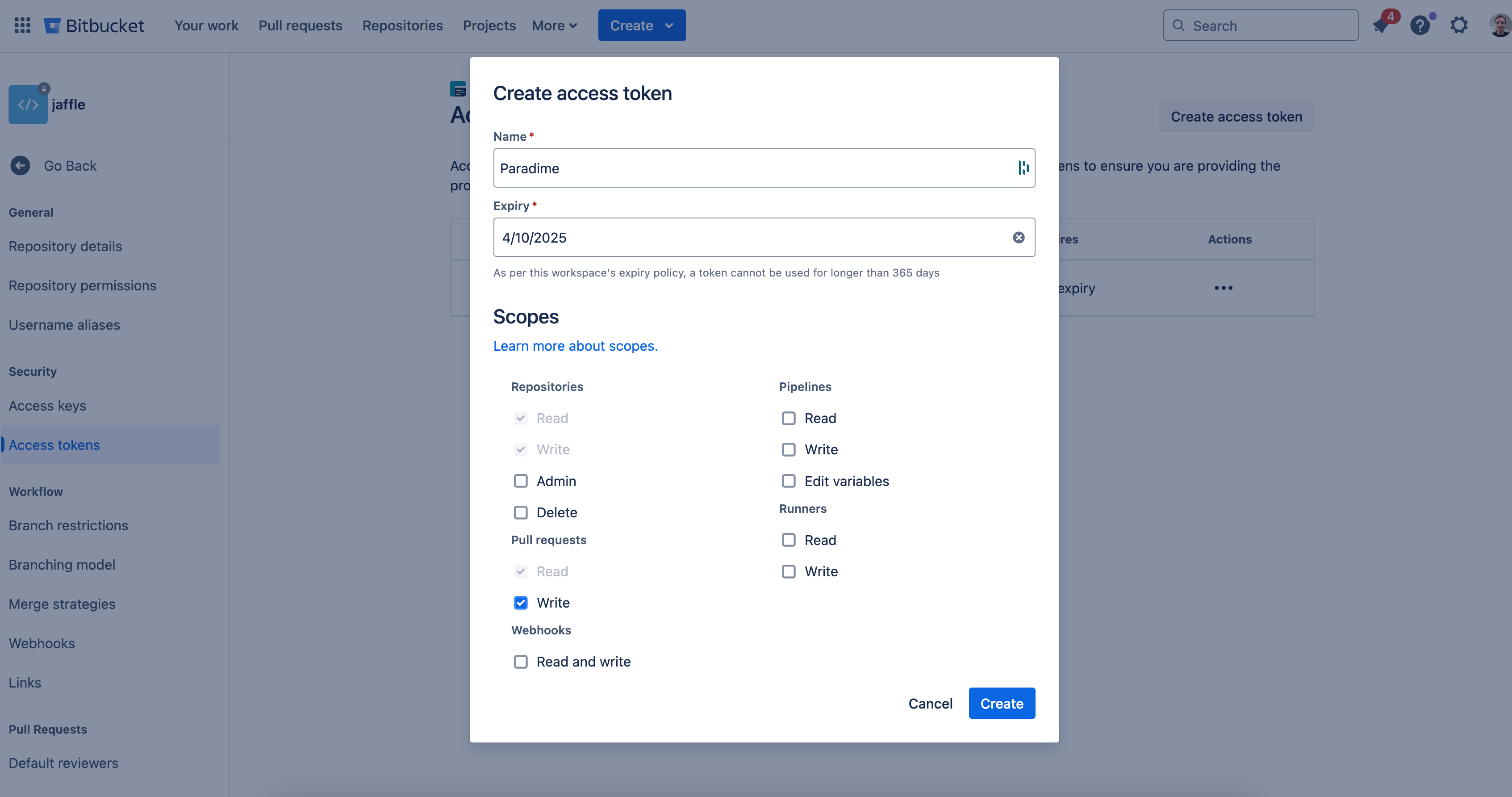
#### 3. Generate BitBucket Access Token
You will need to create a BitBucket Access Token with p`ull_request:write` to enable Comments to be generated when opening a Pull Request.
Go to [bitbucket.org](https://bitbucket.org/) and sign in:
1. Select your BitBucket Repository
2. Click "Repository Settings" in the left sidebar
3. In Settings, scroll to "Security" section
4. Select "Access tokens"
5. Create New Access Token
6. Click "Create repository access token"
7. Enter the following details:
* **Name**: `Paradime`
* **Permissions**: Select `Pull requests: Write`
***
#### 1. Generate API keys
**API keys are generate at a workspace level.**
To be able to trigger Bolt using the API, you will first need to generate API keys for your workspace. Got to account settings and generate your API keys, make sure to save in your password manager:
* API key
* API secret
* API Endpoint
You will need this later when setting up the secrets in BitBucket.
#### 2. Create a BitBucket Pipeline
Now you will need to create a new `bitbucket-pipelines.yml` file in your dbt™️ repository. Copy the code block below.
```yaml theme={"system"}
image: python:3.11
definitions:
steps:
- step: ¶dime-lineage-diff-report
name: Generate Lineage Diff Report
size: 2x
max-time: 30
script:
- apt-get update && apt-get install -y curl jq git
- pip install paradime-io==4.7.1
- export PARADIME_API_KEY=$PARADIME_API_KEY
- export PARADIME_API_SECRET=$PARADIME_API_SECRET
- export PARADIME_API_ENDPOINT=$PARADIME_API_ENDPOINT
- git fetch origin $BITBUCKET_PR_DESTINATION_BRANCH
- export HEAD_COMMIT_SHA=$(git rev-parse $BITBUCKET_PR_DESTINATION_COMMIT)
- export BASE_COMMIT_SHA=$BITBUCKET_COMMIT
- export PULL_REQUEST_NUMBER=$BITBUCKET_PR_ID
- export REPO_NAME=$BITBUCKET_REPO_FULL_NAME
- export USER_EMAIL=$(git log -1 --pretty=format:"%ae" $BITBUCKET_COMMIT)
- export CHANGED_FILES=$(git diff --name-only $BASE_COMMIT_SHA $HEAD_COMMIT_SHA)
- echo "Head Commit Hash $HEAD_COMMIT_SHA"
- echo "Base Commit Hash $BASE_COMMIT_SHA"
- echo "Pull Request Number $PULL_REQUEST_NUMBER"
- echo "Repository Full Name $REPO_NAME"
- echo "Pull Request Author Email $USER_EMAIL"
- echo "Files changed in this PR $CHANGED_FILES"
- export REPORT_FILE="report_$(openssl rand -hex 12).json"
- echo "Report file $REPORT_FILE"
- |
cat > generate_report.py << 'EOL'
import os
import json
from pathlib import Path
from paradime import Paradime
def format_json_to_markdown(report_json):
"""
Convert the JSON report into formatted markdown for Bitbucket comments.
"""
formatted_output = []
# 1. Title and Warning
formatted_output.append("# Paradime Column-Level Lineage Analysis\n")
formatted_output.append("⚠️ The changes included in this pull request may have downstream impacts:\n")
# 2. Table headers and data
formatted_output.append("| File changed | dbt nodes | dbt projects | Tableau | Looker | ThoughtSpot |")
formatted_output.append("| :- | -: | -: | -: | -: | -: |")
# Process each file's impact summary
for file_path, file_data in report_json["changed_files"].items():
summary = file_data["impact_summary"]
row = [
file_path,
f"**{summary['dbt_nodes_count']}**",
f"**{summary['dbt_projects_count']}**",
f"**{summary['tableau_nodes_count']}**",
f"**{summary['looker_nodes_count']}**",
f"**{summary['thoughtspot_nodes_count']}**"
]
formatted_output.append(f"| {' | '.join(row)} |")
# 3. Impact Details Section
formatted_output.append("\n## 📁 Impact by Changed Files\n")
formatted_output.append("Expand to view the potential downstream impact created by each changed file:\n")
# Process each file's detailed impacts
for file_path, file_data in report_json["changed_files"].items():
# File header
formatted_output.append(f"\n### {file_path}\n")
impacted_nodes = file_data["impacted_nodes"]
# DBT impacts
if impacted_nodes["dbt"]["nodes"]:
formatted_output.append(f"**🔶 dbt nodes impacted**: \n")
for node in impacted_nodes["dbt"]["nodes"]:
formatted_output.append(f"- {node['model_name']}.*{node['column_name']}*\n")
# Looker impacts
if any([
impacted_nodes["looker"]["views"],
impacted_nodes["looker"]["explores"],
impacted_nodes["looker"]["dashboards"]
]):
formatted_output.append(f"**📊 Looker nodes impacted**\n")
if impacted_nodes["looker"]["views"]:
formatted_output.append("**Views:**\n")
for view in impacted_nodes["looker"]["views"]:
node_text = f"{view['model_name']}.{view['view_id']}.**{view['field_id']}**"
if 'url' in view and view['url']:
formatted_output.append(f"- [{node_text}]({view['url']})\n")
else:
formatted_output.append(f"- {node_text}\n")
if impacted_nodes["looker"]["explores"]:
formatted_output.append("**Explores:**\n")
for explore in impacted_nodes["looker"]["explores"]:
node_text = f"{explore['model_name']}.{explore['explore_id']}.**{explore['field_id']}**"
if 'url' in explore and explore['url']:
formatted_output.append(f"- [{node_text}]({explore['url']})\n")
else:
formatted_output.append(f"- {node_text}\n")
if impacted_nodes["looker"]["dashboards"]:
formatted_output.append("**Dashboards:**\n")
for dashboard in impacted_nodes["looker"]["dashboards"]:
if 'url' in dashboard and dashboard['url']:
formatted_output.append(f"- [{dashboard['name']}]({dashboard['url']})\n")
else:
formatted_output.append(f"- {dashboard['name']}\n")
# Tableau impacts
if any([
impacted_nodes["tableau"]["dashboards"],
impacted_nodes["tableau"]["datasources"],
impacted_nodes["tableau"]["worksheets"]
]):
formatted_output.append(f"**📊 Tableau nodes impacted**\n")
if impacted_nodes["tableau"]["dashboards"]:
formatted_output.append("**Dashboards:**\n")
for dashboard in impacted_nodes["tableau"]["dashboards"]:
if 'url' in dashboard and dashboard['url']:
formatted_output.append(f"- [{dashboard['name']}]({dashboard['url']})\n")
else:
formatted_output.append(f"- {dashboard['name']}\n")
if impacted_nodes["tableau"]["datasources"]:
formatted_output.append("**Datasources:**\n")
for datasource in impacted_nodes["tableau"]["datasources"]:
if 'url' in datasource and datasource['url']:
formatted_output.append(f"- [{datasource['name']}]({datasource['url']})\n")
else:
formatted_output.append(f"- {datasource['name']}\n")
if impacted_nodes["tableau"]["worksheets"]:
formatted_output.append("**Worksheets:**\n")
for worksheet in impacted_nodes["tableau"]["worksheets"]:
if 'url' in worksheet and worksheet['url']:
formatted_output.append(f"- [{worksheet['name']}]({worksheet['url']})\n")
else:
formatted_output.append(f"- {worksheet['name']}\n")
# ThoughtSpot impacts
if any([
impacted_nodes["thoughtspot"]["answers"],
impacted_nodes["thoughtspot"]["liveboards"],
impacted_nodes["thoughtspot"]["visualizations"],
impacted_nodes["thoughtspot"]["worksheets"]
]):
formatted_output.append(f"**📊 ThoughtSpot nodes impacted**\n")
if impacted_nodes["thoughtspot"]["answers"]:
formatted_output.append("**Answers:**\n")
for answer in impacted_nodes["thoughtspot"]["answers"]:
if 'url' in answer and answer['url']:
formatted_output.append(f"- [{answer['name']}]({answer['url']})\n")
else:
formatted_output.append(f"- {answer['name']}\n")
if impacted_nodes["thoughtspot"]["liveboards"]:
formatted_output.append("**Liveboards:**\n")
for liveboard in impacted_nodes["thoughtspot"]["liveboards"]:
if 'url' in liveboard and liveboard['url']:
formatted_output.append(f"- [{liveboard['name']}]({liveboard['url']})\n")
else:
formatted_output.append(f"- {liveboard['name']}\n")
if impacted_nodes["thoughtspot"]["visualizations"]:
formatted_output.append("**Visualizations:**\n")
for viz in impacted_nodes["thoughtspot"]["visualizations"]:
if 'url' in viz and viz['url']:
formatted_output.append(f"- [{viz['name']}]({viz['url']})\n")
else:
formatted_output.append(f"- {viz['name']}\n")
if impacted_nodes["thoughtspot"]["worksheets"]:
formatted_output.append("**Worksheets:**\n")
for worksheet in impacted_nodes["thoughtspot"]["worksheets"]:
if 'url' in worksheet and worksheet['url']:
formatted_output.append(f"- [{worksheet['name']}]({worksheet['url']})\n")
else:
formatted_output.append(f"- {worksheet['name']}\n")
return '\n'.join(formatted_output)
paradime = Paradime(
api_key=os.environ["PARADIME_API_KEY"],
api_secret=os.environ["PARADIME_API_SECRET"],
api_endpoint=os.environ["PARADIME_API_ENDPOINT"]
)
report = paradime.lineage_diff.trigger_report_and_wait(
base_commit_sha=os.environ["BASE_COMMIT_SHA"],
head_commit_sha=os.environ["HEAD_COMMIT_SHA"],
changed_file_paths=os.environ["CHANGED_FILES"].split("\n"),
pull_request_number=int(os.environ["PULL_REQUEST_NUMBER"]),
repository_name=os.environ["REPO_NAME"],
user_email=os.environ["USER_EMAIL"]
)
print("Lineage Diff Report Message: ", report.message)
if report.result_json:
# Convert JSON string to Python dict and format as markdown
report_data = json.loads(report.result_json)
formatted_markdown = format_json_to_markdown(report_data)
Path(os.environ["REPORT_FILE"]).write_text(formatted_markdown)
EOL
- python3 generate_report.py
- |
if [ -f "$REPORT_FILE" ]; then
# Create the JSON payload with properly escaped content
FORMATTED_CONTENT=$(cat "$REPORT_FILE")
JSON_PAYLOAD=$(jq -n \
--arg content "$FORMATTED_CONTENT" \
'{content:{raw:$content}}')
# Send to Bitbucket API
curl -X POST \
"https://api.bitbucket.org/2.0/repositories/$BITBUCKET_REPO_FULL_NAME/pullrequests/$BITBUCKET_PR_ID/comments" \
-H "Authorization: Bearer $BITBUCKET_ACCESS_TOKEN" \
-H "Content-Type: application/json" \
-d "$JSON_PAYLOAD"
else
echo "Report file not found, skipping comment."
fi
pipelines:
pull-requests:
'**':
- step:
<<: *paradime-lineage-diff-report
variables:
PARADIME_API_KEY: $PARADIME_API_KEY
PARADIME_API_SECRET: $PARADIME_API_SECRET
PARADIME_API_ENDPOINT: $PARADIME_API_ENDPOINT
```
#### 3. Generate BitBucket Access Token
You will need to create a BitBucket Access Token with p`ull_request:write` to enable Comments to be generated when opening a Pull Request.
Go to [bitbucket.org](https://bitbucket.org/) and sign in:
1. Select your BitBucket Repository
2. Click "Repository Settings" in the left sidebar
3. In Settings, scroll to "Security" section
4. Select "Access tokens"
5. Create New Access Token
6. Click "Create repository access token"
7. Enter the following details:
* **Name**: `Paradime`
* **Permissions**: Select `Pull requests: Write`
 #### 4. Add the API keys and Credentials in the BitBucket Pipeline variables
Finally you need to add the API key and credentials generated in the [previous step](/products/bolt/ci-cd/lineage-diff-deprecated/index#generate-api-keys-and-find-you-workspace-token-2) in BitBucket Pipelines as well as the [BitBucket Access Token](/products/bolt/ci-cd/lineage-diff-deprecated/index#id-3.-generate-bitbucket-access-token).
Set the corresponding values using your credentials for the variable names:
* `PARADIME_API_KEY`
* `PARADIME_API_SECRET`
* `PARADIME_API_ENDPOINT`
* `BITBUCKET_ACCESS_TOKEN`
## Lineage Diff Feature - Supported Use Cases
The lineage diff feature analyzes changes in dbt models to track structural modifications that affect downstream dependencies.
The lineage diff feature focuses on **structural changes to SELECT statements** that affect the schema and column availability for downstream models. It does not track logic changes, data transformations, or modifications to non-SELECT clauses.
### Supported Changes
#### SQL Structural Changes
The lineage diff feature detects and tracks the following structural modifications:
* **Column renaming**: When a column is renamed in a SELECT statement
* **Column removal**: When a column is removed from a SELECT statement
* **Column addition**: When a new column is added to a SELECT statement
#### Example - Supported Changes
```sql theme={"system"}
-- Before
SELECT
customer_id,
customer_name,
email
FROM customers
-- After (column renamed)
SELECT
customer_id,
full_name, -- renamed from customer_name
email
FROM customers
```
### Non-Supported Changes
#### Structural Changes to Non-SELECT Statements
* **WHERE clause modifications**: Changes to filtering conditions
* **JOIN modifications**: Adding, removing, or changing JOIN conditions
* **GROUP BY changes**: Modifications to grouping logic
* **ORDER BY changes**: Changes to sorting logic
#### Structural Changes Used in Non-SELECT Contexts
Even if a change is structural (like renaming a column), the lineage diff feature does not track usage in:
* **WHERE clauses**: Column references in filtering conditions
* **JOIN conditions**: Column references in table joins
* **GROUP BY clauses**: Column references in grouping logic
* **ORDER BY clauses**: Column references in sorting logic
#### Data Changes
* **Column calculation changes**: Modifications to how a column value is computed
* **NULL handling changes**: Changes in NULL value treatment
* **Data type transformations**: Changes that affect data representation but not structure
#### Example - Non-Supported Changes
```sql theme={"system"}
-- Before
SELECT
customer_id,
customer_name,
revenue * 1.1 as adjusted_revenue
FROM customers
WHERE status = 'active'
ORDER BY customer_name
-- After (non-supported changes)
SELECT
customer_id,
customer_name,
revenue * 1.2 as adjusted_revenue -- calculation change (not detected)
FROM customers
WHERE status IN ('active', 'pending') -- WHERE clause change (not detected)
ORDER BY full_name -- ORDER BY with renamed column (not detected)
```
**Note**: Even though `customer_name` was structurally renamed to `full_name`, the lineage diff feature only tracks this change in the SELECT statement itself, not its usage in the ORDER BY clause.
## Related topics
- [Column-Level Lineage Diff [deprecated]](/products/bolt/ci-cd/lineage-diff-deprecated/index.md)
- [Lineage Diff [deprecated]](/developers/python-sdk/modules/lineage-diff-deprecated.md)
- [Column-Level Lineage Diff](/products/bolt/ci-cd/lineage-diff/index.md)
- [Column Level Lineage](/products/dino-ai/tools-and-features/column-level-lineage.md)
- [Data Mesh Setup](/guides/data-mesh-setup/index.md)
#### 4. Add the API keys and Credentials in the BitBucket Pipeline variables
Finally you need to add the API key and credentials generated in the [previous step](/products/bolt/ci-cd/lineage-diff-deprecated/index#generate-api-keys-and-find-you-workspace-token-2) in BitBucket Pipelines as well as the [BitBucket Access Token](/products/bolt/ci-cd/lineage-diff-deprecated/index#id-3.-generate-bitbucket-access-token).
Set the corresponding values using your credentials for the variable names:
* `PARADIME_API_KEY`
* `PARADIME_API_SECRET`
* `PARADIME_API_ENDPOINT`
* `BITBUCKET_ACCESS_TOKEN`
## Lineage Diff Feature - Supported Use Cases
The lineage diff feature analyzes changes in dbt models to track structural modifications that affect downstream dependencies.
The lineage diff feature focuses on **structural changes to SELECT statements** that affect the schema and column availability for downstream models. It does not track logic changes, data transformations, or modifications to non-SELECT clauses.
### Supported Changes
#### SQL Structural Changes
The lineage diff feature detects and tracks the following structural modifications:
* **Column renaming**: When a column is renamed in a SELECT statement
* **Column removal**: When a column is removed from a SELECT statement
* **Column addition**: When a new column is added to a SELECT statement
#### Example - Supported Changes
```sql theme={"system"}
-- Before
SELECT
customer_id,
customer_name,
email
FROM customers
-- After (column renamed)
SELECT
customer_id,
full_name, -- renamed from customer_name
email
FROM customers
```
### Non-Supported Changes
#### Structural Changes to Non-SELECT Statements
* **WHERE clause modifications**: Changes to filtering conditions
* **JOIN modifications**: Adding, removing, or changing JOIN conditions
* **GROUP BY changes**: Modifications to grouping logic
* **ORDER BY changes**: Changes to sorting logic
#### Structural Changes Used in Non-SELECT Contexts
Even if a change is structural (like renaming a column), the lineage diff feature does not track usage in:
* **WHERE clauses**: Column references in filtering conditions
* **JOIN conditions**: Column references in table joins
* **GROUP BY clauses**: Column references in grouping logic
* **ORDER BY clauses**: Column references in sorting logic
#### Data Changes
* **Column calculation changes**: Modifications to how a column value is computed
* **NULL handling changes**: Changes in NULL value treatment
* **Data type transformations**: Changes that affect data representation but not structure
#### Example - Non-Supported Changes
```sql theme={"system"}
-- Before
SELECT
customer_id,
customer_name,
revenue * 1.1 as adjusted_revenue
FROM customers
WHERE status = 'active'
ORDER BY customer_name
-- After (non-supported changes)
SELECT
customer_id,
customer_name,
revenue * 1.2 as adjusted_revenue -- calculation change (not detected)
FROM customers
WHERE status IN ('active', 'pending') -- WHERE clause change (not detected)
ORDER BY full_name -- ORDER BY with renamed column (not detected)
```
**Note**: Even though `customer_name` was structurally renamed to `full_name`, the lineage diff feature only tracks this change in the SELECT statement itself, not its usage in the ORDER BY clause.
## Related topics
- [Column-Level Lineage Diff [deprecated]](/products/bolt/ci-cd/lineage-diff-deprecated/index.md)
- [Lineage Diff [deprecated]](/developers/python-sdk/modules/lineage-diff-deprecated.md)
- [Column-Level Lineage Diff](/products/bolt/ci-cd/lineage-diff/index.md)
- [Column Level Lineage](/products/dino-ai/tools-and-features/column-level-lineage.md)
- [Data Mesh Setup](/guides/data-mesh-setup/index.md)