> ## Documentation Index
> Fetch the complete documentation index at: https://docs.paradime.io/llms.txt
> Use this file to discover all available pages before exploring further.
# Tableau
> GitHub & Bolt Turbo CI: Connect GitHub with Paradime for dbt™ projects. Enhance continuous integration and deployment workflows.
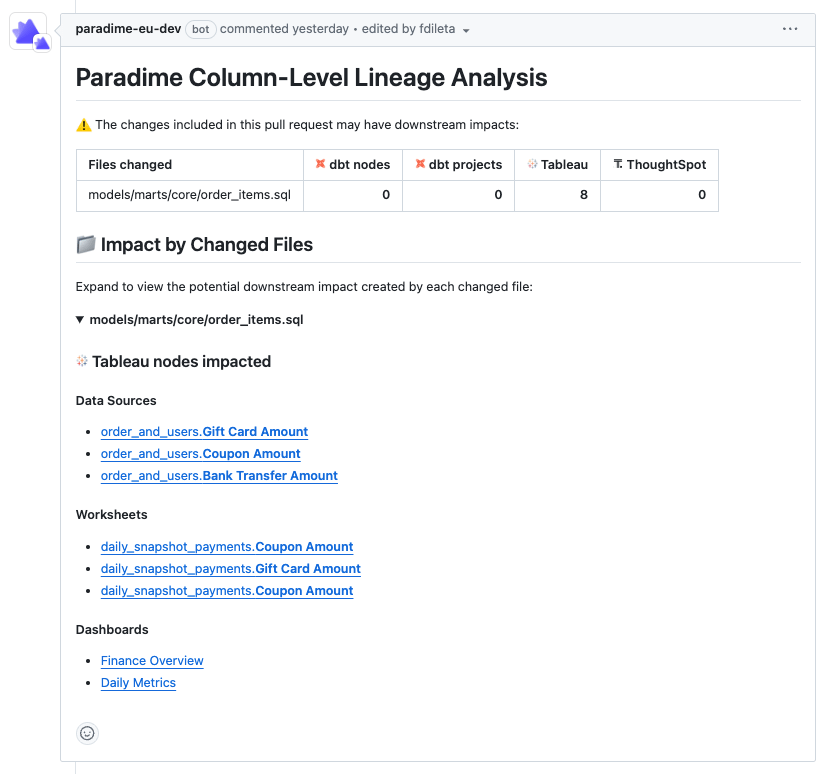
This feature provides a comprehensive impact analysis of dbt™ changes on your Tableau environment. When you open a pull request (PR) in your dbt™ project, you can visualize the downstream effects of your changes across various Tableau assets.
### Key Benefits:
1. Identify which dbt™ model changes are impacting your Tableau assets.
2. Proactively communicate which Tableau data sources and calculated fields are affected by your dbt™ changes before going into production.
3. Discover which workbooks and dashboards might be impacted by the changes.
### Prerequisites:
1. Complete [Lineage Diff setup prerequisites](/products/bolt/ci-cd/lineage-diff/index#setup-instructions)
2. Connect Tableau to Paradime via the [Tableau integration](/products/bolt/ci-cd/lineage-diff/tableau#prerequisites)
## How to Use
When a PR is opened in GitHub, an automated comment is generated listing all downstream Tableau nodes (Data Sources, Worksheets, Dashboards, etc.) that would be impacted.
Using the links available in the "Tableau nodes impacted" section, you can confidently investigate each node within Tableau before merging the PR changes into production.
 ## Related topics
- [Tableau](/integrations/tableau.md)
- [Security model](/resources/other-important-stuff/security-model.md)
- [Tableau assets](/products/data-catalog/data-assets/tableau-assets.md)
- [Tableau CLI](/developers/paradime-cli/tableau-cli.md)
## Related topics
- [Tableau](/integrations/tableau.md)
- [Security model](/resources/other-important-stuff/security-model.md)
- [Tableau assets](/products/data-catalog/data-assets/tableau-assets.md)
- [Tableau CLI](/developers/paradime-cli/tableau-cli.md)