> ## Documentation Index
> Fetch the complete documentation index at: https://docs.paradime.io/llms.txt
> Use this file to discover all available pages before exploring further.
# BitBucket
export const Arcade = ({src, title}) =>
;
With Paradime Turbo CI, you can run and test code changes to your dbt™️ project prior to merge them in your main branch, by configuring a Bolt schedule to run when a new pull request is opened against your dbt™️ repository.
Paradime will build the models affected by your changed into a temporary schema, and will run tests that you have written against the changes models to validate your test are still passing. When opening a pull request, Paradime Turbo CI run status will be showing in the pull request.
## How Turbo CI works
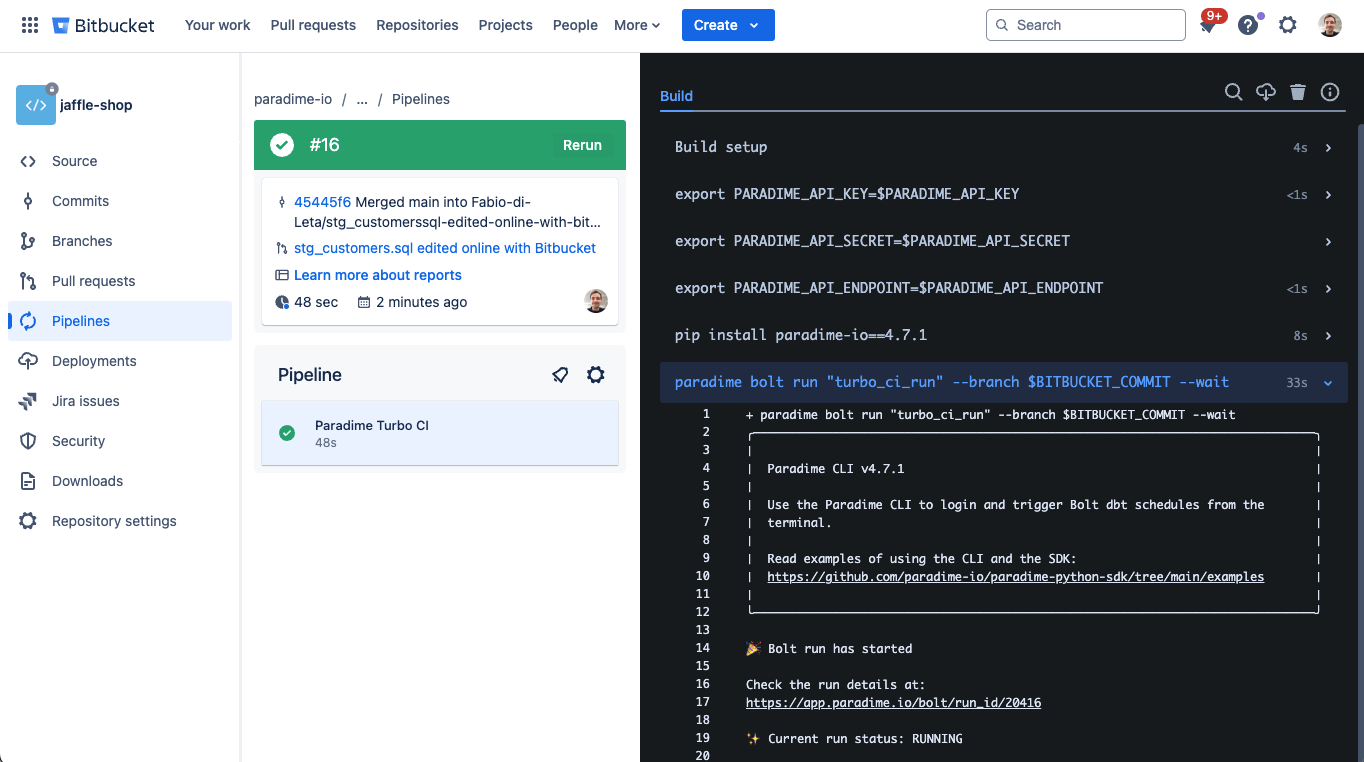
When Turbo CI is configured, a BitBucket Pipeline will trigger a TurboCI schedule in Paradime executing your configured dbt™️ command to run and test your dbt™️ changes.
When running, models will be built in a temporary schema using the prefix **`paradime_turbo_ci_pr_`** followed by the commit SHA number (e.g **`paradime_turbo_ci_pr_6d8f55c0`**). This will enabled you to see the results of your changes associated with the code in your pull request in your production data warehouse
 ## Pre-requisites
**A Scheduler Connection to your data warehouse where the target is set to `ci`.**
**ℹ️** [**Check our setup guide here based on your data warehouse provider**](/products/settings/connections/scheduler-environment/index)**.**
### Configure a custom schema for CI runs
Customize you dbt™️ schema generation at runtime, to make sure that when a PR is opened, Paradime Turbo CI will build and test your changed dbt™️ models in a temporary schema. We will want to update the dbt™️ `generate_schema_name.sql` macro.
In your dbt™️ project, in your *macros* folder create a macro called: `generate_schema_name.sql` and use a similar logic as below, where when a Bolt run is executed using the `ci` target the schema where your models will be built will use the **`paradime_turbo_ci_pr`** prefix.
```sql theme={"system"}
{% macro generate_schema_name(custom_schema_name, node) -%}
{%- set default_schema = target.schema -%}
{%- if target.name == 'prod' -%}
{{ custom_schema_name | trim }}
{%- elif target.name == 'ci' -%}
{{ default_schema }}
{%- else -%}
{%- if custom_schema_name is none -%}
{{ default_schema }}
{%- else -%}
{{ default_schema }}_{{ custom_schema_name | trim }}
{%- endif -%}
{%- endif -%}
{%- endmacro %}
```
See also:
[https://docs.getdbt.com/docs/build/custom-schemas#advanced-custom-schema-configuration](https://docs.getdbt.com/docs/build/custom-schemas#advanced-custom-schema-configuration)
### Deferral and State Comparison explained
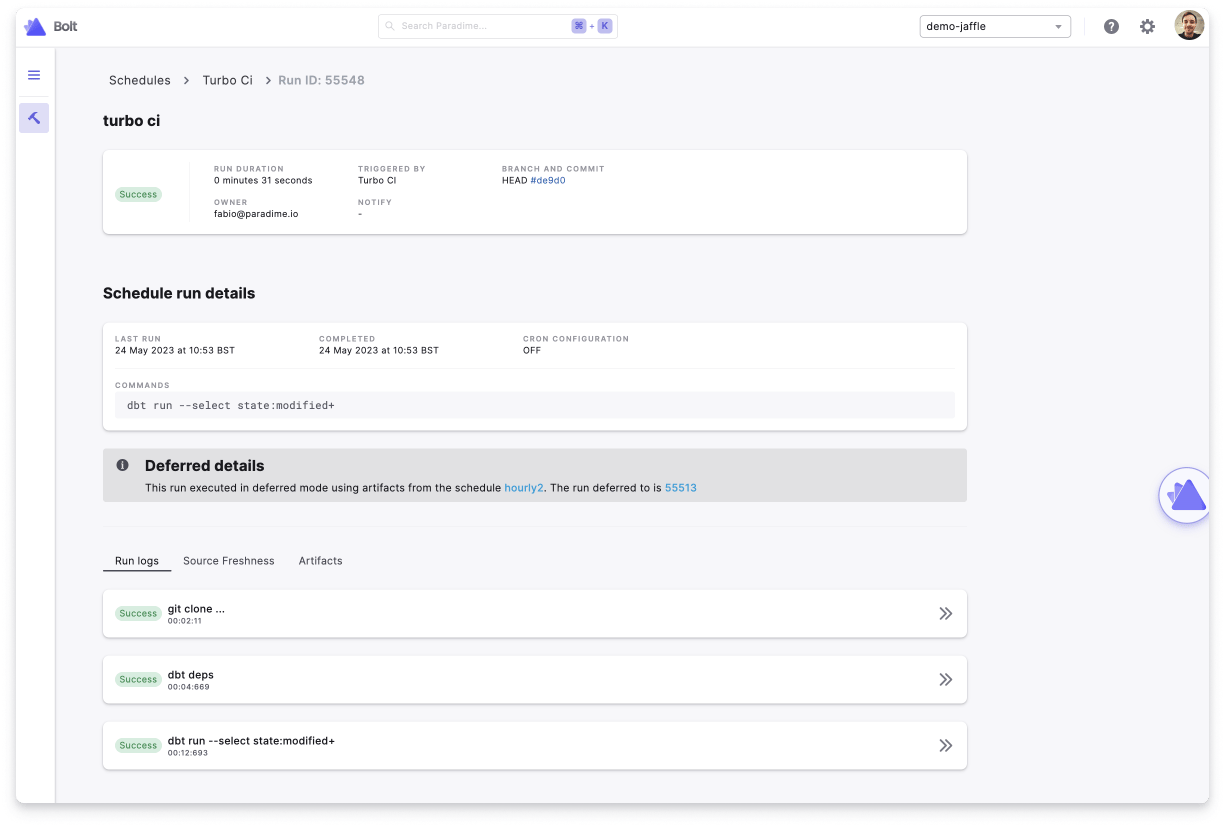
When creating the Turbo CI job in Paradime, you can set your execution settings to defer to a previous run state by adding in the `deferred_schedule_slug` configuration the slug of the Bolt production schedule you want to defer to
Paradime will look at the `manifest.json` from the specified schedule's most recent successful run *(unless setting the optional parameter `successful_run_only: false`)* to determined the set of new and modified dbt™️ resources. In your Turbo CI commands, you can then use the `state:modified+` argument to only run the modified resources and their downstream dependencies.
**A common example is:**
```bash theme={"system"}
dbt build --select state:modified+ --target ci
```
This will run and test all modified models with the downstream dependencies. Useful to validate that test are still passing after making changes to upstream dbt™️ models.
👉 To read more about state comparison check the dbt Core™️ documentation [here](https://docs.getdbt.com/reference/node-selection/state-comparison-caveats).
## 1. Configuring Bolt Turbo CI job
Setting up your Turbo CI Bolt Schedule is very similar to a normal bolt schedule with the addition of a couple more configurations.
A Turbo CI job differ from a bolt schedule as it involves:
* The Bolt schedule to defer to
* The `commands` to use the `state:modified+` selector to build / tests only new dbt™️ models and their downstream dependencies. State comparison can only happen when there is a deferred schedule name configured to compare state to.
* Being triggered by a pull request opened in your BitBucket dbt™️ repository
**Check our template:**
## 2. Create a BitBucket Pipeline
### Generate API keys and find you workspace token
**API keys are generate at a workspace level.**
To be able to trigger Bolt using the API, you will first need to generate API keys for your workspace. Got to account settings and generate your API keys, make sure to save in your password manager:
* API key
* API secret
* API Endpoint
You will need this later when setting up the secrets in BitBucket.
### Create a BitBucket Pipeline
Now you will need to create a new `bitbucket-pipelines.yml` file in your dbt™️ repository. Copy the code block below and enter the values required.
```yaml title="bitbucket-pipelines.yml" lineNumbers theme={"system"}
# Specify the base Docker image to use for all pipeline steps
image: python:3.11
# Define reusable pipeline steps
definitions:
steps:
# Create a reusable step template using YAML anchor (&)
- step: ¶dime-turbo-ci
# Name of this pipeline step for identification
name: Paradime Turbo CI
# Commands to execute in this step
script:
# Export required Paradime environment variables from repository variables
- export PARADIME_API_KEY=$PARADIME_API_KEY
- export PARADIME_API_SECRET=$PARADIME_API_SECRET
- export PARADIME_API_ENDPOINT=$PARADIME_API_ENDPOINT
# Get the PR number from Bitbucket's predefined variable
- export PR_NUMBER=$BITBUCKET_PR_ID
- echo "PR Number: $PR_NUMBER"
# Get the commit hash
- echo "Commit Hash: $BITBUCKET_COMMIT"
# Install Paradime Python SDK
- pip install paradime-io==4.18.0 # Check for latest version of the Paradime Python SDK on https://github.com/paradime-io/paradime-python-sdk/releases
# Run Paradime bolt schedule with PR number
# --branch flag uses Bitbucket's commit hash variable
# --pr-number flag passes the PR ID to Paradime
# --wait flag makes the pipeline wait for completion
- paradime bolt run "flowing-pachy-wyy4fs" --branch $BITBUCKET_COMMIT --pr-number $PR_NUMBER --wait
# Specify compute resources for this step
size: 2x # Double the default resources
# Set maximum execution time in minutes
max-time: 60
# Define when and how pipelines should run
pipelines:
pull-requests:
# '**' means this will run on PRs from any branch
'**':
- step:
# Reference the template step defined above using YAML alias (*)
<<: *paradime-turbo-ci
# Define environment variables needed for this step
# These should be configured in Bitbucket repository settings
variables:
API_KEY: PARADIME_API_KEY # API key for Paradime authentication
API_SECRET: PARADIME_API_SECRET # API secret for Paradime authentication
API_ENDPOINT: PARADIME_API_ENDPOINT # Paradime API endpoint URL
```
### Add the API keys and Credentials in the BitBucket Pipeline variables
Finally you need to add the API key and credentials generated in the [previous step](/products/bolt/ci-cd/turbo-ci/bitbucket#generate-api-keys-and-find-you-workspace-uid) in BitBucket Pipelines.
Set the corresponding values using your credentials for the variable names:
* `PARADIME_API_KEY`
* `PARADIME_API_SECRET`
* `PARADIME_API_ENDPOINT`
## View Turbo CI run Logs
As per other bolt schedules, you can inspect run logs for each of the Turbo CI jobs running when a pull request is opened.
## Pre-requisites
**A Scheduler Connection to your data warehouse where the target is set to `ci`.**
**ℹ️** [**Check our setup guide here based on your data warehouse provider**](/products/settings/connections/scheduler-environment/index)**.**
### Configure a custom schema for CI runs
Customize you dbt™️ schema generation at runtime, to make sure that when a PR is opened, Paradime Turbo CI will build and test your changed dbt™️ models in a temporary schema. We will want to update the dbt™️ `generate_schema_name.sql` macro.
In your dbt™️ project, in your *macros* folder create a macro called: `generate_schema_name.sql` and use a similar logic as below, where when a Bolt run is executed using the `ci` target the schema where your models will be built will use the **`paradime_turbo_ci_pr`** prefix.
```sql theme={"system"}
{% macro generate_schema_name(custom_schema_name, node) -%}
{%- set default_schema = target.schema -%}
{%- if target.name == 'prod' -%}
{{ custom_schema_name | trim }}
{%- elif target.name == 'ci' -%}
{{ default_schema }}
{%- else -%}
{%- if custom_schema_name is none -%}
{{ default_schema }}
{%- else -%}
{{ default_schema }}_{{ custom_schema_name | trim }}
{%- endif -%}
{%- endif -%}
{%- endmacro %}
```
See also:
[https://docs.getdbt.com/docs/build/custom-schemas#advanced-custom-schema-configuration](https://docs.getdbt.com/docs/build/custom-schemas#advanced-custom-schema-configuration)
### Deferral and State Comparison explained
When creating the Turbo CI job in Paradime, you can set your execution settings to defer to a previous run state by adding in the `deferred_schedule_slug` configuration the slug of the Bolt production schedule you want to defer to
Paradime will look at the `manifest.json` from the specified schedule's most recent successful run *(unless setting the optional parameter `successful_run_only: false`)* to determined the set of new and modified dbt™️ resources. In your Turbo CI commands, you can then use the `state:modified+` argument to only run the modified resources and their downstream dependencies.
**A common example is:**
```bash theme={"system"}
dbt build --select state:modified+ --target ci
```
This will run and test all modified models with the downstream dependencies. Useful to validate that test are still passing after making changes to upstream dbt™️ models.
👉 To read more about state comparison check the dbt Core™️ documentation [here](https://docs.getdbt.com/reference/node-selection/state-comparison-caveats).
## 1. Configuring Bolt Turbo CI job
Setting up your Turbo CI Bolt Schedule is very similar to a normal bolt schedule with the addition of a couple more configurations.
A Turbo CI job differ from a bolt schedule as it involves:
* The Bolt schedule to defer to
* The `commands` to use the `state:modified+` selector to build / tests only new dbt™️ models and their downstream dependencies. State comparison can only happen when there is a deferred schedule name configured to compare state to.
* Being triggered by a pull request opened in your BitBucket dbt™️ repository
**Check our template:**
## 2. Create a BitBucket Pipeline
### Generate API keys and find you workspace token
**API keys are generate at a workspace level.**
To be able to trigger Bolt using the API, you will first need to generate API keys for your workspace. Got to account settings and generate your API keys, make sure to save in your password manager:
* API key
* API secret
* API Endpoint
You will need this later when setting up the secrets in BitBucket.
### Create a BitBucket Pipeline
Now you will need to create a new `bitbucket-pipelines.yml` file in your dbt™️ repository. Copy the code block below and enter the values required.
```yaml title="bitbucket-pipelines.yml" lineNumbers theme={"system"}
# Specify the base Docker image to use for all pipeline steps
image: python:3.11
# Define reusable pipeline steps
definitions:
steps:
# Create a reusable step template using YAML anchor (&)
- step: ¶dime-turbo-ci
# Name of this pipeline step for identification
name: Paradime Turbo CI
# Commands to execute in this step
script:
# Export required Paradime environment variables from repository variables
- export PARADIME_API_KEY=$PARADIME_API_KEY
- export PARADIME_API_SECRET=$PARADIME_API_SECRET
- export PARADIME_API_ENDPOINT=$PARADIME_API_ENDPOINT
# Get the PR number from Bitbucket's predefined variable
- export PR_NUMBER=$BITBUCKET_PR_ID
- echo "PR Number: $PR_NUMBER"
# Get the commit hash
- echo "Commit Hash: $BITBUCKET_COMMIT"
# Install Paradime Python SDK
- pip install paradime-io==4.18.0 # Check for latest version of the Paradime Python SDK on https://github.com/paradime-io/paradime-python-sdk/releases
# Run Paradime bolt schedule with PR number
# --branch flag uses Bitbucket's commit hash variable
# --pr-number flag passes the PR ID to Paradime
# --wait flag makes the pipeline wait for completion
- paradime bolt run "flowing-pachy-wyy4fs" --branch $BITBUCKET_COMMIT --pr-number $PR_NUMBER --wait
# Specify compute resources for this step
size: 2x # Double the default resources
# Set maximum execution time in minutes
max-time: 60
# Define when and how pipelines should run
pipelines:
pull-requests:
# '**' means this will run on PRs from any branch
'**':
- step:
# Reference the template step defined above using YAML alias (*)
<<: *paradime-turbo-ci
# Define environment variables needed for this step
# These should be configured in Bitbucket repository settings
variables:
API_KEY: PARADIME_API_KEY # API key for Paradime authentication
API_SECRET: PARADIME_API_SECRET # API secret for Paradime authentication
API_ENDPOINT: PARADIME_API_ENDPOINT # Paradime API endpoint URL
```
### Add the API keys and Credentials in the BitBucket Pipeline variables
Finally you need to add the API key and credentials generated in the [previous step](/products/bolt/ci-cd/turbo-ci/bitbucket#generate-api-keys-and-find-you-workspace-uid) in BitBucket Pipelines.
Set the corresponding values using your credentials for the variable names:
* `PARADIME_API_KEY`
* `PARADIME_API_SECRET`
* `PARADIME_API_ENDPOINT`
## View Turbo CI run Logs
As per other bolt schedules, you can inspect run logs for each of the Turbo CI jobs running when a pull request is opened.
 ## Related topics
- [BitBucket](/products/settings/git-repositories/importing-a-repository/bitbucket.md)
- [Using BitBucket Pipelines](/products/bolt/ci-cd/continuous-deployment-with-bolt/using-bitbucket-pipelines.md)
- [Column-Level Lineage Diff [deprecated]](/products/bolt/ci-cd/lineage-diff-deprecated/index.md)
- [Column-Level Lineage Diff](/products/bolt/ci-cd/lineage-diff/index.md)
- [Importing a repository](/products/settings/git-repositories/importing-a-repository/index.md)
## Related topics
- [BitBucket](/products/settings/git-repositories/importing-a-repository/bitbucket.md)
- [Using BitBucket Pipelines](/products/bolt/ci-cd/continuous-deployment-with-bolt/using-bitbucket-pipelines.md)
- [Column-Level Lineage Diff [deprecated]](/products/bolt/ci-cd/lineage-diff-deprecated/index.md)
- [Column-Level Lineage Diff](/products/bolt/ci-cd/lineage-diff/index.md)
- [Importing a repository](/products/settings/git-repositories/importing-a-repository/index.md)