> ## Documentation Index
> Fetch the complete documentation index at: https://docs.paradime.io/llms.txt
> Use this file to discover all available pages before exploring further.
# 2. Self-Healing
When a Bolt run fails on a schedule with Self-Healing enabled, Paradime automatically triggers a DinoAI agent against the failure — inside the same Slack thread as the failure notification. The agent diagnoses the run, implements a fix, and opens a pull request for your team to review.
You stay in control. The agent **always opens a PR** — it never merges to your default branch. Reviewers approve the fix before it reaches production.
**Prerequisites**
* **A Slack notification channel** must be configured for this schedule under Notification Settings — Self-Healing reuses the failure-notification thread to run the agent in.
* Aa Programmable Agent defined under `.dinoai/agents/.yml` if you want a custom healer instead of the default Bolt-fix agent.
#### Configure from the Bolt UI
In the Bolt schedule editor:
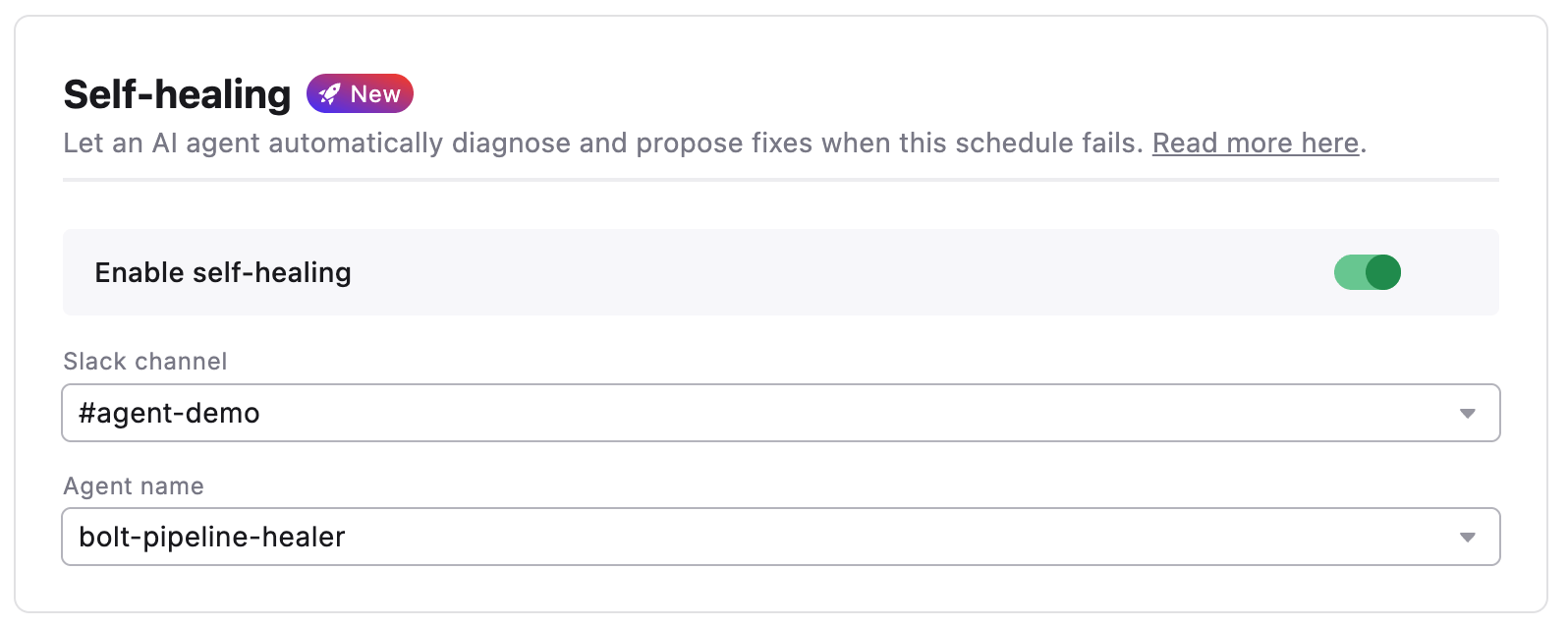
1. Open the **Self-Healing** section.
2. Toggle **Enable Self-Healing**.
3. Pick the **Slack channel** the agent should run in. It must already be configured as a Slack notification channel on this schedule.
4. Pick an **Agent Name** from the dropdown — the list is populated from `.dinoai/agents/*.yml` on the configured git branch. Leave empty to use Paradime's default Bolt-fix agent.
5. Save the schedule.
 #### Configure from YAML
If you manage schedules as code, add a `self_healing` block to the schedule:
```yaml theme={"system"}
self_healing:
enabled: true
slack_channel: '#agent-demo'
agent_name: bolt-pipeline-healer
```
`self_healing.slack_channel` **must also appear** in `notifications.slack_channels` for the same schedule. The validator rejects the schedule otherwise. The agent threads into the failure notification, so the notification has to exist for the agent to find its thread.
***
#### What happens when a run fails
1. The standard failure notification posts to every Slack channel in `notifications.slack_channels`.
2. In the **Self-Healing channel**, Paradime posts `🦖 Self-healing enabled — starting healing session...` into the failure thread and triggers the DinoAI agent.
3. In every **other** notification channel, Paradime posts `🦖 Self-healing started in #` so reviewers know where to follow along.
4. The agent works in-thread, posts progress, and ends with a PR link for the proposed fix.
5. If the same schedule has been self-healed recently, the agent is given a summary of those prior sessions so it doesn't duplicate work — for example, if an open PR already proposes a fix.
For the full agent-side narrative, see DinoAI → Self-Healing.
***
#### Related
* [Notification Settings](/products/bolt/creating-schedules/notification-settings) - Configure the Slack channel Self-Healing reuses
* [Schedules as Code](/products/bolt/creating-schedules/schedules-as-code/index) - Configuration Reference — Full YAML schema
* [DinoAI Self-Healing](/products/dino-ai/bolt-pipeline-agent/self-healing) - How the agent diagnoses and fixes the failure
* [Fix with DinoAI](/products/dino-ai/bolt-pipeline-agent/fix-with-dinoai) - Manual one-click equivalent
* [Programmable Agents](/guides/programmable-agents/index) - Author a custom `agent_name`
## Related topics
- [Self-Healing](/products/dino-ai/bolt-pipeline-agent/self-healing.md)
- [Bolt Pipeline Agent](/products/dino-ai/bolt-pipeline-agent/index.md)
- [Bolt Pipeline Healer](/guides/programmable-agents/bolt-pipeline-healer.md)
- [bolt-ci-healer](/guides/programmable-agents/bolt-ci-healer.md)
- [Pipeline Insights](/products/dino-ai/bolt-pipeline-agent/production-pipelines.md)
#### Configure from YAML
If you manage schedules as code, add a `self_healing` block to the schedule:
```yaml theme={"system"}
self_healing:
enabled: true
slack_channel: '#agent-demo'
agent_name: bolt-pipeline-healer
```
`self_healing.slack_channel` **must also appear** in `notifications.slack_channels` for the same schedule. The validator rejects the schedule otherwise. The agent threads into the failure notification, so the notification has to exist for the agent to find its thread.
***
#### What happens when a run fails
1. The standard failure notification posts to every Slack channel in `notifications.slack_channels`.
2. In the **Self-Healing channel**, Paradime posts `🦖 Self-healing enabled — starting healing session...` into the failure thread and triggers the DinoAI agent.
3. In every **other** notification channel, Paradime posts `🦖 Self-healing started in #` so reviewers know where to follow along.
4. The agent works in-thread, posts progress, and ends with a PR link for the proposed fix.
5. If the same schedule has been self-healed recently, the agent is given a summary of those prior sessions so it doesn't duplicate work — for example, if an open PR already proposes a fix.
For the full agent-side narrative, see DinoAI → Self-Healing.
***
#### Related
* [Notification Settings](/products/bolt/creating-schedules/notification-settings) - Configure the Slack channel Self-Healing reuses
* [Schedules as Code](/products/bolt/creating-schedules/schedules-as-code/index) - Configuration Reference — Full YAML schema
* [DinoAI Self-Healing](/products/dino-ai/bolt-pipeline-agent/self-healing) - How the agent diagnoses and fixes the failure
* [Fix with DinoAI](/products/dino-ai/bolt-pipeline-agent/fix-with-dinoai) - Manual one-click equivalent
* [Programmable Agents](/guides/programmable-agents/index) - Author a custom `agent_name`
## Related topics
- [Self-Healing](/products/dino-ai/bolt-pipeline-agent/self-healing.md)
- [Bolt Pipeline Agent](/products/dino-ai/bolt-pipeline-agent/index.md)
- [Bolt Pipeline Healer](/guides/programmable-agents/bolt-pipeline-healer.md)
- [bolt-ci-healer](/guides/programmable-agents/bolt-ci-healer.md)
- [Pipeline Insights](/products/dino-ai/bolt-pipeline-agent/production-pipelines.md)