> ## Documentation Index
> Fetch the complete documentation index at: https://docs.paradime.io/llms.txt
> Use this file to discover all available pages before exploring further.
# Alert Templates
> Customize Slack and Microsoft Teams Bolt notifications with reusable Jinja2 templates for run status, command details, and error context.
Customize the [Slack](/integrations/slack) and [Microsoft Teams](/integrations/microsoft-teams) notifications sent by your Bolt Schedules. Using Jinja2 syntax, templates let you control exactly what your alerts say, surfacing the run context your team needs, in the format that works for them.
Templates are created once in the Alert Templates page and can then be attached to any channel destination across your schedules.
***
### Creating a Template
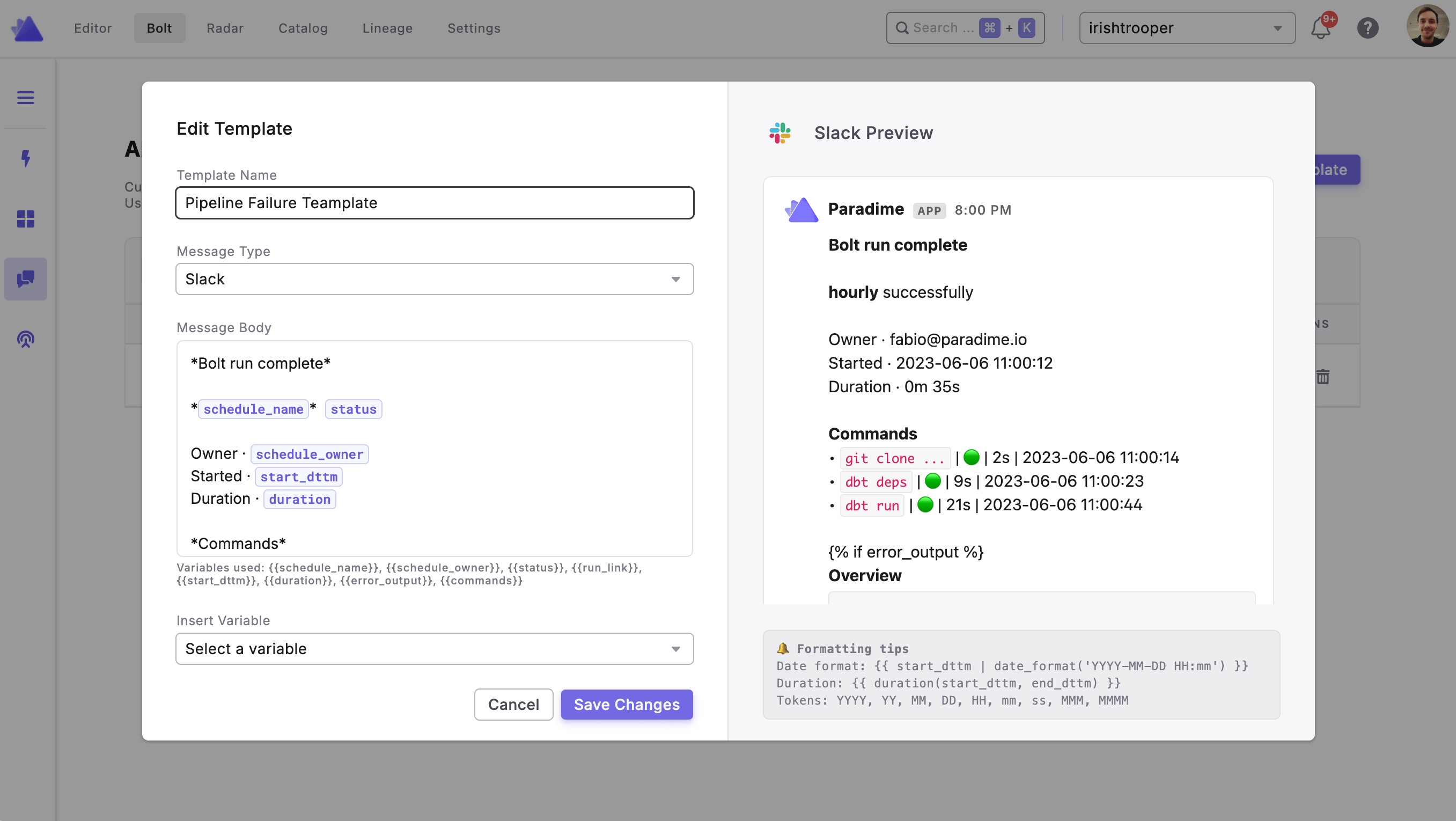
1. Navigate to **Bolt > Alert Templates** in the top navigation
2. Click **+ New Template**
3. Give your template a name
4. Write your message using plain text, template variables, and Jinja expressions
5. Save the template
 ### Attaching a Template to a Schedule
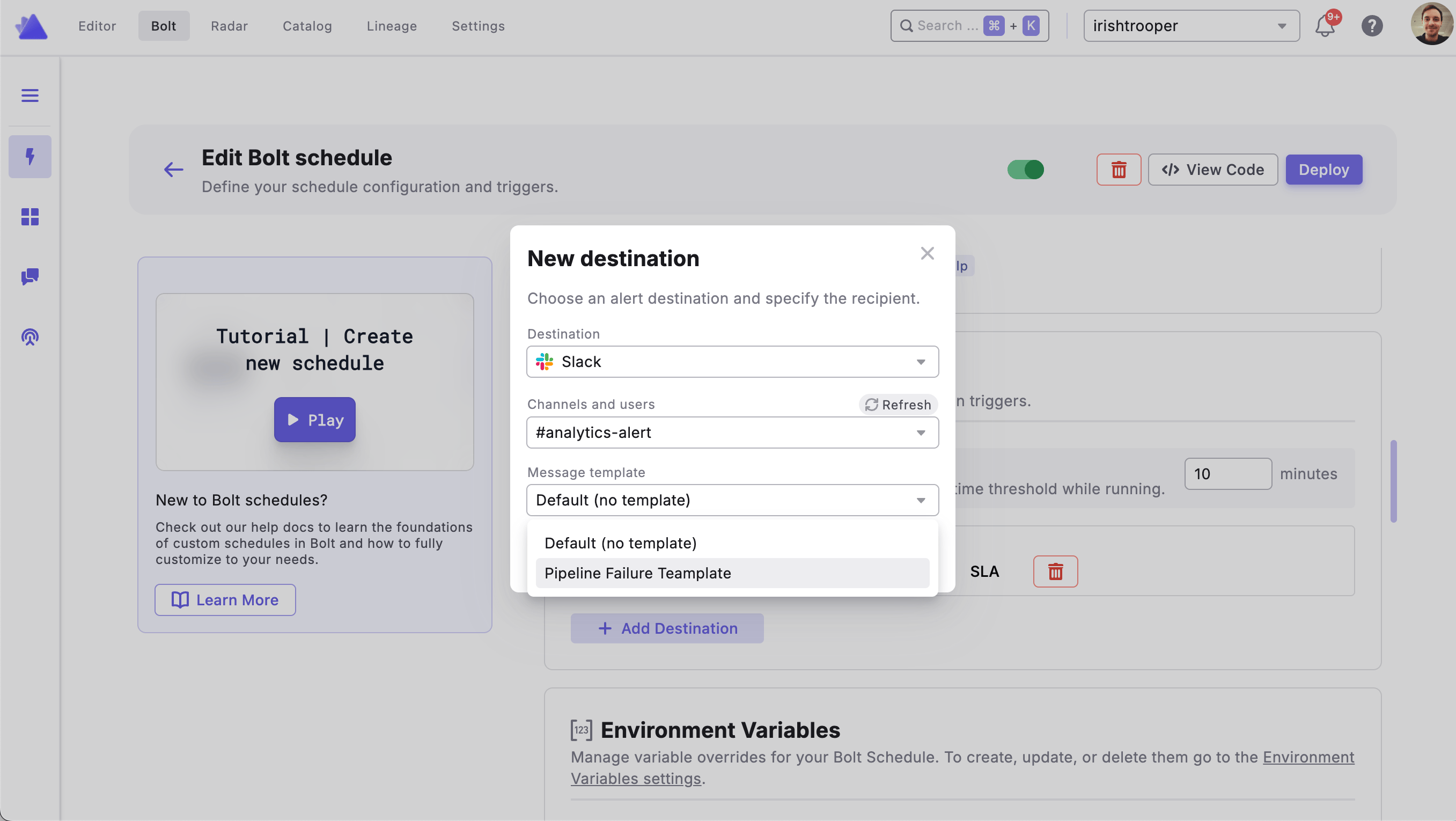
1. Open the Bolt Schedule you want to configure
2. Navigate to the **Notification Settings** tab
3. Under **Notification Destinations**, locate the Slack or MS Teams channel you want to customize
4. Select your saved template from the template dropdown on that channel row
5. Click **Deploy** to save your changes
### Attaching a Template to a Schedule
1. Open the Bolt Schedule you want to configure
2. Navigate to the **Notification Settings** tab
3. Under **Notification Destinations**, locate the Slack or MS Teams channel you want to customize
4. Select your saved template from the template dropdown on that channel row
5. Click **Deploy** to save your changes
 ***
### Template Variables
Templates use Jinja2 syntax. The following variables are available:
| Variable | Description |
| ---------------------- | --------------------------- |
| `{{ slug }}` | Slug of the Bolt Schedule |
| `{{ schedule_owner }}` | Owner email of the schedule |
| Variable | Description |
| -------------------- | -------------------------------------------------- |
| `{{ status }}` | Run completion status (e.g. "succeeded", "failed") |
| `{{ status_emoji }}` | Emoji representing the run status |
| `{{ run_link }}` | URL link to the run in Paradime |
| `{{ run_uuid }}` | UUID of the run |
| `{{ start_dttm }}` | Run start datetime |
| `{{ end_dttm }}` | Run end datetime |
| `{{ duration }}` | Run duration (e.g. "5m 32s") |
| Variable | Description |
| ---------------------- | ------------------------------ |
| `{{ workspace_name }}` | Name of the Paradime workspace |
| `{{ branch }}` | Git branch used for the run |
| `{{ commit_hash }}` | Git commit hash |
| `{{ actor }}` | User who triggered the run |
`{{ commands }}` is a list of objects, one per dbt command in the schedule. Each object contains:
| Field | Description |
| -------------- | ---------------------------- |
| `command` | The dbt command string |
| `status` | Completion status |
| `status_emoji` | Emoji for the command status |
| `duration` | Duration string |
| `start_dttm` | Command start datetime |
| `end_dttm` | Command end datetime |
| Variable | Description |
| --------------------- | ----------------------------------- |
| `{{ error_command }}` | The command that errored, or `None` |
| `{{ error_output }}` | The error output text, or `None` |
#### Filters & Helpers
| Syntax | Description |
| ----------------------------------------------------- | ----------------------------------------------------------------------------------------------------- |
| `{{ start_dttm \| date_format('YYYY-MM-DD HH:mm') }}` | Format a datetime string. Supported tokens: `YYYY`, `YY`, `MMMM`, `MMM`, `MM`, `DD`, `HH`, `mm`, `ss` |
| `{{ duration(start_dttm, end_dttm) }}` | Compute duration between two datetime strings |
***
### Example Template
***
### Template Variables
Templates use Jinja2 syntax. The following variables are available:
| Variable | Description |
| ---------------------- | --------------------------- |
| `{{ slug }}` | Slug of the Bolt Schedule |
| `{{ schedule_owner }}` | Owner email of the schedule |
| Variable | Description |
| -------------------- | -------------------------------------------------- |
| `{{ status }}` | Run completion status (e.g. "succeeded", "failed") |
| `{{ status_emoji }}` | Emoji representing the run status |
| `{{ run_link }}` | URL link to the run in Paradime |
| `{{ run_uuid }}` | UUID of the run |
| `{{ start_dttm }}` | Run start datetime |
| `{{ end_dttm }}` | Run end datetime |
| `{{ duration }}` | Run duration (e.g. "5m 32s") |
| Variable | Description |
| ---------------------- | ------------------------------ |
| `{{ workspace_name }}` | Name of the Paradime workspace |
| `{{ branch }}` | Git branch used for the run |
| `{{ commit_hash }}` | Git commit hash |
| `{{ actor }}` | User who triggered the run |
`{{ commands }}` is a list of objects, one per dbt command in the schedule. Each object contains:
| Field | Description |
| -------------- | ---------------------------- |
| `command` | The dbt command string |
| `status` | Completion status |
| `status_emoji` | Emoji for the command status |
| `duration` | Duration string |
| `start_dttm` | Command start datetime |
| `end_dttm` | Command end datetime |
| Variable | Description |
| --------------------- | ----------------------------------- |
| `{{ error_command }}` | The command that errored, or `None` |
| `{{ error_output }}` | The error output text, or `None` |
#### Filters & Helpers
| Syntax | Description |
| ----------------------------------------------------- | ----------------------------------------------------------------------------------------------------- |
| `{{ start_dttm \| date_format('YYYY-MM-DD HH:mm') }}` | Format a datetime string. Supported tokens: `YYYY`, `YY`, `MMMM`, `MMM`, `MM`, `DD`, `HH`, `mm`, `ss` |
| `{{ duration(start_dttm, end_dttm) }}` | Compute duration between two datetime strings |
***
### Example Template
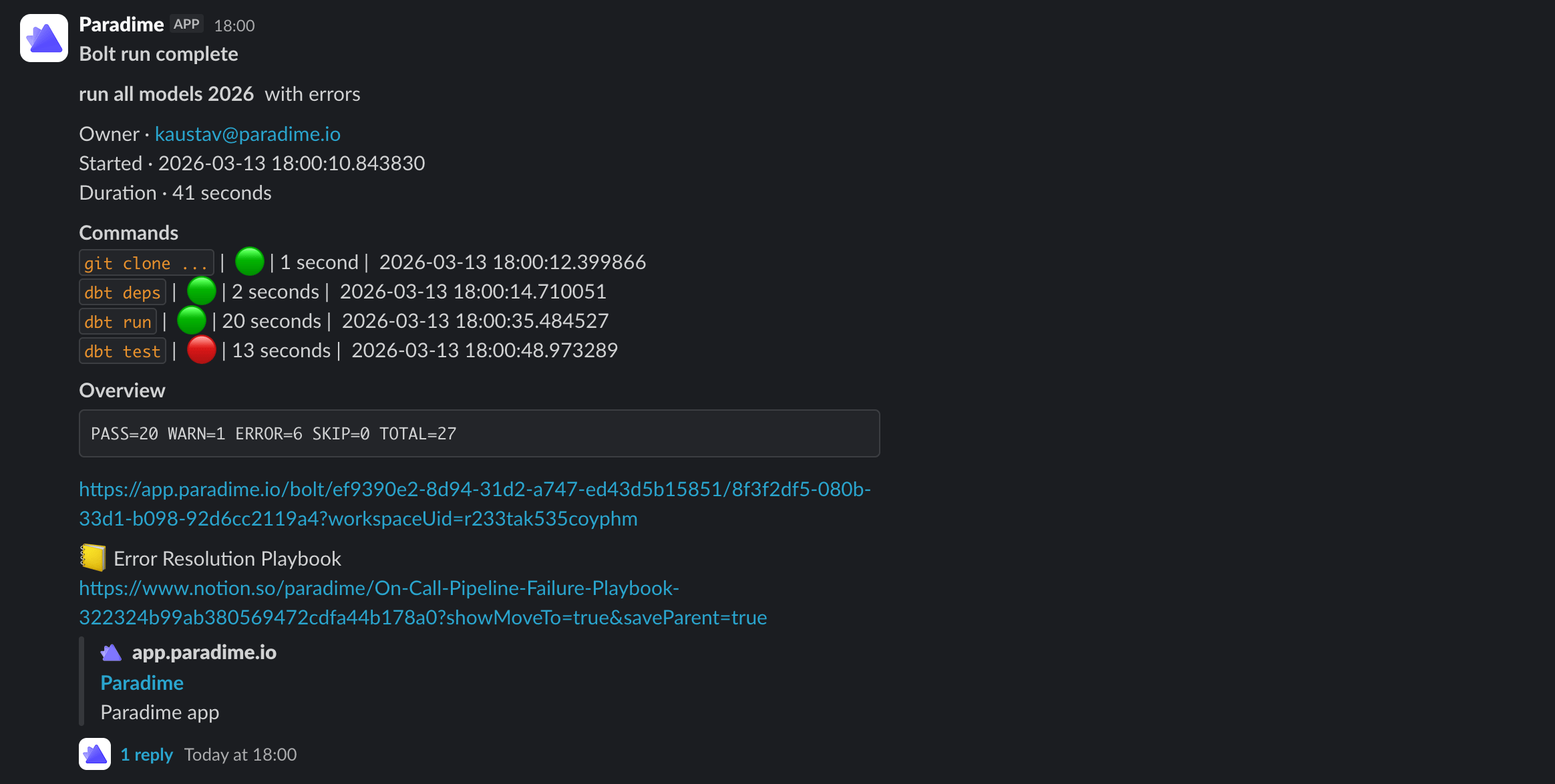 ````jinja theme={"system"}
*Bolt run complete*
*{{slug}}* {{status}}
Owner · {{schedule_owner}}
Started · {{start_dttm}}
Duration · {{duration}}
*Commands*
{% for cmd in commands %}
`{{cmd.command}}` | {{cmd.status_emoji}} | {{cmd.duration}} | {{cmd.end_dttm}}
{% endfor %}
{% if error_output %}
*Overview*
```
{{error_output}}
```
{% endif %}
{{run_link}}
📒 Error Resolution Playbook
https://www.notion.so/paradime/On-Call-Pipeline-Failure-Playbook-322324b99ab380569472cdfa44b178a0?showMoveTo=true&saveParent=true
````
## Related topics
- [5. Notification Settings](/products/bolt/creating-schedules/notification-settings.md)
- [Observability Templates](/products/bolt/creating-schedules/templates/observability-templates/index.md)
- [Send Elementary alerts to Slack](/products/bolt/creating-schedules/templates/observability-templates/send-elementary-alerts-to-slack.md)
- [Send Elementary alerts to MS Teams](/products/bolt/creating-schedules/templates/observability-templates/send-elementary-alerts-to-ms-teams.md)
- [Snapshot Source Data Freshness](/products/bolt/creating-schedules/templates/dbt-tm-templates/snapshot-source-data-freshness.md)
````jinja theme={"system"}
*Bolt run complete*
*{{slug}}* {{status}}
Owner · {{schedule_owner}}
Started · {{start_dttm}}
Duration · {{duration}}
*Commands*
{% for cmd in commands %}
`{{cmd.command}}` | {{cmd.status_emoji}} | {{cmd.duration}} | {{cmd.end_dttm}}
{% endfor %}
{% if error_output %}
*Overview*
```
{{error_output}}
```
{% endif %}
{{run_link}}
📒 Error Resolution Playbook
https://www.notion.so/paradime/On-Call-Pipeline-Failure-Playbook-322324b99ab380569472cdfa44b178a0?showMoveTo=true&saveParent=true
````
## Related topics
- [5. Notification Settings](/products/bolt/creating-schedules/notification-settings.md)
- [Observability Templates](/products/bolt/creating-schedules/templates/observability-templates/index.md)
- [Send Elementary alerts to Slack](/products/bolt/creating-schedules/templates/observability-templates/send-elementary-alerts-to-slack.md)
- [Send Elementary alerts to MS Teams](/products/bolt/creating-schedules/templates/observability-templates/send-elementary-alerts-to-ms-teams.md)
- [Snapshot Source Data Freshness](/products/bolt/creating-schedules/templates/dbt-tm-templates/snapshot-source-data-freshness.md)