> ## Documentation Index
> Fetch the complete documentation index at: https://docs.paradime.io/llms.txt
> Use this file to discover all available pages before exploring further.
# Airbyte Connector Sync
> Trigger Airbyte syncs and run dbt™ transformations automatically with Paradime Bolt integration.
## Overview
Paradime provides a convenient way to trigger and orchestrate Airbyte connector syncs, allowing you to keep your data warehouse up to date with the latest data from your sources.
By leveraging Paradime's Airbyte Integration to triggering syncs, you can orchestrate your data pipeline by running dbt™ transformations immediately after your Airbyte sync completes.
You can configure this by adding dbt™ commands directly in the same Bolt schedule or by using the [on run completion trigger](/products/bolt/creating-schedules/trigger-types) in a separate dbt™ pipeline.
**Prerequisites**
**1. Generate Client ID and Secret for your Application**
You will need Airbyte credentials to use these commands:
* **Airbyte Cloud**: Client ID and Client Secret from your [Airbyte Cloud workspace](https://cloud.airbyte.com/). [More here](/integrations/airbyte/airbyte-cloud)
* **Airbyte Server**: Client ID and Client Secret from your self-hosted Airbyte instance as well as your Airbyte URL of your Airbyte API endpoint (including the correct port number). [More here](/products/bolt/creating-schedules/command-settings/airbyte-connector-sync#airbyte-server-self-hosted)
**🔧 Connector Configuration**
* Ensure the connection exists and is enabled in the Airbyte dashboard.
* Confirm that both the source and destination connectors have valid credentials and can connect.
* Make sure the credentials used have the necessary permissions to run syncs and access resources.
* Run manual tests or sample syncs in the Airbyte UI to validate configuration prior to large or automated runs.
**2. Set Environment Variables**
Use the generated credentials and set as [environment variables](https://docs.paradime.io/app-help/documentation/settings/environment-variables/bolt-schedule-env-variables) for Bolt Schedules
* `AIRBYTE_CLIENT_ID`
* `AIRBYTE_CLIENT_SECRET`
* `AIRBYTE_BASE_URL` (Airbyte Server ONly)
* `USE_SERVER_AUTH` (Airbyte Server Only)
### How to Configure Airbyte Connector Syncs
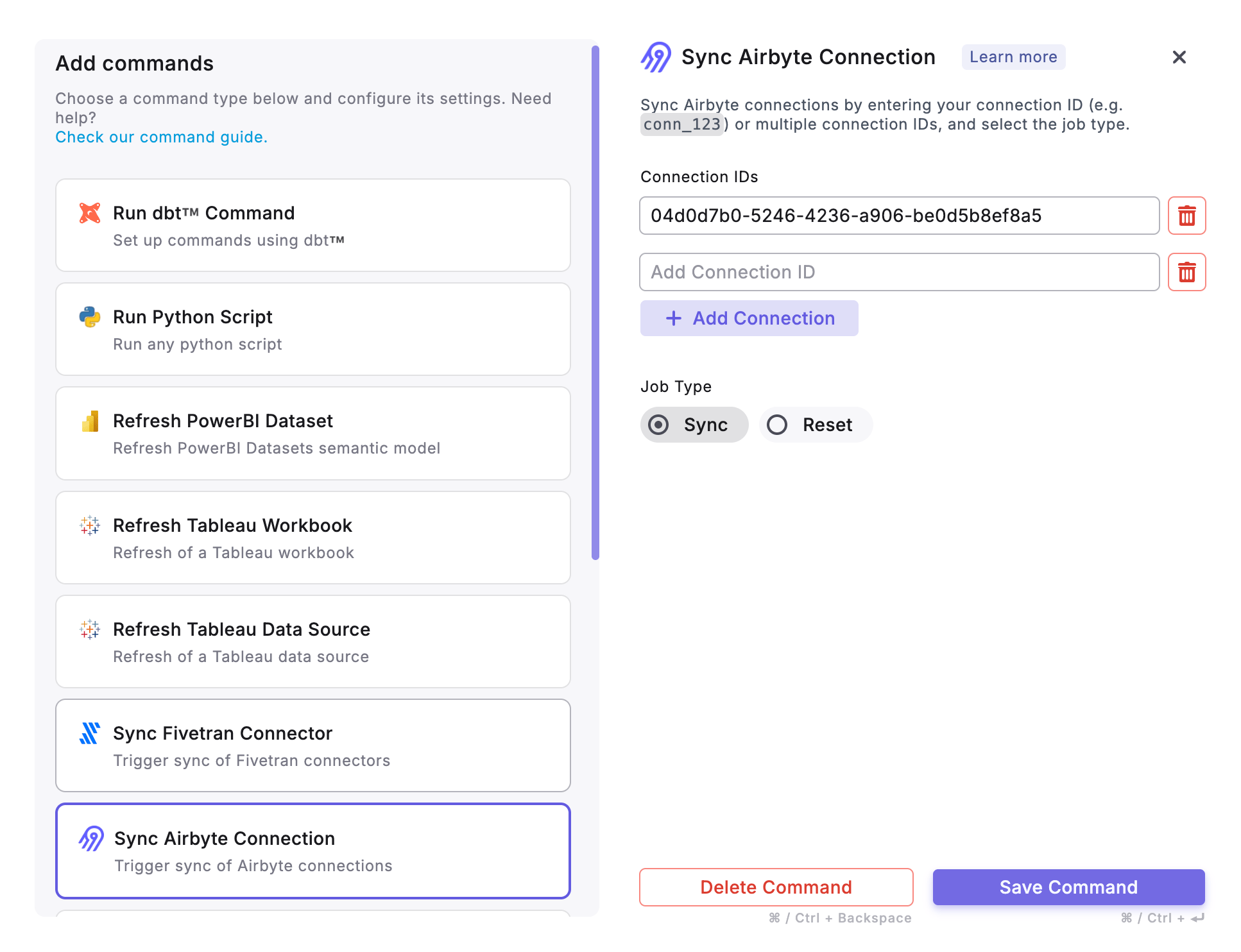
When setting up Airbyte Connector Sync, you can provide one or more Airbyte Connectors ID when setting up the task. Providing multiple Connector IDs in the same taks will allow the syncs to be run in parallel and continue to the next task only when all syncs completed.
We recommend you set the Airbyte connector sync schedule to **manual**. This ensures Airbyte runs when you expect, and syncs are orchestrated only via Paradime.
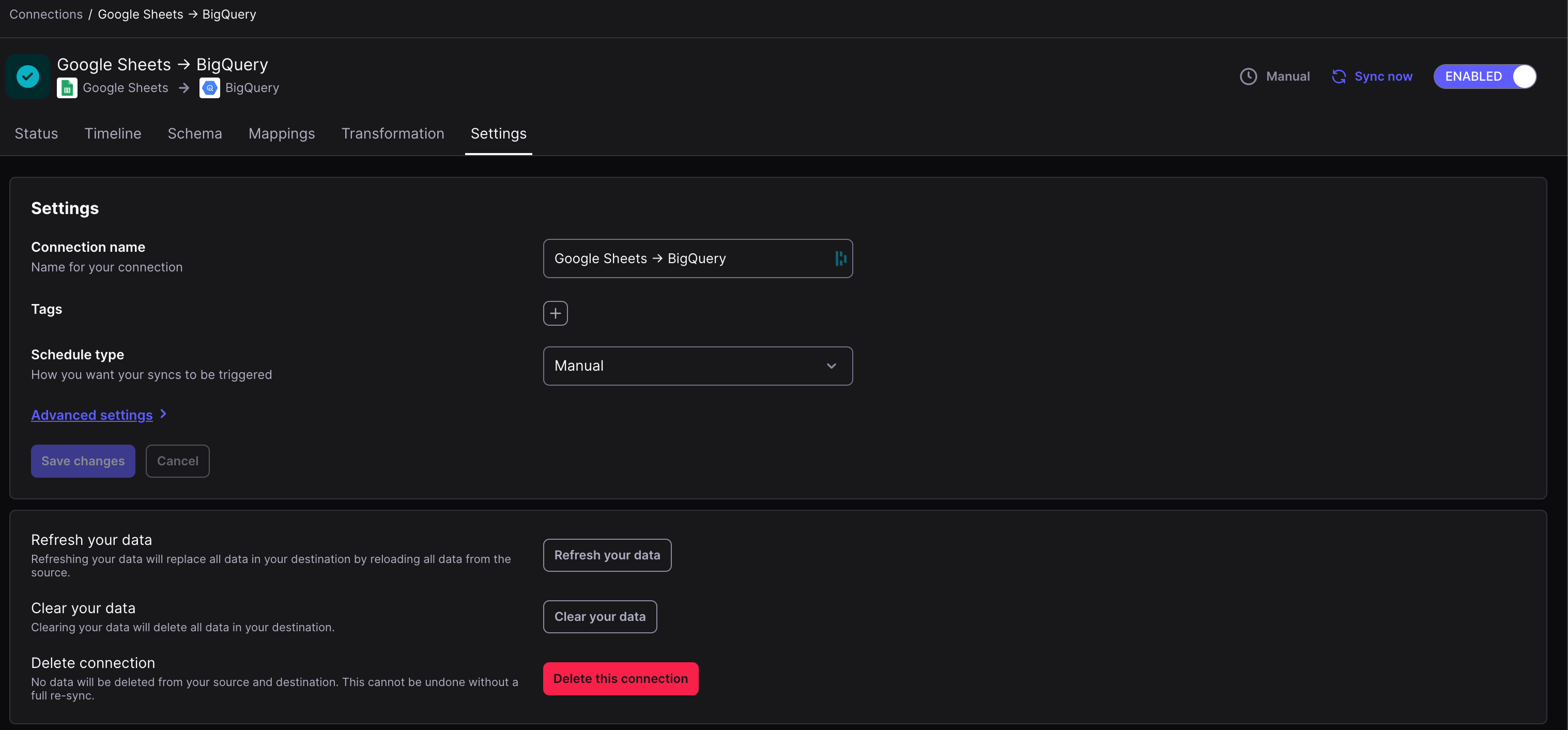
To set an Airbyte connection to "manual," you need to find the specific connection in the Airbyte UI and change its **Schedule Type** to "Manual".
This is done within the connection's settings, which allows you to manually trigger syncs rather than having them run on a fixed schedule.
**Step 1: Navigate to the connection**
* In the left navigation pane, click on **Connections**.
* Find the specific connection you want to modify and click on its name.
**Step 2: Change the schedule type**
* In the connection's settings page, find the **Schedule Type** setting.
* Click on the dropdown menu next to it and select **Manual**.
**Step 3: Save the changes**
* Click the **Save changes** button at the bottom of the page to apply the new schedule.
* Your connection is now set to manual and will not sync automatically.
 **Learn More**: For all supported commands and additional configuration flags, refer to the [Paradime Airbyte CLI documentation](/developers/paradime-cli/airbyte-cli).
***
Now, let's learn how to configure the [Trigger Types](/products/bolt/creating-schedules/trigger-types) of a Bolt Schedule.
## Related topics
- [Airbyte CLI](/developers/paradime-cli/airbyte-cli.md)
- [Fivetran Connector Sync](/products/bolt/creating-schedules/command-settings/fivetran-connector-sync.md)
- [Fivetran CLI](/developers/paradime-cli/fivetran-cli.md)
- [Airbyte Cloud](/integrations/airbyte/airbyte-cloud.md)
- [Airbyte Server](/integrations/airbyte/airbyte-server.md)
**Learn More**: For all supported commands and additional configuration flags, refer to the [Paradime Airbyte CLI documentation](/developers/paradime-cli/airbyte-cli).
***
Now, let's learn how to configure the [Trigger Types](/products/bolt/creating-schedules/trigger-types) of a Bolt Schedule.
## Related topics
- [Airbyte CLI](/developers/paradime-cli/airbyte-cli.md)
- [Fivetran Connector Sync](/products/bolt/creating-schedules/command-settings/fivetran-connector-sync.md)
- [Fivetran CLI](/developers/paradime-cli/fivetran-cli.md)
- [Airbyte Cloud](/integrations/airbyte/airbyte-cloud.md)
- [Airbyte Server](/integrations/airbyte/airbyte-server.md)