> ## Documentation Index
> Fetch the complete documentation index at: https://docs.paradime.io/llms.txt
> Use this file to discover all available pages before exploring further.
# 3. Command Settings
> Orchestrate command execution for dbt™, Elementary, Tableau, Power BI, Monte Carlo & Python scripts in Paradime Bolt schedules with smart error handling.
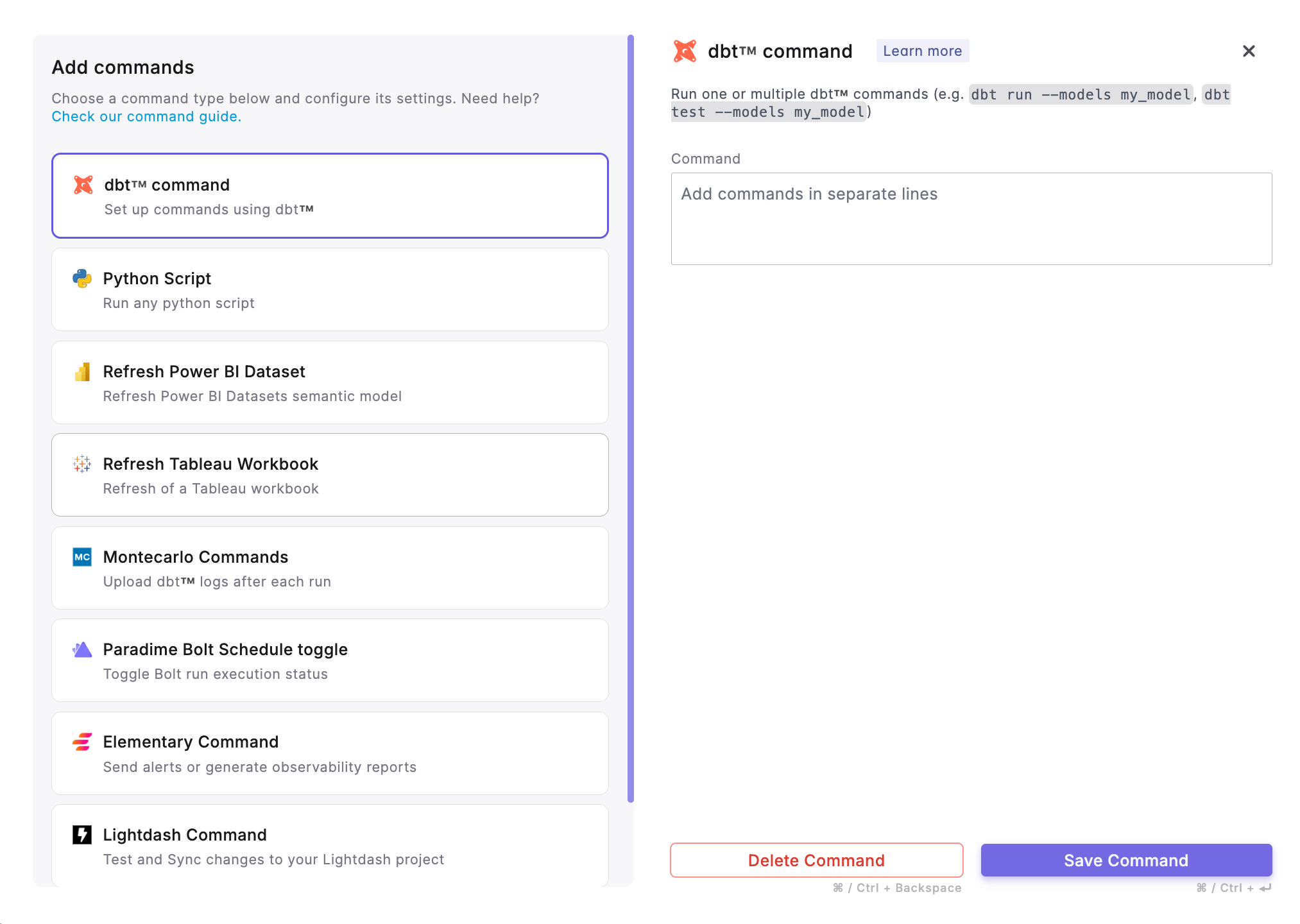
After configuring [Schedule Settings](/products/bolt/creating-schedules/schedule-settings) of a Bolt Schedule, you’ll specify the commands you want the schedule to execute. **Command Settings** allow you to define which commands run when the schedule is triggered, supporting a variety of workflows.
### Overview
With **Command Settings**, you can:
* Select [commands](/products/bolt/creating-schedules/command-settings/index#explore-paradime-supported-commands-in-bolt) (dbt™, Elementary Data, and others) to run in Paradime
* Set the order of command execution
* Customize options for each command
* Create custom command combinations to suit your workflows
 ### Commands execution logic
Paradime follows a specific command execution logic to handle errors and determine whether subsequent tasks should be executed. Here's how it works:
1. **Command Completion with Error**: When a command in a Paradime schedules completes with an error, the subsequent tasks in the job will be skipped by default.
2. **Exceptions to Skipping Subsequent Tasks**: Despite the default behavior of skipping subsequent tasks on error, there are a few exceptions where the subsequent tasks will still be executed:
1. **Source Freshness and Source Status**: If the command that encountered an error is a [`dbt source freshness`](/guides/dbt-fundamentals/running-dbt/mastering-the-dbt-cli/commands#source-freshness) command and the following command is using the [`source_status:fresher`](/guides/dbt-fundamentals/running-dbt/mastering-the-dbt-cli/methods#source_status-method) dbt™ selector method, the subsequent command will still be executed ([Check our Bolt Template](/products/bolt/creating-schedules/templates/dbt-tm-templates/deferred-model-execution)).
2. **Elementary CLI Command**: If the next command in the schedule is an [Elementary CLI ](/products/bolt/creating-schedules/command-settings/elementary-commands)command, it will be executed regardless of the error in the previous command to enable [sending alerts](/integrations/elementary-data/sending-alerts/index) and [generating reports](/integrations/elementary-data/generate-observability-report) on tests failures.
3. **Montecarlo Command**: If the next command is a Montecarlo command, it will be executed even if the previous command encountered an error to upload dbt™ resources.
## Explore Paradime Supported Commands in Bolt
## Related topics
- [Re-executes the last dbt™ command from the point of failure](/products/bolt/creating-schedules/templates/dbt-tm-templates/re-executes-the-last-dbt-command.md)
- [Run and Test all your dbt™ Models](/products/bolt/creating-schedules/templates/dbt-tm-templates/run-and-test-all-your-dbt-tm-models.md)
- [Test Code Changes On Pull Requests](/products/bolt/creating-schedules/templates/ci-cd-templates/test-code-changes-on-pull-requests.md)
- [Paradime Turbo CI Schema Cleanup](/products/bolt/ci-cd/turbo-ci/paradime-turbo-ci-schema-cleanup.md)
- [Snapshot Source Data Freshness](/products/bolt/creating-schedules/templates/dbt-tm-templates/snapshot-source-data-freshness.md)
### Commands execution logic
Paradime follows a specific command execution logic to handle errors and determine whether subsequent tasks should be executed. Here's how it works:
1. **Command Completion with Error**: When a command in a Paradime schedules completes with an error, the subsequent tasks in the job will be skipped by default.
2. **Exceptions to Skipping Subsequent Tasks**: Despite the default behavior of skipping subsequent tasks on error, there are a few exceptions where the subsequent tasks will still be executed:
1. **Source Freshness and Source Status**: If the command that encountered an error is a [`dbt source freshness`](/guides/dbt-fundamentals/running-dbt/mastering-the-dbt-cli/commands#source-freshness) command and the following command is using the [`source_status:fresher`](/guides/dbt-fundamentals/running-dbt/mastering-the-dbt-cli/methods#source_status-method) dbt™ selector method, the subsequent command will still be executed ([Check our Bolt Template](/products/bolt/creating-schedules/templates/dbt-tm-templates/deferred-model-execution)).
2. **Elementary CLI Command**: If the next command in the schedule is an [Elementary CLI ](/products/bolt/creating-schedules/command-settings/elementary-commands)command, it will be executed regardless of the error in the previous command to enable [sending alerts](/integrations/elementary-data/sending-alerts/index) and [generating reports](/integrations/elementary-data/generate-observability-report) on tests failures.
3. **Montecarlo Command**: If the next command is a Montecarlo command, it will be executed even if the previous command encountered an error to upload dbt™ resources.
## Explore Paradime Supported Commands in Bolt
## Related topics
- [Re-executes the last dbt™ command from the point of failure](/products/bolt/creating-schedules/templates/dbt-tm-templates/re-executes-the-last-dbt-command.md)
- [Run and Test all your dbt™ Models](/products/bolt/creating-schedules/templates/dbt-tm-templates/run-and-test-all-your-dbt-tm-models.md)
- [Test Code Changes On Pull Requests](/products/bolt/creating-schedules/templates/ci-cd-templates/test-code-changes-on-pull-requests.md)
- [Paradime Turbo CI Schema Cleanup](/products/bolt/ci-cd/turbo-ci/paradime-turbo-ci-schema-cleanup.md)
- [Snapshot Source Data Freshness](/products/bolt/creating-schedules/templates/dbt-tm-templates/snapshot-source-data-freshness.md)