> ## Documentation Index
> Fetch the complete documentation index at: https://docs.paradime.io/llms.txt
> Use this file to discover all available pages before exploring further.
# Paradime DinoAI Agent Trigger
## Overview
The **Run Paradime DinoAI Agent** command lets a Bolt schedule kick off a Paradime DinoAI programmable agent with a specific task.
Use this command type whenever you want an autonomous DinoAI agent to run on a schedule, on PR merge, on an upstream-job completion, or any other Bolt trigger — for example, a nightly agent, a freshness check, or a "summarise yesterday's failures and post to Slack" agent.
 **Prerequisites**
* A programmable agent definition committed to your dbt™ repository under `.dinoai/agents/.yml`. The `` you pick in the Bolt command UI must match an existing agent file.
* Generate API credentials in your Paradime workspace with **DinoAI Agent** capabilities.
* Use the generated credentials and set them as environment variables for Bolt Schedules:
* You can find your workspace UID in the settings > workspace tab
* `PARADIME_API_ENDPOINT`
* `PARADIME_API_SECRET`
* `PARADIME_WORKSPACE_UID`
#### When to Use
The Run Paradime DinoAI Agent command is valuable when:
* **Scheduled agent runs**: Run a DinoAI agent on a cron schedule (e.g. nightly sweeps, weekly freshness reports).
* **Post-deployment automation**: Trigger an agent after a successful production `dbt run` (e.g. summarise model changes, sync docs, notify stakeholders).
* **Incident response on failure**: Chain a DinoAI agent to a failing schedule (via trigger on run completion) to investigate and report on the failure automatically.
* **PR-driven workflows**: Combine with Turbo CI so an agent runs against a PR's branch when a pull request is opened.
#### How to Configure the DinoAI Agent Command
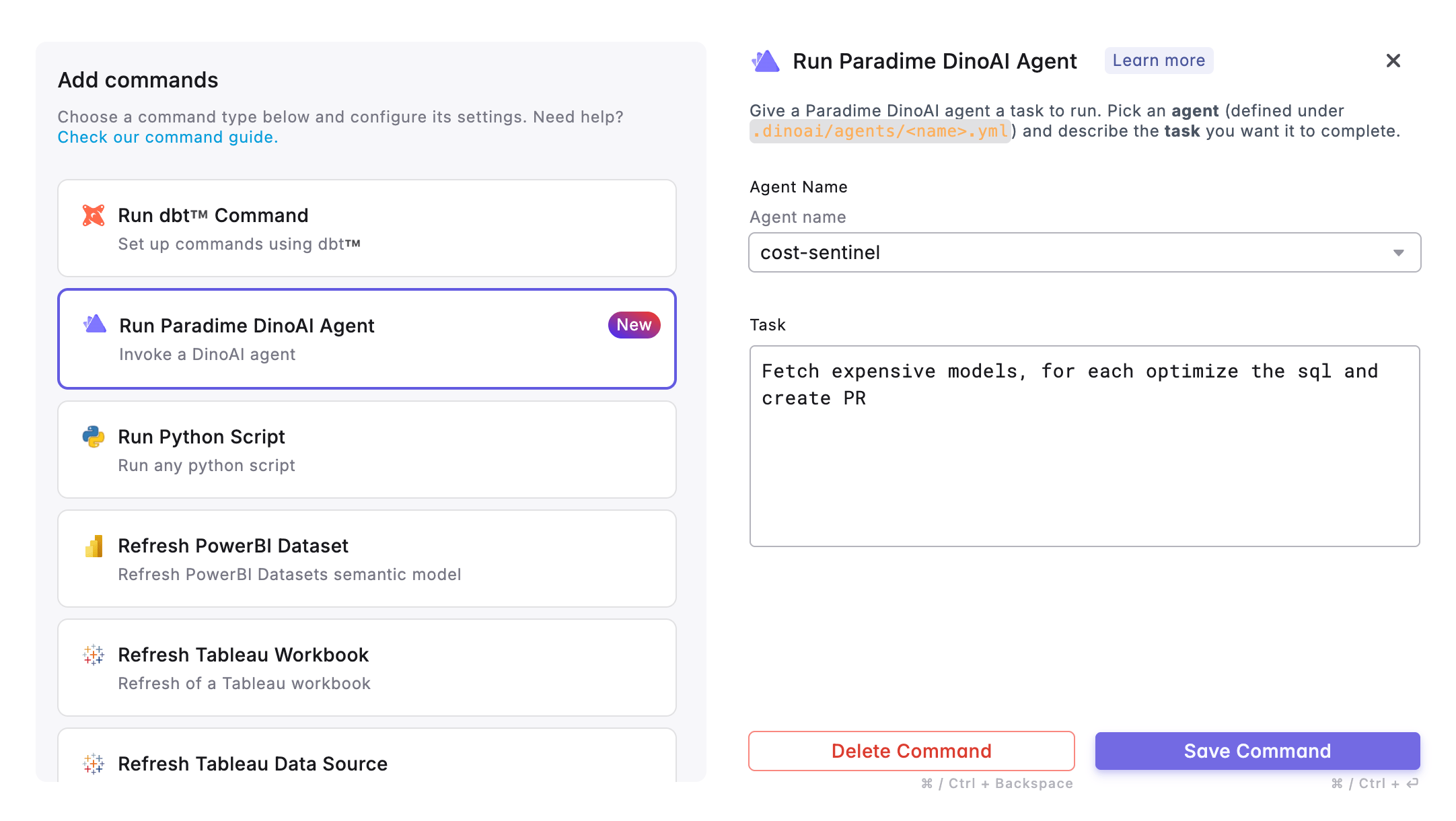
1. From the Bolt UI, click **Add command** and select **Run Paradime DinoAI Agent**.
2. **Agent Name** — pick the agent you want to run from the dropdown. The list is populated from the agent YAML files in `.dinoai/agents/` on the configured git branch. If the dropdown is empty, you need to commit an agent definition first — see Programmable Agents → YAML Configuration.
3. **Task** — describe the task you want the agent to complete. This becomes the agent's opening user message (the `--message` argument to `paradime dinoai`). Be specific: agents work best when the task is narrowly scoped and references concrete inputs (e.g. table names, schedule names, time windows).
4. Click **Save Command**.
5. Configure your desired trigger type (e.g. scheduled run, on run completion, on PR merge).
6. Deploy your schedule.
**Each scheduled run is a fresh agent session.** The Bolt command does not resume previous sessions — every Bolt run that fires this command starts a new DinoAI agent session with the configured task as its first message. Use the Programmable Agents API if you need session continuity across runs.
**Tools available to the agent** are controlled by the agent's YAML — including its access to Bolt, Slack, Linear, the data warehouse, and the file system. See the Tools Reference for the full list and the YAML Configuration guide for how to scope them.
#### Related
* [Programmable Agents: Overview what a DinoAI agent is and what it can do](/products/dino-ai/programmable-agents/index)
* [Programmable Agents: YAML Configuration - how to author an agent under `.dinoai/agents/`](/products/dino-ai/programmable-agents/yaml-configuration)
* [Programmable Agents: Tools Reference - full list of tools an agent can use](/products/dino-ai/programmable-agents/tools-reference)
## Related topics
- [DinoAI Programmable Agents](/developers/python-sdk/modules/dinoai-programmable-agents.md)
- [DinoAI Programmable Agents API](/developers/graphql-api/api-reference/dinoai-programmable-agents-api.md)
- [DinoAI CLI](/developers/paradime-cli/dinoai-cli.md)
- [DinoAI Agent](/guides/paradime-101/getting-started-with-the-paradime-ide/dinoai-accelerating-your-analytics-engineering-workflow/dinoai-agent/index.md)
- [Getting started with the DinoAI background agent](/guides/paradime-101/getting-started-with-the-dinoai-background-agent/index.md)
**Prerequisites**
* A programmable agent definition committed to your dbt™ repository under `.dinoai/agents/.yml`. The `` you pick in the Bolt command UI must match an existing agent file.
* Generate API credentials in your Paradime workspace with **DinoAI Agent** capabilities.
* Use the generated credentials and set them as environment variables for Bolt Schedules:
* You can find your workspace UID in the settings > workspace tab
* `PARADIME_API_ENDPOINT`
* `PARADIME_API_SECRET`
* `PARADIME_WORKSPACE_UID`
#### When to Use
The Run Paradime DinoAI Agent command is valuable when:
* **Scheduled agent runs**: Run a DinoAI agent on a cron schedule (e.g. nightly sweeps, weekly freshness reports).
* **Post-deployment automation**: Trigger an agent after a successful production `dbt run` (e.g. summarise model changes, sync docs, notify stakeholders).
* **Incident response on failure**: Chain a DinoAI agent to a failing schedule (via trigger on run completion) to investigate and report on the failure automatically.
* **PR-driven workflows**: Combine with Turbo CI so an agent runs against a PR's branch when a pull request is opened.
#### How to Configure the DinoAI Agent Command
1. From the Bolt UI, click **Add command** and select **Run Paradime DinoAI Agent**.
2. **Agent Name** — pick the agent you want to run from the dropdown. The list is populated from the agent YAML files in `.dinoai/agents/` on the configured git branch. If the dropdown is empty, you need to commit an agent definition first — see Programmable Agents → YAML Configuration.
3. **Task** — describe the task you want the agent to complete. This becomes the agent's opening user message (the `--message` argument to `paradime dinoai`). Be specific: agents work best when the task is narrowly scoped and references concrete inputs (e.g. table names, schedule names, time windows).
4. Click **Save Command**.
5. Configure your desired trigger type (e.g. scheduled run, on run completion, on PR merge).
6. Deploy your schedule.
**Each scheduled run is a fresh agent session.** The Bolt command does not resume previous sessions — every Bolt run that fires this command starts a new DinoAI agent session with the configured task as its first message. Use the Programmable Agents API if you need session continuity across runs.
**Tools available to the agent** are controlled by the agent's YAML — including its access to Bolt, Slack, Linear, the data warehouse, and the file system. See the Tools Reference for the full list and the YAML Configuration guide for how to scope them.
#### Related
* [Programmable Agents: Overview what a DinoAI agent is and what it can do](/products/dino-ai/programmable-agents/index)
* [Programmable Agents: YAML Configuration - how to author an agent under `.dinoai/agents/`](/products/dino-ai/programmable-agents/yaml-configuration)
* [Programmable Agents: Tools Reference - full list of tools an agent can use](/products/dino-ai/programmable-agents/tools-reference)
## Related topics
- [DinoAI Programmable Agents](/developers/python-sdk/modules/dinoai-programmable-agents.md)
- [DinoAI Programmable Agents API](/developers/graphql-api/api-reference/dinoai-programmable-agents-api.md)
- [DinoAI CLI](/developers/paradime-cli/dinoai-cli.md)
- [DinoAI Agent](/guides/paradime-101/getting-started-with-the-paradime-ide/dinoai-accelerating-your-analytics-engineering-workflow/dinoai-agent/index.md)
- [Getting started with the DinoAI background agent](/guides/paradime-101/getting-started-with-the-dinoai-background-agent/index.md)