> ## Documentation Index
> Fetch the complete documentation index at: https://docs.paradime.io/llms.txt
> Use this file to discover all available pages before exploring further.
# Paradime Refresh Catalog
> Refresh your Paradime Data Catalog on-demand with the Paradime Refresh Catalog command. Update catalog metadata immediately after data changes without waiting for the overnight refresh.
### Overview
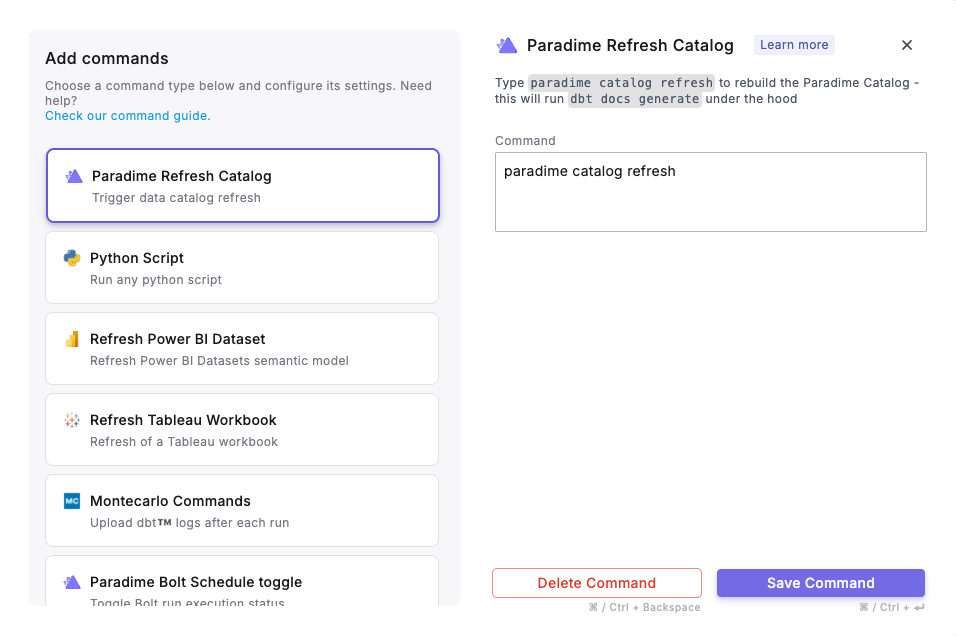
The Paradime Refresh Catalog command allows you to update your [Data Catalog](/products/data-catalog/index) metadata on-demand by running `dbt docs generate` whenever needed. This eliminates the need to wait for the scheduled overnight refresh that typically occurs between 2-3 AM UTC.
 **Prerequisites**
* Generate API credentials in your Paradime workspace with **Bolt Catalog admin** Capabilities
* Use the generated credentials and set as [environment variables](/products/settings/environment-variables/bolt-schedule-env-variables) for Bolt Schedules. You can find your workspace UID in the settings > workspace tab
* `PARADIME_API_ENDPOINT`
* `PARADIME_API_SECRET`
* `PARADIME_WORKSPACE_UID`
### When to Use
The Paradime Refresh Catalog command is valuable when:
* **New tables are added**: After creating new tables in your data warehouse
* **Schema changes occur**: When table structures or column definitions are modified
* **After production deployments**: Following the completion of production jobs (ex. `dbt run`) that modify your data warehouse schema
### How to Configure Catalog Refresh
1. From the Bolt UI, select **Paradime Refresh Catalog** as your command
2. Configure your desired [trigger type](/products/bolt/creating-schedules/trigger-types) (ex. scheduled run, on run completion, etc.)
3. Deploy your schedule
**Note**: Users have full control over when catalog refreshes occur - whether every hour, multiple times per day, or triggered by specific job completions.
## Related topics
- [Data Catalog](/products/data-catalog/index.md)
- [Default Roles and Permissions](/products/settings/users/roles-and-permissions.md)
- [Catalog Tool](/products/dino-ai/tools-and-features/catalog-tool.md)
- [3. Command Settings](/products/bolt/creating-schedules/command-settings/index.md)
- [Tableau](/integrations/tableau.md)
**Prerequisites**
* Generate API credentials in your Paradime workspace with **Bolt Catalog admin** Capabilities
* Use the generated credentials and set as [environment variables](/products/settings/environment-variables/bolt-schedule-env-variables) for Bolt Schedules. You can find your workspace UID in the settings > workspace tab
* `PARADIME_API_ENDPOINT`
* `PARADIME_API_SECRET`
* `PARADIME_WORKSPACE_UID`
### When to Use
The Paradime Refresh Catalog command is valuable when:
* **New tables are added**: After creating new tables in your data warehouse
* **Schema changes occur**: When table structures or column definitions are modified
* **After production deployments**: Following the completion of production jobs (ex. `dbt run`) that modify your data warehouse schema
### How to Configure Catalog Refresh
1. From the Bolt UI, select **Paradime Refresh Catalog** as your command
2. Configure your desired [trigger type](/products/bolt/creating-schedules/trigger-types) (ex. scheduled run, on run completion, etc.)
3. Deploy your schedule
**Note**: Users have full control over when catalog refreshes occur - whether every hour, multiple times per day, or triggered by specific job completions.
## Related topics
- [Data Catalog](/products/data-catalog/index.md)
- [Default Roles and Permissions](/products/settings/users/roles-and-permissions.md)
- [Catalog Tool](/products/dino-ai/tools-and-features/catalog-tool.md)
- [3. Command Settings](/products/bolt/creating-schedules/command-settings/index.md)
- [Tableau](/integrations/tableau.md)