> ## Documentation Index
> Fetch the complete documentation index at: https://docs.paradime.io/llms.txt
> Use this file to discover all available pages before exploring further.

# Trigger Hex Projects

> Automatically trigger Hex projects after successful dbt™ production runs.

export const Arcade = ({src, title}) => <div style={{
  position: 'relative',
  paddingBottom: 'calc(56.2225% + 41px)',
  height: 0,
  width: '100%'
}}>
    <iframe src={src} title={title} frameBorder="0" loading="lazy" allow="clipboard-write" allowFullScreen style={{
  position: 'absolute',
  top: 0,
  left: 0,
  width: '100%',
  height: '100%',
  colorScheme: 'light'
}} />
  </div>;

Learn how to automatically trigger Hex projects when your dbt™ runs complete successfully in Bolt. This integration helps data teams maintain up-to-date dashboards by refreshing Hex projects immediately after successful pipeline runs.

### What You'll Get

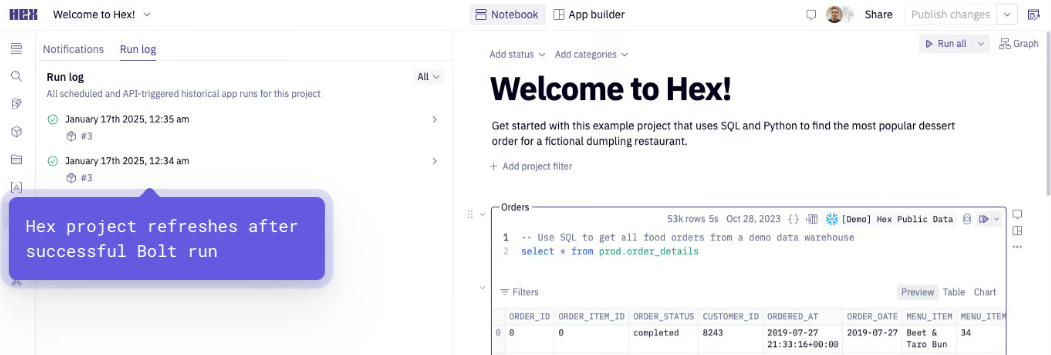
When a run succeeds, Bolt automatically triggers your Hex project:

* Webhook triggers automatically
* Hex project refreshes with latest data

<Frame>
  <img src="https://mintcdn.com/paradime-docs/9ZsuN0wtxDqr0yUA/images/image-139.png?fit=max&auto=format&n=9ZsuN0wtxDqr0yUA&q=85&s=abc6fd48e0b33fb8291fded171f0d85c" alt="" width="1051" height="355" data-path="images/image-139.png" />
</Frame>

<Check>
  **Key Benefits for Data Teams**

  * Automatic Hex project updates after successful Bolt runs
  * Real-time dashboard refreshes
  * Streamlined workflow between dbt™ pipelines and Hex analytics
  * Always current visualizations and reports
</Check>

<Warning>
  **Prerequisites for Hex Integration**

  * Existing [Bolt schedule](https://app.paradime.io/bolt)
  * Admin access to Hex
  * Hex [workspace token](https://learn.hex.tech/docs/explore-data/notebook-view/hex-api/hex-api-overview#workspace-tokens) (API Key)
  * Project UUID from your Hex project
</Warning>

***

### Setup Guide

Set up Hex project updates for successful runs. Follow the steps below, and watch our [interactive tutorial](/products/bolt/creating-schedules/templates/dashboard-templates/trigger-hex-projects#step-3-test-the-integration).

#### Step 1: Gather Your Hex Credentials

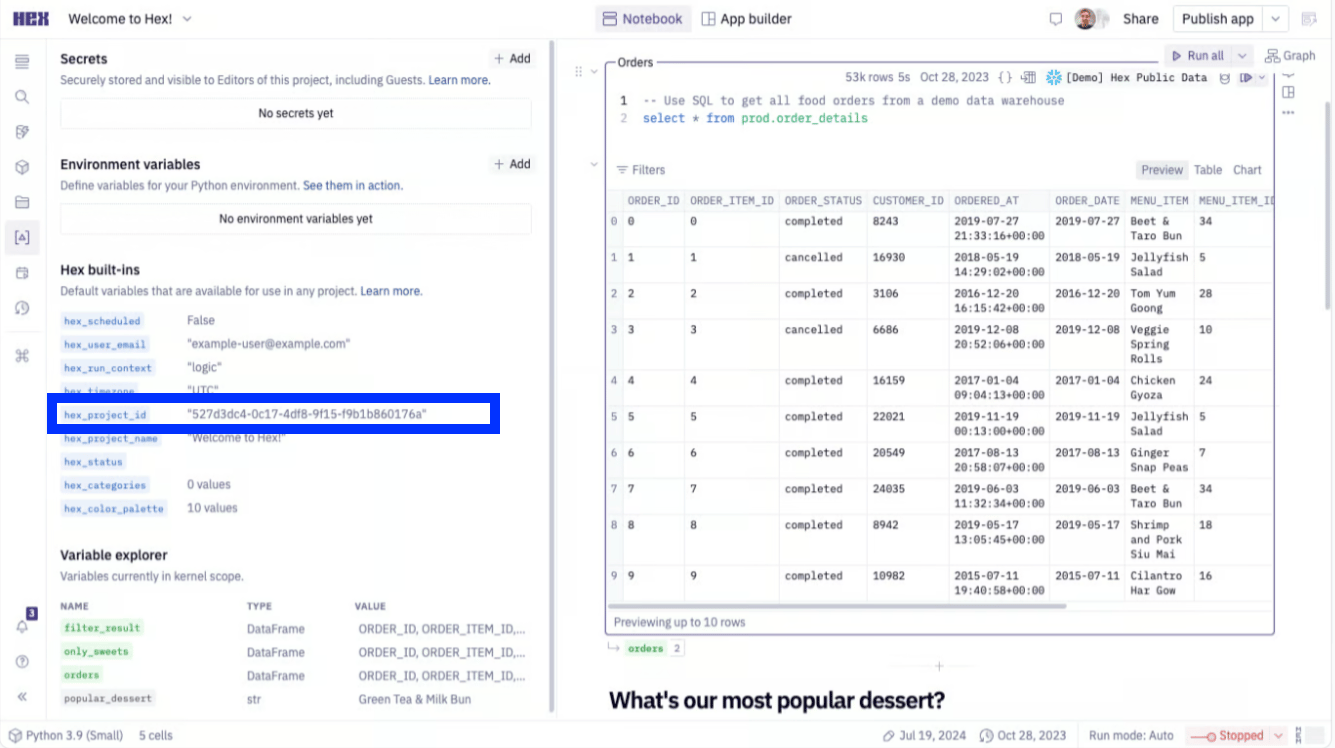
1. **Get Your Project UUID**:
   * Find the UUID in either:
     * The URL after `/hex/`
     * The Variables view in the sidebar

<Frame>
  <img src="https://mintcdn.com/paradime-docs/KJcB9NhKTmxLMoZP/images/image-138.png?fit=max&auto=format&n=KJcB9NhKTmxLMoZP&q=85&s=dfb8c006aec06ee08eafec94a72711cb" alt="" width="1335" height="748" data-path="images/image-138.png" />
</Frame>

2. **Generate API Key**:

* Go to Settings > API Keys
* Create a new [workspace token](https://learn.hex.tech/docs/explore-data/notebook-view/hex-api/hex-api-overview#workspace-tokens)
* Save the token securely

#### Step 2: Configure the Webhook In Paradime

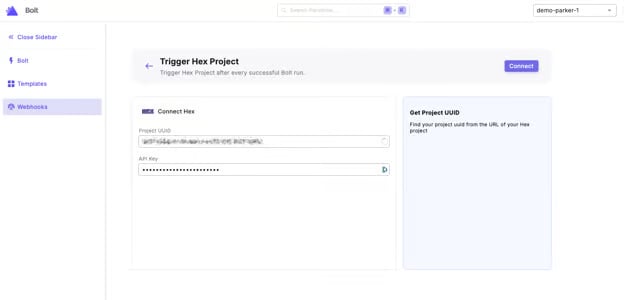
1. From the [Bolt](https://app.paradime.io/bolt) home screen, go to [Templates](https://app.paradime.io/bolt/templates)
2. Click "Trigger Hex Project"
3. Enter your Hex Credentials:
   * Project UUID
   * API Key (Workspace Token)
4. Click "Connect"
<Frame>
  <img src="https://mintcdn.com/paradime-docs/VA9BDQ6XklSoCs4-/images/image-8-2-1.png?fit=max&auto=format&n=VA9BDQ6XklSoCs4-&q=85&s=e28140e589109b9043721e06799e5978" alt="" width="624" height="300" data-path="images/image-8-2-1.png" />
</Frame>

#### Step 3: Test the Integration

1. [Run a Bolt schedule manually](/products/bolt/managing-schedules/schedule-configurations#trigger-a-run-manually) (the webhook triggers only on successful runs)
2. After the run succeeds:
   * From the Bolt homescreen, go to Webhooks
   * Select your Hex Project Webhook
   * Check the Endpoints tab to verify the webhook triggered
   * Verify your Hex dashboard has updated

<Arcade src="https://demo.arcade.software/KI8qI3B8o3lP9QLdoPBE?embed&embed_mobile=tab&embed_desktop=inline&show_copy_link=true" title="Trigger Hex Projects" />


## Related topics

- [Dashboard Templates](/products/bolt/creating-schedules/templates/dashboard-templates/index.md)
- [4. Trigger Types](/products/bolt/creating-schedules/trigger-types.md)
- [Sankey Diagrams](/integrations/mermaid-js/sankey-diagrams.md)
- [Understanding schedule types and triggers](/guides/paradime-101/running-dbt-in-production-with-bolt/understanding-schedule-types-and-triggers.md)
- [Column-Level Lineage Diff [deprecated]](/products/bolt/ci-cd/lineage-diff-deprecated/index.md)
