> ## Documentation Index
> Fetch the complete documentation index at: https://docs.paradime.io/llms.txt
> Use this file to discover all available pages before exploring further.
# Create Incident in incident.io
> Create incident.io incident when the following Bolt schedules fail.
Learn how to automatically create incident.io incidents when dbt™ runs fail in Bolt. This integration helps data teams track and respond to pipeline failures efficiently by connecting Bolt's pipeline monitoring with incident.io's modern incident management platform.
***
#### What You'll Get
When a run fails, Bolt automatically creates an incident.io incident containing:
* Incident name with schedule and workspace details
* Incident summary including:
* Direct link to Paradime run logs
* Run ID and execution details
* Start and end timestamps
* Commands executed
* Branch information
* Severity level based on your configuration
**Key Benefits for Data Teams**
* **Streamline incident response** - Leverage incident.io's battle-tested incident workflow for data pipelines
* **Enable Slack-native collaboration** - Manage incidents directly in Slack with automatic channel creation
* **Track incident metrics** - Measure MTTR and incident frequency for data pipeline reliability
* **Integrate with on-call rotations** - Automatically page the right team when critical pipelines fail
**Prerequisites for incident.io Integration**
* Existing [Bolt schedule](https://app.paradime.io/bolt)
* incident.io account with API access
* incident.io API Key
* Configured severity levels in incident.io
***
#### Setup Guide
Set up incident.io incident creation for failed runs. Follow the steps below, and watch our interactive tutorial.
**Step 1: Gather Your incident.io Information**
1. **Generate API Key**:
* Navigate to [https://app.incident.io/settings/api-keys](https://app.incident.io/settings/api-keys)
* Click "Create API Key"
* Give it a descriptive name (e.g., "Paradime Integration")
* Copy and save your API key securely
2. **Find Your Severity ID**:
**Method 1: Using the API**
* Make a GET request to `https://api.incident.io/v1/severities` with your API key
* This returns all severities with their corresponding IDs
**Method 2: Through the Web Interface**
* Navigate to [https://app.incident.io/settings/severities](https://app.incident.io/settings/severities)
* Click the Edit button for the severity you want to use
* Check the browser URL - the severity ID will be displayed in the URL path
Both methods will give you the unique severity ID (e.g., `01FCNDV6P870EA6S7TK1DSYDG0`)
**Step 2: Configure the Template in Paradime**
1. From the [Bolt](https://app.paradime.io/bolt) home screen, go to [Templates](https://app.paradime.io/bolt/templates)
2. Click I**ncidents** and select "Create incident in incident.io"
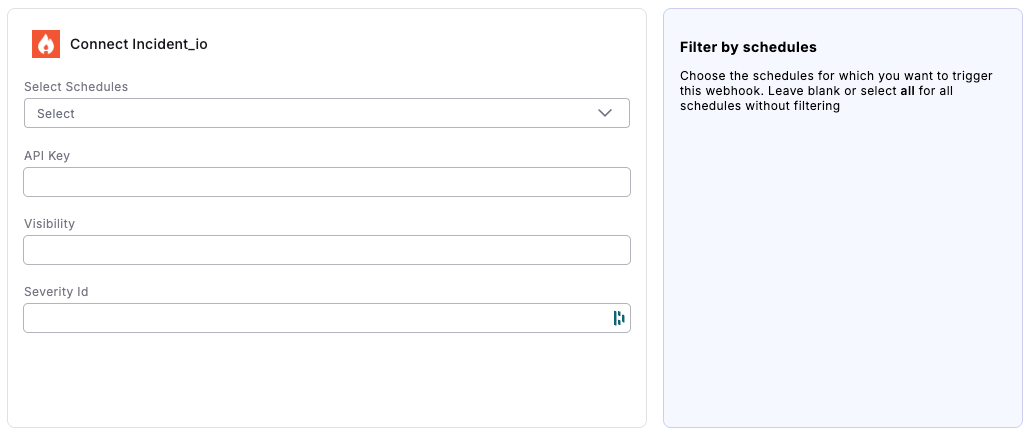
3. Fill in the following fields:
* **Select Schedules**: Choose the schedules for which you want to trigger this webhook. Leave blank or select all for all schedules without filtering
* **API Key**: Enter the API key you generated in incident.io
* **Visibility**: Choose incident visibility:
* `public` - Open to anyone in your Slack workspace
* `private` - Invite-only access
* **Severity Id**: Enter the severity ID you found in Step 1
4. Click "Connect"
 **Step 3: Test the Integration**
1. Run a Bolt schedule manually that will fail (the webhook only triggers on failed runs)
2. After the run fails:
* Check your incident.io dashboard for the new incident
* Verify a Slack channel was created (if configured)
* Confirm the incident contains all run failure details
## Related topics
- [Incident.io](/integrations/incident.io.md)
- [Trigger incident.io Incidents](/products/bolt/creating-schedules/trigger-integrations/trigger-incident.io-incidents.md)
- [Create Rootly Incident](/products/bolt/creating-schedules/templates/incident-templates/create-rootly-incident.md)
- [Create Datadog Incident](/products/bolt/creating-schedules/templates/incident-templates/create-datadog-incident.md)
- [Create New Relic Incidents](/products/bolt/creating-schedules/templates/incident-templates/create-new-relic-incidents.md)
**Step 3: Test the Integration**
1. Run a Bolt schedule manually that will fail (the webhook only triggers on failed runs)
2. After the run fails:
* Check your incident.io dashboard for the new incident
* Verify a Slack channel was created (if configured)
* Confirm the incident contains all run failure details
## Related topics
- [Incident.io](/integrations/incident.io.md)
- [Trigger incident.io Incidents](/products/bolt/creating-schedules/trigger-integrations/trigger-incident.io-incidents.md)
- [Create Rootly Incident](/products/bolt/creating-schedules/templates/incident-templates/create-rootly-incident.md)
- [Create Datadog Incident](/products/bolt/creating-schedules/templates/incident-templates/create-datadog-incident.md)
- [Create New Relic Incidents](/products/bolt/creating-schedules/templates/incident-templates/create-new-relic-incidents.md)