> ## Documentation Index
> Fetch the complete documentation index at: https://docs.paradime.io/llms.txt
> Use this file to discover all available pages before exploring further.

# Create New Relic Incidents

> Automatically create New Relic incidents when dbt™ production runs fail

export const Arcade = ({src, title}) => <div style={{
  position: 'relative',
  paddingBottom: 'calc(56.2225% + 41px)',
  height: 0,
  width: '100%'
}}>
    <iframe src={src} title={title} frameBorder="0" loading="lazy" allow="clipboard-write" allowFullScreen style={{
  position: 'absolute',
  top: 0,
  left: 0,
  width: '100%',
  height: '100%',
  colorScheme: 'light'
}} />
  </div>;

Learn how to automatically create New Relic incidents when dbt™ runs fail in Bolt. This integration helps data teams track and respond to pipeline failures efficiently by connecting Bolt's pipeline monitoring with New Relic's incident management system.

### What You'll Get

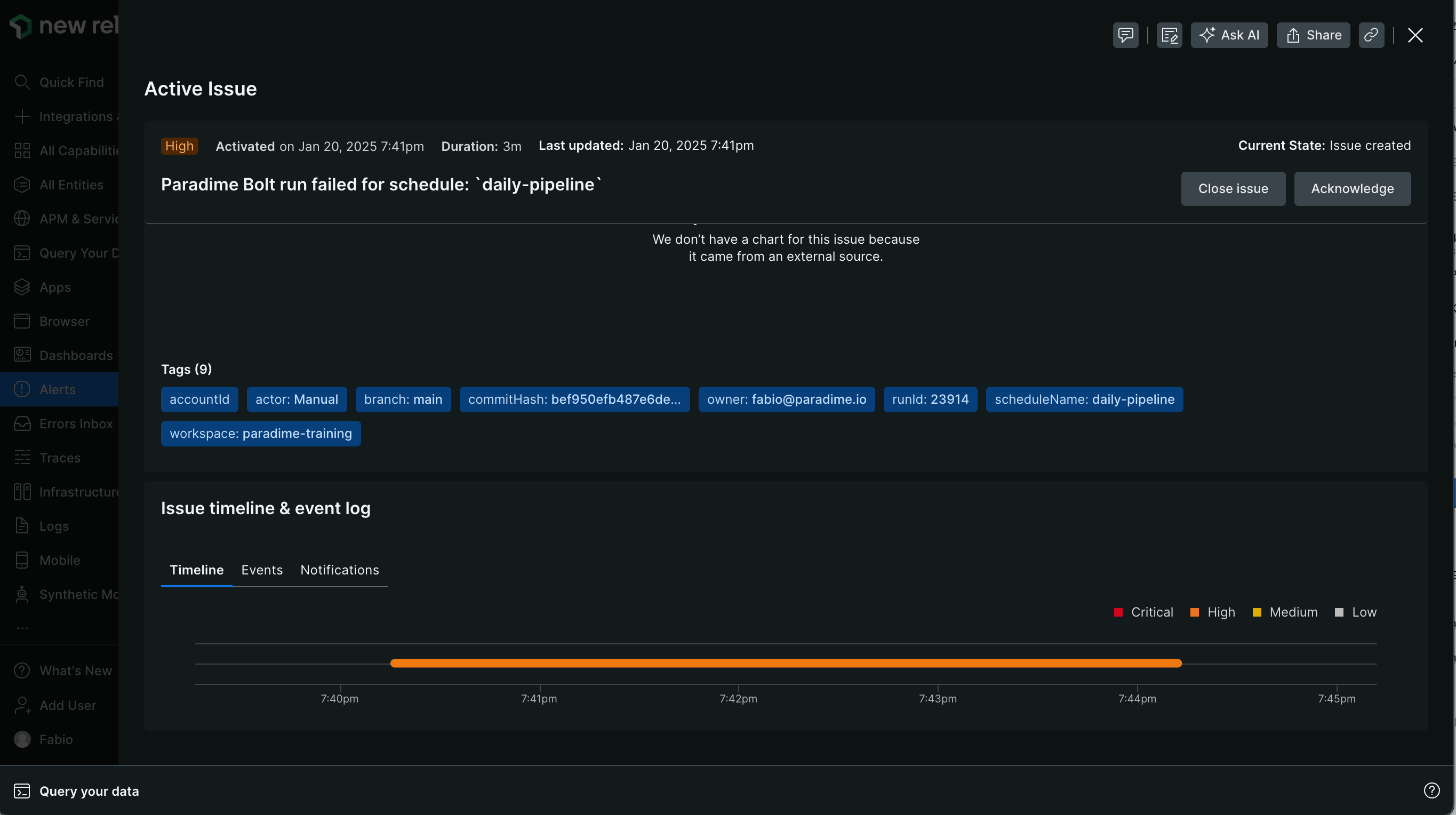
When a run fails, Bolt automatically creates a New Relic incident containing:

* Issue title with schedule name
* Description including:
  * Link to Paradime run logs
  * Run details:
    * Run ID
    * Start and end time
    * Commands executed
    * Branch information

<Frame>
  <img src="https://mintcdn.com/paradime-docs/KJcB9NhKTmxLMoZP/images/image-127.png?fit=max&auto=format&n=KJcB9NhKTmxLMoZP&q=85&s=e92c90a74e9d5e7742aebc252bbb4790" alt="" width="2730" height="1528" data-path="images/image-127.png" />
</Frame>

<Check>
  **Key Benefits for Data Teams**

  * Automatic New Relic incident creation when dbt™ pipelines fail
  * Real-time pipeline monitoring and incident tracking
  * Streamlined workflow between dbt™ runs and New Relic
  * Faster response time to pipeline failures
</Check>

<Warning>
  **Prerequisites for New Relic Integration**

  * Existing [Bolt schedule](https://app.paradime.io/bolt)
  * Admin access to New Relic
  * Access to New Relic [Account ID](https://docs.newrelic.com/docs/accounts/accounts-billing/account-structure/account-id/) and [API Key](https://docs.newrelic.com/docs/apis/intro-apis/new-relic-api-keys/)
</Warning>

***

### Setup Guide

Set up New Relic incident creation for failed runs. Follow the steps below, and watch our [interactive tutorial](/products/bolt/creating-schedules/templates/incident-templates/create-new-relic-incidents#step-3-test-the-integration).

#### Step 1: Gather Your New Relic Credentials

1. **Get Your Account ID**:
   * Visit [https://docs.newrelic.com/docs/accounts/accounts-billing/account-structure/account-id/](https://docs.newrelic.com/docs/accounts/accounts-billing/account-structure/account-id/)
   * Follow instructions to locate your Account ID
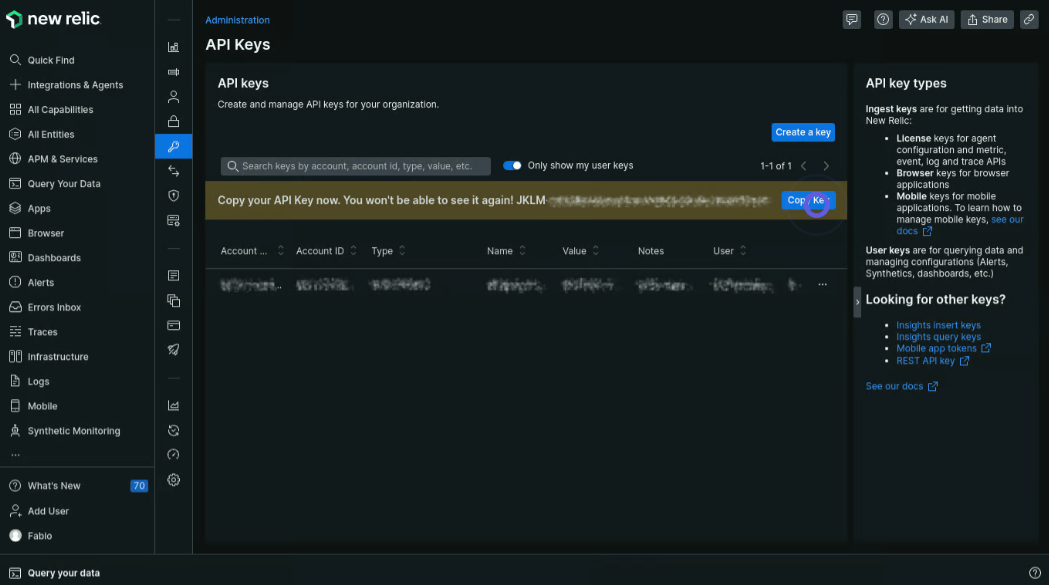
2. **Generate API Key**:
   * Visit [https://docs.newrelic.com/docs/apis/intro-apis/new-relic-api-keys/](https://docs.newrelic.com/docs/apis/intro-apis/new-relic-api-keys/)
   * Create a new API key
   * Save this key securely

<Frame>
  <img src="https://mintcdn.com/paradime-docs/9ZsuN0wtxDqr0yUA/images/image-143.png?fit=max&auto=format&n=9ZsuN0wtxDqr0yUA&q=85&s=8ea76681be1c3da919910944990fdecf" alt="" width="1049" height="585" data-path="images/image-143.png" />
</Frame>

### Step 2: Configure the Webhook

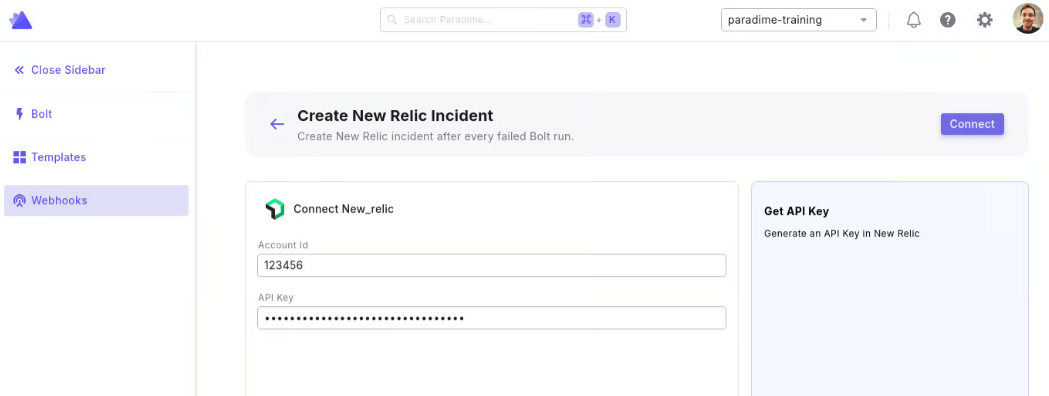
1. From the [Bolt](https://app.paradime.io/bolt) home screen, go to [Templates](https://app.paradime.io/bolt/templates)
2. Click **Ticketing** and use "Create New Relic Incident"
3. Enter your New Relic Credentials:
   * Account ID
   * API Key
4. Click "Connect"
<Frame>
  <img src="https://mintcdn.com/paradime-docs/9ZsuN0wtxDqr0yUA/images/image-144.png?fit=max&auto=format&n=9ZsuN0wtxDqr0yUA&q=85&s=3e45dd27247794d242402d4351263ad2" alt="" width="1049" height="396" data-path="images/image-144.png" />
</Frame>

#### Step 3: Test the Integration

1. [Run a Bolt schedule manually](/products/bolt/managing-schedules/schedule-configurations#trigger-a-run-manually) (the webhook only triggers on failed runs)
2. After the run fails, check your New Relic dashboard for the new incident
3. Verify the incident contains run failure details

<Arcade src="https://demo.arcade.software/1wliPq7dW73hEcSBu8YZ?embed&embed_mobile=tab&embed_desktop=inline&show_copy_link=true" title="Create New Relic Incidents" />


## Related topics

- [Incident Templates](/products/bolt/creating-schedules/templates/incident-templates/index.md)
- [Trigger New Relic Incidents](/products/bolt/creating-schedules/trigger-integrations/trigger-new-relic-incidents.md)
- [New Relic](/integrations/new-relic.md)
- [7. Trigger Integrations](/products/bolt/creating-schedules/trigger-integrations/index.md)
- [Create Incident in incident.io](/products/bolt/creating-schedules/templates/incident-templates/create-incident-in-incident.io.md)
