> ## Documentation Index
> Fetch the complete documentation index at: https://docs.paradime.io/llms.txt
> Use this file to discover all available pages before exploring further.
# Trigger incident.io Incidents
> Configure incident.io triggers in Paradime Bolt to automatically create incidents for failed runs.
## incident.io Integration
Connect incident.io to Paradime to automatically create incidents when Bolt runs fail, with Slack-native collaboration and automated incident workflows.
**Need to connect incident.io first?** Follow our [incident.io integration](/integrations/incident.io) setup guide to authenticate and connect your account.
### Configure incident.io Trigger
#### Step 1: Add incident.io Destination
1. Navigate to the **Triggers integration** section
2. Click **Add Integration**
3. Select **incident.io** from the dropdown
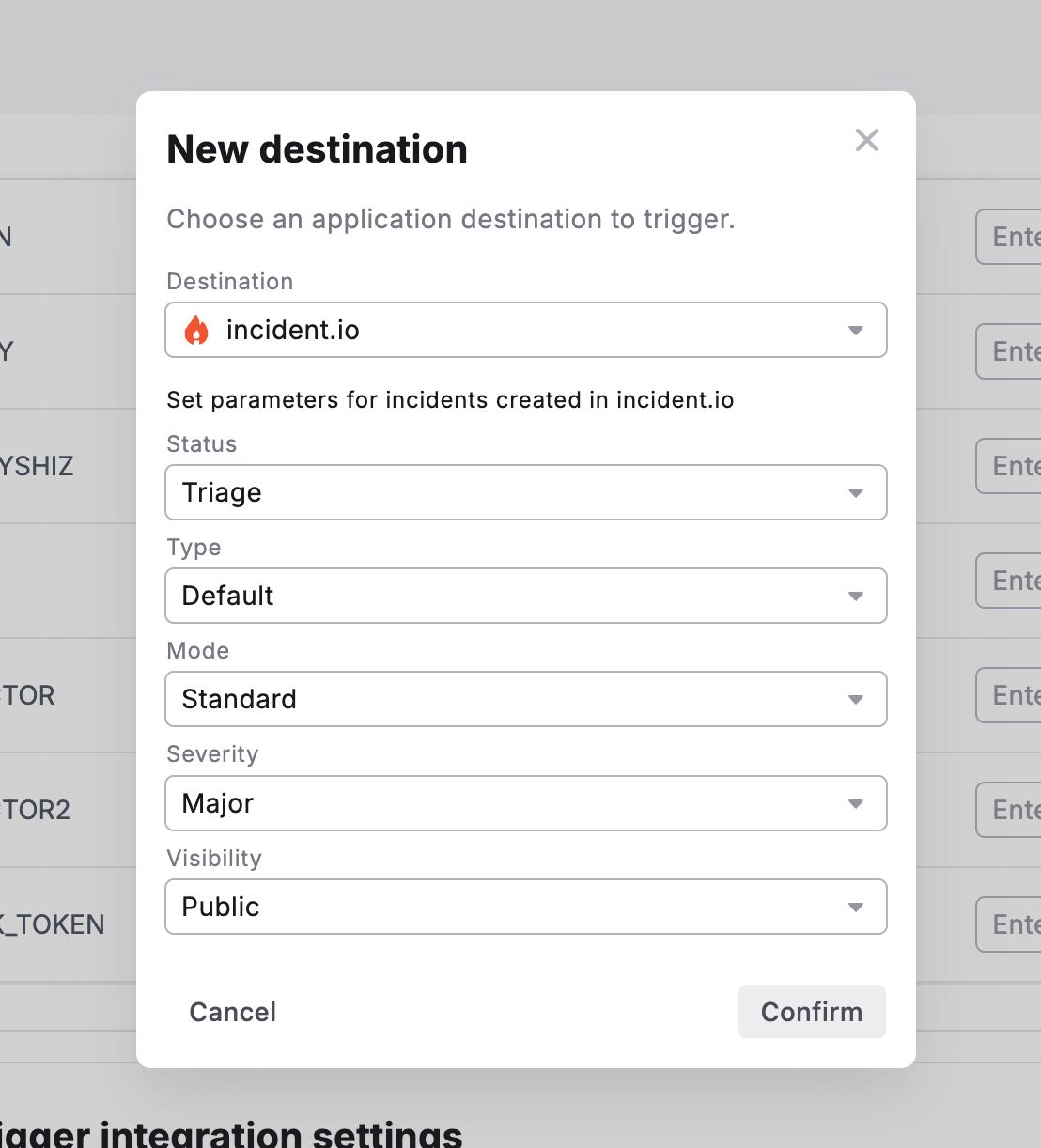 #### Step 2: Set Incident Parameters
Configure the following fields to customize incidents created in incident.io:
| Field | Description | Options |
| -------------- | ------------------------------------ | ------------------------------------------------- |
| **Status** | Initial status for created incidents | Merged, Declined, Canceled, Active, Resolved |
| **Type** | Incident type classification | Default, or custom types from incident.io |
| **Mode** | Incident creation mode | Retrospective, Standard, Tutorial |
| **Severity** | Priority level for pipeline failures | Minor, Major, Critical, or custom severity levels |
| **Visibility** | Who can see the incident | Public (anyone in Slack), Private (invite-only) |
#### Step 3: Confirm Configuration
1. Review your incident parameters
2. Click **Confirm** to save the trigger
3. The incident.io trigger is now active for this schedule
### What Gets Created
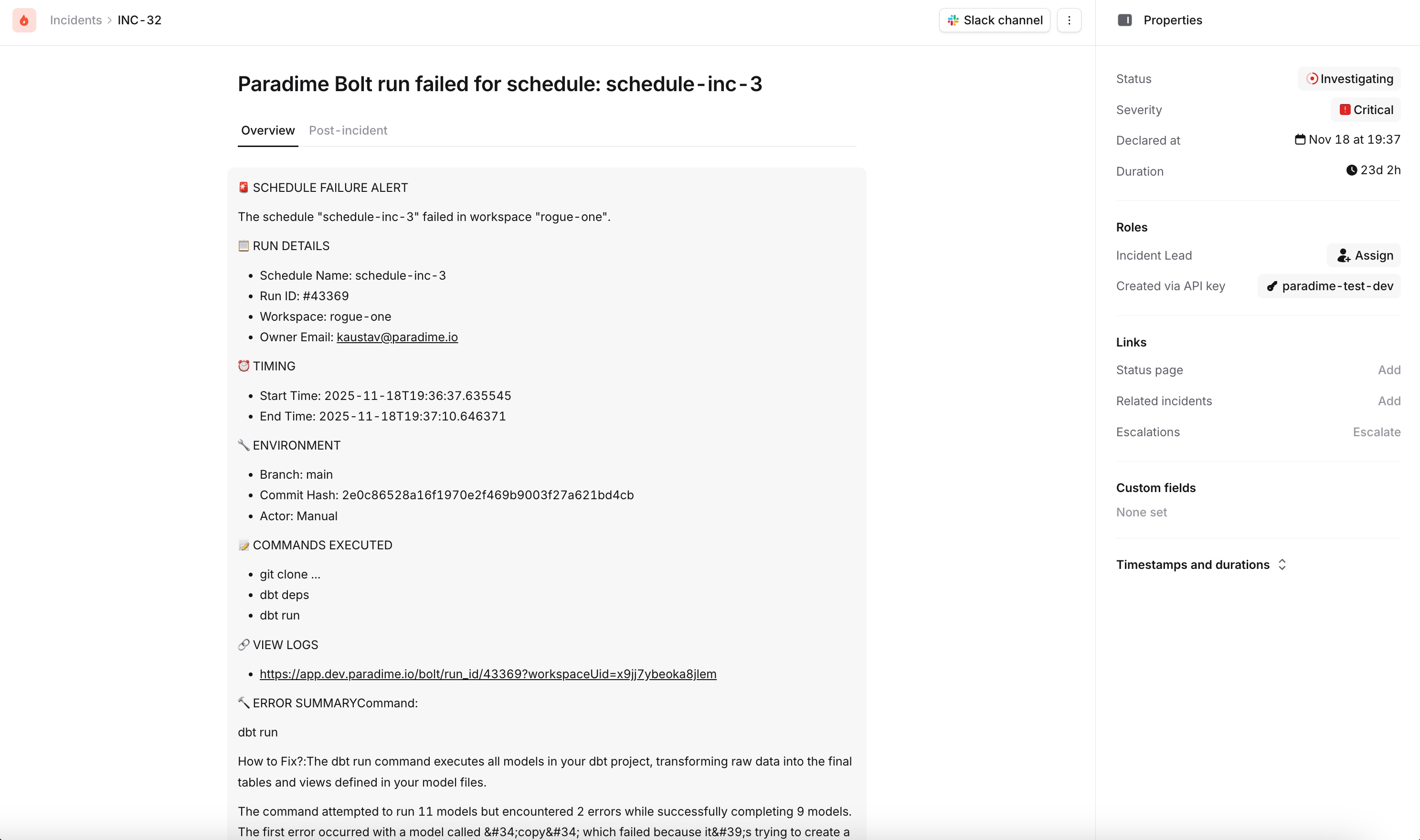
When a Bolt run fails, incident.io will automatically create an incident containing:
* Incident name with schedule and workspace details
* Incident summary including:
* Direct link to Paradime run logs
* Run ID and execution details
* Start and end timestamps
* Commands executed
* Branch information
* AI Summary of the command Logs
* Configured severity level, type, and mode
* Automatic Slack channel creation (if visibility is Public)
#### Step 2: Set Incident Parameters
Configure the following fields to customize incidents created in incident.io:
| Field | Description | Options |
| -------------- | ------------------------------------ | ------------------------------------------------- |
| **Status** | Initial status for created incidents | Merged, Declined, Canceled, Active, Resolved |
| **Type** | Incident type classification | Default, or custom types from incident.io |
| **Mode** | Incident creation mode | Retrospective, Standard, Tutorial |
| **Severity** | Priority level for pipeline failures | Minor, Major, Critical, or custom severity levels |
| **Visibility** | Who can see the incident | Public (anyone in Slack), Private (invite-only) |
#### Step 3: Confirm Configuration
1. Review your incident parameters
2. Click **Confirm** to save the trigger
3. The incident.io trigger is now active for this schedule
### What Gets Created
When a Bolt run fails, incident.io will automatically create an incident containing:
* Incident name with schedule and workspace details
* Incident summary including:
* Direct link to Paradime run logs
* Run ID and execution details
* Start and end timestamps
* Commands executed
* Branch information
* AI Summary of the command Logs
* Configured severity level, type, and mode
* Automatic Slack channel creation (if visibility is Public)
 ### Testing Your Configuration
1. Manually run a schedule that will fail
2. Check your incident.io dashboard for the new incident
3. Verify the incident contains the correct parameters and run details
4. Confirm the Slack channel was created (if applicable)
### Key Benefits
* **Slack-native collaboration** - Manage incidents directly in Slack with automatic channel creation
* **Standardized workflows** - Leverage incident.io's battle-tested incident response processes
* **Automatic documentation** - Timeline and postmortem features for pipeline issues
* **Integration with on-call** - Automatically page the right team when critical pipelines fail
## Related topics
- [Incident.io](/integrations/incident.io.md)
- [Create Incident in incident.io](/products/bolt/creating-schedules/templates/incident-templates/create-incident-in-incident.io.md)
- [7. Trigger Integrations](/products/bolt/creating-schedules/trigger-integrations/index.md)
- [Trigger Datadog Incidents](/products/bolt/creating-schedules/trigger-integrations/trigger-datadog-incidents.md)
- [Trigger New Relic Incidents](/products/bolt/creating-schedules/trigger-integrations/trigger-new-relic-incidents.md)
### Testing Your Configuration
1. Manually run a schedule that will fail
2. Check your incident.io dashboard for the new incident
3. Verify the incident contains the correct parameters and run details
4. Confirm the Slack channel was created (if applicable)
### Key Benefits
* **Slack-native collaboration** - Manage incidents directly in Slack with automatic channel creation
* **Standardized workflows** - Leverage incident.io's battle-tested incident response processes
* **Automatic documentation** - Timeline and postmortem features for pipeline issues
* **Integration with on-call** - Automatically page the right team when critical pipelines fail
## Related topics
- [Incident.io](/integrations/incident.io.md)
- [Create Incident in incident.io](/products/bolt/creating-schedules/templates/incident-templates/create-incident-in-incident.io.md)
- [7. Trigger Integrations](/products/bolt/creating-schedules/trigger-integrations/index.md)
- [Trigger Datadog Incidents](/products/bolt/creating-schedules/trigger-integrations/trigger-datadog-incidents.md)
- [Trigger New Relic Incidents](/products/bolt/creating-schedules/trigger-integrations/trigger-new-relic-incidents.md)