> ## Documentation Index
> Fetch the complete documentation index at: https://docs.paradime.io/llms.txt
> Use this file to discover all available pages before exploring further.
# Retrying a Failed Run
export const Arcade = ({src, title}) =>
;
When a Bolt run fails, you don't need to manually rebuild commands or kick off a new schedule from scratch. From the **Run Details** page, retry the failed run with a single click and pick how much you want to re-execute.
* **Retry from failure** *(default)* — resume from the failed command. The first failed `dbt` command is substituted with `dbt retry` so only the failed models are re-executed.
* **Retry all** — re-run **every** original command verbatim, regardless of which ones succeeded or failed.
In both modes, a **new Bolt run is created**. The original run is **never modified** — its status, logs, and artifacts stay intact for auditing.
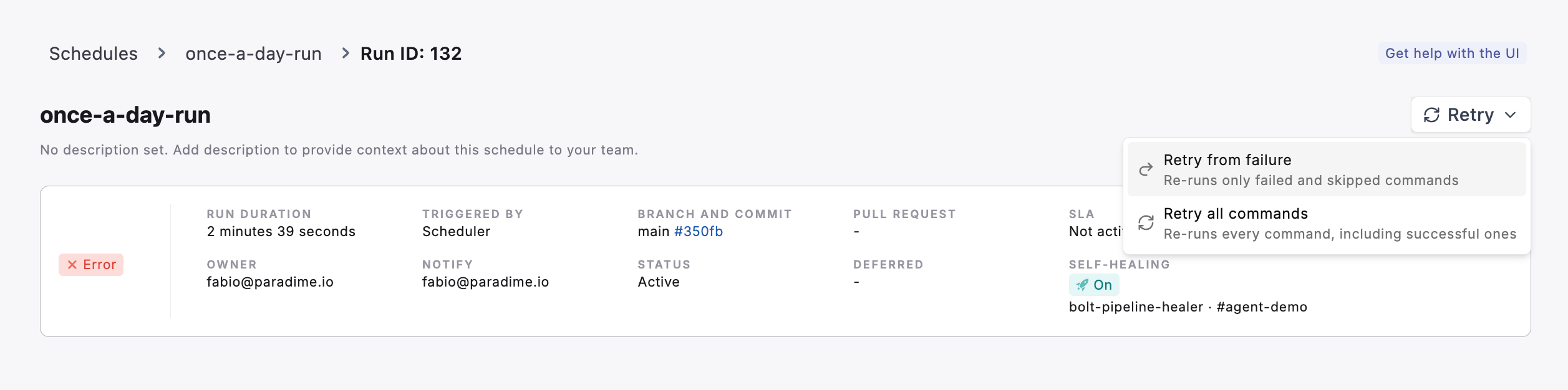 #### Two retry modes
| Mode | What re-runs | When to use it |
| ---------------------- | --------------------------------------------------------------------------------------------------- | --------------------------------------------------------------------------------------------------------------------------------------------- |
| **Retry from failure** | Only the failed commands. The first failing `dbt` command becomes `dbt retry` (failed models only). | The common case — transient warehouse errors, a flaky test, a single broken model. Cheapest and fastest path back to green. |
| **Retry all** | Every original command, in order, exactly as the schedule defined them. | The fix changed an upstream model or invalidated earlier results, so you need a clean rebuild. Or you want to verify the full schedule again. |
**Infrastructure commands are skipped** in both modes — `git clone`, `dbt deps`, and other setup steps always run automatically on every Bolt run, so you don't need to (and can't) retry them.
***
#### Retrying from the UI
1. Open the failed run from the Run History of any schedule.
2. On the **Run Details** page, click the **Retry** action.
3. Pick a retry mode:
* **Retry from failure** *(default)*
* **Retry all commands**
4. Confirm. A new Bolt run is queued immediately and a link to it appears in the confirmation toast.
5. Track the new run in the same Run History — it appears with its own run ID and links back to the original via the **Retried from** indicator.
#### What happens to the original run
* The original run's status (`failed`), logs, artifacts, and timeline are **unchanged**.
* The new run is a **separate** entry in the Run History — it has its own run ID, start time, and logs.
* If you retry the same original run more than once, each retry creates its own new run. Retries do not chain — they all reference the original failed run as their parent.
* Notifications (Slack / email / MS Teams) configured on the schedule fire on the **new** run as if it were any other Bolt run.
***
#### Triggering retries from code
The same retry behaviour is available from the Paradime CLI, the Python SDK, and the GraphQL API — useful if you want to automate retries from CI, an external orchestrator, or an incident-response tool.
| Path | Reference |
| ------------------------------------------------------------- | --------------------------------------------------------------------------- |
| [**CLI**](/developers/paradime-cli/bolt-cli) | `paradime bolt retry` / `paradime bolt schedule retry` |
| [**SDK**](/developers/python-sdk/modules/bolt) | `paradime.bolt.retry_run` / `retry_run_all` / `retry_schedule_from_failure` |
| [**GraphQL**](/developers/graphql-api/api-reference/bolt-api) | `retryBoltRun` / `retryAllBoltRun` / `retryBoltRunFromFailure` |
***
#### Related
* [Viewing Run Log History](/products/bolt/managing-schedules/viewing-run-log-history) — Find the failed run you want to retry
* [Analyzing Individual Run Details](/products/bolt/managing-schedules/analyzing-run-details/index) — Diagnose the failure before retrying
## Related topics
- [Bolt](/developers/python-sdk/modules/bolt.md)
- [Debugging Failed Runs](/guides/paradime-101/running-dbt-in-production-with-bolt/debugging-failed-runs.md)
- [Bolt API](/developers/graphql-api/api-reference/bolt-api.md)
- [Bolt CLI](/developers/paradime-cli/bolt-cli.md)
- [GitHub](/products/bolt/ci-cd/turbo-ci/github.md)
#### Two retry modes
| Mode | What re-runs | When to use it |
| ---------------------- | --------------------------------------------------------------------------------------------------- | --------------------------------------------------------------------------------------------------------------------------------------------- |
| **Retry from failure** | Only the failed commands. The first failing `dbt` command becomes `dbt retry` (failed models only). | The common case — transient warehouse errors, a flaky test, a single broken model. Cheapest and fastest path back to green. |
| **Retry all** | Every original command, in order, exactly as the schedule defined them. | The fix changed an upstream model or invalidated earlier results, so you need a clean rebuild. Or you want to verify the full schedule again. |
**Infrastructure commands are skipped** in both modes — `git clone`, `dbt deps`, and other setup steps always run automatically on every Bolt run, so you don't need to (and can't) retry them.
***
#### Retrying from the UI
1. Open the failed run from the Run History of any schedule.
2. On the **Run Details** page, click the **Retry** action.
3. Pick a retry mode:
* **Retry from failure** *(default)*
* **Retry all commands**
4. Confirm. A new Bolt run is queued immediately and a link to it appears in the confirmation toast.
5. Track the new run in the same Run History — it appears with its own run ID and links back to the original via the **Retried from** indicator.
#### What happens to the original run
* The original run's status (`failed`), logs, artifacts, and timeline are **unchanged**.
* The new run is a **separate** entry in the Run History — it has its own run ID, start time, and logs.
* If you retry the same original run more than once, each retry creates its own new run. Retries do not chain — they all reference the original failed run as their parent.
* Notifications (Slack / email / MS Teams) configured on the schedule fire on the **new** run as if it were any other Bolt run.
***
#### Triggering retries from code
The same retry behaviour is available from the Paradime CLI, the Python SDK, and the GraphQL API — useful if you want to automate retries from CI, an external orchestrator, or an incident-response tool.
| Path | Reference |
| ------------------------------------------------------------- | --------------------------------------------------------------------------- |
| [**CLI**](/developers/paradime-cli/bolt-cli) | `paradime bolt retry` / `paradime bolt schedule retry` |
| [**SDK**](/developers/python-sdk/modules/bolt) | `paradime.bolt.retry_run` / `retry_run_all` / `retry_schedule_from_failure` |
| [**GraphQL**](/developers/graphql-api/api-reference/bolt-api) | `retryBoltRun` / `retryAllBoltRun` / `retryBoltRunFromFailure` |
***
#### Related
* [Viewing Run Log History](/products/bolt/managing-schedules/viewing-run-log-history) — Find the failed run you want to retry
* [Analyzing Individual Run Details](/products/bolt/managing-schedules/analyzing-run-details/index) — Diagnose the failure before retrying
## Related topics
- [Bolt](/developers/python-sdk/modules/bolt.md)
- [Debugging Failed Runs](/guides/paradime-101/running-dbt-in-production-with-bolt/debugging-failed-runs.md)
- [Bolt API](/developers/graphql-api/api-reference/bolt-api.md)
- [Bolt CLI](/developers/paradime-cli/bolt-cli.md)
- [GitHub](/products/bolt/ci-cd/turbo-ci/github.md)