> ## Documentation Index
> Fetch the complete documentation index at: https://docs.paradime.io/llms.txt
> Use this file to discover all available pages before exploring further.
# Data Explorer
> Paradime Data Preview: Instantly preview data changes in your dbt™ projects. Validate updates and ensure data accuracy.
export const Arcade = ({src, title}) =>
;
Paradime IDE's Data Explorer provides real-time data preview capabilities for your dbt™ models and SQL queries, allowing you to validate your transformations without running a full dbt™ compile.
### How It Works
Click the Data Explorer Tab in the [Command Panel](/products/code-ide/command-panel/index). Here you can:
* Preview Data (View model results)
* Download results as CSV
* Preview compiled SQL
* Preview specific SQL segments
***
### Compile & preview using production state (Defer to Production)
If you enable **Defer to Production** in the IDE, Data Explorer will compile and preview your models using the **production state** (the latest `manifest.json` from the production schedule you selected).
This is useful when you want to:
* Validate changes to a downstream model **without** rebuilding all upstream models in your dev schema.
* Preview results against production-like upstream relations while still iterating in development.
When Defer to Production is enabled, both Data Explorer actions (**Preview Data** and **Compiled SQL**) will automatically defer to the selected production manifest/state.
For setup requirements and deeper details on how `--defer` works, see [Using Defer to Production in Paradime](/guides/paradime-fundamentals/dbt-tm-defer-to-production) and ["Defer to Production" configuration](/products/bolt/managing-schedules/schedule-configurations#defer-to-production-configuration).
***
### Previewing Data
1. Open any SQL file in the editor
2. Click the Data Explorer icon in the command panel
3. Optional: Change the query row limit to your desired value (anywhere between 1-1000)
4. Click "Preview Data" to see your model's results
5. Review the compiled SQL and data output
6. Optional: Download the data returned in the preview as a .csv, click "Download CSV"
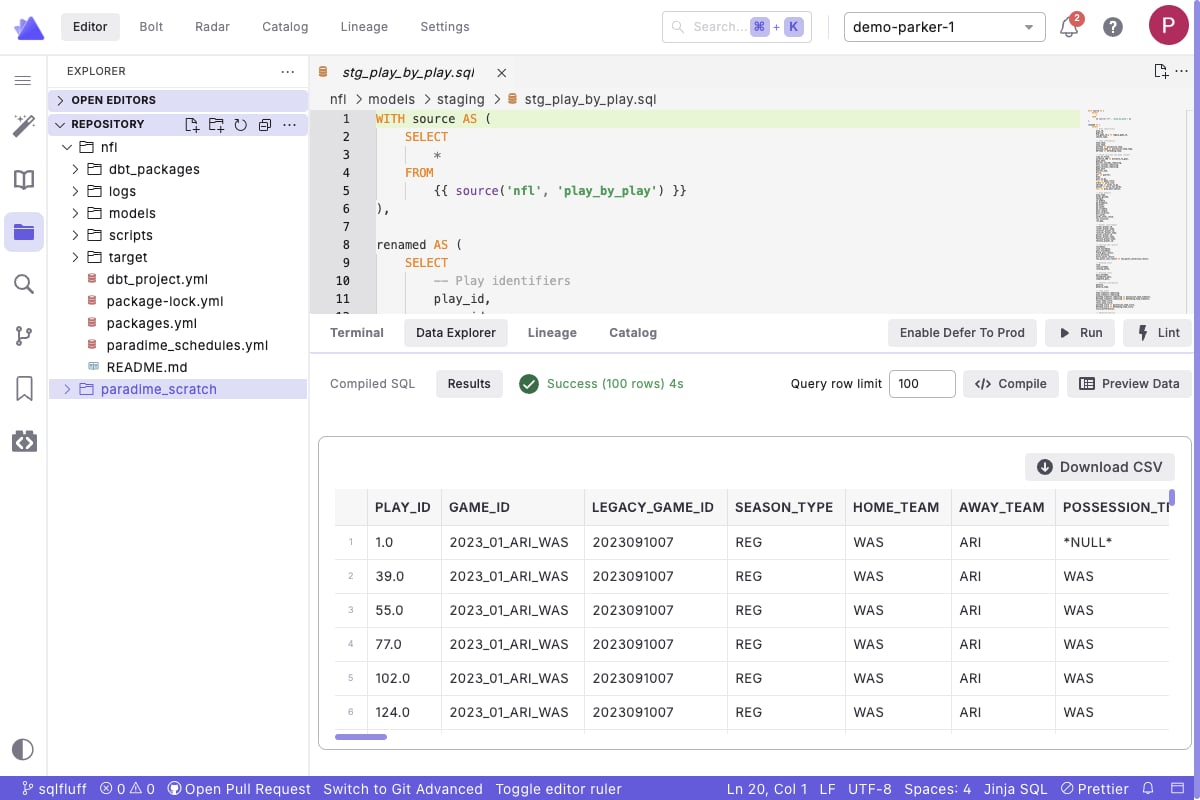 By default, Paradime automatically adds a `LIMIT 100` to the data preview. You can change this limit anywhere between 1 - 1000 by editing the text box next to "Query Limit"
***
### Previewing Compiled SQL
1. Click the Data Explorer icon in the [command panel](/products/code-ide/command-panel/index)
2. Click "Compiled SQL" to see your model's results
3. Review the compiled SQL to understand how your SQL, jinja, and macros unfold
By default, Paradime automatically adds a `LIMIT 100` to the data preview. You can change this limit anywhere between 1 - 1000 by editing the text box next to "Query Limit"
***
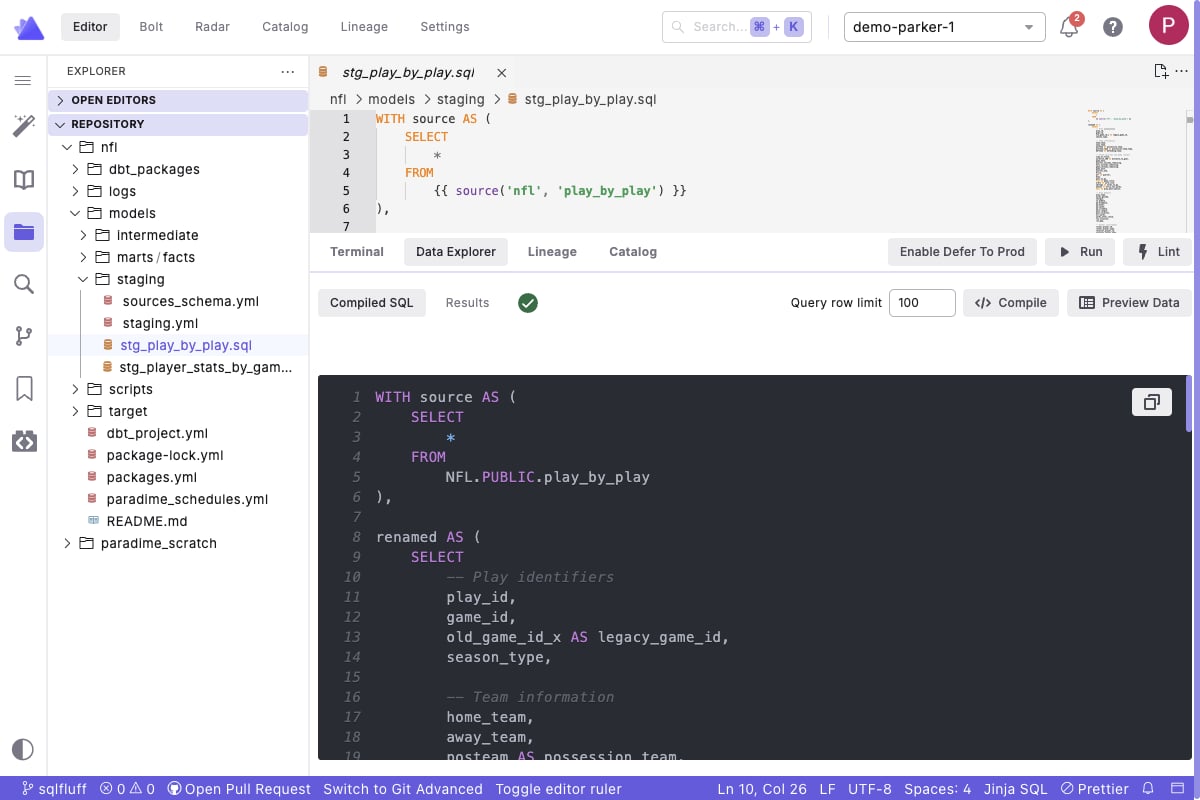
### Previewing Compiled SQL
1. Click the Data Explorer icon in the [command panel](/products/code-ide/command-panel/index)
2. Click "Compiled SQL" to see your model's results
3. Review the compiled SQL to understand how your SQL, jinja, and macros unfold
 ***
### Preview Specific SQL Segments
To preview only a portion of your model (like a CTE or subquery):
1. Highlight the desired SQL segment in your file
2. Click the Data Explorer icon in the command panel
3. Click "Preview Data" to see results for just that segment
***
### Preview Specific SQL Segments
To preview only a portion of your model (like a CTE or subquery):
1. Highlight the desired SQL segment in your file
2. Click the Data Explorer icon in the command panel
3. Click "Preview Data" to see results for just that segment
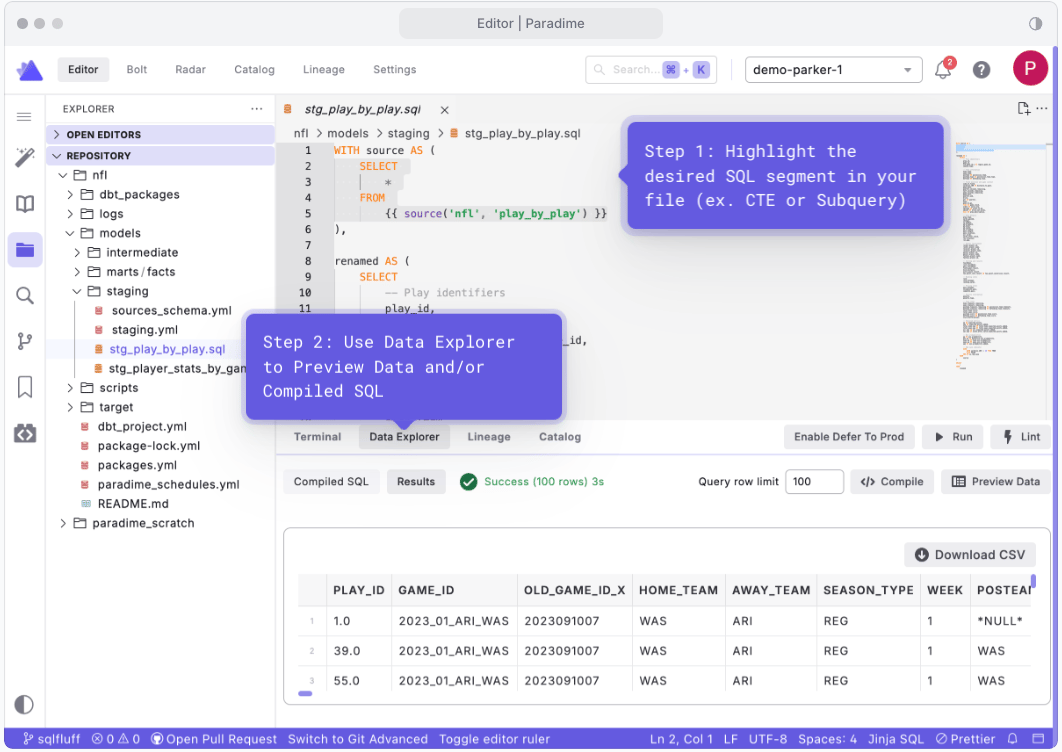 This is useful for testing individual CTEs or subqueries before running your entire model.
***
### Related Resources
[**Scratchpad**](/products/code-ide/additional-features/scratchpad) - Need a space for SQL experiments? Scratchpad provides a temporary environment for testing SQL and dbt™ queries without affecting your project files. Learn more about writing and testing queries in a dedicated, persistent workspace.
## Related topics
- [Data Exploration in the Code IDE](/guides/paradime-101/getting-started-with-the-paradime-ide/data-exploration-in-the-code-ide.md)
- [Scratchpad](/products/code-ide/additional-features/scratchpad.md)
- [Command Panel](/products/code-ide/command-panel/index.md)
- [Translation of Key Terms](/guides/migrations/dbt-cloud-tm-importer/translation-of-key-terms.md)
- [Getting Started with the Paradime IDE](/guides/paradime-101/getting-started-with-the-paradime-ide/index.md)
This is useful for testing individual CTEs or subqueries before running your entire model.
***
### Related Resources
[**Scratchpad**](/products/code-ide/additional-features/scratchpad) - Need a space for SQL experiments? Scratchpad provides a temporary environment for testing SQL and dbt™ queries without affecting your project files. Learn more about writing and testing queries in a dedicated, persistent workspace.
## Related topics
- [Data Exploration in the Code IDE](/guides/paradime-101/getting-started-with-the-paradime-ide/data-exploration-in-the-code-ide.md)
- [Scratchpad](/products/code-ide/additional-features/scratchpad.md)
- [Command Panel](/products/code-ide/command-panel/index.md)
- [Translation of Key Terms](/guides/migrations/dbt-cloud-tm-importer/translation-of-key-terms.md)
- [Getting Started with the Paradime IDE](/guides/paradime-101/getting-started-with-the-paradime-ide/index.md)