> ## Documentation Index
> Fetch the complete documentation index at: https://docs.paradime.io/llms.txt
> Use this file to discover all available pages before exploring further.
# Git Lite
> Paradime Git Lite - Simplified Git version control for dbt™ projects. Manage code with ease and efficiency
export const Arcade = ({src, title}) =>
;
Git Lite simplifies version control for dbt™ projects. It provides a purpose-built git workflow that keeps you in sync with your main branch, perfect for users new to git or those who prefer a streamlined interface.
Git Lite creates new branches from your remote main/master branch and automatically handles syncing with remote branches.
You can choose between Git Lite and Git Advanced in your [IDE preferences](/products/code-ide/user-interface/ide-preferences).
### Branch Management
#### Creating a New Branch
1. Click the **Git Lite** icon (🪄) in the left panel of the Code IDE
2. Select "Create Branch"
3. Enter your branch name
4. Click "Create Branch"
#### Switching Branches
1. Click the **Git Lite** icon (🪄) in the left panel of the Code IDE
2. Click the branch dropdown
3. Use the search bar to find your branch
4. Select the branch name to switch
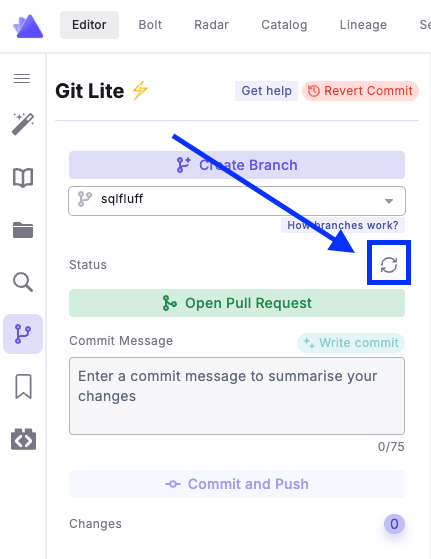
Branch list updates automatically every 30 minutes. Click the refresh button to update manually.
### Working With Changes
#### Keeping Branches Updated
Git Lite automatically checks if your branch is behind your remote branch and/or your main/master branch. This check happens:
* After each commit
* When you click the refresh button manually
 #### Committing Changes
1. Click the **Git Lite** icon (🪄) in the left panel of the Code IDE
2. Enter a commit message
3. Click "Commit and Push"
**Git Lite will:**
* Commit your changes
* Push to your remote branch
* Automatically pull and merge remote changes if needed
To abandon changes, click the "Discard All Changes" button.
### Advanced Features
#### Opening Pull Requests
1. Click the **Git Lite** icon (🪄) in the left panel of the Code IDE
2. Ensure all changes are committed by clicking "Commit and Push"
3. Click "Open Pull Request"
4. Review changes in your git provider
The "Open Pull Request" button is only enabled when there are no uncommitted changes.
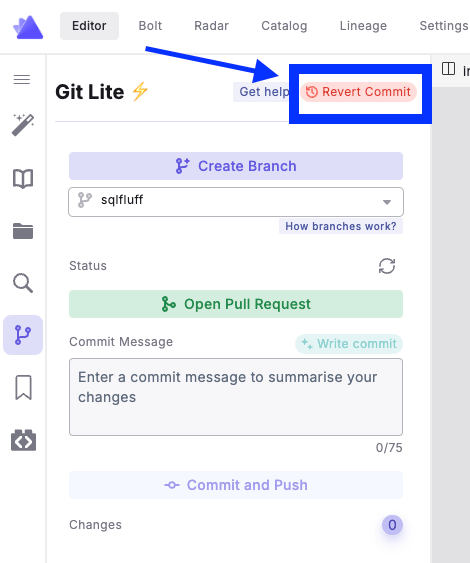
#### Reverting Commits
To undo your last commit:
1. Click "Revert Commit" in the top right corner
2. Review the commit details
3. Click "Continue" to revert
#### Committing Changes
1. Click the **Git Lite** icon (🪄) in the left panel of the Code IDE
2. Enter a commit message
3. Click "Commit and Push"
**Git Lite will:**
* Commit your changes
* Push to your remote branch
* Automatically pull and merge remote changes if needed
To abandon changes, click the "Discard All Changes" button.
### Advanced Features
#### Opening Pull Requests
1. Click the **Git Lite** icon (🪄) in the left panel of the Code IDE
2. Ensure all changes are committed by clicking "Commit and Push"
3. Click "Open Pull Request"
4. Review changes in your git provider
The "Open Pull Request" button is only enabled when there are no uncommitted changes.
#### Reverting Commits
To undo your last commit:
1. Click "Revert Commit" in the top right corner
2. Review the commit details
3. Click "Continue" to revert
 #### Handling Merge Conflicts
When merge conflicts occur, Git Lite provides tools to help you resolve them easily.
For detailed instructions on resolving merge conflicts, see our [merge conflict documentation](/guides/working-with-git/merge-conflicts).
## Related topics
- [Git Lite](/guides/working-with-git/git-lite.md)
- [Delete Branches](/guides/working-with-git/delete-branches.md)
- [Accelerating GitOps](/guides/paradime-101/getting-started-with-the-paradime-ide/dinoai-accelerating-your-analytics-engineering-workflow/accelerating-git-ops.md)
- [Working with Git](/guides/working-with-git/index.md)
- [Git Advanced](/guides/working-with-git/git-advanced.md)
#### Handling Merge Conflicts
When merge conflicts occur, Git Lite provides tools to help you resolve them easily.
For detailed instructions on resolving merge conflicts, see our [merge conflict documentation](/guides/working-with-git/merge-conflicts).
## Related topics
- [Git Lite](/guides/working-with-git/git-lite.md)
- [Delete Branches](/guides/working-with-git/delete-branches.md)
- [Accelerating GitOps](/guides/paradime-101/getting-started-with-the-paradime-ide/dinoai-accelerating-your-analytics-engineering-workflow/accelerating-git-ops.md)
- [Working with Git](/guides/working-with-git/index.md)
- [Git Advanced](/guides/working-with-git/git-advanced.md)