> ## Documentation Index
> Fetch the complete documentation index at: https://docs.paradime.io/llms.txt
> Use this file to discover all available pages before exploring further.
# Classifications
> earn how to use dbt™ meta configurations to set up classifications that appear in the Paradime catalog for better data governance and searchability.
Classifications in Paradime are powered by dbt™'s `meta` configuration, which allows you to add custom metadata to your [models](/products/data-catalog/data-assets/dbt-assets/classifications#model-level-classifications), [columns](/products/data-catalog/data-assets/dbt-assets/classifications#column-level-classifications), sources, and other dbt™ resources. All classifications must be defined within the `meta` config block in your dbt™ YAML files. These classifications appear in the Paradime catalog as searchable and filterable metadata, helping with data governance and asset discovery.
***
### Legacy vs Modern Syntax
**Important**: dbt™ 1.10+ requires `meta` configurations to be nested within `config` blocks. The legacy syntax shown below is deprecated and will be removed in future versions.
**Deprecated (will be removed in future dbt™ versions):**
```yaml theme={"system"}
models:
- name: my_model
meta: # Direct meta placement - deprecated
classification: "restricted"
columns:
- name: my_column
meta: # Direct meta placement - deprecated
pii: true
```
#### Current (dbt™ 1.10+ compatible):
```yaml theme={"system"}
models:
- name: my_model
config:
meta: # ✅ Meta nested in config block
classification: "restricted"
columns:
- name: my_column
config:
meta: # ✅ Meta nested in config block
pii: true
```
***
### How Classifications Appear in Paradime
Once you've added `meta` configurations to your dbt™ files, they appear in two key places in the Paradime catalog:
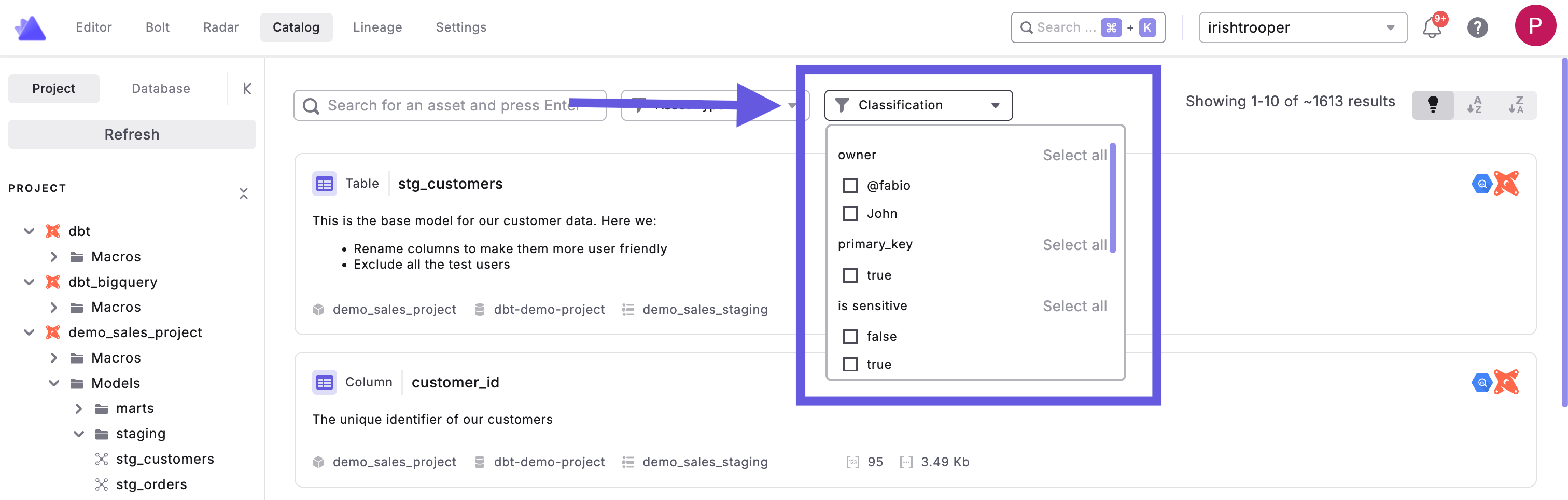
#### 1. Search and Filter Bar
At the top of the catalog home screen, click the **Classification** dropdown to search and filter by any custom metadata you've added. This allows you to quickly find assets with specific classification values like sensitivity levels, data domains, or ownership information.
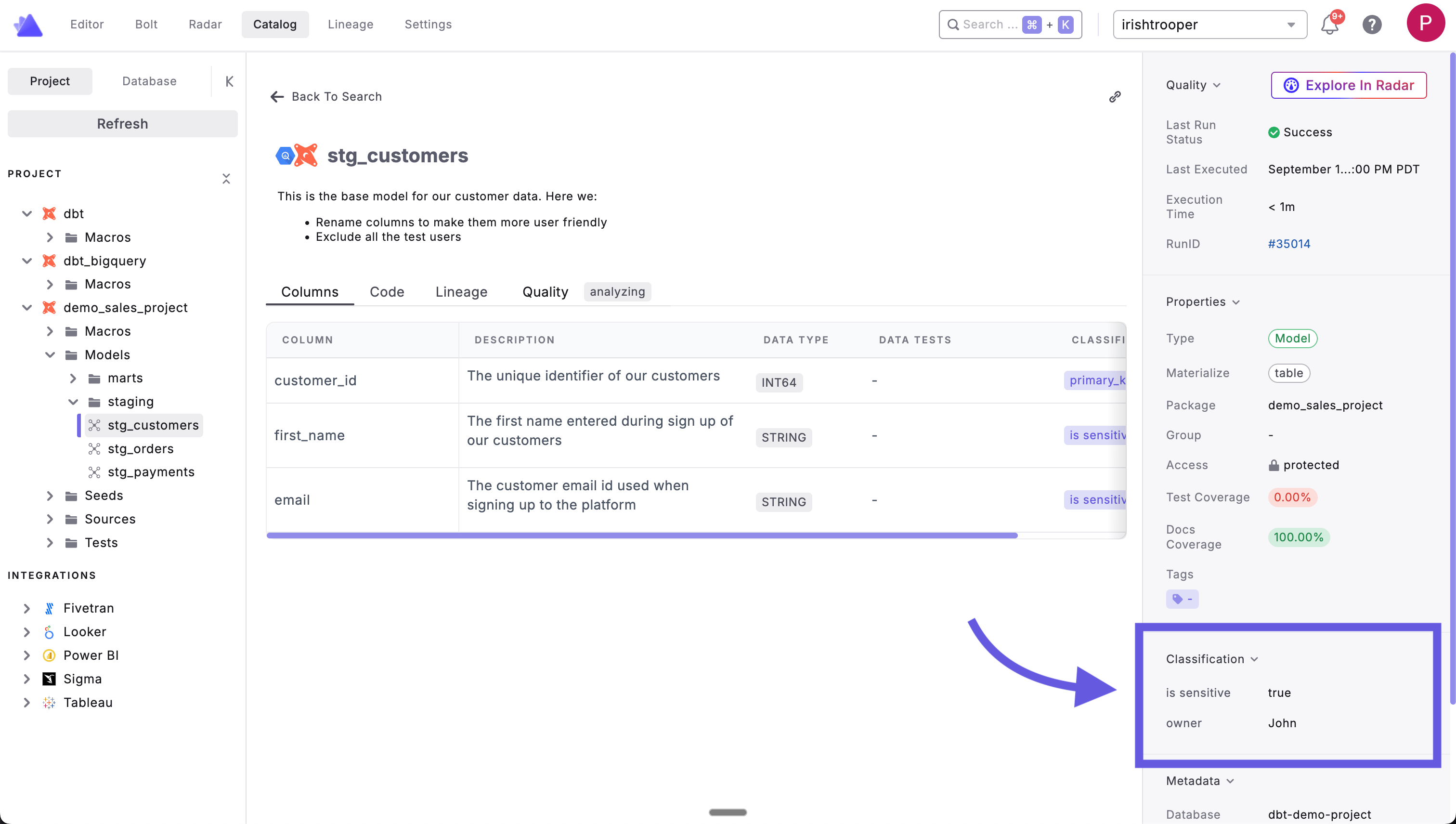
 #### 2. Asset Details Panel
When viewing any data asset, classifications appear in the right-side panel under the **Classification** section. This displays all the meta key-value pairs you've defined, such as:
* `is_sensitive: true`
* `owner: John`
* Any other custom metadata you've configured
#### 2. Asset Details Panel
When viewing any data asset, classifications appear in the right-side panel under the **Classification** section. This displays all the meta key-value pairs you've defined, such as:
* `is_sensitive: true`
* `owner: John`
* Any other custom metadata you've configured
 ***
### Where to Set Classifications
Classifications are always defined within the `meta` configuration block at two levels in your dbt™ project:
#### Model Level Classifications
Add classifications to entire models using the `meta` config block in your properties file:
```yaml theme={"system"}
models:
- name: customer_orders
description: "Customer order data with purchase history"
config:
meta: # Meta nested in config block
classification: "restricted"
data_domain: "sales"
owner: "analytics-team"
pii_contains: true
columns:
- name: customer_id
description: "Unique customer identifier"
- name: order_total
description: "Total order amount"
```
#### Column Level Classifications
Add classifications to specific columns using the `meta` config block within column definitions:
```yaml theme={"system"}
models:
- name: customer_orders
description: "Customer order data with purchase history"
columns:
- name: customer_id
description: "Unique customer identifier"
config:
meta: # Meta nested in config block
classification: "public"
pii: false
- name: customer_email
description: "Customer email address"
config:
meta: # Meta nested in config block
classification: "restricted"
pii: true
retention_period: "7_years"
- name: order_total
description: "Total order amount"
config:
meta: # Meta nested in config block
classification: "internal"
currency: "USD"
```
***
### Common Classification Examples
Here are some typical classification patterns teams use within the `meta` config block:
#### Data Sensitivity Levels
```yaml theme={"system"}
models:
- name: my_model
config:
meta: # Meta nested in config block
classification: "public" # Safe for wide access
# OR
classification: "internal" # Company employees only
# OR
classification: "restricted" # Limited access required
# OR
classification: "confidential" # Highly sensitive data
```
#### Data Domains
```yaml theme={"system"}
models:
- name: my_model
config:
meta: # Meta nested in config block
data_domain: "finance"
# OR
data_domain: "marketing"
# OR
data_domain: "product"
# OR
data_domain: "operations"
```
#### Data Governance
```yaml theme={"system"}
models:
- name: my_model
config:
meta: # Meta nested in config block
owner: "data-engineering"
pii_contains: true
retention_period: "5_years"
compliance_requirement: "gdpr"
```
***
**Best Practices**
1. **Be Consistent**: Use standardized classification values across your project
2. **Document Standards**: Define what each classification level means for your organization
3. **Use Meaningful Keys**: Choose descriptive meta keys that make sense to your team
4. **Combine Classifications**: Use multiple meta fields to provide rich context
## Related topics
- [Working with Tags](/guides/dbt-fundamentals/configuring-your-dbt-project/working-with-tags-in-your-dbt-tm-project.md)
- [Unit Testing](/guides/dbt-fundamentals/configuring-your-dbt-project/unit-testing.md)
- [Catalog](/products/code-ide/command-panel/docs-preview.md)
- [Search and Discovery](/products/data-catalog/lineage/search-and-discovery.md)
- [Auto-generated Data Documentation](/guides/paradime-101/getting-started-with-the-paradime-ide/utilizing-advanced-developer-features/auto-generated-data-documentation.md)
***
### Where to Set Classifications
Classifications are always defined within the `meta` configuration block at two levels in your dbt™ project:
#### Model Level Classifications
Add classifications to entire models using the `meta` config block in your properties file:
```yaml theme={"system"}
models:
- name: customer_orders
description: "Customer order data with purchase history"
config:
meta: # Meta nested in config block
classification: "restricted"
data_domain: "sales"
owner: "analytics-team"
pii_contains: true
columns:
- name: customer_id
description: "Unique customer identifier"
- name: order_total
description: "Total order amount"
```
#### Column Level Classifications
Add classifications to specific columns using the `meta` config block within column definitions:
```yaml theme={"system"}
models:
- name: customer_orders
description: "Customer order data with purchase history"
columns:
- name: customer_id
description: "Unique customer identifier"
config:
meta: # Meta nested in config block
classification: "public"
pii: false
- name: customer_email
description: "Customer email address"
config:
meta: # Meta nested in config block
classification: "restricted"
pii: true
retention_period: "7_years"
- name: order_total
description: "Total order amount"
config:
meta: # Meta nested in config block
classification: "internal"
currency: "USD"
```
***
### Common Classification Examples
Here are some typical classification patterns teams use within the `meta` config block:
#### Data Sensitivity Levels
```yaml theme={"system"}
models:
- name: my_model
config:
meta: # Meta nested in config block
classification: "public" # Safe for wide access
# OR
classification: "internal" # Company employees only
# OR
classification: "restricted" # Limited access required
# OR
classification: "confidential" # Highly sensitive data
```
#### Data Domains
```yaml theme={"system"}
models:
- name: my_model
config:
meta: # Meta nested in config block
data_domain: "finance"
# OR
data_domain: "marketing"
# OR
data_domain: "product"
# OR
data_domain: "operations"
```
#### Data Governance
```yaml theme={"system"}
models:
- name: my_model
config:
meta: # Meta nested in config block
owner: "data-engineering"
pii_contains: true
retention_period: "5_years"
compliance_requirement: "gdpr"
```
***
**Best Practices**
1. **Be Consistent**: Use standardized classification values across your project
2. **Document Standards**: Define what each classification level means for your organization
3. **Use Meaningful Keys**: Choose descriptive meta keys that make sense to your team
4. **Combine Classifications**: Use multiple meta fields to provide rich context
## Related topics
- [Working with Tags](/guides/dbt-fundamentals/configuring-your-dbt-project/working-with-tags-in-your-dbt-tm-project.md)
- [Unit Testing](/guides/dbt-fundamentals/configuring-your-dbt-project/unit-testing.md)
- [Catalog](/products/code-ide/command-panel/docs-preview.md)
- [Search and Discovery](/products/data-catalog/lineage/search-and-discovery.md)
- [Auto-generated Data Documentation](/guides/paradime-101/getting-started-with-the-paradime-ide/utilizing-advanced-developer-features/auto-generated-data-documentation.md)