> ## Documentation Index
> Fetch the complete documentation index at: https://docs.paradime.io/llms.txt
> Use this file to discover all available pages before exploring further.
# Fix with DinoAI
When a [Bolt run fails](/products/bolt/index), DinoAI can go beyond just explaining what went wrong — it can fix it. The **Fix with DinoAI** button spins up a full Slack Agent session scoped to the failed run, implements the fix in your codebase, and opens a PR for your team to review.
### How It Works
When you click **Fix with DinoAI**, the agent:
1. Reads the Bolt run logs from the failed run to understand exactly what went wrong
2. Spins up a Slack Agent session and posts the analysis to your connected Slack channel
3. Creates a new branch in your connected repository
4. Implements the fix directly in the codebase
5. Opens a pull request for your team to review and merge
The entire process runs in the background. You'll see progress updates and the final PR link posted in Slack.
 ### Triggering a Fix
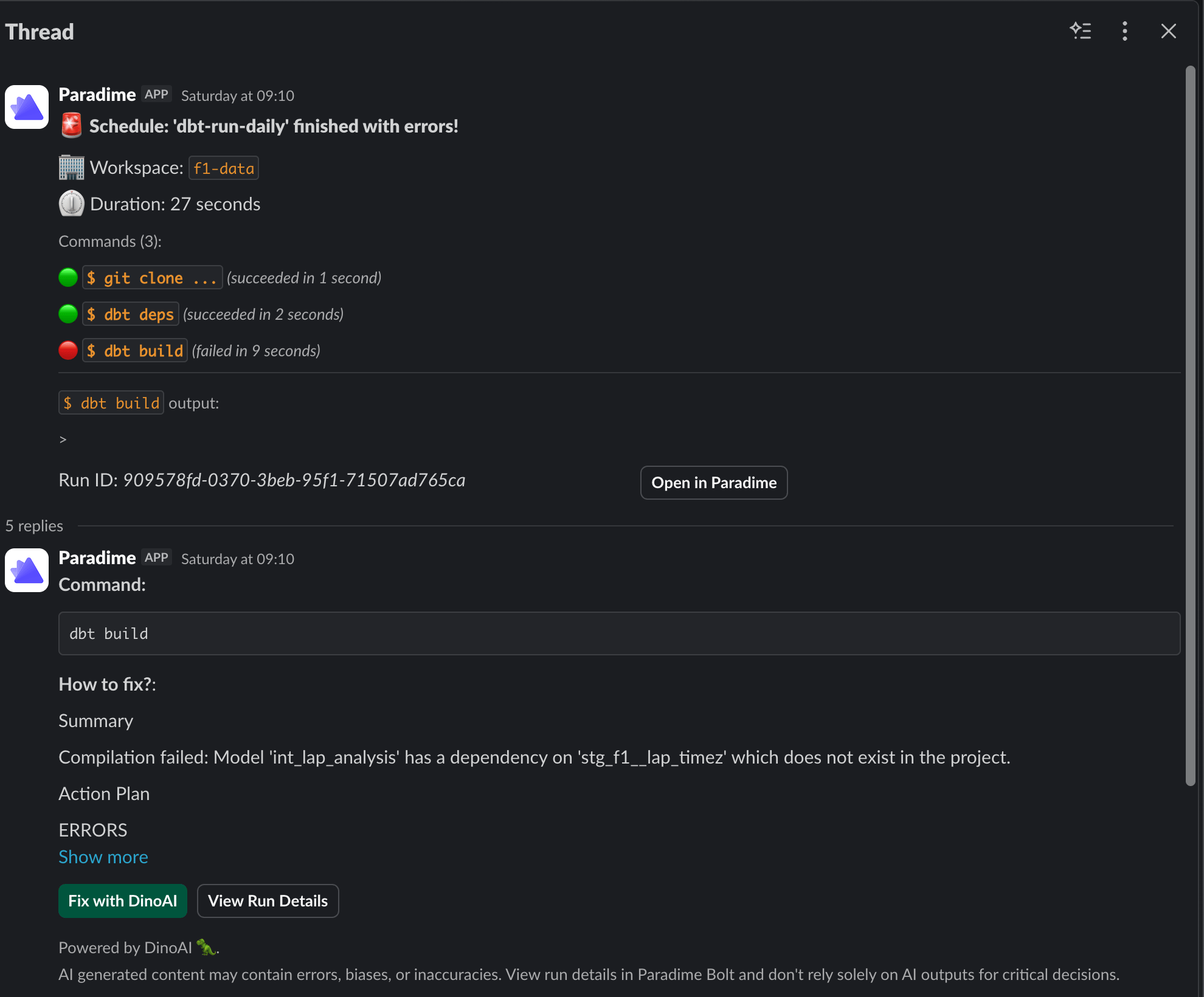
When Bolt posts a run failure notification to Slack, the thread includes a **Fix with DinoAI** button alongside the error summary. Click it directly from the thread to kick off the fix.
### Example
The screenshot below shows a Bolt run failure posted to Slack. The `dbt build` command failed because a model references a source that doesn't exist in the project. DinoAI surfaces the root cause, an action plan, and the **Fix with DinoAI** button — all in the same Slack thread.
Clicking **Fix with DinoAI** will spin up an agent session, create a branch, resolve the missing dependency, and open a PR.
### Triggering a Fix
When Bolt posts a run failure notification to Slack, the thread includes a **Fix with DinoAI** button alongside the error summary. Click it directly from the thread to kick off the fix.
### Example
The screenshot below shows a Bolt run failure posted to Slack. The `dbt build` command failed because a model references a source that doesn't exist in the project. DinoAI surfaces the root cause, an action plan, and the **Fix with DinoAI** button — all in the same Slack thread.
Clicking **Fix with DinoAI** will spin up an agent session, create a branch, resolve the missing dependency, and open a PR.
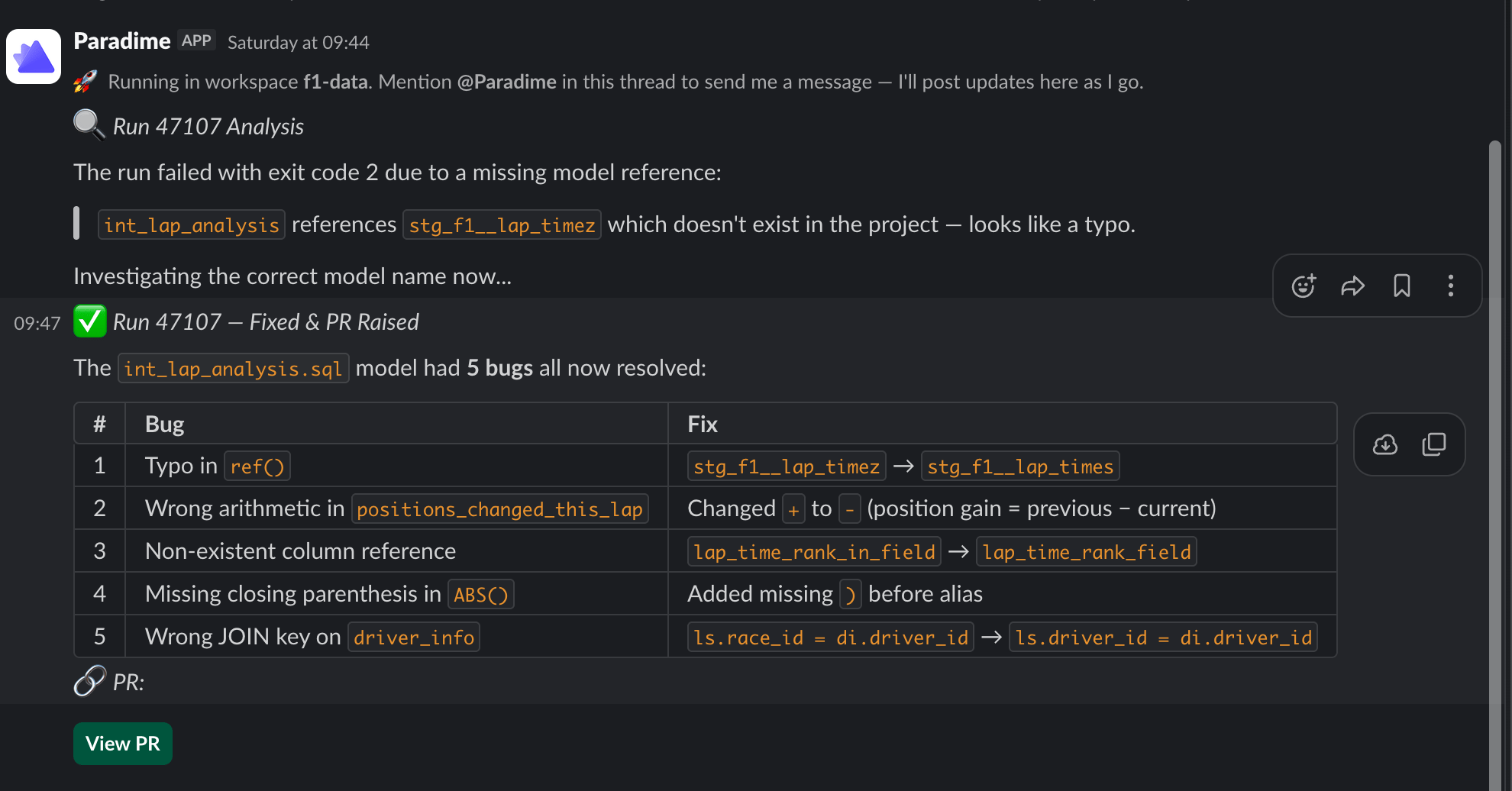 > **You stay in control.** Fix with DinoAI always opens a pull request — it never merges directly to your default branch. Your team reviews and approves before anything reaches production.
### What DinoAI Has Access To
To implement the fix, the agent uses:
* **Bolt run logs** — the full output of the failed command, including error messages and stack traces
* **Your connected repository** — cloned from the workspace selected at session start
* **Warehouse connection** — to run validation queries if needed
* **Slack** — to post progress updates and the final PR link
> The environment used (warehouse connection, integrations, repository) is determined by the workspace configured in [DinoAI Background Agent](/products/settings/connections/dinoai-background-agent-environment/index)
### Related
* [Run Summaries](/products/dino-ai/bolt-pipeline-agent/production-pipelines) — Understand what went wrong before triggering a fix
* [Self-Healing](/products/dino-ai/bolt-pipeline-agent/self-healing) — Automatically fix and re-run pipelines without manual intervention
* [Slack Agent](/products/dino-ai/slack-agent/index) — How the underlying agent session works
## Related topics
- [Bolt Pipeline Agent](/products/dino-ai/bolt-pipeline-agent/index.md)
- [Self-Healing](/products/dino-ai/bolt-pipeline-agent/self-healing.md)
- [Context Menu](/products/code-ide/user-interface/context-menu.md)
- [DinoAI](/products/dino-ai/index.md)
- [DinoAI Copilot](/products/code-ide/left-panel/copilot.md)
> **You stay in control.** Fix with DinoAI always opens a pull request — it never merges directly to your default branch. Your team reviews and approves before anything reaches production.
### What DinoAI Has Access To
To implement the fix, the agent uses:
* **Bolt run logs** — the full output of the failed command, including error messages and stack traces
* **Your connected repository** — cloned from the workspace selected at session start
* **Warehouse connection** — to run validation queries if needed
* **Slack** — to post progress updates and the final PR link
> The environment used (warehouse connection, integrations, repository) is determined by the workspace configured in [DinoAI Background Agent](/products/settings/connections/dinoai-background-agent-environment/index)
### Related
* [Run Summaries](/products/dino-ai/bolt-pipeline-agent/production-pipelines) — Understand what went wrong before triggering a fix
* [Self-Healing](/products/dino-ai/bolt-pipeline-agent/self-healing) — Automatically fix and re-run pipelines without manual intervention
* [Slack Agent](/products/dino-ai/slack-agent/index) — How the underlying agent session works
## Related topics
- [Bolt Pipeline Agent](/products/dino-ai/bolt-pipeline-agent/index.md)
- [Self-Healing](/products/dino-ai/bolt-pipeline-agent/self-healing.md)
- [Context Menu](/products/code-ide/user-interface/context-menu.md)
- [DinoAI](/products/dino-ai/index.md)
- [DinoAI Copilot](/products/code-ide/left-panel/copilot.md)