> ## Documentation Index
> Fetch the complete documentation index at: https://docs.paradime.io/llms.txt
> Use this file to discover all available pages before exploring further.
# Pipeline Insights
> DinoAI's integration with Paradime Bolt provides detailed summaries and recommendations to help troubleshoot issues during dbt™ model deployments in production environments.
export const Arcade = ({src, title}) =>
;
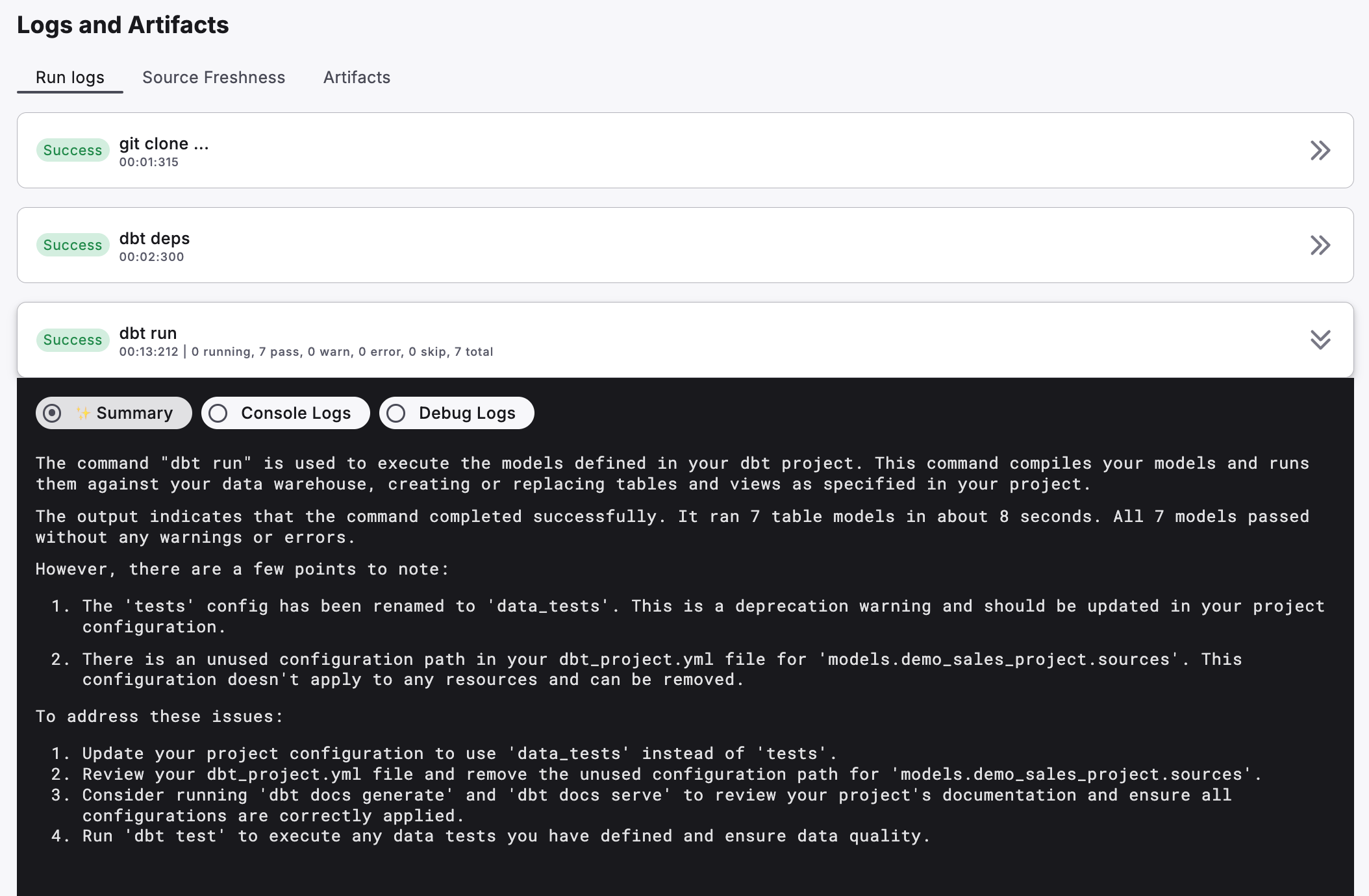
When a Bolt run completes, DinoAI automatically analyses the execution logs and generates a human-readable summary for each command. Instead of manually scanning through hundreds of log lines, you get a clear breakdown of what happened, what went wrong, and what to do next
### What the Summary Includes
For each command executed in a Bolt run, DinoAI provides:
* **Execution overview** — a plain-language summary of what the command did
* **Warnings and errors** — surfaced and explained in context, not just raw stack traces
* **Recommendations** — actionable suggestions to improve reliability and performance
 ### Turbo CI summaries on GitHub
DinoAI summaries also appear on pull requests. When a Turbo CI run fails, Paradime posts the DinoAI Summary as a comment on the pull request — so reviewers can see why CI failed without leaving GitHub.
### Turbo CI summaries on GitHub
DinoAI summaries also appear on pull requests. When a Turbo CI run fails, Paradime posts the DinoAI Summary as a comment on the pull request — so reviewers can see why CI failed without leaving GitHub.
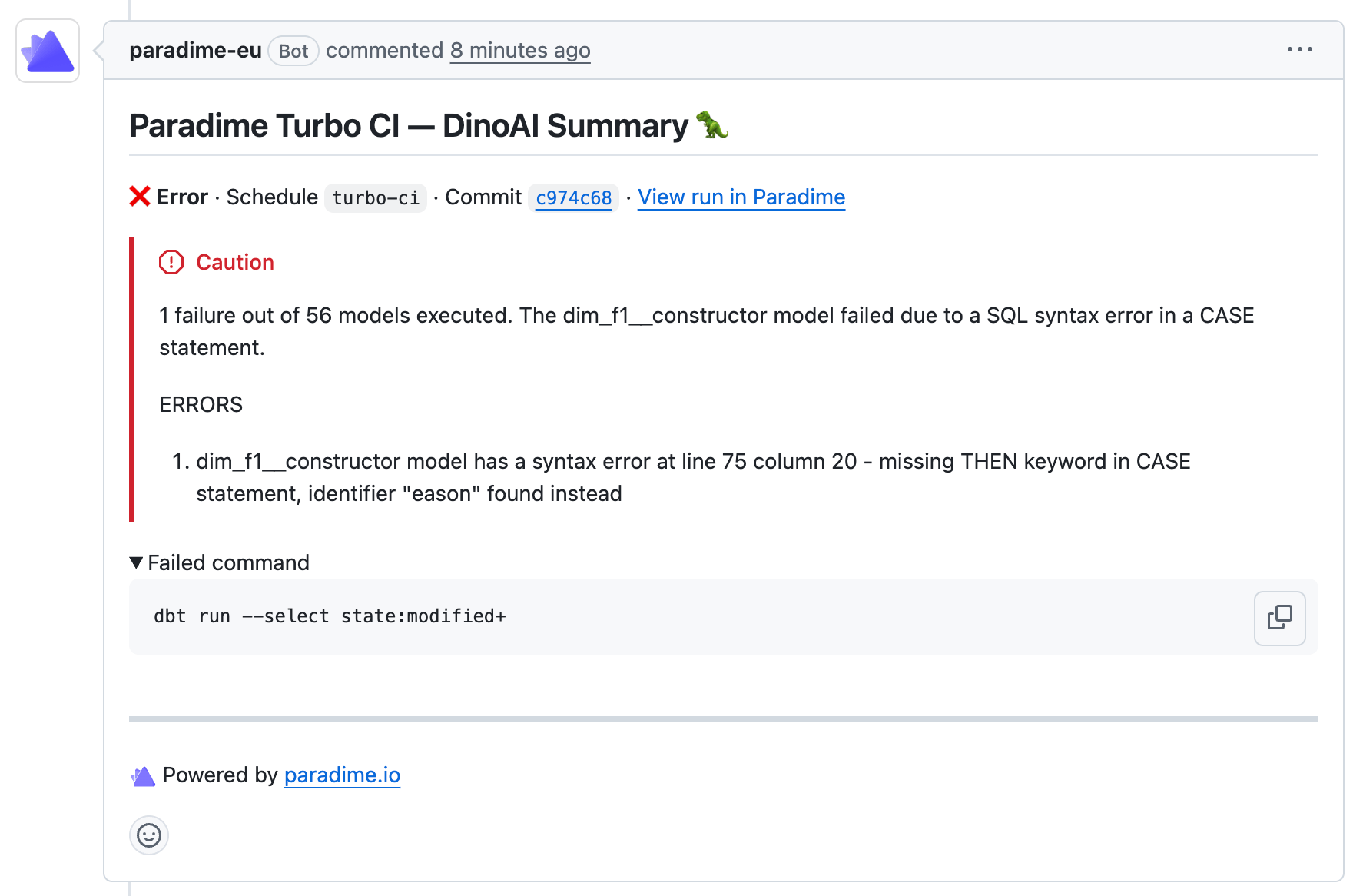 The PR comment includes the schedule name and commit SHA, a plain-language explanation of the failure, the specific errors with affected models, and the command that failed. A link back to the full run in Paradime is included for deeper investigation.
No additional configuration is required — the DinoAI Summary is posted automatically whenever a Turbo CI run fails on a pull request. **See the** [**GitHub Turbo CI doc**](/products/bolt/ci-cd/turbo-ci/github) **for details.**
### Troubleshooting Pipeline Runs
1. Open the **Bolt UI** and select a schedule
2. Scroll down to **Run History** and click on a specific run
3. Scroll down to **Logs and Artifacts**
4. Select a command that has an error or warning (e.g. `dbt run`)
5. Click the **Summary** tab to see the DinoAI-generated analysis
> **Tip:** The Summary tab is most useful when a command has failed or produced warnings — that's when DinoAI's analysis saves the most time.
***
### Next Steps
Once you've reviewed the summary, you have two options:
* **Fix it yourself** — use the recommendations to make changes in the IDE
* **Let DinoAI fix it** — use [Fix with DinoAI](https://claude.ai/chat/fix-with-dinoai.md) to trigger a one-click fix directly from the run
***
### Related
* [Bolt Schedules](/products/bolt/index) — Setting up and managing your pipelines
* [Fix with DinoAI](/products/dino-ai/bolt-pipeline-agent/fix-with-dinoai) — One-click fixes based on run errors
* [Self-Healing](/products/dino-ai/bolt-pipeline-agent/self-healing) — Automatically fix and re-run failed pipelines
## Related topics
- [Bolt Pipeline Agent](/products/dino-ai/bolt-pipeline-agent/index.md)
- [Self-Healing](/products/dino-ai/bolt-pipeline-agent/self-healing.md)
- [GitHub](/products/bolt/ci-cd/turbo-ci/github.md)
- [Viewing Run Log History](/products/bolt/managing-schedules/viewing-run-log-history.md)
- [Schedules Dashboard](/products/radar/dbt-monitoring/schedules-dashboard.md)
The PR comment includes the schedule name and commit SHA, a plain-language explanation of the failure, the specific errors with affected models, and the command that failed. A link back to the full run in Paradime is included for deeper investigation.
No additional configuration is required — the DinoAI Summary is posted automatically whenever a Turbo CI run fails on a pull request. **See the** [**GitHub Turbo CI doc**](/products/bolt/ci-cd/turbo-ci/github) **for details.**
### Troubleshooting Pipeline Runs
1. Open the **Bolt UI** and select a schedule
2. Scroll down to **Run History** and click on a specific run
3. Scroll down to **Logs and Artifacts**
4. Select a command that has an error or warning (e.g. `dbt run`)
5. Click the **Summary** tab to see the DinoAI-generated analysis
> **Tip:** The Summary tab is most useful when a command has failed or produced warnings — that's when DinoAI's analysis saves the most time.
***
### Next Steps
Once you've reviewed the summary, you have two options:
* **Fix it yourself** — use the recommendations to make changes in the IDE
* **Let DinoAI fix it** — use [Fix with DinoAI](https://claude.ai/chat/fix-with-dinoai.md) to trigger a one-click fix directly from the run
***
### Related
* [Bolt Schedules](/products/bolt/index) — Setting up and managing your pipelines
* [Fix with DinoAI](/products/dino-ai/bolt-pipeline-agent/fix-with-dinoai) — One-click fixes based on run errors
* [Self-Healing](/products/dino-ai/bolt-pipeline-agent/self-healing) — Automatically fix and re-run failed pipelines
## Related topics
- [Bolt Pipeline Agent](/products/dino-ai/bolt-pipeline-agent/index.md)
- [Self-Healing](/products/dino-ai/bolt-pipeline-agent/self-healing.md)
- [GitHub](/products/bolt/ci-cd/turbo-ci/github.md)
- [Viewing Run Log History](/products/bolt/managing-schedules/viewing-run-log-history.md)
- [Schedules Dashboard](/products/radar/dbt-monitoring/schedules-dashboard.md)