> ## Documentation Index
> Fetch the complete documentation index at: https://docs.paradime.io/llms.txt
> Use this file to discover all available pages before exploring further.
# Directory Context
> Directory Context enables DinoAI to access entire folders of files, helping it understand patterns across multiple related models in your project.
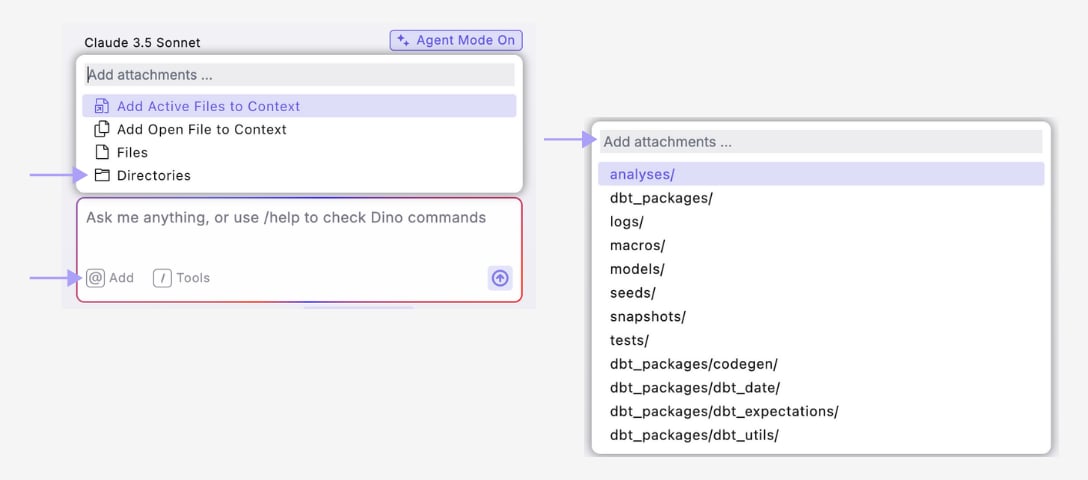
Directory Context lets you add entire folders to DinoAI, giving it access to all files within that directory and its subdirectories.
When you add a directory, DinoAI gains access to all files in that folder, helping it understand patterns across multiple related files.
### Adding Directory Context
**How to use:**
1. Click the DinoAI icon (🪄)
2. Click the "@" symbol and select "Directories"
3. Search and/or select the directory(s) to add as context
4. Add your prompt
 ### When to Use Directory Context
**Example Use Cases**
* Add your `/models/staging/` directory when creating a new staging model
* Add your `/models/marts/finance/` directory when working on finance models
* Add your entire `/models/` directory when generating documentation
* Add your sources directory when updating source definitions
Directory Context is particularly useful when:
* Generating documentation for multiple models at once
* Understanding patterns across a category of files
* Creating new files that should follow existing folder conventions
* Making bulk updates to related models
### Directory Context in Action
Here's how Directory Context improves DinoAI's results:
#### Without Directory Context
```
Prompt: "Document all models in the finance folder"
Result: DinoAI might deliver inconsistent results
```
#### With Directory Context
```
Prompt: "Document all models in the finance folder"
+ Directory Context: /models/marts/finance/
Result: Comprehensive, accurate documentation for all finance models
```
***
**Best Practices**
1. **Be specific** - choose the most relevant directory for your task
2. **Use subdirectories** rather than root directories when possible
3. **Combine with file context** for best results (e.g., add a directory plus a specific example file)
4. **Consider directory size** - smaller, more focused directories often provide better context
## Related topics
- [Context](/products/dino-ai/copilot/context/index.md)
- [Documentation Generation](/guides/paradime-101/getting-started-with-the-paradime-ide/dinoai-accelerating-your-analytics-engineering-workflow/dinoai-agent/documentation-generation.md)
- [Agent Mode](/products/dino-ai/copilot/agent-mode.md)
- [Ask Mode](/products/dino-ai/copilot/ask-mode.md)
- [MCP Server](/products/dino-ai/mcp-server/index.md)
### When to Use Directory Context
**Example Use Cases**
* Add your `/models/staging/` directory when creating a new staging model
* Add your `/models/marts/finance/` directory when working on finance models
* Add your entire `/models/` directory when generating documentation
* Add your sources directory when updating source definitions
Directory Context is particularly useful when:
* Generating documentation for multiple models at once
* Understanding patterns across a category of files
* Creating new files that should follow existing folder conventions
* Making bulk updates to related models
### Directory Context in Action
Here's how Directory Context improves DinoAI's results:
#### Without Directory Context
```
Prompt: "Document all models in the finance folder"
Result: DinoAI might deliver inconsistent results
```
#### With Directory Context
```
Prompt: "Document all models in the finance folder"
+ Directory Context: /models/marts/finance/
Result: Comprehensive, accurate documentation for all finance models
```
***
**Best Practices**
1. **Be specific** - choose the most relevant directory for your task
2. **Use subdirectories** rather than root directories when possible
3. **Combine with file context** for best results (e.g., add a directory plus a specific example file)
4. **Consider directory size** - smaller, more focused directories often provide better context
## Related topics
- [Context](/products/dino-ai/copilot/context/index.md)
- [Documentation Generation](/guides/paradime-101/getting-started-with-the-paradime-ide/dinoai-accelerating-your-analytics-engineering-workflow/dinoai-agent/documentation-generation.md)
- [Agent Mode](/products/dino-ai/copilot/agent-mode.md)
- [Ask Mode](/products/dino-ai/copilot/ask-mode.md)
- [MCP Server](/products/dino-ai/mcp-server/index.md)